
MONODEAL AS60
MONODEAL Wireless Headphones User Manual
Model: AS60 (CTFAS60)
Увод
Thank you for choosing the MONODEAL Wireless Headphones. This manual provides essential information for setting up, operating, and maintaining your headphones to ensure optimal performance and longevity. These headphones are designed for TV watching, offering a clear, wireless audio experience with a wide range and multiple audio modes.
Безбедносне информације
- Не излажите уређај екстремним температурама, влази или течностима.
- Avoid dropping or subjecting the headphones and transmitter to strong impacts.
- Користите само испоручени адаптер за напајање и каблове.
- Не покушавајте сами да растављате или поправљате уређај. Обратите се квалификованом сервисеру.
- Чувати ван домашаја деце.
- Дуготрајно слушање на високим нивоима јачине звука може проузроковати оштећење слуха. Подесите јачину звука на удобан ниво.
- Ensure proper ventilation around the charging dock.
Садржај пакета
Проверите да ли су све ставке присутне у вашем пакету:
- MD60 Wireless Headphones (x1)
- Wireless Transmitter & Charging Base (x1)
- AC Micro USB Adapter (x1)
- RCA to 3.5mm Cable (x1)
- Optical Cable (x1)
Производ је завршенview
Слушалице
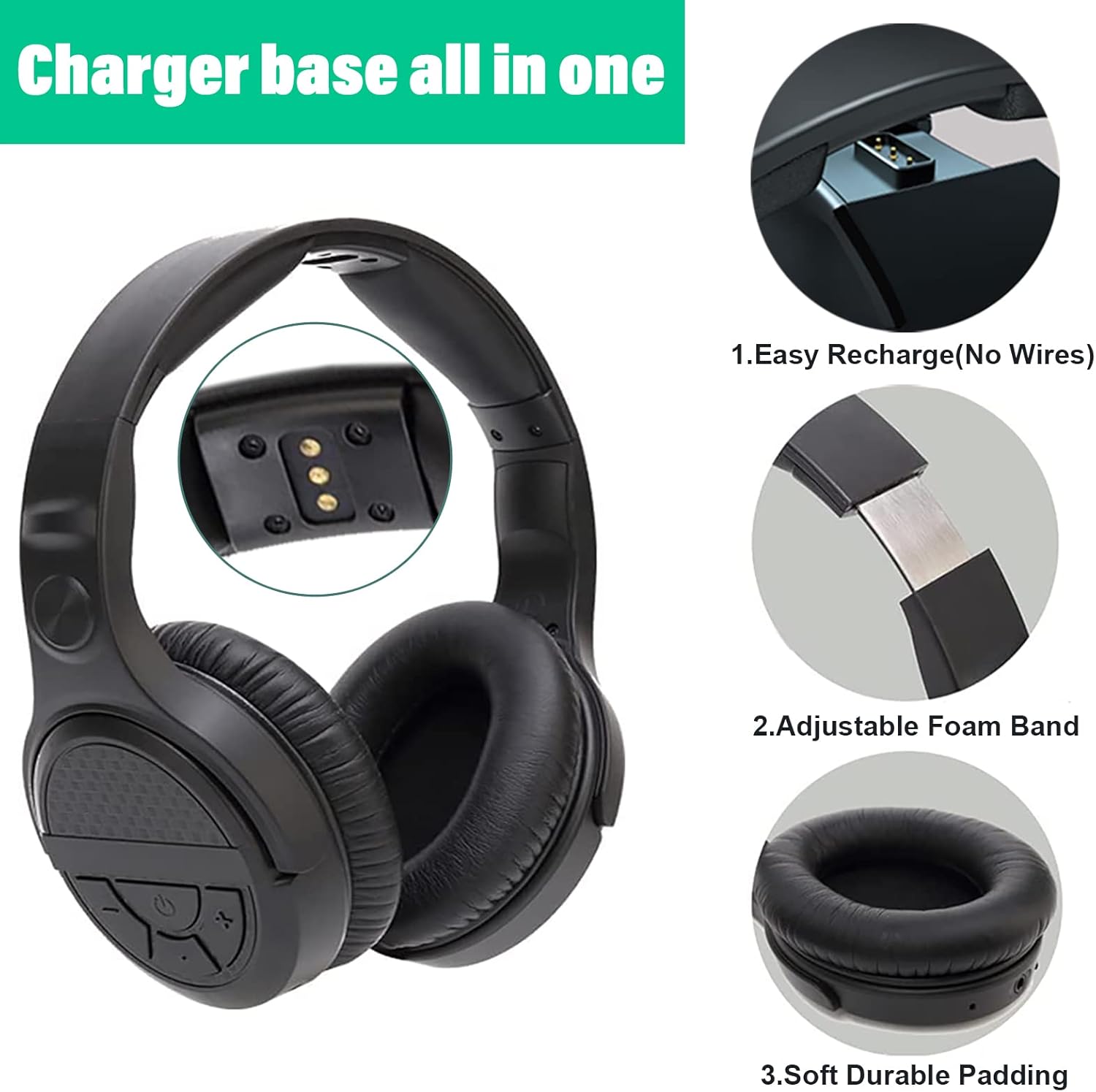
The headphones feature intuitive controls on the earcup, charging contacts for easy docking, an adjustable foam band for comfort, and soft, durable padding on the earcups.
- Контролна дугмад: Located on the right earcup for volume, power, and audio mode selection.
- Подесива трака за главу: Allows for a comfortable fit for various head sizes.
- Soft Ear Pads: Designed for extended wear comfort and to seal in audio.
- Контакти за пуњење: Located on the underside of the headband for charging on the dock.
Transmitter & Charging Dock

The base serves as both the wireless transmitter and the charging station for the headphones.
- Прекидач: Located on the back of the base.
- Аудио улазни портови: Includes AUX/3.5mm, RCA, and Optical for wide compatibility.
- Улаз наизменичне струје: За повезивање адаптера за напајање.
- Пинови за пуњење: Located on the upright stand to connect with headphone charging contacts.
Сетуп
1. Напајање предајника
- Connect the provided AC Micro USB adapter to the "AC" port on the back of the transmitter base.
- Укључите АЦ адаптер у зидну утичницу.
- Flip the power switch on the back of the transmitter base to the "ON" position.
2. Connecting to Your Audio Source (TV/Audio Device)
The MONODEAL headphones offer multiple connection options. Choose the one that best suits your TV or audio device.
Optical Audio Connection (Recommended for Digital Audio)

Use the optical cable for digital audio output from your TV or audio device.
- Connect one end of the optical cable to the "Optical" port on the transmitter base.
- Connect the other end to the Optical Audio Out port on your TV or audio device.
- Важно: On your TV's audio settings, set the Digital Audio Output format to "PCM" or "Stereo". Dolby/DTS formats are not supported.
RCA Audio Connection (Analog Audio)

Use the RCA to 3.5mm cable for analog audio output.
- Connect the 3.5mm end of the RCA to 3.5mm cable to the "AUX/3.5mm" port on the transmitter base.
- Connect the red and white RCA plugs to the corresponding "Audio Out" ports (usually red and white) on your TV or audio device.
- Напомена: Not compatible with RCA outputs on the back of AV receivers/ampлифиерс.
3.5mm AUX Audio Connection (Analog Audio)

For devices with a 3.5mm audio output jack (e.g., headphone jack on TV, smartphone, computer).
- Connect a 3.5mm audio cable (not included) from your device's 3.5mm audio output to the "AUX/3.5mm" port on the transmitter base.
3. Pairing Headphones with Transmitter (Automatic)
The headphones and transmitter are designed for automatic pairing. Once both are powered on and connected, they should connect quickly.
- Ensure the transmitter is powered on and connected to an audio source.
- Press and hold the power button on the headphones until they turn on.
- The headphones will automatically connect to the transmitter. No manual pairing is required.
Упутство за употребу
Укључивање/искључивање
- To turn on the headphones: Press and hold the power button on the right earcup until the indicator light illuminates.
- To turn off the headphones: Press and hold the power button until the indicator light turns off.
Контрола јачине звука
- Use the volume up (+) and volume down (-) buttons on the right earcup to adjust the listening volume.
Аудио режими

The headphones feature three distinct audio modes to enhance your listening experience. Press the "Mode" button on the right earcup to cycle through them:
- нормалан режим: Професионални балансирани звукfile за опште слушање.
- Музички режим: Enhanced audio for musical content, often with richer bass and clearer highs.
- Режим филма: Optimized for cinematic experiences, providing a more immersive soundstage and enhanced dialogue clarity.
Пуњење слушалица

The transmitter base also functions as a charging dock.
- Place the headphones onto the charging pins of the transmitter base. Ensure the charging contacts on the headphones align with the pins on the dock.
- A red indicator light on the base will illuminate, indicating that the headphones are charging.
- The light will turn off when the headphones are fully charged (approximately 3 hours for a full charge).
- A full charge provides up to 10 hours of audio playtime.
Wireless Range and Performance

The MONODEAL headphones utilize 2.4GHz RF wireless technology, offering a stable connection with minimal static and interference.
- The wireless range is up to 197 feet (60 meters), even through walls.
- This technology ensures audio and image synchronization without noticeable delay.
Одржавање
- Чишћење: Use a soft, dry cloth to clean the headphones and transmitter base. Do not use abrasive cleaners or solvents.
- Складиштење: When not in use for extended periods, store the headphones on the charging dock in a cool, dry place away from direct sunlight.
- Одржавање батерије: Да бисте продужили век трајања батерије, избегавајте често потпуно пражњење слушалица. Редовно их пуните.
Решавање проблема
| Проблем | Могући узрок | Решење |
|---|---|---|
| Нема звука из слушалица. |
|
|
| Static or intermittent audio. |
|
|
| Слушалице се не пуне. |
|
|
| TV internal speakers muted. |
|
|
Спецификације
| Назив модела | АС60 |
| Број модела ставке | CTFAS60 |
| Технологија повезивања | Бежично (2.4 GHz РФ) |
| Домет | До 197 стопе (60 метара) |
| Аудио улазни портови | Optical, RCA, 3.5mm AUX |
| Трајање батерије | До 10 сати |
| Време пуњења | Отприлике 3 сата |
| Фреквенцијски опсег | 20 Хз до 20,000 Хз |
| Тежина | 6 oz (headphones), 1.41 pounds (package weight) |
| Материјал | Пластика |
Гаранција и подршка
MONODEAL products come with a standard warranty. For specific warranty terms and conditions, please refer to the warranty card included in your package or visit the official MONODEAL webсајту.
If you encounter any issues or have questions not covered in this manual, please contact MONODEAL customer support:
- Подршка на мрежи: Посетите MONODEAL Store on Amazon за често постављана питања и контакт информације.
- Подршка путем е-поште: Refer to your product packaging or warranty card for the dedicated support email address.
Please have your product model (AS60) and purchase details ready when contacting support.
Званични видео производа
This video demonstrates the key features and setup process of the MONODEAL Wireless Headphones, including connecting to a TV and using the charging dock.
Ask a question about this manual
Ask about setup, troubleshooting, compatibility, parts, safety, or missing instructions. Manuals+ will review the question and use this page’s manual context to help answer it.