
Увод
This manual provides detailed instructions for the setup, operation, and maintenance of your Amazon Basics Projection Alarm Clock. Please read this manual thoroughly before using the product to ensure proper function and to prevent damage.

Image: The Amazon Basics Projection Alarm Clock, showing its digital display and projection lens.
Безбедносна упутства
- Не излажите јединицу екстремним температурама, директној сунчевој светлости, прашини или влази.
- Уверите се да је адаптер за напајање компатибилан са вашим локалним напајањем.
- Држите уређај даље од воде или других течности.
- Не покушавајте да растављате или модификујете уређај. То ће поништити гаранцију.
- Clean the unit only with a soft, dry cloth. Do not use liquid cleaners.
- Батерије одложите на одговарајући начин у складу са локалним прописима.
Садржај пакета
- Amazon Basics Projection Alarm Clock
- АЦ адаптер
- Упутство за употребу
Карактеристике производа
- Projection of time onto a wall or ceiling.
- FM Radio with automatic/manual scan and up to 15 preset stations.
- USB port for charging mobile phones or tablets.
- 7-inch high-definition LED display with adjustable brightness.
- Dual alarms for separate wake-up times.
- Snooze function with adjustable duration (2 to 60 minutes).
- Sleep timer for automatic radio shut-off (5 to 90 minutes).
- DST button for Daylight Saving Time adjustment.
- Battery backup (requires 2 AAA batteries, not included) to maintain time settings during power outagес.

Слика: Прекоview of key features including sleep timer, radio presets, and snooze function.
Контроле и дисплеј
Familiarize yourself with the buttons and ports on your alarm clock for optimal use.

Слика: Са стране view illustrating the location of controls, USB charging port, and projection lens.
- Дугме за подешавање времена: Користи се за подешавање тренутног времена.
- Alarm 1/2 Buttons: Used to set and activate Alarm 1 and Alarm 2.
- Дугме за одлагање/затамњивање: Activates snooze during an alarm; adjusts display brightness when not alarming.
- Radio/Sleep Button: Turns FM radio on/off; sets sleep timer.
- Volume/Tune Dial: Adjusts radio volume and tunes FM frequencies.
- Projection On/Off/Flip Button: Controls the projection feature and flips the projected time.
- Projection Focus Wheel: Adjusts the clarity of the projected time.
- Projection Angle Adjuster: Changes the angle of the projected time.
- УСБ пуњач: За пуњење екстерних уређаја.
- DST Button: Toggles Daylight Saving Time.
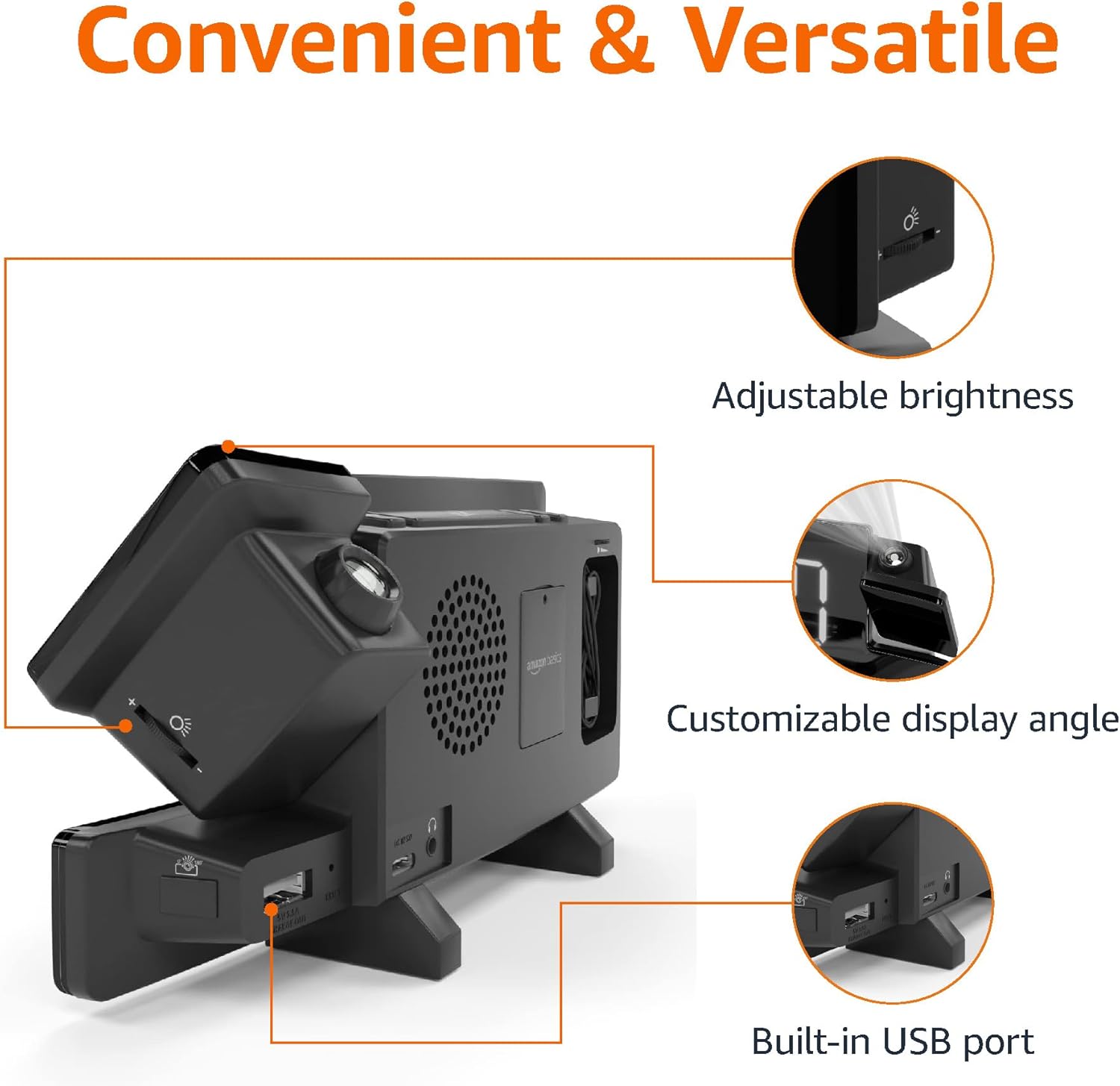
Image: Diagram highlighting the adjustable brightness, customizable projection angle, and USB charging port.
Сетуп
1. Прикључак за напајање
Connect the AC power adapter to the DC IN port on the back of the alarm clock and plug it into a standard wall outlet. The display will light up.
2. Инсталација резервне батерије
For battery backup, open the battery compartment on the bottom of the unit. Insert 2 AAA batteries (not included), ensuring correct polarity (+/-). Close the compartment. The battery backup maintains time settings during power outages but does not power the display or alarm functions.
3. Почетно подешавање времена
- Притисните и држите Тиме Сет дугме. Цифре сата ће трептати.
- Користите Volume/Tune Dial за подешавање сата. Притисните Тиме Сет поново да потврдим.
- The minute digits will flash. Use the Volume/Tune Dial за прилагођавање минута. Притисните Тиме Сет поново да потврдим.
- The time format (12H/24H) will flash. Use the Volume/Tune Dial to select your preferred format. Press Тиме Сет да бисте потврдили и изашли из режима подешавања времена.
4. Летње рачунање времена (ДСТ)
Притисните тастер ДСТ button to toggle Daylight Saving Time on or off. The DST indicator will appear or disappear on the display.
Упутство за употребу
1. Подешавање аларма (Аларм 1 и Аларм 2)
- Притисните и држите Аларм 1 or Аларм 2 дугме. Цифре сата аларма ће трептати.
- Користите Volume/Tune Dial to adjust the alarm hour. Press the respective Аларм поново дугме за потврду.
- The alarm minute digits will flash. Use the Volume/Tune Dial to adjust the alarm minutes. Press the respective Аларм поново дугме за потврду.
- The alarm source (FM radio or buzzer) will flash. Use the Volume/Tune Dial to select your preference. Press the respective Аларм button to confirm and activate the alarm. An alarm icon will appear on the display.
- To deactivate an alarm, press the respective Аларм дугме једном. Икона аларма ће нестати.
2. Using Snooze
Када се огласи аларм, притисните дугме Сноозе/Диммер button to temporarily silence the alarm. The alarm will sound again after the set snooze duration. The default snooze duration is 9 minutes. To adjust the snooze duration, press and hold the Сноозе/Диммер дугме, а затим користите Volume/Tune Dial to select a duration between 2 and 60 minutes. Press Сноозе/Диммер поново да потврдим.
3. Рад ФМ радија
- Укључи/искључи: Притисните тастер Radio/Sleep дугме да бисте укључили или искључили ФМ радио.
- Станице за праћење: Користите Volume/Tune Dial to manually tune to a desired FM frequency.
- Аутоматско скенирање: Притисните и држите Radio/Sleep button to automatically scan and save available FM stations as presets.
- Изаберите унапред подешене вредности: Once stations are saved, short press the Radio/Sleep button to cycle through the preset stations.
- Подесите јачину звука: Ротирајте Volume/Tune Dial да подесите јачину звука радија.
4. Мерач спавања
While the FM radio is playing, press the Radio/Sleep button repeatedly to set the sleep timer. Options typically range from 5 to 90 minutes. The radio will automatically turn off after the selected duration.
5. Projection Feature

Image: The alarm clock projecting the time onto a bedroom ceiling.
- Активирај/Деактивирај: Притисните тастер Projection On/Off/Flip button to turn the time projection on or off.
- Подесите угао: Manually adjust the projection arm to direct the time onto your desired surface (wall or ceiling).
- Фокус: Ротирајте Projection Focus Wheel to achieve a clear image.
- Flip Display: Притисните тастер Projection On/Off/Flip button repeatedly to rotate the projected time 180 degrees, ensuring correct orientation.

Image: The alarm clock on a nightstand, projecting the time onto a wall, demonstrating its use in a bedroom setting.
6. УСБ пуњење
Connect your mobile phone or tablet's USB charging cable to the УСБ прикључак за пуњење on the back of the alarm clock. The device will begin charging. This port is for charging only and does not support data transfer.
7. Подешавање осветљености екрана
Притисните тастер Сноозе/Диммер button (when no alarm is sounding) to cycle through different brightness levels for the main LED display.
Одржавање
1. Чишћење
Wipe the unit with a soft, dry, lint-free cloth. Do not use abrasive cleaners, waxes, or solvents as they may damage the surface.
2. Замена батерије
If the battery backup is not functioning correctly (e.g., time resets after a power outage), replace the 2 AAA batteries in the battery compartment, ensuring correct polarity.
Решавање проблема
| Проблем | Могући узрок | Решење |
|---|---|---|
| Екран је празан. | Нема прикључка за напајање. | Уверите се да је АЦ адаптер безбедно прикључен на уређај и исправну зидну утичницу. |
| Аларм се не оглашава. | Аларм није активиран или је јачина звука прениска. | Check if the alarm icon is visible on the display. Re-set the alarm if necessary. Increase radio volume if FM is selected as alarm source. |
| Пројектовано време је мутно. | Projection focus is not adjusted. | Ротирајте Projection Focus Wheel док слика не буде јасна. |
| Пројектовано време није видљиво. | Projection is off or room is too bright. | Притисните тастер Projection On/Off/Flip button to activate. The projection is best viewed in a dark room. |
| Радио пријем је лош. | Antenna position or interference. | Adjust the position of the FM antenna wire. Move the unit away from other electronic devices that may cause interference. |
| Пуњење преко USB-а не ради. | Проблем са каблом или некомпатибилност уређаја. | Ensure the USB cable is functional and properly connected. Try a different cable or device. |
Спецификације
- Модел: МЕТ8831-УС
- Улазна снага: АЦ адаптер (укључен)
- Резервна батерија: 2 к ААА батерије (нису укључене)
- Приказ: 7-инчни ЛЕД
- Радио фреквенција: FM
- УСБ излаз: 5V, 1A (for charging)
- Димензије (Д к Ш к В): 7.1 к 1.6 к 3.7 инча (18.03 к 4.06 к 9.4 цм)
- Тежина: Приближно 0.59 лбс (267.62 г)

Image: Product dimensions for the Amazon Basics Projection Alarm Clock.
Информације о гаранцији
This product is covered by the Amazon Basics warranty. For detailed information regarding warranty terms and conditions, please refer to the official Amazon Basics webсајту или контактирајте корисничку подршку.
Корисничка подршка
For further assistance, troubleshooting, or product inquiries, please contact Amazon Basics customer support through the Amazon website or your purchase platform. Have your product model number (MET8831-US) and purchase details ready.