
MICROWARE EZCAP-234-TapeDigi1
ezcap234 TapeDigi 1 User Manual
Model: EZCAP-234-TapeDigi1 | Brand: MICROWARE
1. Производ је готовview
The ezcap234 TapeDigi 1 is a multi-functional device designed to bring your analog audio into the digital age. It combines a cassette player, AM/FM radio, and a digital audio recorder/converter into one portable unit. You can enjoy your old cassette tapes, tune into your favorite radio stations, and even record audio directly to a Micro SD card.
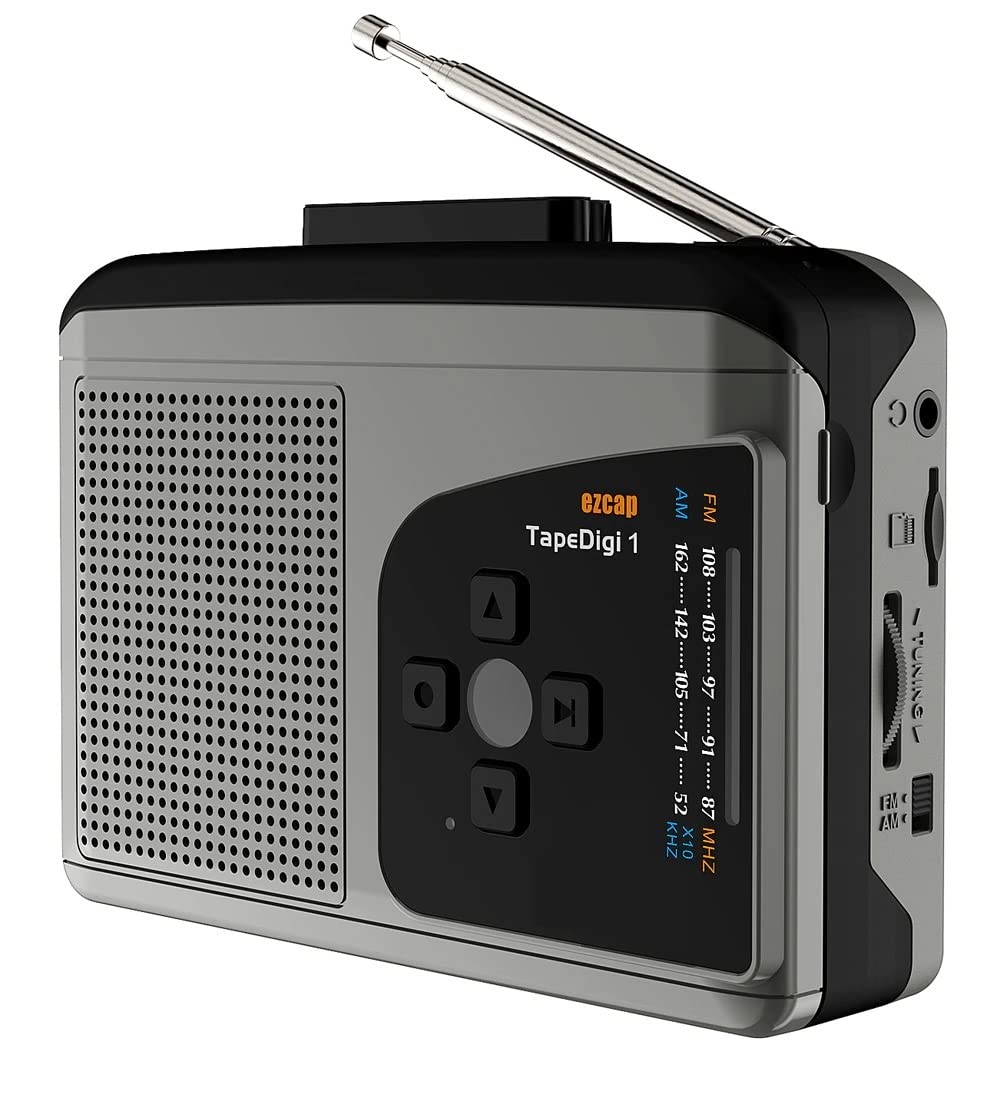
Слика: Фронт view of the ezcap234 TapeDigi 1, showcasing its speaker grille, control buttons, and extended antenna.
2. Кључне карактеристике
- Cassette Player: Playback your classic cassette tape collection.
- АМ/ФМ радио: Tune into local radio stations with clear reception.
- MP3 Conversion: Convert cassette tapes and radio broadcasts directly to MP3 files on a Micro SD card (up to 32GB).
- Диктафон: Built-in microphone allows for direct voice recording to Micro SD card.
- Интегрисани звучник: Enjoy audio playback directly from the device.
- Утичница за слушалице: За приватно слушање.
- Опције двоструког напајања: Operates via USB power or 2x AA batteries (not included).

Image: Visual representation of the device's core functionalities, including tape playback, radio, recording, and audio output options.
3. Идентификација компоненте
Familiarize yourself with the various parts of your ezcap234 TapeDigi 1:

Image: Detailed diagram labeling the antenna, volume adjustment, earphone jack, Micro SD card slot, radio tuning knob, FM/AM switch, Tape/Radio switch, Record/Stop recording button, Indicator LED, UP/DOWN/Play/Stop playing buttons, Speaker, Tape fast forward/rewind, Stop playing tape, Play tape, Microphone inside, and 5V DC jack.
- Антена: Extendable for FM/AM radio reception.
- Подешавање јачине звука: Rotary knob to control audio output level.
- Утичница за слушалице: 3.5 мм порт за повезивање слушалица.
- Утор за микро СД картицу: Insert Micro SD card for recording and playback.
- Дугме за подешавање радија: Подешава радио фреквенцију.
- FM/AM Switch: Selects between FM and AM radio bands.
- Tape/Radio Switch: Toggles between cassette player and radio modes.
- Record/Stop Recording Button: Initiates and ends audio recording.
- ЛЕД индикатор: Shows device status (e.g., recording, power).
- Control Buttons (UP/DOWN/Play/Stop): For navigation and playback control.
- говорник: Уграђени звучник за аудио излаз.
- Tape Controls (Fast Forward/Rewind/Stop/Play): Standard cassette player controls.
- микрофон: Internal microphone for voice recording.
- 5В ДЦ прикључак: Улазни порт за напајање.
4. Напајање уређаја
The ezcap234 TapeDigi 1 can be powered in two ways:
- УСБ Снага: Connect a 5V DC power adapter (not included) to the 5V DC jack using a USB cable.
- АА батерије: Insert 2x AA batteries (not included) into the battery compartment located on the back of the device. Ensure correct polarity.

Image: The device demonstrating its power options, showing both USB cable connection and the open battery compartment for AA batteries.
5. Репродукција касете
Да бисте пустили касету:
- Отворите одељак за касету.
- Insert a cassette tape, ensuring it is properly seated.
- Затворите одељак за касету.
- Померите Tape/Radio Switch to the 'Tape' position.
- Притисните тастер Играј button on the cassette controls.
- Подесите Подешавање јачине звука дугме на жељени ниво слушања.
- Користите Фаст Форвард и Премотавање уназад дугмад за навигацију по траци.
- Притисните тастер Стани дугме за заустављање репродукције.

Image: The ezcap234 TapeDigi 1 positioned on a wooden surface, surrounded by various cassette tapes, illustrating its primary function as a cassette player.
6. Рад AM/FM радија
Да бисте слушали радио:
- Померите Tape/Radio Switch to the 'Radio' position.
- Проширите Антена за оптималан пријем.
- Померите FM/AM Switch to select your desired band (FM: 87-108MHz, AM: 520-1610 KHz).
- Ротирајте Дугме за подешавање радија to find a station.
- Подесите Подешавање јачине звука дугме на жељени ниво звука слушања.

Image: The device with its telescopic antenna fully extended, highlighting its capability as a portable FM/AM radio receiver.

Image: A conceptual image showing the device broadcasting radio waves, with text bubbles indicating various types of content such as music, news, and talk shows, emphasizing its AM/FM radio function.
7. Снимање звука
The device supports recording from cassette tapes, AM/FM radio, and the built-in microphone directly to a Micro SD card.
7.1. Preparing for Recording
- Ensure a Micro SD card (up to 32GB, formatted to FAT32) is inserted into the Утор за микро СД картицу.
- Select the desired audio source (Tape or Radio) using the Tape/Radio Switch, or prepare to use the built-in microphone.

Слика: Крупни план view of the side of the device, clearly showing the Micro SD card slot, indicating where to insert the storage for recordings.
7.2. Recording from Tape or Radio
- Start playback of the cassette tape or tune to the desired radio station.
- Притисните тастер Record/Stop Recording Button. The Indicator LED will illuminate, indicating recording is in progress.
- Притисните тастер Record/Stop Recording Button again to stop recording. The LED will turn off.
7.3. Recording Voice (Built-in Microphone)
- Ensure the device is in 'Radio' mode (even if not listening to radio) or 'Tape' mode without a tape playing.
- Притисните тастер Record/Stop Recording Button. The Indicator LED will illuminate.
- Speak clearly towards the built-in Микрофон.
- Притисните тастер Record/Stop Recording Button поново да бисте зауставили снимање.

Image: The device next to a microphone icon and text, illustrating its capability to record voice using its built-in microphone and save to a Micro SD card.

Image: A person speaking near the device, with visual cues of sound waves, demonstrating the microphone recording function to a TF card.
7.4. Recording Modes (Auto/Manual)
The device supports both automatic and manual recording modes. In auto mode, the device can detect pauses in audio and automatically partition recordings into separate MP3 files, which is useful for digitizing albums or long broadcasts.

Image: A graphic illustrating audio waveforms, explaining the Auto or Manual Recording Mode feature, where auto mode can partition songs into separate MP3 files.
8. Converting Tapes to MP3
The ezcap234 TapeDigi 1 simplifies the process of converting your analog cassette tapes into digital MP3 files, saving them directly to a Micro SD card.
- Insert your Micro SD card into the slot.
- Insert the cassette tape you wish to convert.
- Осигурајте Tape/Radio Switch is in the 'Tape' position.
- Притисните тастер Играј button on the cassette controls.
- Одмах притисните Record/Stop Recording Button to begin conversion. The audio from the tape will be recorded as an MP3 file на Мицро СД картицу.
- Притисните тастер Record/Stop Recording Button again to stop the conversion.
The converted MP3 files can then be transferred to a computer or other devices for playback.

Image: A visual representation of the conversion process, showing a cassette tape transforming into MP3 format and being stored on a 32GB Micro SD card.

Image: An overhead shot of a workspace featuring the ezcap234 TapeDigi 1 alongside a laptop and other audio gear, demonstrating its role in converting old cassettes to MP3s for digital use.
9. Репродукција снимљеног Files
To listen to MP3 files stored on the Micro SD card:
- Ensure a Micro SD card with MP3 fileУбацује се слово с.
- Померите Tape/Radio Switch to the 'Radio' position.
- Притисните тастер Play/Stop playing button (often the center button in the control cluster).
- Користите ГОРЕ/ДОЉЕ buttons to navigate between recorded tracks.
- Подесите Подешавање јачине звука knob as needed.

Image: The device surrounded by icons for music, news, and talk shows, illustrating its dual function of playing FM/AM radio and recording that content to MP3 format.
КСНУМКС. Решавање проблема
| Проблем | Могући узрок | Решење |
|---|---|---|
| Нема напајања / Уређај се не укључује | Batteries are dead or incorrectly inserted; USB cable not connected properly or power source is faulty. | Replace batteries, ensuring correct polarity. Check USB cable connection and try a different power source. |
| No sound from speaker/earphones | Volume is too low; Earphones not fully plugged in; Device in wrong mode. | Increase volume. Ensure earphones are fully inserted. Check Tape/Radio switch position. |
| Лош радио пријем | Антена није извучена; Подручје слабог сигнала; Сметње. | Fully extend the antenna. Try repositioning the device. Avoid areas with strong electromagnetic interference. |
| Cannot record to Micro SD card | Micro SD card is full, corrupted, or not formatted correctly (FAT32); Card not inserted properly. | Check Micro SD card capacity. Reformat the card to FAT32 on a computer. Reinsert the card firmly. Try a different Micro SD card. |
| Cassette tape not playing correctly | Tape is tangled or damaged; Tape compartment not closed properly. | Inspect the tape for damage. Ensure the tape compartment is securely closed. |
11. Спецификације
| Феатуре | Детаљ |
|---|---|
| Бранд | МИЦРОВАРЕ |
| Модел | EZCAP-234-TapeDigi1 |
| Димензије производа | 10 к 3 к 8 цм |
| Тежина артикла | 290 г |
| Повер Суппли | 5V DC (USB) or 2x AA Batteries |
| Радио фреквенција | FM: 87-108MHz, AM: 520-1610 KHz |
| Формат снимања | МП3 |
| Медијум за складиштење | Micro SD Card (up to 32GB, FAT32 format) |
| Аудио излаз | Built-in Speaker, 3.5mm Earphone Jack |
| Инпут | Cassette Tape, AM/FM Radio, Built-in Microphone |
12. Нега и одржавање
- Keep the device dry. Do not expose it to moisture or extreme temperatures.
- Очистите спољашњост меком, сувом крпом. Не користите абразивна средства за чишћење или раствараче.
- For cassette playback, periodically clean the tape head and pinch roller with a cotton swab lightly dampпремазано изопропил алкохолом како би се осигурао оптималан квалитет звука и спречило оштећење траке.
- Када се не користи дуже време, извадите батерије да бисте спречили цурење.
- Избегавајте испуштање или излагање уређаја јаким ударима.
13. Гаранција и подршка
For warranty information and customer support, please refer to the documentation included with your purchase or visit the official MICROWARE webсајт. Сачувајте рачун као доказ о куповини за потребе гаранције.
Произвођач: Microware Multimedia Private Limited
Земља порекла: Кина