
1. Увод
Thank you for choosing the ICON Morpheus GX 66 Wired Gaming Mouse. This manual provides essential information for setting up, operating, and maintaining your new gaming mouse. Please read this guide thoroughly to ensure optimal performance and longevity of your device.
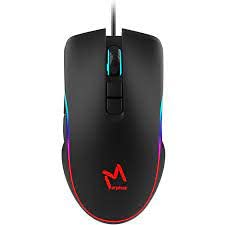
The ICON Morpheus GX 66 is a high-performance wired gaming mouse featuring customizable LED lighting and a precise 7200 DPI optical sensor, designed for an optimal gaming experience. It offers a modern style and ambidextrous design, compatible with Windows 7, Windows XP, and Linux operating systems.
2. Карактеристике производа
- Сензор високе прецизности: Equipped with a 7200 DPI optical sensor for accurate tracking and responsiveness.
- Прилагодљиво ЛЕД осветљење: Dynamic LED illumination enhances your gaming setup.
- 7 програмабилних дугмади: Offers extensive customization for various gaming commands.
- Жичано повезивање: Ensures a stable and lag-free connection.
- Амбидекстрални дизајн: Удобно и за леворуке и за десноруке кориснике.
- Издржљива конструкција: Designed for long-lasting use in intense gaming sessions.
- Широка компатибилност: Supports Windows 7, Windows XP, and Linux operating systems.

3. Подешавање
- Распакујте миш: Carefully remove the ICON Morpheus GX 66 mouse from its packaging.
- Повежите се са рачунаром: Locate an available USB port on your computer. Plug the USB connector of the mouse firmly into the USB port.
- Инсталација драјвера: The mouse is plug-and-play. Your operating system (Windows 7, Windows XP, or Linux) should automatically detect and install the necessary drivers. This process may take a few moments.
- Тест функционалност: Once installed, move the mouse and click the buttons to ensure it is working correctly.
4. Упутство за употребу
4.1 Основне функције
- Леви клик: Primary action, selection, activation.
- Десни клик: Контекстни мени, секундарне радње.
- Точак за померање: Scroll up/down, middle click for specific functions.
4.2 ДПИ подешавање
The mouse features a dedicated DPI button (often located behind the scroll wheel) to cycle through different sensitivity levels. Press this button to adjust the DPI (Dots Per Inch) to your preferred setting for various tasks or games. The LED lighting may change color to indicate the current DPI level.
4.3 ЛЕД осветљење
The ICON Morpheus GX 66 features dynamic LED lighting. The lighting patterns and colors are typically pre-programmed and may change based on the selected DPI setting or cycle automatically. There are no user-configurable software controls for the LED lighting on this model.

5. Одржавање
- Чишћење: Користите меку, суву крпу да обришете површину миша. За тврдокорну прљавштину, благо обришитеampИсперите крпу водом. Избегавајте употребу јаких хемикалија или абразивних материјала.
- Чишћење сензора: Occasionally, dust or debris may accumulate around the optical sensor. Use a cotton swab or compressed air to gently clean the sensor area on the underside of the mouse.
- Нега каблова: Avoid sharp bends or excessive pulling on the mouse cable to prevent damage. Store the cable neatly when not in use.
- Складиштење: Када се миш не користи дуже време, чувајте га на чистом и сувом месту, даље од директне сунчеве светлости и екстремних температура.

КСНУМКС. Решавање проблема
- Миш не реагује:
- Ensure the USB cable is securely plugged into the computer's USB port.
- Покушајте да прикључите миш на други УСБ порт.
- Поново покрените рачунар.
- Неправилно кретање курсора:
- Очистите оптички сензор на доњој страни миша.
- Уверите се да користите миш на чистој, нерефлектујућој и уједначеној површини. Избегавајте стакло или површине са високим рефлектујућим ефектом.
- LED Lighting Not Working:
- Проверите УСБ везу.
- The LED lighting is typically powered directly via USB. If the mouse functions but LEDs do not, contact support.
- Дугмад не функционишу:
- Уверите се да је миш правилно повезан.
- Тестирајте миш на другом рачунару да бисте искључили проблеме са софтвером.
7. Спецификације
| Произвођач | ИЦОН |
| Модел | Morpheus GX 66 |
| ASIN | B0B5PLWQXC |
| Посебне карактеристике | ЛЕД осветљење |
| Технологија детекције покрета | Оптицал |
| ДПИ | 7200 |
| Оријентација руке | Амбидектроус |
| Препоручена употреба | Гаминг |
| Компатибилност оперативног система | Линукс, Виндоус 7, Виндоус XP |
| Стиле | Модерна |
| Финисх Типе | Мат |
| Извор напајања | Електрични са каблом (УСБ) |
| Боја | Мулти-цолор |
8. Гаранција и подршка
The ICON Morpheus GX 66 Wired Gaming Mouse comes with a standard manufacturer's warranty. For specific warranty terms and conditions, please refer to the warranty card included with your product or visit the official ICON webсајту.
For technical support, troubleshooting assistance, or to inquire about replacement parts, please contact ICON customer service through their official support channels. Keep your purchase receipt and product model information (GX 66) handy when contacting support.