
ПЕТЛИБРО ПЛАФ203
PETLIBRO Automatic Cat Feeder with Camera User Manual
Модел: ПЛАФ203
Увод
This manual provides detailed instructions for the setup, operation, and maintenance of your PETLIBRO Automatic Cat Feeder with Camera (Model PLAF203). Please read this manual thoroughly before using the product to ensure proper function and safety. This feeder is designed to provide scheduled meals for your cats, with integrated camera monitoring and smart app control.

Figure 1: PETLIBRO Automatic Cat Feeder with Camera (Model PLAF203).
Садржај пакета
- Аутоматска хранилица за кућне љубимце к1
- Adapter With Cord x1
- Pet Food Desiccant Bag x1
- Посуда од нерђајућег челика к2
- Упутство за употребу к1
Сетуп
1. Распакивање и монтажа
- Пажљиво уклоните све компоненте из паковања.
- Поставите главну јединицу за додавање хране на стабилну, равну површину.
- Insert the two stainless steel bowls into the designated slots on the feeder base.
- Open the top lid of the feeder and insert the desiccant bag into its compartment to maintain food freshness.
2. Прикључак за напајање
Connect the adapter cord to the feeder's power input port and plug it into a standard electrical outlet. For backup power during outages, install 3 D-cell batteries (not included) in the battery compartment at the bottom of the unit.
3. Пуњење резервоара за храну
Open the top lid and pour dry kibble into the food tank. Ensure the kibble size is between 2-15mm (0.08-0.6 inches) to prevent jamming. Do not use wet pet food or kibble with a diameter over 15mm.

Figure 2: Filling the food tank with dry kibble.
4. Преузимање апликације и Wi-Fi веза
Download the PETLIBRO App from the iOS App Store or Android Play Store. Follow the in-app instructions to connect your feeder to your home Wi-Fi network. The feeder supports both 5GHz and 2.4GHz Wi-Fi. For optimal performance, especially if obstacles are present, consider using 2.4GHz Wi-Fi as 5GHz signals may have weaker penetration.

Figure 3: Wi-Fi connectivity options for the feeder.
Упутство за употребу
1. Постављање распореда храњења
Use the PETLIBRO App to program feeding times and portion sizes. You can set up to 6 meals per day with 1-50 portions per meal. The app allows you to customize the schedule for two pets.

Figure 4: Remote control and scheduling via the PETLIBRO App.
2. Remote Monitoring with Camera
The built-in 1080P HD camera with a 145° wide viewing angle allows you to monitor your pets remotely. The camera supports IR night vision for clear viewing in low light conditions. Videos can be saved to a micro SD card (up to 256GB, not included) or cloud storage (additional subscription may apply).

Figure 5: Live monitoring of pet activity through the app.
3. Two-Way Audio and Personalized Meal Calls
Utilize the integrated microphone and speaker for two-way communication with your pets. You can record a 10-second voice message that plays at mealtime, with options to set the playback frequency (0-5 times). This feature allows for personalized meal calls or simple communication.

Figure 6: Two-way audio communication with your pet.
4. Детекција покрета и звука
The feeder is equipped with motion and sound detection capabilities. When movement or sound is detected, the camera records and saves video clips. You will receive alerts on your smartphone, allowing for real-time monitoring. Sensitivity and viewing ranges can be adjusted within the app.
5. Dual Tray Feeding
The feeder includes a dual tray system, allowing two cats to eat simultaneously. The adjustable meal splitter ensures even food dispensing between the two bowls. To remove the tray for cleaning, rotate the meal splitter to the left.
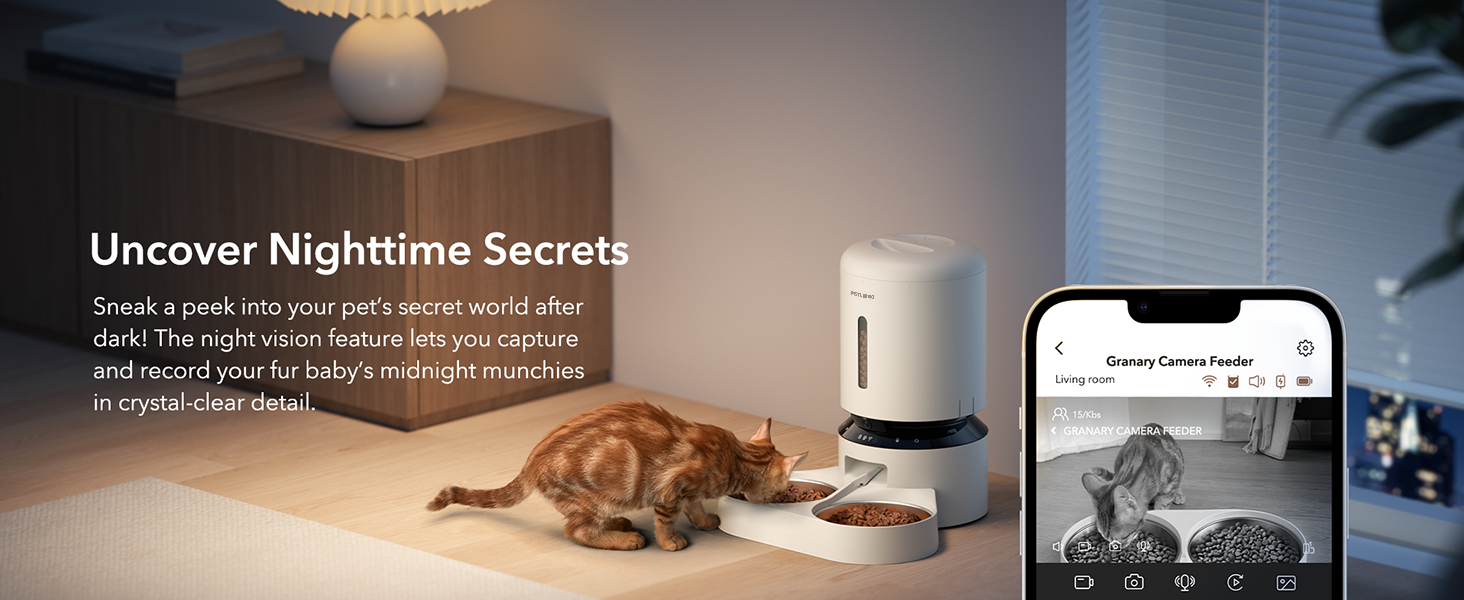
Figure 7: Adjustable meal splitter for balanced feeding.
Одржавање
1. Чишћење хранилице
Regular cleaning is essential for hygiene and proper function. The stainless steel bowls are removable for easy cleaning. The main unit should be wiped clean with a damp тканина. Не урањајте главну јединицу у воду.
- Food Bowls: Remove and hand wash with mild soap and water. Rinse thoroughly and dry completely before reinserting.
- Резервоар за храну: Wipe the inside of the food tank with a dry cloth. If necessary, use a slightly damp cloth and ensure it is completely dry before adding new food.
- База хранилице: Wipe the exterior and dispensing area with a damp тканина.
2. Замена кесе за сушење
Replace the desiccant bag every 1-2 months to ensure food freshness. New desiccant bags can be purchased from PETLIBRO authorized retailers.
3. Checking Food Level
Monitor the food level through the transparent window on the feeder. The app will also send notifications when the food level is low.
Решавање проблема
| Проблем | Могући узрок | Решење |
|---|---|---|
| Хранилица не додељује храну. | Food blockage; low food level; power outage; incorrect schedule settings. | Check for blockages in the dispensing outlet and clear any obstructions. Refill food tank. Verify power connection and D-cell batteries. Review and adjust feeding schedule in the app. |
| Проблеми са Wi-Fi везом. | Incorrect Wi-Fi password; feeder too far from router; 5GHz signal interference. | Ensure correct Wi-Fi password. Move feeder closer to the router. Try connecting to a 2.4GHz network if available. Restart feeder and router. |
| Camera feed is unclear or black. | Poor lighting; night vision not active; camera lens obstructed. | Ensure adequate lighting. Check app settings for night vision. Clean camera lens. |
| App notifications not received. | App notification settings disabled; phone settings blocking notifications. | Enable notifications within the PETLIBRO App. Check your phone's system notification settings for the app. |
If problems persist, please contact PETLIBRO customer support.
Спецификације
- Назив модела: Granary Dual Tray
- Број модела ставке: ПЛАФ203
- Капацитет: 5L
- Материјал: Stainless Steel (bowls)
- Боја: Бела
- Димензије артикла (ДкШкВ): 12.68 к 13.78 к 13.19 инча
- Тежина артикла: 0.56 фунти (приближно 9 унци)
- камера: 1080P HD, 145° Wide Viewing Angle, IR Night Vision
- Повезивање: 5GHz and 2.4GHz Wi-Fi
- аудио: Two-way Audio, 10s Voice Recording
- Снага: Adapter with Cord, 3 x D-cell batteries (backup, not included)
- Препоручена величина кибла: 2-15мм
- Произвођач: ПЕТЛИБРО
Гаранција и подршка
Your PETLIBRO Automatic Cat Feeder with Camera comes with a 24-месечна гаранција од датума куповине. Ова гаранција покрива производне недостатке и кварове при нормалној употреби.
For warranty claims, technical support, or any inquiries, please contact PETLIBRO customer service through the official PETLIBRO webсајт или контакт информације наведене на паковању производа.
Additional resources, including FAQs and video tutorials, may be available on the PETLIBRO webсајту.
Званични видео снимци производа
Below is an official product video from PETLIBRO that provides visual guidance and demonstrations of the feeder's features.
Video 1: Demonstration of the PETLIBRO Automatic Cat Feeder in use, showing a cat eating from the dual bowls and a person interacting with the feeder's settings. This video highlights the ease of use and the cat's comfort with the device.
Ask a question about this manual
Ask about setup, troubleshooting, compatibility, parts, safety, or missing instructions. Manuals+ will review the question and use this page’s manual context to help answer it.