
Производ је завршенview
The Ratakee Digital AM/FM Radio Alarm Clock (Model RA01SA) is designed for ease of use and clear readability, featuring large 1.4-inch LED digits. This versatile alarm clock offers multiple alarm sound options, an AM/FM radio with preset capabilities, a dimmable display, sleep timer, and snooze function. It operates via AC power with a battery backup for continued functionality during power outagес.
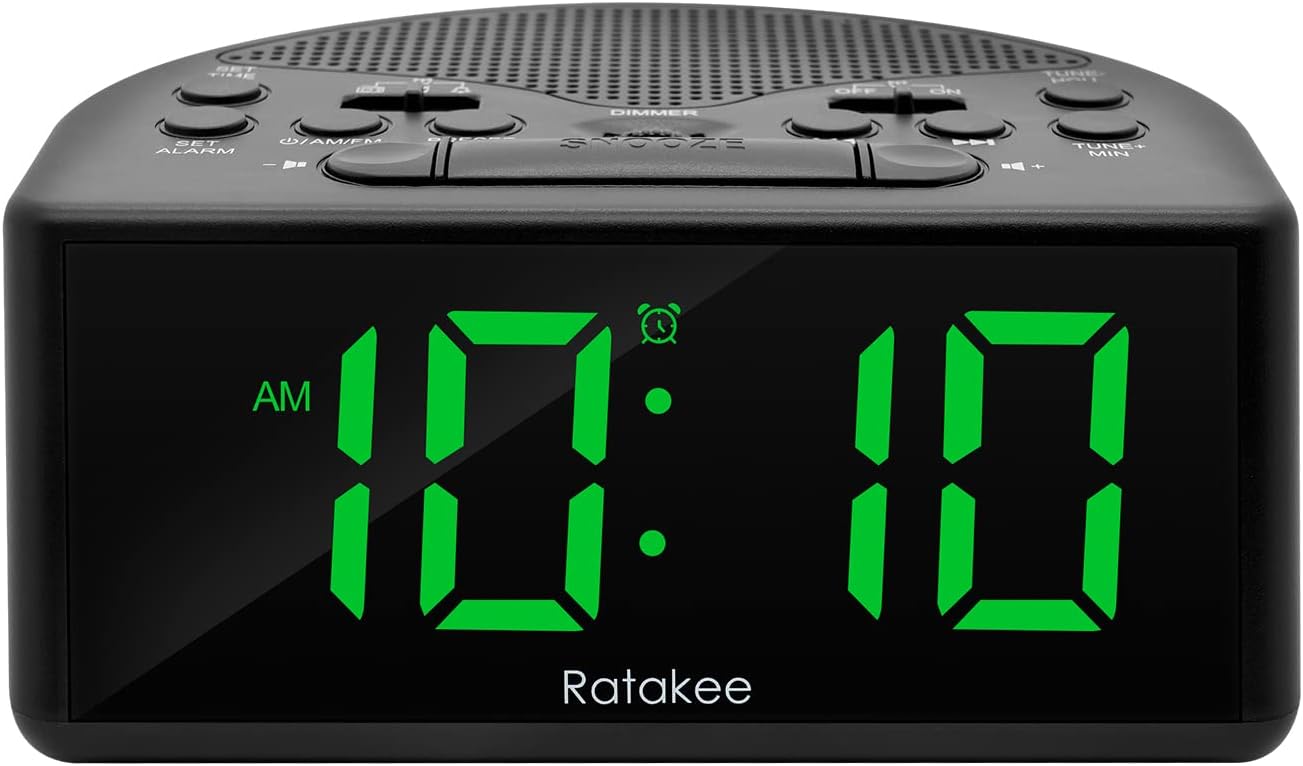
Слика 1: Предња страна view of the Ratakee Digital AM/FM Radio Alarm Clock displaying 10:10 AM.
Сетуп
Напајање будилника
The alarm clock can be powered by an AC outlet or by batteries for backup.
- АЦ напајање: Connect the included power cord to the AC120V outlet and plug it into a wall socket. The display will light up, and the radio will be operational.
- Резервна батерија: За моћ оуtage protection, insert 3 AA batteries (not included) into the battery compartment located on the bottom of the unit. When powered by batteries, the display will auto-dim after 20 seconds of no operation to conserve power, but the clock, alarm, and radio functions will remain active.

Figure 2: Illustration of the dual power methods: AC cord connection and battery compartment for 3 AA batteries.
Упутство за употребу
This section details the operation of your Ratakee alarm clock. Refer to Figure 3 for button and switch locations.

Figure 3: Top panel controls of the Ratakee Digital AM/FM Radio Alarm Clock.
Подешавање времена
- Притисните и држите ОДРЕДИТИ ВРЕМЕ button for 2 seconds. The hour digits will begin to flash.
- Користите TUNE+ HOU dugme za podešavanje sata.
- Користите TUNE- MIN dugme za podešavanje minuta.
- Притисните тастер ОДРЕДИТИ ВРЕМЕ поново притисните дугме да бисте потврдили и изашли из режима подешавања времена.
Постављање аларма
The alarm clock offers three selectable alarm sounds: AM/FM radio, music, or a classic beep.

Figure 4: The alarm clock offers three distinct alarm sound options.
- Притисните и држите СЕТ АЛАРМ дугме 2 секунде. Цифре сата аларма ће трептати.
- Користите TUNE+ HOU дугме за подешавање сата аларма.
- Користите TUNE- MIN дугме за подешавање минута аларма.
- Slide the alarm tone switch (located near the СЕТ АЛАРМ button) to select your desired alarm sound: radio, music, or beep.
- Притисните тастер СЕТ АЛАРМ button again to confirm the alarm time and sound.
- To turn the alarm ON or OFF, use the dedicated ON/OFF slide switch for the alarm (located on the top panel, near the right side).
Подешавање јачине звука аларма: The alarm volume is adjustable from 5 to 15 levels. When using the radio as an alarm, the clock will play the last station you listened to at the set volume level.
АМ/ФМ радио операција
The radio allows you to store up to 20 AM and 20 FM stations.

Figure 5: The alarm clock features AM/FM radio with strong reception capabilities.
- Turn Radio On/Off: Притисните тастер ON/AM/FM дугме за укључивање или искључивање радија.
- Switch Bands: While the radio is on, press the ON/AM/FM дугме за пребацивање између АМ и ФМ опсега.
- Ручно подешавање: Користите TUNE+ HOU и TUNE- MIN buttons to manually tune to your desired frequency.
- Auto Scan/Preset: Притисните тастер ПРЕСЕТ button to scan and store available stations automatically.
- Подсетите унапред подешене вредности: Користите ПРЕСЕТ button to cycle through stored stations.
- Подесите јачину звука: Користите ВОЛУМЕ + и ЗАПРЕМИНА - buttons to adjust the radio volume (1-16 levels).
Напомена: When listening to FM stations with earphones (via the earphone jack), stereo mode will automatically activate for enhanced sound.
Дисплаи Диммер
The alarm clock features a full-range dimmable LED display (0-100% brightness).

Figure 6: Adjusting the display brightness from 0% to 100% for optimal viewинг.
Ротирајте ДИММЕР knob (located on the top panel) to adjust the display brightness to your preferred level.
Слееп Тимер
Тајмер за спавање омогућава радију да ради одређено време пре него што се аутоматски искључи.
To activate the sleep timer, press the СЛЕЕП button. Each press will cycle through available sleep timer durations (e.g., 10, 20, 30, 60, 90 minutes). The radio will turn off automatically after the selected time.
Функција одлагања
Када се огласи аларм, притисните велико СНООЗЕ button (located on the top center) to temporarily silence the alarm for an additional 9 minutes of sleep.

Figure 7: Easily activate the snooze function for a short delay in your alarm.
Утичница за слушалице
A 3.5mm earphone jack is provided on the side of the unit for private listening. Plug in your earphones to enjoy radio content without disturbing others.
Одржавање
- Чишћење: To clean the unit, wipe it with a soft, dry cloth. Do not use abrasive cleaners or solvents.
- Замена батерије: If using battery backup, replace the 3 AA batteries when the display dims significantly or the clock functions become unreliable during a power outagе. Обезбедите исправан поларитет приликом уметања нових батерија.
- Складиштење: Ако складиштите уређај дуже време, извадите батерије да бисте спречили цурење.
Решавање проблема
| Проблем | Могући узрок / решење |
|---|---|
| Екран је затамњен или искључен. |
|
| Аларм се не оглашава. |
|
| Лош радио пријем или статичан. |
|
| Cannot set radio presets. |
|
Спецификације
| Феатуре | Детаљ |
|---|---|
| Бранд | Ратакее |
| Број модела | РА01СА |
| Дисплаи Типе | Digital LED (Green Digits) |
| Величина екрана | 1.4 inches (LED Digits) |
| Извор напајања | Corded Electric (AC120V) / Battery Powered (3 AA batteries, not included) |
| Димензије производа | 5.4" Ш x 2.4" В |
| Тежина артикла | 0.4 килограма (14 унци) |
| Радио Бандс | AM/FM (20 AM, 20 FM presets) |
| Мелодије за аларм | 3 (AM/FM Radio, Music, Beep) |
| Јачина звука аларма | Adjustable (5-15 levels) |
| Дисплаи Диммер | 0-100% (Rotary Knob) |
| Слееп Тимер | 10-90 минута |
| Трајање одлагања | КСНУМКС минута |
| Утичница за слушалице | Да |
| Материјал | Пластика |
| Унутрашња/спољна употреба | Индоор |
Гаранција и подршка
Врста гаранције: Доживотна гаранција
For technical support, troubleshooting assistance, or warranty claims, please contact Ratakee customer service. Refer to the product packaging or the official Ratakee webсајт за најновије контакт информације.
You may also find helpful resources and frequently asked questions on the manufacturer's support page.