
1. Увод
Thank you for choosing the Karlsson LED Mirror Alarm Clock. This digital alarm clock features a modern design with a clear LED display integrated into a silver mirror surface, showing time and temperature. This manual provides essential information for the safe and efficient use of your device.
Шта је у кутији:
- Karlsson LED Mirror Alarm Clock
- УСБ кабл за напајање

Слика 1: Фронт view of the Karlsson LED Mirror Alarm Clock, showing the time (15:08) and temperature (19°C) on its reflective display.
2. Безбедносне информације
- Не излажите уређај води или прекомерној влази.
- Избегавајте екстремне температуре, директну сунчеву светлост или прашњава окружења.
- Чувати ван домашаја деце.
- Use only the provided USB cable or a compatible power adapter.
- When inserting batteries, ensure correct polarity (+/-).
- Немојте мешати старе и нове батерије или различите типове батерија.
- Уклоните батерије ако се уређај неће користити дужи период.
3. Производ је готовview
Упознајте се са компонентама и контролама вашег будилника.
Предњи дисплеј:
- Приказ времена: Приказује тренутно време у 12-часовном или 24-часовном формату.
- Приказ температуре: Shows ambient temperature in Celsius or Fahrenheit.
Контроле са задње стране:
- СЕТ дугме: Used to enter setting modes (time, alarm).
- Дугме ГОРЕ: Користи се за повећање вредности или навигацију кроз меније.
- Дугме ДОЛЕ: Користи се за смањење вредности или навигацију кроз меније.
- MODE/V Button: Used to switch display modes or activate voice control (if available).
- Ресет: Ресетује уређај на фабричка подешавања.
- ДЦ 5В Улаз: For connecting the USB power cable.
- Одељак за батерије: Holds 3 x AAA batteries for backup power.
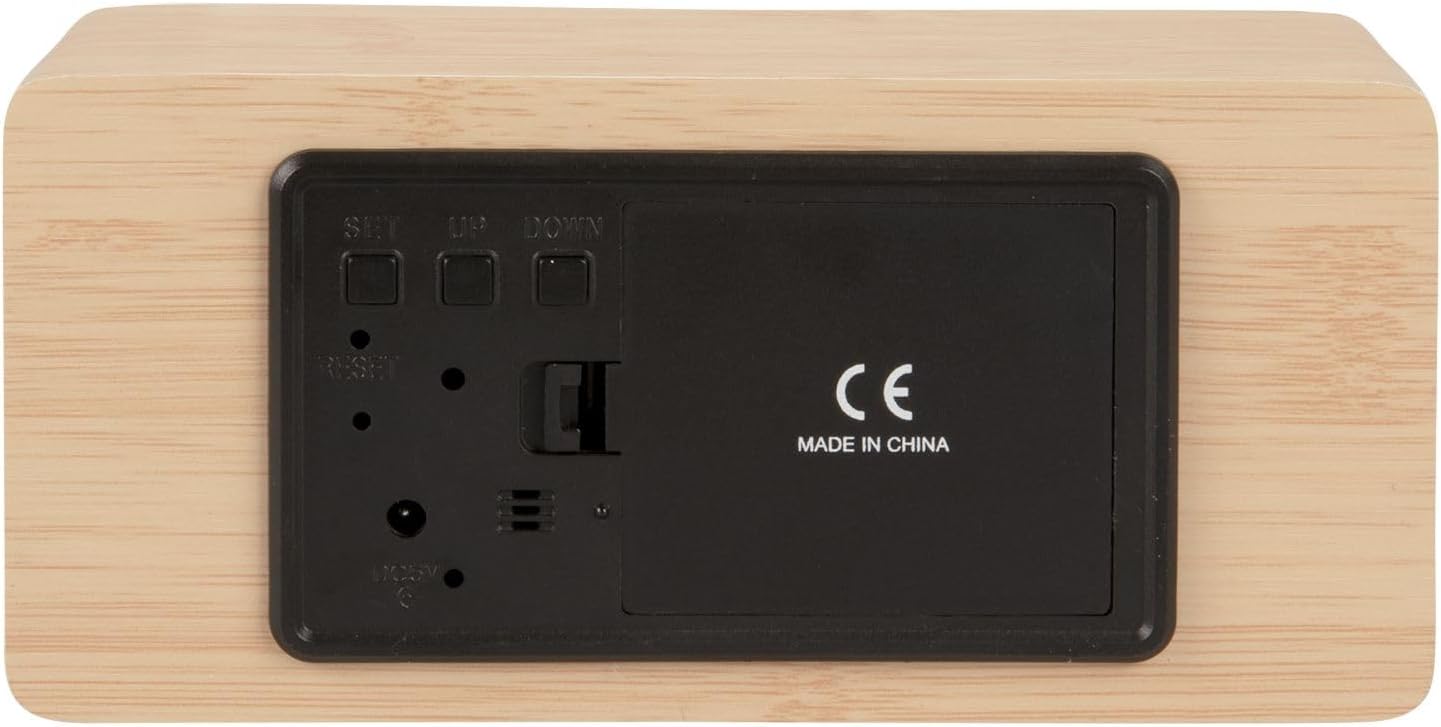
Слика 2: Позади view of the alarm clock, highlighting the SET, UP, DOWN buttons, power input, and battery compartment.
4. Подешавање
Напајање уређаја:
The alarm clock can be powered via the included USB cable or by 3 x AAA batteries (not included) for backup.
- УСБ Снага: Connect the small end of the USB cable to the DC 5V input port on the back of the alarm clock. Connect the other end to a USB power adapter (not included) or a powered USB port.
- Резервна батерија: Open the battery compartment cover on the back of the clock. Insert 3 x AAA batteries, ensuring correct polarity. Close the cover securely. Batteries are primarily for backup and may not power the display continuously.

Слика 3: The USB power cable provided for connecting the alarm clock to a power source.
5. Упутство за употребу
Подешавање времена:
- Притисните и држите СЕТ дугме док цифре сати не почну да трепћу.
- Користите UP or ДОВН дугмад за подешавање сата.
- Притисните СЕТ again to confirm the hour and move to minute setting.
- Користите UP or ДОВН дугмад за подешавање минута.
- Притисните СЕТ to confirm the minutes and exit time setting mode.
Подешавање аларма:
- Притисните тастер СЕТ button once (do not hold) to cycle through display modes until 'AL' or an alarm icon appears.
- Притисните и држите СЕТ button again until the alarm hour digits flash.
- Користите UP or ДОВН дугмад да бисте подесили жељени сат аларма.
- Притисните СЕТ to confirm the alarm hour and move to alarm minute setting.
- Користите UP or ДОВН дугмад за подешавање жељених минута аларма.
- Притисните СЕТ да бисте потврдили и изашли из режима подешавања аларма.
- Да бисте активирали/деактивирали аларм, притисните дугме UP button while in normal time display mode. An alarm icon will appear/disappear on the display.
Switching Display Modes (12/24 Hour, Temperature Unit):
- У режиму нормалног приказа времена, притисните UP дугме за пребацивање између 12-часовног и 24-часовног формата.
- Притисните тастер ДОВН button to switch between Celsius (°C) and Fahrenheit (°F) temperature units.
6. Одржавање
- Clean the alarm clock with a soft, dry cloth.
- Do not use abrasive cleaners, solvents, or harsh chemicals, as these may damage the mirror surface or casing.
- Ensure the device is unplugged and batteries are removed before cleaning.
КСНУМКС. Решавање проблема
- Екран је празан: Check if the USB cable is securely connected to a power source. If using batteries, ensure they are inserted correctly and are not depleted.
- Аларм се не оглашава: Verify that the alarm is set and activated (alarm icon visible on display). Check the alarm volume if adjustable (this model may not have adjustable volume).
- Incorrect time/settings: Притисните тастер РЕСЕТ button on the back of the unit using a thin object (e.g., a paperclip) to restore factory settings, then re-set the time and alarm.
- Очитавање температуре делује нетачно: Ensure the clock is placed in a location away from direct heat sources or drafts that could affect ambient temperature readings.
8. Спецификације
| Број модела | PTG-KA5879WD |
| Материјал | Дрвени фурнир |
| Димензије (Д к Ш к В) | 15 цм x 7 цм x 4.5 цм (приближно 5.9 x 2.76 x 1.77 инча) |
| Тежина | 245 г (приближно 0.54 фунти) |
| Боја | Light wood casing, silver mirror display |
| Дисплаи Типе | Дигитал ЛЕД |
| Посебна карактеристика | Аларм |
| Извор напајања | USB powered (cable included), 3 x AAA batteries (not included) for backup |
9. Гаранција и подршка
This product is manufactured by Karlsson. For any support inquiries, warranty information, or service requests, please refer to the retailer where the product was purchased or visit the official Karlsson webсајт за контакт податке. Молимо вас да сачувате доказ о куповини за потребе гаранције.