
FLAMMA FX200
FLAMMA FX200 Упутство за употребу процесора за гитару са вишеструким ефектима
Модел: ФКС200
1. Увод
This manual provides detailed instructions for the operation and maintenance of your FLAMMA FX200 Multi Effects Guitar Processor. Please read this manual thoroughly to ensure proper usage and to maximize the potential of your device.
The FLAMMA FX200 is a versatile multi-effects processor designed for guitarists, featuring a 5-inch LCD touch screen, extensive input/output options, and a wide array of effects, amplifier models, and cabinet simulations.
2. Мере предострожности
- Не излажите уређај киши, влази или екстремним температурама.
- Избегавајте постављање уређаја у близини извора топлоте или на директној сунчевој светлости.
- Користите само наведени адаптер за напајање.
- Не покушавајте да растављате или модификујете уређај. Сва сервисирања препустите квалификованом особљу.
- Чувати ван домашаја деце.
3. Садржај пакета
Проверите да ли су све ставке присутне у пакету:
- FLAMMA FX200 Multi Effects Guitar Processor
- Повер Адаптер
- УСБ-Ц кабл
- Кориснички приручник (овај документ)

Figure 3.1: Contents of the FLAMMA FX200 package.
4. Девице Оверview
4.1 Предња плоча
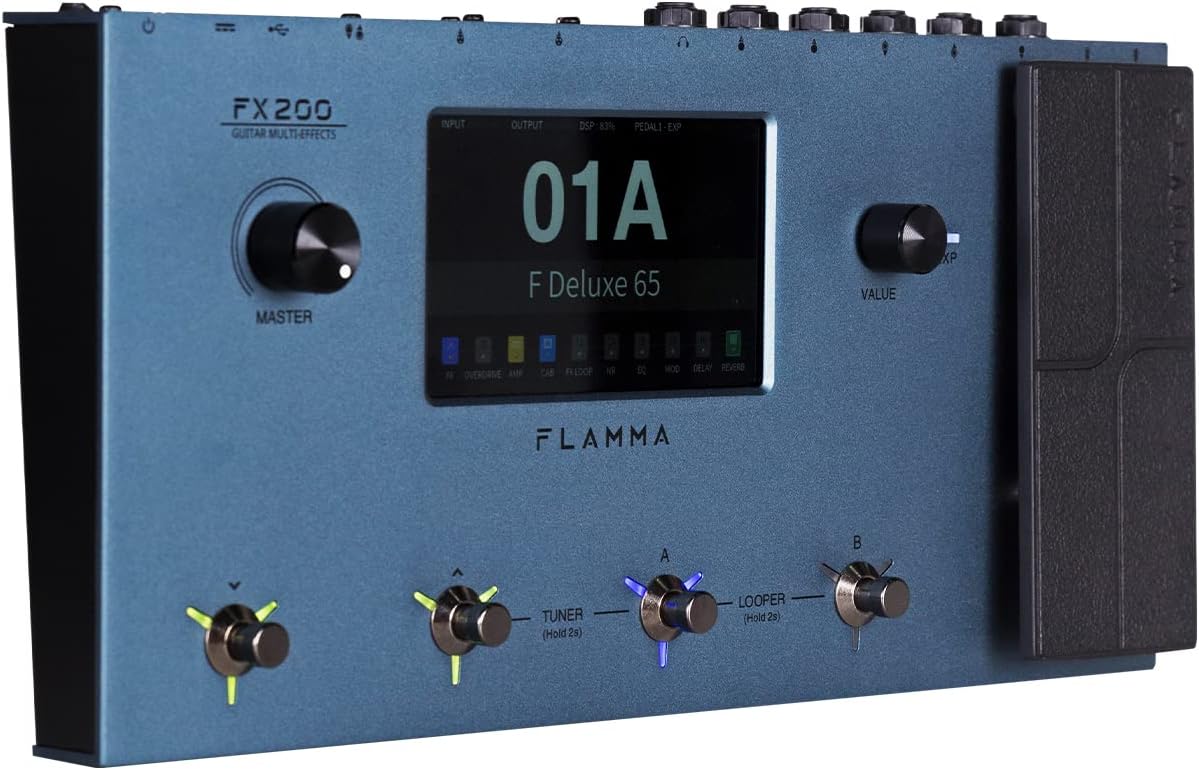
Figure 4.1: Front Panel Layout of the FX200.
- Главно дугме: Подешава укупну јачину звука.
- ЛЦД екран осетљив на додир: 5-inch display for navigation, parameter editing, and preset management.
- Value Knob: Used for data entry and parameter adjustments.
- Ножни прекидачи (A, B, C, D): Control presets, effects, looper, and tuner functions.
- Педала експресије: Assignable for real-time control of various effects parameters.
4.2 Rear Panel (I/O)

Figure 4.2: Rear Panel Input/Output Connections.
- АУКС ИН: 3.5 мм стерео улаз за екстерне аудио уређаје.
- ЕКСП2: External expression pedal input.
- УЛАЗНИ: 1/4-inch mono input for guitar.
- SEND/RETURN: Stereo FX Loop for integrating external effects pedals.
- OUTPUT (L/MONO, R): 1/4-inch stereo outputs to ampлифиер или миксер.
- ТЕЛЕФОНИ: 3.5 мм стерео излаз за слушалице.
- ГНД/ЛИФТ: Ground lift switch to eliminate hum.
- XLR OUT (L, R): Balanced XLR stereo outputs for direct connection to PA systems or audio interfaces.
- MIDI УЛАЗ/ИЗЛАЗ: 5-pin MIDI connectors for external MIDI control.
- USB DC IN: USB-C port for power and connection to a computer.
- Прекидач: Укључује/искључује уређај.
5. Подешавање
5.1 Почетно укључивање
- Connect the provided power adapter to the USB DC IN port on the rear panel.
- Укључите адаптер за напајање у одговарајућу АЦ утичницу.
- Flip the Power Switch to the ON position. The unit will power on and display the startup screen.
5.2 Connecting Your Guitar and Ampлифиер
- Повежите своју гитару са ИНПУТ прикључак помоћу стандардног инструменталног кабла од 1/4 инча.
- Повежите OUTPUT L/MONO прикључак за твоју гитару amplifier's input using a 1/4-inch instrument cable. For stereo output, connect the ИЗЛАЗ Р џек на секунду amplifier or mixer input.
- Alternatively, for direct recording or PA system connection, use XLR cables from the XLR OUT L и XLR OUT R ports to your audio interface or mixer.
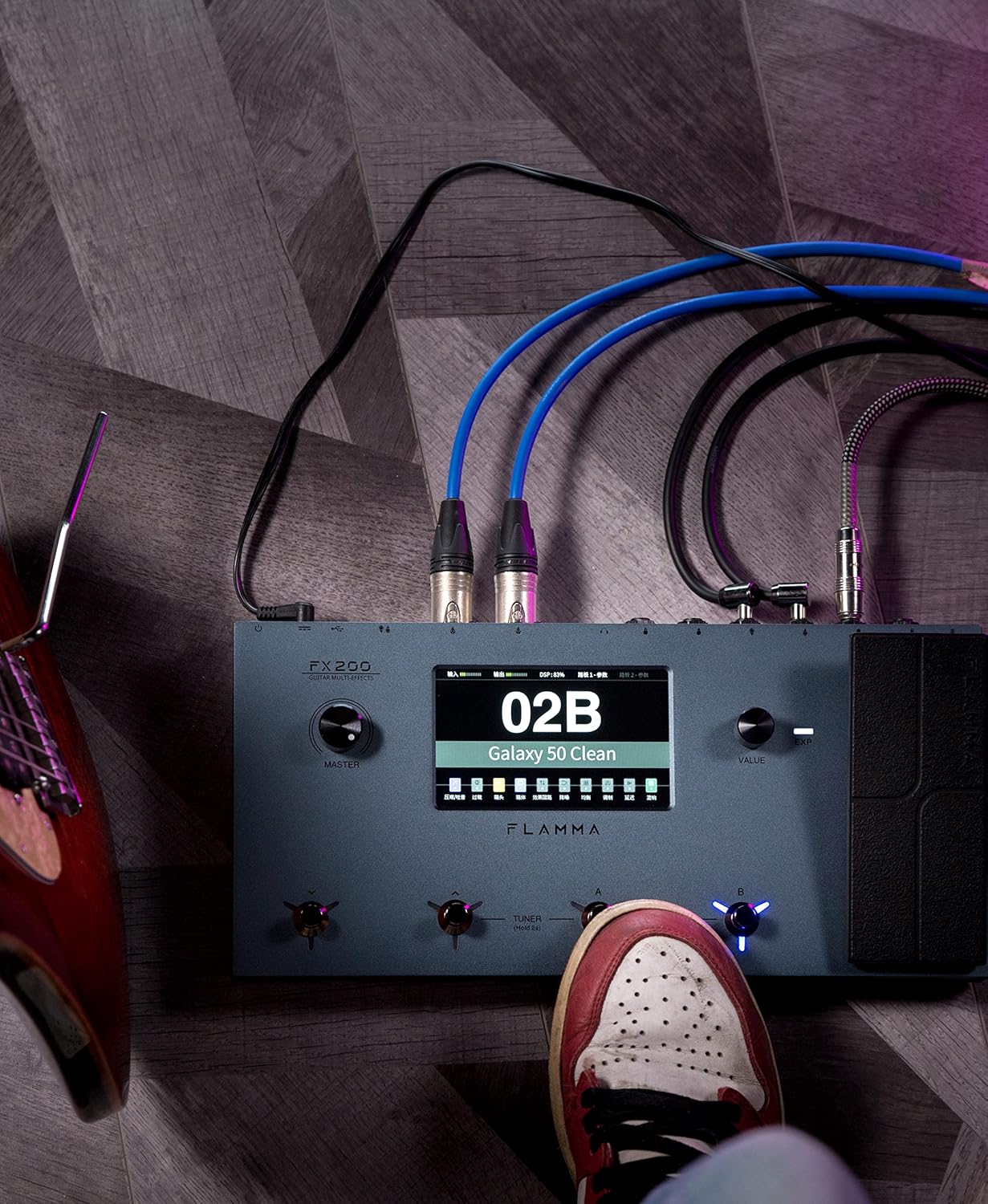
Figure 5.1: Typical connection setup for the FX200.
5.3 Повезивање са рачунаром
The FX200 can be connected to a computer for editing presets, firmware updates, and USB audio recording.
- Download the specialized editing software from the official FLAMMA webсајту.
- Connect the FX200 to your computer using the provided USB-C cable.
- Launch the editing software. The software will detect the FX200, allowing you to manage presets, effects, and perform firmware updates.

Figure 5.2: FX200 connected to a computer for software editing.
6. Упутство за употребу
6.1 Навигација по екрану осетљивом на додир
The 5-inch LCD touch screen is the primary interface for controlling the FX200. Tap icons and parameters to select them, and use the Value Knob to adjust values.

Слика 6.1: Интеракција са интерфејсом екрана осетљивог на додир.
6.2 Управљање унапред подешеним подешавањима
The FX200 features 200 editable user preset slots. Presets can be selected using the footswitches or by navigating the touch screen.
- Избор пресета: In Play mode, press footswitches A or B to cycle through presets within a bank. Press footswitches C or D to change banks.
- Уређивање унапред подешених вредности: Tap on an effect module icon on the touch screen to access its parameters. Adjust settings using the Value Knob.
- Чување унапред подешених вредности: After editing, tap the 'Save' icon on the touch screen and follow the prompts to store your changes to a user preset slot.
6.3 Effect Modules and Chain
The FX200 includes 10 effect modules with over 160 different effect types, 58 preamp models, and 30 cabinet simulations. The effects chain can be customized.
- Module Order: Drag and drop effect module icons on the touch screen to change their order in the signal chain.
- Activating/Deactivating Modules: Tap an effect module icon to toggle it on or off within a preset.
- Third-Party IRs: The unit supports third-party impulse response files (up to 1024 sampling points) with 50 empty slots for custom cabinet simulations. Use the editing software to load IRs.

Figure 6.2: Customizable effects chain on the FX200.
6.4 Лупер и бубањ машина
The FX200 includes an integrated 52-second looper and 80 drum machine variations with 10 metronome styles.
- Лоопер: Access the looper function via a dedicated footswitch or the touch screen. Record, overdub, play, and stop loops.
- Друм машина: Select drum patterns and metronome styles from the touch screen interface. Adjust tempo and volume.
6.5 USB Audio Recording
The FX200 supports USB audio recording, allowing you to record directly to your computer.
- Connect the FX200 to your computer via USB-C.
- Select the FX200 as your audio input device in your Digital Audio Workstation (DAW) software.
- Adjust input levels on both the FX200 and your DAW for optimal recording.
7. Одржавање
- Чишћење: Use a soft, dry cloth to clean the unit. Do not use abrasive cleaners or solvents.
- Складиштење: When not in use for extended periods, store the unit in a dry, cool place away from direct sunlight.
- Ажурирања фирмвера: Regularly check the FLAMMA website for firmware updates to ensure optimal performance and access to new features. Updates are performed via the USB-C connection and editing software.
КСНУМКС. Решавање проблема
| Проблем | Могући узрок | Решење |
|---|---|---|
| Нема струје | Power adapter not connected or faulty; Power switch off. | Ensure power adapter is securely connected and plugged into a working outlet. Check power switch. |
| Нема излаза звука | Incorrect cable connections; Master volume too low; Amplifier off; Effect module bypassed. | Verify all audio cables are correctly connected. Increase Master volume. Check amplifier power. Ensure desired effect modules are active. |
| Humming or noise | Ground loop; Faulty cables; Interference. | Engage the GND/LIFT switch. Try different cables. Ensure power supply is stable and away from other electronics. |
| Екран на додир не реагује | Привремени софтверски квар. | Restart the unit by cycling the power switch. If the issue persists, contact customer support. |
| Повезивање са рачунаром није могуће | USB-C cable issue; Driver not installed; Software not running. | Ensure USB-C cable is functional. Install necessary drivers. Launch the FLAMMA editing software. |
9. Спецификације
| Феатуре | Детаљ |
|---|---|
| Дисплаи | 5-inch LCD Touch Screen |
| Модули ефеката | 10 modules, 160+ effect types |
| Преamp Модели | 58 |
| Cabinet Simulations | 30 (IR-based, 1024pts), 50 user IR slots |
| Корисничке пресете | 200 editable slots |
| Лоопер | 52 секунди |
| Машина за бубањ | 80 variations, 10 metronome styles |
| Повезивање | AUX IN, EXP2, INPUT, SEND/RETURN, OUTPUT (L/MONO, R), PHONES, XLR OUT (L, R), MIDI IN/OUT, USB-C |
| USB Audio Recording | Подржано |
| Димензије (Д к Ш к В) | 13.5 к 6.6 к 2 инча (34.3 к 16.8 к 5.1 цм) |
| Тежина | 3.9 фунте (1.77 кг) |
| Повер Суппли | 9V DC (via USB-C) |
| Материјал тела | Метал |
10. Гаранција и подршка
FLAMMA products are covered by a limited warranty. For detailed warranty information, product registration, and technical support, please visit the official FLAMMA webсајту или контактирајте њихову корисничку службу.
Official FLAMMA Webсајт: www.flamma.com
For any issues not covered in this manual, please refer to the online resources or contact FLAMMA customer support directly.
Ask a question about this manual
Ask about setup, troubleshooting, compatibility, parts, safety, or missing instructions. Manuals+ will review the question and use this page’s manual context to help answer it.