
1. Производ је готовview
The CaDA C51073W Blue Race Car is a building block set designed for enthusiasts aged 6 and above. This set allows you to construct a remote-controlled blue race car using 325 high-quality ABS parts. The finished model is compatible with other CaDA sets and standard building blocks, offering extensive customization possibilities. The vehicle features stable construction and movable elements, and can be controlled via an included remote control or a dedicated smartphone application.

Image 1.1: The CaDA C51073W Blue Race Car set, showcasing the packaging, the assembled car, and the dual control options (remote and smartphone).

Image 1.2: The assembled CaDA C51073W Blue Race Car, highlighting its sleek design and the dual control capability.
2. Подешавање и монтажа
Before operating your CaDA C51073W Blue Race Car, assembly is required. The set includes 325 building blocks and detailed instructions to guide you through the construction process. Ensure all parts are accounted for before beginning assembly.
2.1. Потребне компоненте (нису укључене)
- 3 x AA batteries for the vehicle.
- 2 x AAA batteries for the remote control.
Please ensure you have fresh batteries of the specified types before attempting to operate the vehicle.
2.2. Процес монтаже
Follow the step-by-step instructions provided in the physical manual included with your set. The building blocks are designed for a secure fit. Some elements of the set are movable, which will become apparent during assembly.

Image 2.1: A user engaged in the assembly process of the CaDA C51073W Blue Race Car, showing the individual building blocks.
3. Упутство за употребу
The CaDA C51073W Blue Race Car offers versatile control options, including a dedicated remote control and a smartphone application.
3.1. Операције даљинског управљача
The included remote control provides basic directional movement for the vehicle (forward, backward, left, right). It operates on a 2.4GHz interference-free system, offering a remote control range of up to 25 meters.

Image 3.1: A detailed diagram of the remote control, indicating the functions of its various buttons and switches.
3.2. Контрола помоћу апликације за паметне телефоне
For advanced control and programming capabilities, download the official CaDA app. The app allows you to control the vehicle's movements and program custom sequences. You can arrange movements in various orders and adjust them individually, enabling the car to perform autonomous actions.
- Преузимање апликације: Scan the QR code provided on the product packaging to download the application.
- Компатибилност: Апликација је доступна и за Андроид и иОС уређаје.
- Режими управљања: The app offers multiple control interfaces, including Remote Control mode, Scratch Programming mode, Gyroscope control, and Path mode.
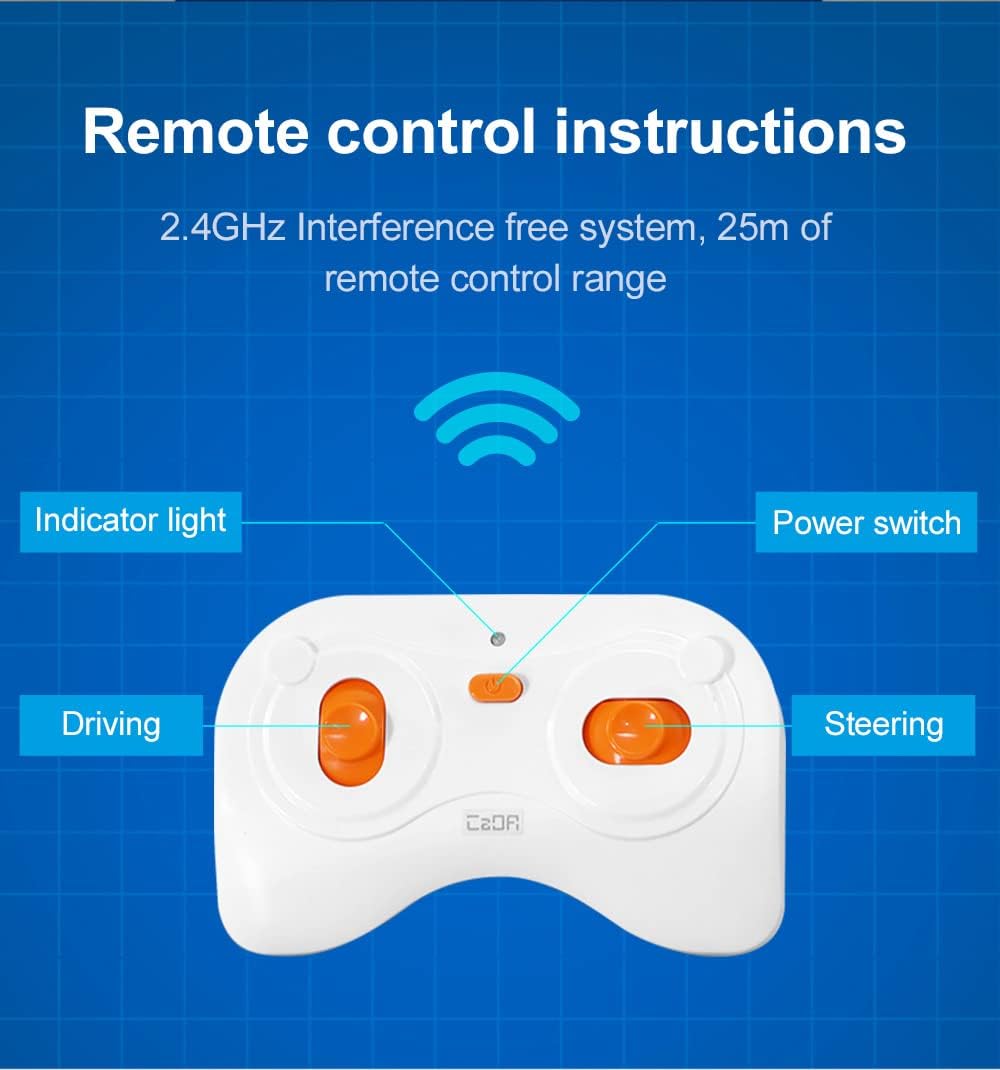
Image 3.2: The CaDA app interface on a smartphone, illustrating the various control and programming modes available.
4. Одржавање
To ensure the longevity and optimal performance of your CaDA C51073W Blue Race Car, follow these general maintenance guidelines:
- Чишћење: Use a soft, dry cloth to wipe down the building blocks and assembled car. Avoid using harsh chemicals or abrasive materials.
- Складиштење: Store the car and its components in a cool, dry place away from direct sunlight and extreme temperatures.
- Одржавање батерије: Remove batteries from the vehicle and remote control if they will not be used for an extended period to prevent leakage.
- инспекција: Periodically check for any loose or damaged parts. Reassemble any loose connections to maintain structural integrity.
КСНУМКС. Решавање проблема
While the CaDA C51073W Blue Race Car is designed for reliable operation, you may encounter minor issues. Here are some common troubleshooting tips:
- Car Not Responding:
- Check if the batteries in both the car and the remote control are correctly inserted and have sufficient charge.
- Ensure the power switch on the car is in the 'ON' position.
- Verify that the remote control and car are within the operating range (up to 25 meters).
- If using the app, ensure Bluetooth is enabled on your device and the car is properly paired.
- Неправилан покрет:
- Check for any loose connections or misaligned blocks in the car's assembly.
- Ensure the operating surface is flat and clear of obstructions.
- Проблеми са повезивањем апликација:
- Restart the app and your smartphone.
- Ensure your app version is up to date.
If you continue to experience issues, please refer to the 'Support and Warranty' section for further assistance.
6. Спецификације
| Феатуре | Детаљ |
|---|---|
| Број модела | Ц51073В |
| Бранд | ЦаДА |
| Димензије производа (склопљено) | 19.8 x 5.4 cm (approximate) |
| Димензије производа (паковање) | 35 к 24 к 6 цм |
| Тежина | 601 г |
| Број комада | 325 |
| Врста материјала | АБС |
| Боја | Плава |
| Препоручена старост | 6 година и више |
| Образовни циљеви | Креативно размишљање |
| Batteries Required (Vehicle) | 3 к АА (није укључено) |
| Потребне батерије (даљински управљач) | 2 к ААА (није укључено) |
| Даљински управљач укључен | Да |
| Фреквенција даљинског управљача | 2.4ГХз |
| Домет даљинског управљача | До 25 метара |
7. Подршка и гаранција
For any questions, technical support, or warranty inquiries regarding your CaDA C51073W Blue Race Car, please contact the manufacturer directly. Refer to the product packaging or the official CaDA webсајт за контакт информације.
Молимо вас да сачувате доказ о куповини ради гаранције.