
Увод
The LARIAU HCT-366 is an intelligent, rain-proof, and dust-proof automatic watering device designed to simplify your garden irrigation. Featuring a large display and a rain sensor, it offers precise and efficient watering for various plants and gardens. This manual provides detailed instructions for installation, operation, and maintenance to ensure optimal performance of your device.
Карактеристике производа
- Велики екран: Features a large screen for clear visibility and convenient operation.
- Сензор за кишу: Automatically pauses watering during rainfall, conserving water and preventing over-watering.
- Филтер за улаз воде: An integrated filter screen effectively prevents impurities from entering the device.
- Функција закључавања за децу: Prevents accidental button presses or unauthorized changes to settings.
- Програмабилни распореди: Supports 6 groups of programmable timing settings, offering weekly or cyclical modes.
- Флексибилна инсталација: Equipped with a twisted active joint for easy installation on faucets, even those close to a wall.
- Прецизно мерење времена: Irrigation duration can be set precisely from 1 second to 99 minutes and 59 seconds.
Садржај пакета
Молимо вас да проверите пакет како бисте били сигурни да су сви састојци присутни:
- 1 x LARIAU HCT-366 Irrigation Timer
- 1 к кутија за паковање
- 1 x Accessory Set (e.g., connectors, seals)
Сетуп
1. Инсталација батерије
The device requires two (2) AA alkaline batteries (not included). Ensure correct polarity when inserting the batteries into the compartment, typically located on the back or side of the unit. Close the battery compartment securely to maintain water resistance.
2. Инсталација уређаја
- Attach the LARIAU HCT-366 irrigation timer directly to your outdoor faucet. The twisted active joint allows for easy connection, even in tight spaces.
- Ensure the connection is tight to prevent leaks. Use the provided accessory set (e.g., rubber washers) to create a secure, watertight seal.
- Connect your garden hose or irrigation system to the outlet of the watering device.

Image: The LARIAU HCT-366 device connected to a standard outdoor faucet, demonstrating its compact design and easy installation.
3. Филтер за довод воде
The device includes a water inlet filter screen to prevent debris from entering and clogging the system. Ensure this filter is properly seated during installation. Regularly check and clean the filter to maintain optimal water flow.

Image: An illustrative diagram of the HCT-366 connected to a water source and distributing water through a drip irrigation system to multiple plants.
Упутство за употребу
Дисплаи Оверview

Слика: Детаљна view of the HCT-366's LCD screen, displaying various indicators such as current time, day of the week, battery status, rain sensor icon, and active program slots (P1-P6).
The large LCD screen provides all necessary information at a glance. Key indicators include:
- САДА: Тренутно време.
- Дани у недељи: Indicates active watering days (Su, Mo, Tu, We, Th, Fr, Sa).
- Индикатор батерије: Приказује преостали век трајања батерије.
- Rain Sensor Icon: Indicates if the rain sensor is active or has detected rain.
- Икона браве за децу: Приказује да ли је функција заштите за децу омогућена.
- П1-П6: Program slots for setting irrigation schedules.
- ПОЧЕТНО ВРЕМЕ: The programmed start time for watering.
- КОЛИКО ДУГО: The programmed duration for watering.
Подешавање тренутног времена и дана
- Притисните тастер "ПОСТАВИ" button (or similar, typically indicated by a clock icon) to enter time setting mode.
- Користите "+" и "-" дугмад за подешавање сати и минута.
- Притисните У реду to confirm and move to the next setting (e.g., day of the week).
- Adjust the current day using "+" и "-", а затим притисните У реду да спасе.
Programming Irrigation Schedules (P1-P6)
The device allows for up to 6 independent watering programs. Follow these steps to set a program:
- Притисните тастер "P" button (Program) to select a program slot (P1-P6). Use "+" or "-" to navigate between programs.
- Притисните У реду to enter the settings for the selected program.
- Подесите време почетка: Користите "+" и "-" to adjust the desired start time (hour and minute). Press У реду.
- Подесите трајање заливања: Користите "+" и "-" to set the watering duration from 1 second to 99 minutes 59 seconds. Press У реду.
- Set Watering Frequency (Days):
- Weekly Mode: Select specific days of the week (Su, Mo, Tu, etc.) using "+" и "-". Притисните У реду to toggle selection for each day.
- Режим циклуса: Some models may offer a cycle mode (e.g., every 2 days). Refer to the on-screen prompts to set the cycle interval.
- Притисните У реду to save the program settings. Repeat for other programs (P2-P6) as needed.

Image: The HCT-366 display in programming mode, showing placeholders for setting start time and watering duration, along with day selection options.
Rain Sensor Function
The integrated rain sensor automatically detects rainfall. When rain is detected, the device will pause any scheduled watering programs to prevent over-watering. Watering will resume according to the schedule once the sensor is dry. This feature helps conserve water and protects your plants.
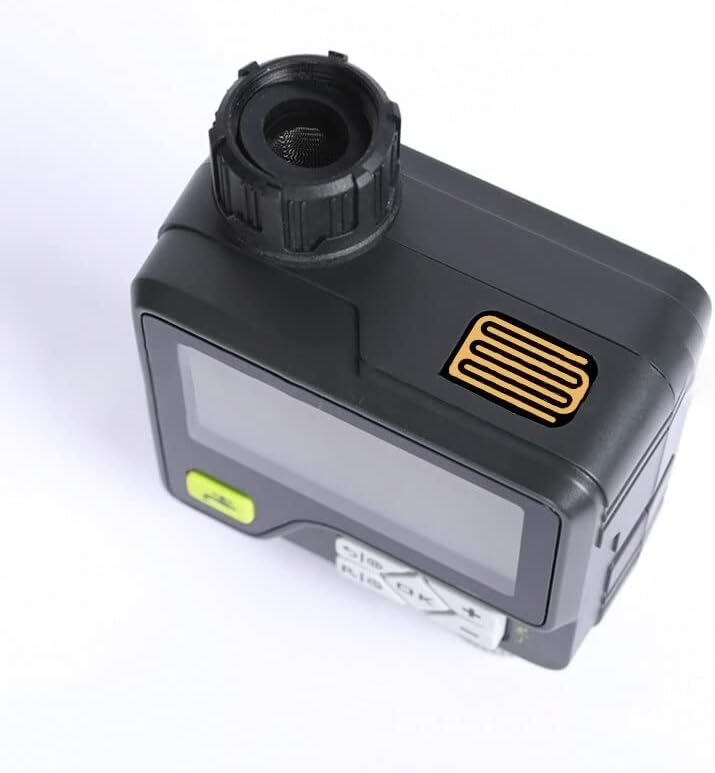
Слика: Споредни професионалацfile of the HCT-366, clearly showing the rain sensor grid located on the top of the unit, designed to detect precipitation.
Функција закључавања за децу
To prevent accidental changes to your watering schedule, activate the child lock:
- Да бисте активирали: Притисните и држите "LOCK" button (or a combination like У реду и "-" simultaneously, refer to the device's button labels) until the lock icon appears on the screen.
- To deactivate: Repeat the action. The lock icon will disappear.
Ручно заливање
To initiate watering outside of the programmed schedule:
- Притисните тастер "РУЧНИК" button (often indicated by a water droplet or faucet icon).
- Користите "+" и "-" to set the desired manual watering duration.
- Притисните У реду да започне ручно заливање.
- To stop manual watering, press the "РУЧНИК" button again or "OFF".
Одржавање
Чишћење филтера за довод воде
Periodically check the water inlet filter for debris and sediment. If clogged, carefully remove the filter and rinse it under running water. Reinsert the filter securely before reattaching the device to the faucet.
Замена батерије
When the battery indicator shows low power, replace the two AA alkaline batteries promptly to ensure continuous operation. Always use fresh alkaline batteries for best performance.
Зимско складиште
Before the first frost, disconnect the watering device from the faucet and drain any remaining water. Store the device indoors in a dry, frost-free location. Remove batteries if storing for an extended period to prevent leakage.
Решавање проблема
- Уређај се не укључује: Check if batteries are installed correctly and are not depleted. Replace with fresh batteries if necessary.
- Нема протока воде:
- Уверите се да је славина потпуно отворена.
- Check the water inlet filter for clogs and clean if needed.
- Verify that the water pressure is within the operating range (0.05-0.8 MPA).
- Confirm that a watering program is active or manual watering is initiated.
- Watering not starting at scheduled time:
- Check if the current time and day are set correctly on the device.
- Verify that the program's start time and frequency are correctly set.
- Ensure the rain sensor is not wet, pausing the schedule.
- Check if the child lock is active and interfering with settings.
- Rain sensor not working: Ensure the rain sensor area is clean and free from obstructions.
Спецификације
| Модел | ХЦТ-366 |
| Параметри програма | 6 programmable timing groups (Week/Cycle, Dual Mode) |
| Оператинг Волtage | 2 x AA алкалне батерије (нису укључене) |
| Опсег притиска воде | 0.05 - 0.8 MPA |
| Трајање заливања | 1 second - 99 minutes 59 seconds |
| Нето тежина | 382 г (без батерије) |
| Димензије (Д к Ш к В) | 10.1 к 5.5 к 13.6 цм |
| Референца произвођача | 9444325645163 |
| ASIN | B0B6STPQMH |
Гаранција и подршка
For warranty information and technical support, please refer to the retailer's policy or contact LARIAU customer service through their official website or the point of purchase. Keep your purchase receipt as proof of purchase.