
1. Увод
Welcome to the user manual for your Skechers SR1144 Digital Watch. This guide provides detailed instructions on how to set up, operate, and maintain your watch to ensure optimal performance and longevity. Please read this manual thoroughly before using your watch.
2. Производ је готовview
The Skechers SR1144 is a robust digital watch designed for an active lifestyle. It features a digital display, chronograph function, and is water-resistant up to 10 ATM. The watch is constructed with a lightweight polycarbonate case and a comfortable silicone band.
2.1 Кључне карактеристике
- Digital Display with Chronograph Function
- 10 ATM Water Resistance (100 meters / 330 feet)
- Lightweight Polycarbonate Case
- Издржљива силиконска трака
- Функција сјаја у мраку
2.2 Компоненте сата
Упознајте се са главним компонентама и дугмадима вашег сата:
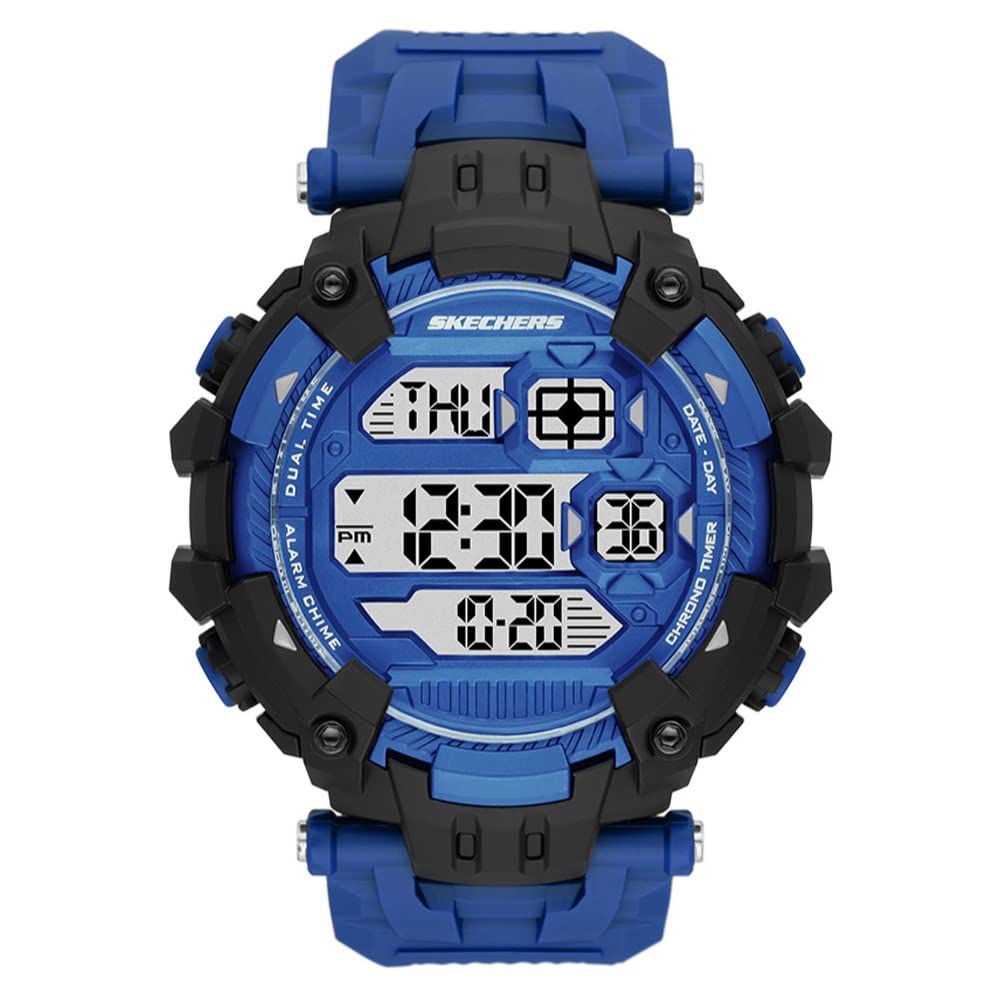
Слика 1: Предња страна view of the Skechers SR1144 Digital Watch, showcasing the digital display and overall design.
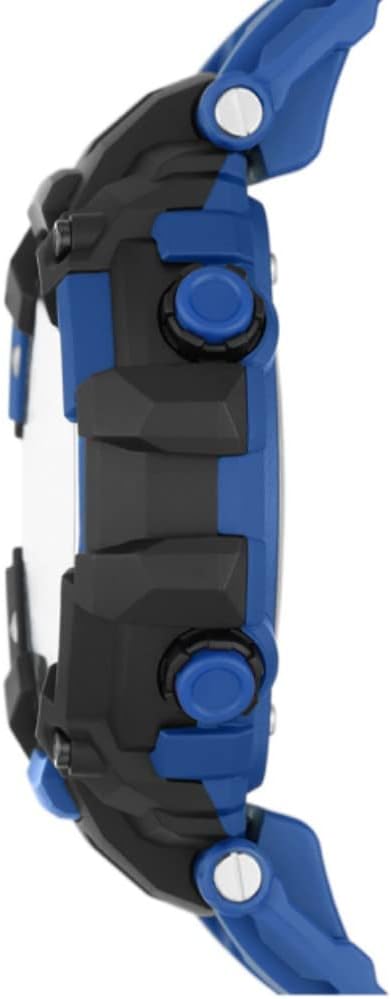
Слика 2: Страна view of a similar Skechers digital watch, illustrating the typical button layout for Mode, Light, Reset, and Start/Stop functions.
- Дугме МОДЕ: Used to cycle through different watch modes (Time, Chronograph, Alarm).
- Дугме ЛИГХТ: Активира позадинско осветљење ради боље видљивости у условима слабог осветљења.
- Ресет: Used to reset settings or chronograph.
- ST/STP (Start/Stop) Button: Used to start and stop the chronograph or adjust settings.
3. Упутства за подешавање
3.1 Подешавање времена и датума
- Са нормалног приказа времена, притисните дугме МОДЕ button repeatedly until the time setting mode is activated (usually indicated by flashing digits).
- Користите РЕСЕТ button to select the digit you wish to adjust (hours, minutes, seconds).
- Користите СТ/СТП button to increase the selected digit. Hold to advance rapidly.
- Наставите овај поступак да бисте подесили годину, месец и дан.
- Када су сва подешавања исправна, притисните дугме МОДЕ дугме да бисте изашли из режима подешавања и вратили се на нормалан приказ времена.
3.2 Activating the Backlight
Притисните тастер ЛИГХТ button to illuminate the display for a few seconds. This feature is useful in dark environments.
4. Упутство за употребу
4.1 Коришћење хронографа (штоперице)
- Притисните тастер МОДЕ button until the chronograph display appears (usually showing '00:00:00').
- Притисните тастер СТ/СТП дугме за покретање штоперице.
- Притисните тастер СТ/СТП поново притисните дугме да бисте зауставили штоперицу.
- Притисните тастер РЕСЕТ дугме да бисте обрисали штоперицу на нулу.
- To return to normal time display, press the МОДЕ дугме.
4.2 Подешавање и коришћење аларма
- Притисните тастер МОДЕ button until the alarm setting mode appears.
- Користите РЕСЕТ button to select the hour or minute digits.
- Користите СТ/СТП button to adjust the selected digit.
- Притисните тастер МОДЕ button to confirm the alarm time and exit the setting mode.
- To turn the alarm ON/OFF, typically press the СТ/СТП button while in the alarm display mode. An alarm icon will indicate if it's active.
- Када се аларм огласи, притисните било које дугме да бисте га зауставили.
4.3 Отпорност на воду
Your Skechers SR1144 watch is water-resistant up to 10 ATM (100 meters or 330 feet). This means it is suitable for bathing, swimming, snorkeling, and shallow diving. Do not press any buttons while the watch is submerged in water, as this can compromise the water resistance seal.
5. Одржавање
5.1 Чишћење сата
Да бисте очистили сат, обришите га меком крпомamp cloth. For silicone bands, mild soap and water can be used. Avoid using harsh chemicals or abrasive materials, as these can damage the watch's finish or components.
5.2 Замена батерије
The watch uses 1 Lithium Ion battery (included). When the display becomes dim or functions become erratic, it may be time to replace the battery. Battery replacement should ideally be performed by a qualified watch technician to ensure the water resistance seal is properly maintained.
5.3 Складиштење
When not in use, store your watch in a cool, dry place away from direct sunlight and extreme temperatures. Avoid exposing the watch to strong magnetic fields.
КСНУМКС. Решавање проблема
6.1 Display is Blank or Dim
- Могући узрок: Ниска батерија.
- решење: Замените батерију.
6.2 Time is Incorrect
- Могући узрок: Time was not set correctly or has been reset.
- решење: Follow the 'Setting Time and Date' instructions in Section 3.1.
6.3 Дугмад не реагују
- Могући узрок: Watch may be in a locked mode or battery is low.
- решење: Try pressing all buttons firmly. If unresponsive, replace the battery. If the issue persists, contact customer support.
7. Спецификације
| Феатуре | Спецификација |
|---|---|
| Број модела | СР1144 |
| Дисплаи Типе | Дигитал |
| Мовемент Типе | Дигитал |
| Материјал кућишта | Поликарбонат |
| Пречник кућишта | 54 милиметара |
| Цасе Тхицкнесс | 16 милиметара |
| Банд Материал | Силицоне |
| Банд Видтх | 22 милиметара |
| Банд Ленгтх | 205 милиметара |
| Дубина водоотпорности | 100 метара (10 банкомата) |
| Тип батерије | 1 литијум јон (укључено) |
| Додатне карактеристике | Chronograph, Glow In The Dark, Second Hand |
8. Гаранција и подршка
8.1 Гаранција произвођача
Your Skechers SR1144 Digital Watch is covered by a manufacturer's warranty. Please refer to the warranty card included with your purchase for specific terms, conditions, and duration of coverage. Keep your proof of purchase for warranty claims.
8.2 Корисничка подршка
For further assistance, technical support, or warranty inquiries, please visit the official Skechers webсајт или контактирајте њихову службу за кориснике. Контакт информације се обично могу наћи на паковању производа или на званичном сајту бренда webсајту.