
1. Увод
Thank you for choosing the ErGear 63" x 55" Dual Motor L-Shaped Standing Desk. This manual provides essential information for the safe assembly, operation, and maintenance of your new electric height-adjustable desk. Please read these instructions carefully before use and retain them for future reference.

Image 1.1: The ErGear 63" x 55" L-Shaped Standing Desk, showcasing its spacious design and electric height adjustment feature.
2. Безбедносне информације
Да бисте осигурали безбедан рад и спречили оштећења, молимо вас да се придржавате следећих безбедносних смерница:
- Уверите се да су све компоненте добро причвршћене пре употребе.
- Држите децу и кућне љубимце даље од стола током подешавања висине.
- Не преоптерећујте сто. Погледајте спецификације за максималну носивост.
- Избегавајте стављање течности директно на контролну таблу или близу електричних компоненти.
- Искључите напајање пре чишћења или обављања одржавања.
- Овај сто је дизајниран само за унутрашњу употребу.

Image 2.1: The desk is certified safe, meeting US federal and state air standards for low VOC emissions, and complies with FCC and UL safety standards.
3. Садржај пакета
The ErGear 63" L-Shaped Electric Standing Desk package includes all necessary components for assembly. Please verify that all parts are present and undamaged before beginning assembly.
- Desktop sections (multiple pieces for L-shape)
- Leg columns with dual motors
- Foot pads/bases
- Контролна табла
- Адаптер за напајање и каблови
- Опрема за монтажу (шрафови, вијци, алати)
- Упутство за употребу
4. Подешавање и монтажа
Assembly of the ErGear L-Shaped Standing Desk requires two people. A screwdriver is recommended for assembly. For detailed step-by-step instructions, please refer to the comprehensive PDF installation manual available online or included with your product.
4.1 опције склапања
The L-shaped desktop can be assembled with the longer section on either the left or right side, allowing you to customize the desk to fit your space and preference.
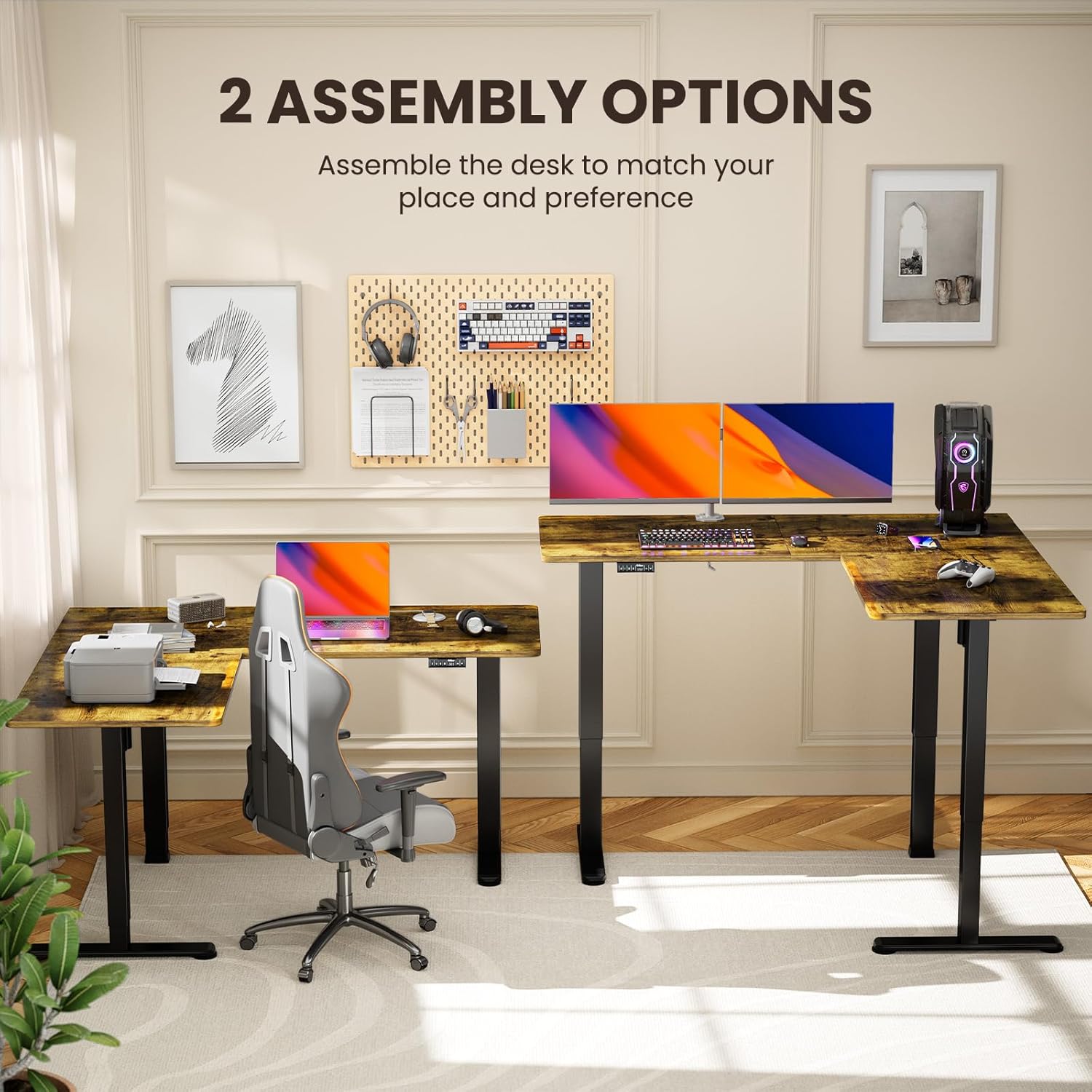
Image 4.1: Illustration of the two possible configurations for the L-shaped desktop, allowing for left or right-hand setup.

Слика 4.2: Надземни приказ view demonstrating the flexibility of assembling the desk with the longer section on either side.
4.2 General Assembly Steps (Refer to PDF for details)
- Распакујте све компоненте и проверите их у односу на списак делова.
- Attach the lifting columns to the desktop sections.
- Secure the foot pads to the lifting columns.
- Connect the motor cables and control panel to the main control box.
- Plug in the power adapter and perform initial calibration as per the detailed manual.
5. Упутство за употребу
Your ErGear standing desk features a dual-motor system for smooth and quiet height adjustments, along with a control panel for easy operation and memory presets.
5.1 Подешавање висине
Use the up and down arrow buttons on the control panel to adjust the desk height. The desk can be adjusted from 28.35 inches to 46.46 inches.

Image 5.1: The desk in a standing position, demonstrating the electric height adjustment feature for ergonomic use.
5.2 Пресет меморије
The control panel allows you to save custom sit and stand height settings for quick transitions. Consult your detailed manual for specific instructions on setting and recalling memory positions.
5.3 Dual Motor System
The desk is equipped with dual motors for faster, smoother, and quieter operation. This system ensures stable and reliable long-term performance.

Слика 5.2: Унутрашњи view highlighting the dual motor mechanism responsible for the desk's smooth and efficient height adjustment.

Image 5.3: The quiet operation of the desk allows for an undisturbed work environment, as demonstrated by a sleeping cat.
6. Одржавање
Regular maintenance helps prolong the life and performance of your desk.
- Чишћење: Обришите радну површину и оквир меком крпомamp крпу. Избегавајте јаке хемикалије или абразивна средства за чишћење.
- Управљање кабловима: Periodically check and organize cables to prevent entanglement or damage during height adjustments.
- Причвршћивачи: Occasionally check all screws and bolts to ensure they remain tight.
КСНУМКС. Решавање проблема
Ако наиђете на проблеме са својим столом, погледајте следећа уобичајена решења:
| Проблем | Могући узрок | Решење |
|---|---|---|
| Радни сто се не помера | Power cable disconnected, overload, motor error | Check power connections. Reduce weight on desk. Refer to manual for error code interpretation and reset procedures. |
| Неравномерно подешавање висине | Obstruction, calibration issue | Ensure no obstructions. Perform a reset/calibration as per the detailed manual. |
| Unusual noise during adjustment | Loose fasteners, obstruction | Check all fasteners for tightness. Remove any objects that may be interfering with the lifting columns. |
If the problem persists, please contact ErGear customer support.
8. Спецификације
Key technical details for your ErGear L-Shaped Standing Desk:
- Број модела: ЕГЕСД8В
- Димензије производа: 55"Д к 63"Ш к 28.35"В
- Минимална висина: 28.35 инча
- Максимална висина: 46.46 инча
- Препорука за максималну тежину: 220 фунти
- Основни материјал: угљенични челик
- Врх Врста материјала: Wood (Laminated)
- Мотори: Двомоторни систем
- Скупштина: Обавезно (препоручено 2 особе)
- гаранција: 5 године гаранције

Image 8.1: Detailed dimensions of the ErGear L-Shaped Standing Desk, including the adjustable height range.

Image 8.2: The desk's robust lifting system is tested to support up to 220 lbs, ensuring dependable performance.
9. Гаранција и подршка
ErGear provides a 5-year warranty for this product, covering parts and labor. For warranty claims, technical assistance, or further inquiries, please visit the official ErGear store or contact customer support.
ErGear Store: Visit the ErGear Store on Amazon
Упутство за инсталацију (PDF): For a detailed installation guide, please refer to the official PDF document: Довнлоад ПДФ Ручно