
Coliao STC-1000
Coliao STC-1000 Digital Temperature Controller 12V
Упутство за употребу
Model: STC-1000 (12V Version)
1. Увод
Thank you for choosing the Coliao STC-1000 Digital Temperature Controller. This device is designed for precise temperature control, offering both heating and cooling functions. It is suitable for a wide range of applications including aquariums, terrariums, vivariums, chicken incubators, laboratories, and other temperature-controlled systems. This manual provides detailed instructions for installation, operation, and maintenance to ensure optimal performance and longevity of your device.

Слика 1.1: The STC-1000 controller shown in typical applications such as a greenhouse for plants and an incubator for chicks, demonstrating its versatility in temperature management.
2. Производ је готовview и компоненте
The STC-1000 is a microcomputer digital LED display temperature controller. It features a flame-retardant shell for durability and safety. The package includes the following components:
- 2 x STC-1000 Digital Temperature Controllers (12V version)
- 2 x NTC 10K Waterproof Sensor Probes (1 meter length)
- 1 x Introduction Manual (this document)

Слика 2.1: A pair of STC-1000 Digital Temperature Controllers, each accompanied by its NTC waterproof sensor probe, as included in the package.

Слика 2.2: Крупни план view of a single STC-1000 controller, highlighting its compact design and the attached NTC sensor probe.
3. Спецификације
| Феатуре | Спецификација |
|---|---|
| Модел | СТЦ-1000 |
| Повер Суппли | ДЦ 12В |
| Опсег мерења температуре | -50℃ до 99℃ |
| Опсег контроле температуре | -50℃ до 110℃ |
| Прецизност мерења | ±0.2℃ |
| Резолуција | 0.1℃ |
| Контролна тачност | ±1℃ |
| Сензор | NTC 10K L=1M waterproof probe |
| Потрошња енергије | <3В |
| Температура околине | 0℃ до 60℃ |
| Температура складиштења | -30℃ до 75℃ |
| Релативна влажност | 20-84% |
| Величина за монтажу | 71 мм к 29 мм |
| Величина предњег панела | 75 мм к 34.5 мм |
| Укупна величина | 75 мм к 34.5 мм к 85 мм |
| Материјал | Поликарбонат (ПЦ) |
| Дисплаи Типе | ЛЕД |

Слика 3.1: Detailed dimensions of the STC-1000 controller, showing its length, width, and height in millimeters and inches for installation planning.
4. Подешавање и ожичење
Важна безбедносна напомена: Wiring should only be performed by individuals familiar with electrical connections. Ensure the power supply is disconnected before attempting any wiring. This device operates on DC 12V. Incorrect wiring can damage the unit or pose a safety hazard.
The STC-1000 features a terminal block for connections. Refer to the diagram below for proper wiring. Strictly distinguish the interface of the relay, sensor, and power. The sensor lead and power wire should be kept at a proper distance to avoid interference.
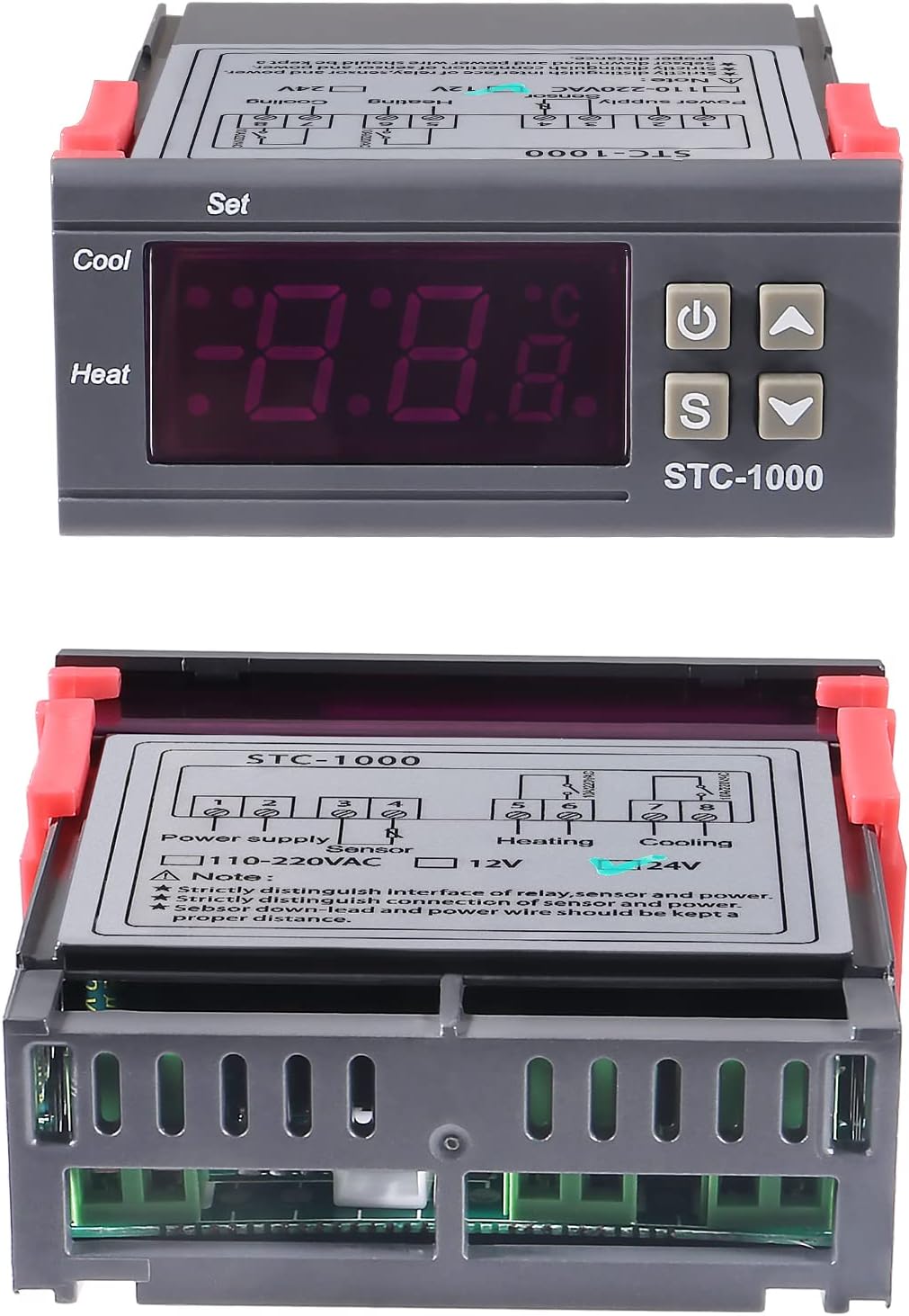
Слика 4.1: Горњи и доњи део views of the STC-1000 controller. The top view shows the display and buttons, while the bottom view reveals the terminal block with a clear wiring diagram for power supply, NTC sensor, heating output, and cooling output connections.
- Power Supply (12V DC): Connect your 12V DC power source to the designated terminals (often pins 1 and 2).
- НТЦ сензор: Connect the NTC waterproof sensor probe to the sensor terminals (often pins 3 and 4). The sensor is non-polar, so connection order does not matter.
- Излаз грејања: Connect your heating device (e.g., heating pad, lamp) to the heating relay output terminals (often pins 5 and 6).
- Излаз хлађења: Connect your cooling device (e.g., fan, chiller) to the cooling relay output terminals (often pins 7 and 8).
Уверите се да су сви прикључци сигурни и изоловани да бисте спречили кратке спојеве.
5. Упутство за употребу
The STC-1000 features a digital display and four control buttons for easy operation.

Слика 5.1: Front panel of the STC-1000, clearly labeling the Digital Display Window, Power Switch, UP Button, Setting Button (S), and Down Button.
- Дугме за укључивање (⏻): Притисните да бисте укључили/искључили уређај.
- 'S' (Set) Button: Used to enter and exit parameter setting mode.
- горе (▲) Дугме: Increases values or navigates through menu options.
- доле (▼) Дугме: Decreases values or navigates through menu options.
5.1. Viewing Current Temperature
Upon powering on, the LED display will show the current temperature measured by the NTC sensor.
5.2. Setting Temperature Parameters
- Уђите у режим подешавања: Press and hold the 'S' button for 3 seconds. The display will show "F1".
- Параметри навигације: Користите горе (▲) и доле (▼) buttons to cycle through parameters (F1, F2, F3, F4).
- View/Modify Parameter Value: While a parameter (e.g., F1) is displayed, press the 'S' button briefly to view its current value. Use the Up (▲) и доле (▼) buttons to adjust the value.
- Сачувај и изађи: After setting all desired parameters, press and hold the 'S' button for 3 seconds to save the settings and exit. If no button is pressed for 10 seconds, settings will be saved automatically, and the device will return to normal operation.
5.3. Parameter Functions
- F1: Temperature Setting Value (SV)
- This is the desired temperature you want to maintain.
- Range: -50℃ to 99℃.
- F2: Hysteresis/Difference Value (D)
- This value determines the temperature difference between the set point and when the heating/cooling output activates.
- Example: If SV = 25℃ and D = 2℃:
- Режим грејања: Heater turns on at 23℃ (SV - D), turns off at 25℃ (SV).
- Режим хлађења: Cooler turns on at 27℃ (SV + D), turns off at 25℃ (SV).
- Range: 0.3℃ to 10℃.
- F3: Temperature Calibration (C)
- Used to correct any deviation between the displayed temperature and the actual temperature.
- Adjust this value if the sensor reading is consistently inaccurate compared to a known reference thermometer.
- Range: -10℃ to 10℃.
- F4: Delay Start Time (PT)
- Sets a delay before the heating or cooling output activates after the temperature condition is met. This protects compressors in cooling systems.
- Range: 0 to 10 minutes. (0 = no delay)
5.4. Heating and Cooling Modes
The STC-1000 automatically determines whether to operate in heating or cooling mode based on the relationship between the Temperature Setting Value (F1) and the Hysteresis Value (F2).
- Режим грејања: If the Start Temperature (F1 - F2) is less than the Stop Temperature (F1), the device operates in heating mode. The heater will activate when the temperature drops below (F1 - F2) and deactivate when it reaches F1.
- Режим хлађења: If the Start Temperature (F1 + F2) is greater than the Stop Temperature (F1), the device operates in cooling mode. The cooler will activate when the temperature rises above (F1 + F2) and deactivate when it reaches F1.
6. Одржавање
- Чишћење: Wipe the controller's surface with a soft, dry cloth. Do not use abrasive cleaners or solvents. Ensure no liquids enter the device.
- Брига о сензорима: The NTC sensor probe is waterproof. However, avoid bending the cable sharply or subjecting it to excessive force. Periodically check the sensor cable for any signs of damage.
- Услови животне средине: Ensure the controller is operated within the specified ambient temperature and humidity ranges to prevent damage.
- Напајање: Always use a stable 12V DC power supply. Fluctuations can affect performance or damage the unit.
КСНУМКС. Решавање проблема
| Проблем | Могући узрок | Решење |
|---|---|---|
| Екран приказује „LLL“ или „HHH“ | Грешка сензора (отворено коло или кратки спој) или температура ван опсега. | Check sensor connection. Replace sensor if damaged. Ensure temperature is within -50℃ to 99℃. |
| Display shows "---" | Sensor not connected or damaged. | Verify sensor connection. Replace sensor if necessary. |
| Controller not turning ON/OFF heating/cooling | Incorrect parameter settings (F1, F2, F4), wiring error, or faulty relay. | Review F1, F2, and F4 settings. Check wiring connections. Test heating/cooling devices independently. |
| Нетачно очитавање температуре | Sensor calibration needed (F3), sensor placement, or faulty sensor. | Use F3 to calibrate the temperature. Ensure sensor is placed correctly and not affected by external heat sources. Replace sensor if faulty. |
| Екран је празан | No power or power button is off. | Check 12V DC power supply connection. Press the power button. |
8. Гаранција и подршка
Coliao products are manufactured to high-quality standards. This product comes with a standard manufacturer's warranty against defects in materials and workmanship. Please refer to your purchase documentation for specific warranty terms and duration.
For technical support, troubleshooting assistance, or warranty claims, please contact your retailer or the Coliao customer service department through the contact information provided at the point of purchase. Please have your product model number (STC-1000) and purchase date available when contacting support.
Ask a question about this manual
Ask about setup, troubleshooting, compatibility, parts, safety, or missing instructions. Manuals+ will review the question and use this page’s manual context to help answer it.