
1. Увод
This manual provides detailed instructions for the RisoPhy Wireless Mechanical Keyboard. This keyboard offers versatile connectivity options, customizable RGB backlighting, and programmable keys, designed for both gaming and everyday use. Please read this manual thoroughly to ensure proper setup and operation of your device.
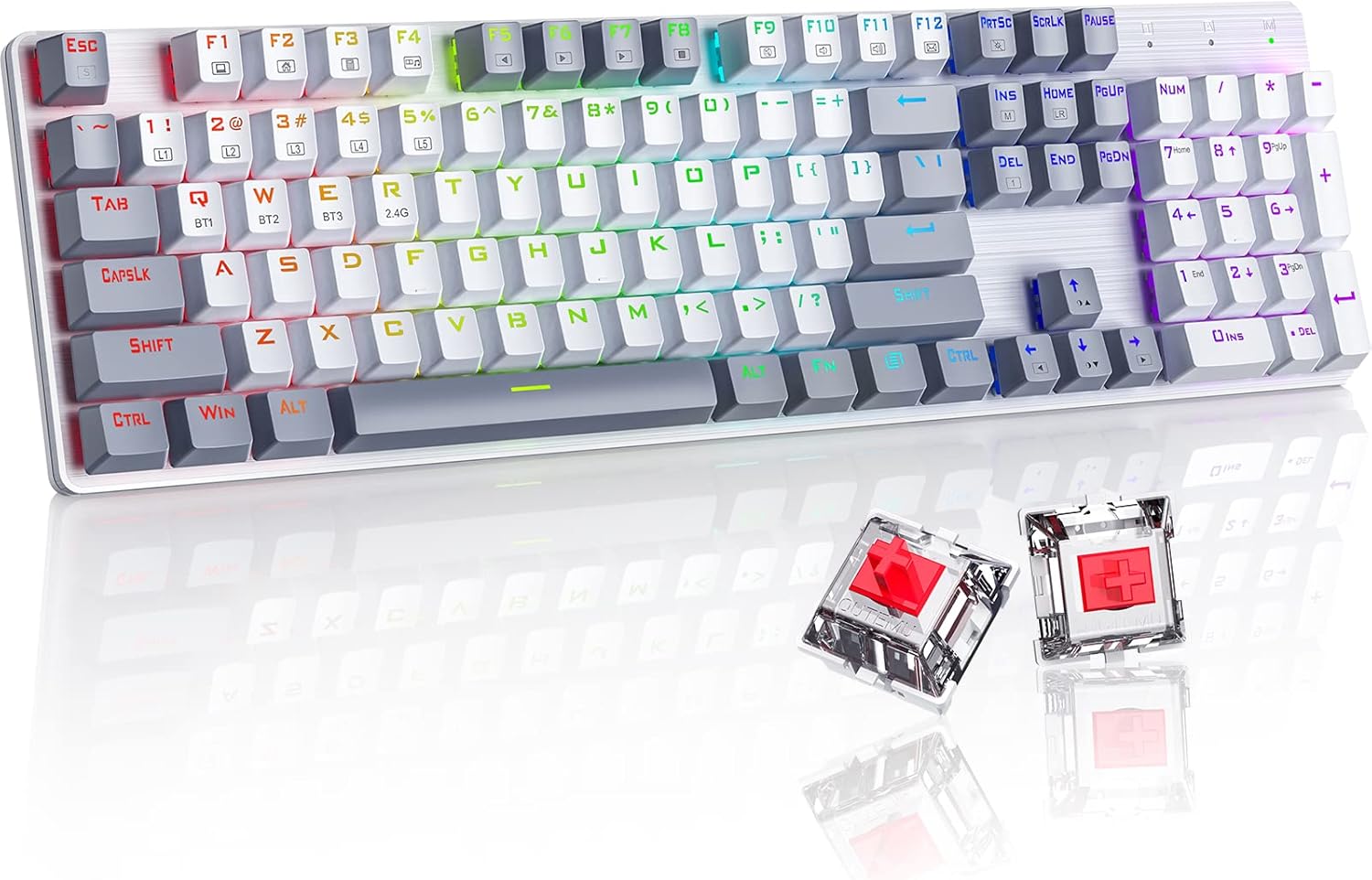
Image: The RisoPhy Wireless Mechanical Keyboard, showcasing its full 104-key layout, RGB backlighting, and two red mechanical switches detached for display.
2. Садржај пакета
Проверите да ли су све ставке присутне у вашем пакету:
- 1 x RisoPhy Wireless Mechanical Keyboard
- 1 к УСБ Типе-Ц кабл
- 1 к 2.4 ГХз УСБ пријемник
- 1 x Упутство за употребу (овај документ)
- 1 к Извлакач за кључеве

Image: A visual representation of the package contents, including the keyboard, USB-C cable, 2.4GHz receiver, user manual, and keycap puller.
3. Подешавање и повезивање
The RisoPhy keyboard supports three connection modes: Wired (USB-C), 2.4GHz Wireless, and Bluetooth. You can connect up to 5 devices simultaneously (1 via 2.4G, 3 via Bluetooth, 1 via Wired).

Image: An illustration demonstrating the three connectivity modes: Bluetooth 5.0, 2.4G Wireless, and Wired Mode, with the keyboard connected to a PC, laptop, and tablet.
3.1 Жични режим
- Connect the provided USB Type-C cable to the keyboard's port and the other end to your computer's USB port.
- Тастатура ће бити аутоматски препозната и спремна за употребу.
3.2 Бежични режим од 2.4 GHz
- Locate the 2.4GHz USB receiver in the keyboard's storage compartment (usually on the underside).
- Укључите УСБ пријемник у слободан УСБ порт на рачунару.
- Switch the keyboard's mode selector to 2.4G. The keyboard will connect automatically.
3.3 Блуетоотх режим
The keyboard supports up to three Bluetooth devices (BT1, BT2, BT3).
- Switch the keyboard's mode selector to Bluetooth.
- To pair a new device, press and hold FN + Q (BT1), FN + W (BT2), или FN + E (BT3) for 3-5 seconds until the corresponding key (Q, W, or E) flashes rapidly. This indicates pairing mode.
- На свом уређају (рачунар, лаптоп, таблет, телефон) омогућите Блутут и потражите нове уређаје.
- Select "RisoPhy Keyboard" (or similar name) from the list of available devices to complete pairing.
- Once paired, the key (Q, W, or E) will stop flashing and remain steadily lit.
3.4 Пребацивање између повезаних уређаја
To switch between paired Bluetooth devices or the 2.4G connection:
- For Bluetooth devices: Briefly press ФН + К, ФН + В, или ФН + Е to switch to the corresponding paired device.
- For 2.4G Wireless: Ensure the mode selector is set to 2.4G.
4. Оперативне карактеристике
4.1 RGB контрола позадинског осветљења
The keyboard features 20 RGB backlight modes, 16.8 million colors, and 5 brightness levels. Use the following FN key combinations to control the backlighting:
- ФН + ИНС: Switch Backlight Mode (cycle through 20 modes).
- ФН + ↑: Increase Backlight Brightness.
- ФН + ↓: Decrease Backlight Brightness.
- ФН + ←: Speed Down Backlight Effect.
- ФН + →: Speed Up Backlight Effect.
- ФН + ДЕЛ: Switch Backlight Color (for modes that support color changes).
- ФН + ПРТСЦ: Turn On/Off Backlight.

Image: A close-up of the keyboard's right side, highlighting the FN key combinations for controlling RGB backlight modes, brightness, speed, and color.
4.2 Custom Lighting Modes
The keyboard offers 5 custom lighting modes (FN+1 to FN+5).
- Притисните FN + 1~5 to enter one of the custom lighting modes.
- While in a custom mode, press ФН + Почетна to begin customizing the light.
- Press each key you wish to customize to set its light to your preferred color.
- After customization, press ФН + Почетна again to save the settings for that custom mode.
4.3 Programmable Keys and Macros
All 104 keys can be reassigned, and macros can be created using the dedicated driver software. This allows for personalized key functions and complex command sequences for enhanced productivity or gaming.
- Download the RisoPhy keyboard driver software from the official webсајту.
- Инсталирајте софтвер на свој рачунар.
- Use the software interface to remap keys, create macros, and fine-tune RGB lighting effects.

Image: A screenshot of the RisoPhy keyboard's software interface, showing options for backlight customization, programmable key settings, and macro creation.
4.4 Мултимедијални и функционални тастери
The keyboard includes dedicated FN key combinations for multimedia control and system functions:
| Комбинација тастера | Функција |
|---|---|
| ФН + Ф1 | Мој рачунар |
| ФН + Ф2 | Почетна страница |
| ФН + Ф3 | Калкулатор |
| ФН + Ф4 | Медиа Плаиер |
| ФН + Ф5 | Претходна песма |
| ФН + Ф6 | Нект Сонг |
| ФН + Ф7 | Пусти/Паузирај |
| ФН + Ф8 | Престани да се играш |
| ФН + Ф9 | Муте |
| ФН + Ф10 | Утишавање звука |
| ФН + Ф11 | Волуме Уп |
| ФН + Ф12 | Емаил |

Image: A visual guide to the FN key combinations (F1-F12) and their corresponding multimedia and system functions.
5. Одржавање
5.1 Чишћење тастатуре
Редовно чишћење помаже у одржавању перформанси и изгледа тастатуре.
- Искључите тастатуру из свих извора напајања пре чишћења.
- Користите меку крпу која не оставља длачицеampводом или благим раствором за чишћење да бисте обрисали капице тастера и кућиште.
- За прашину и остатке између тастера користите компримовани ваздух.
- Избегавајте употребу јаких хемикалија или абразивних материјала.
5.2 Keycap Removal and Replacement
The keyboard features durable PBT keycaps. You can remove them for deeper cleaning or customization using the provided keycap puller.
- Gently attach the keycap puller to the keycap you wish to remove.
- Pull upwards with steady, even pressure until the keycap detaches from the switch stem.
- To replace, align the keycap with the switch stem and press down firmly until it clicks into place.

Image: A close-up showing keycaps removed from the keyboard, revealing the mechanical switches underneath, alongside a keycap puller tool.
КСНУМКС. Решавање проблема
If you encounter issues with your RisoPhy keyboard, refer to the following common solutions:
| Проблем | Могуће решење |
|---|---|
| Тастатура не реагује у бежичном режиму. | Ensure the keyboard is charged. Check if the 2.4G receiver is properly plugged in or if Bluetooth is paired. Switch to wired mode to confirm basic functionality. |
| Проблеми са Bluetooth везом. | Ensure the keyboard is in Bluetooth mode and the correct BT channel (Q, W, or E) is selected. Forget the device on your computer/phone and re-pair. Ensure your device's Bluetooth is enabled. |
| Позадинско осветљење не ради или је неисправно. | Притисните ФН + ПРТСЦ to toggle backlighting. Adjust brightness with ФН + ↑/↓Режими циклуса са ФН + ИНС. |
| Keys double-typing or not registering. | Clean under the keycaps. If the issue persists, it might indicate a switch problem. Contact customer support if under warranty. |
| Тастатура се не пуни. | Ensure the USB Type-C cable is securely connected to both the keyboard and a working USB port. Try a different cable or USB port. |
7. Спецификације
- Модел: РисоПхи
- Повезивање: 2.4G бежично, Bluetooth 5.0, USB-C жично
- Број кључева: 104 Кеис
- Тип прекидача: Mechanical Red Switches
- Тастери: Bicolor PBT Keycaps
- Позадинско осветљење: RGB (20 modes, 16.8 million colors, 5 brightness levels)
- Програмабилност: All keys programmable, macro support via driver
- Анти-Гхостинг: Н-Кеи Ролловер
- Компатибилни уређаји: PC, Laptop, Gaming Console, Phone, Tablet
- Материјал: акрилонитрил бутадиен стирен (АБС)
- Тежина артикла: Приближно 2.01 фунте (0.91 кг)
- Димензије пакета: 17.68 к 5.91 к 2.17 инча (44.9 к 15 к 5.5 цм)

Image: A close-up of the mechanical red switches, detailing their specifications such as 80 million click life, 40g force, and 2.0mm distance, along with a force-travel diagram.
8. Гаранција и подршка
RisoPhy products are designed for reliability and performance. For warranty information, please refer to the documentation included with your purchase or visit the official RisoPhy website. If you require technical assistance or have questions not covered in this manual, please contact RisoPhy customer support.
Више информација и контакт податке можете пронаћи на RisoPhy Store.

Image: A customer support representative wearing a headset, symbolizing available assistance for product inquiries.