
Производ је завршенview
The memzuoix Ergonomic Wireless Mouse is designed to provide a comfortable and natural hand position, reducing wrist and arm strain during extended computer use. This 2.4G optical cordless mouse features adjustable DPI settings and multiple buttons for improved productivity.

Figure 1: memzuoix Ergonomic Wireless Mouse (Red model shown)
Кључне карактеристике:
- Ергономски дизајн: Promotes a natural "handshake" wrist and arm position to minimize strain.
- 2.4G бежична веза: Provides a stable and reliable connection via a USB receiver.
- Подесиви ДПИ: Three sensitivity levels (800/1200/1600 DPI) for precise tracking.
- 6-Button Functionality: Includes left/right click, scroll wheel, DPI switch, and forward/back buttons (note: forward/back buttons not compatible with Mac OS).
- Режим уштеде енергије: Automatically enters sleep mode after 7 minutes of inactivity.
- Широка компатибилност: Supports Windows 8/9/10/XP, Windows Vista, and Linux (requires software setup for Linux).
Шта је у кутији
- memzuoix Ergonomic Wireless Mouse
- USB 2.0 Receiver
Note: 2 AAA batteries are required and not included.
Упутства за подешавање
- Инсталирајте батерије:
Locate the battery compartment on the underside of the mouse. Open the compartment and insert two (2) AAA dry cell batteries, ensuring correct polarity. Close the battery compartment securely.

Figure 2: Battery compartment and USB receiver location.
- Повежите УСБ пријемник:
Remove the USB receiver from its storage slot within the battery compartment. Plug the USB receiver into an available USB 2.0 port on your computer (PC, Laptop, Desktop, Mac).
Figure 3: USB receiver connected to a computer.
- Укључено:
Turn on the mouse using the power switch located on the underside. The mouse is plug-and-play and should be recognized by your operating system automatically.
- Linux System Setup:
For Linux systems, you may need to set up related software for the mouse to function normally. Refer to your Linux distribution's documentation for peripheral device configuration.
Упутство за употребу
Mouse Buttons and Functions:
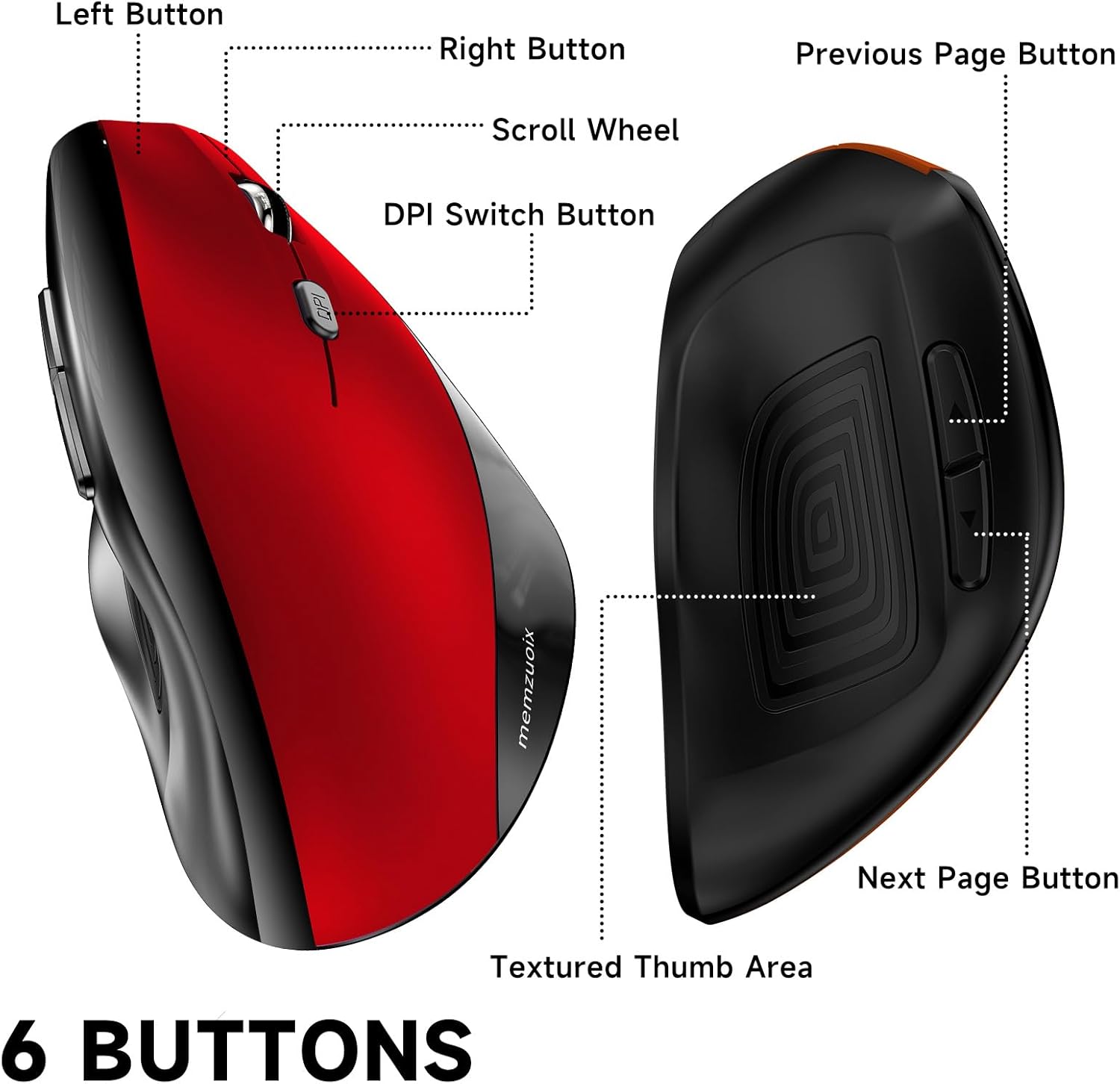
Figure 4: memzuoix Ergonomic Wireless Mouse button layout.
- Лево дугме: Стандардна функција примарног клика.
- Десно дугме: Стандардна функција секундарног клика.
- Точак за померање: Померајте се горе или доле кроз документе и web странице.
- Дугме за прекидач DPI-ја: Press to cycle through DPI settings (800/1200/1600).
- Previous Page Button: Navigates back in web претраживачи или file explorers (not compatible with Mac OS).
- Next Page Button: Навигација напред у web претраживачи или file explorers (not compatible with Mac OS).
Adjusting DPI Sensitivity:
The mouse offers three adjustable DPI (Dots Per Inch) settings: 800, 1200, and 1600. Press the DPI switch button, located near the scroll wheel, to cycle through these settings. Each press will change the cursor speed and precision, allowing you to select the optimal setting for your task.

Figure 5: DPI switch button and sensitivity levels.
Режим уштеде енергије:
To conserve battery life, the mouse automatically enters a sleep mode after 7 minutes of inactivity. To reactivate the mouse, simply click any button.
Ergonomic Benefits
The vertical design of the memzuoix mouse positions your hand and arm in a more natural "handshake" posture. This design aims to reduce pronation of the forearm and alleviate pressure on the wrist, which can contribute to discomfort or repetitive strain injuries associated with traditional mouse usage.

Figure 6: Ergonomic vs. Traditional Mouse Hand Position.
Видео 1: Крајview of the memzuoix Ergonomic Wireless Mouse, highlighting its vertical design and features.
Одржавање
- Чишћење: Користите меку, суву крпу за чишћење миша. Избегавајте употребу јаких хемикалија или абразивних материјала.
- Замена батерије: Replace AAA batteries when the mouse performance degrades or stops responding.
- Складиштење: When not in use for extended periods, turn off the mouse and store the USB receiver in its designated slot to prevent loss.
Решавање проблема
| Проблем | Решење |
|---|---|
| Миш не реагује |
|
| Покрет курсора је неправилан или спор |
|
| Дугмад за напред/назад не раде на Mac OS-у | The forward/back buttons are not compatible with Mac OS. This is a design limitation. |
| Миш пребрзо улази у режим спавања | The mouse is designed to enter sleep mode after 7 minutes of inactivity to conserve battery. This is normal operation. Click any button to wake it up. |
Спецификације
| Феатуре | Детаљ |
|---|---|
| Бранд | мемзуоик |
| Број модела | HLY-JP-WM791 |
| Технологија повезивања | 2.4G бежични (USB пријемник) |
| Технологија детекције покрета | Оптицал |
| ДПИ подешавања | 800 / 1200 / 1600 |
| Број дугмади | 6 |
| Извор напајања | 2 к ААА батерије (нису укључене) |
| Димензије производа | 4.84 к 3.54 к 0.04 инча |
| Тежина артикла | 2.82 унци |
| Компатибилност | PC, Laptop, Computer, Desktop (Windows 8/9/10/XP, Windows Vista, Linux) |
| Посебне карактеристике | Ergonomic Design, Lightweight, Portable, Touch Scroll, Wireless |
Гаранција и подршка
For warranty information or technical support, please refer to the product packaging or contact memzuoix customer service. Keep your purchase receipt for warranty claims.