
Увод
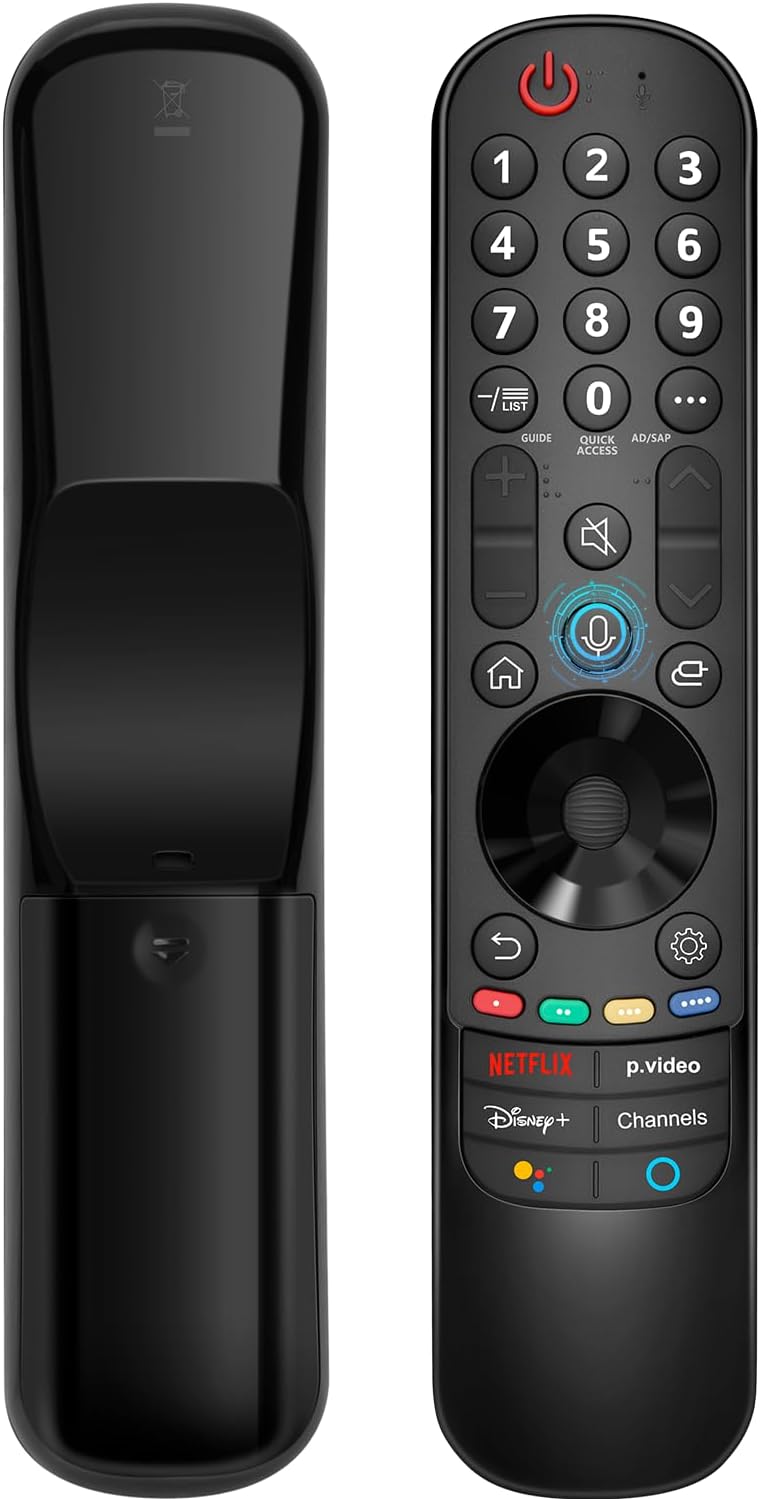
This manual provides instructions for the Angrox AN-MR21GA Magic Remote Control, designed as a replacement for compatible LG Smart TVs. This remote features pointer functionality, voice control, and dedicated shortcut buttons for enhanced navigation and user experience.
The remote is compatible with LG 2021, 2022, 2023, and 2024 OLED, QNED Mini-LED, NanoCell, and UHD TV series. It offers an ergonomic design with soft plastic buttons for comfortable use.
Компатибилност
The Angrox AN-MR21GA Magic Remote Control is compatible with the following LG Smart TV series from 2021, 2022, 2023, and 2024:
- OLED TV Series: G1, G2, G3, G4, C1, C2, C3, C4, A1, A2, A3, A4 series.
- QNED Mini-LED TV Series: QNED99, QNED90 series.
- NanoCell TV Series: NANO99, NANO90, NANO85, NANO80, NANO75 series.
- UHD TV Series: UP80, UP75 series.
Specific compatible model numbers include, but are not limited to: 43NANO75UPA, 43UP7100ZUF, 43UP7560AUD, 43UP7700PUB, 43UP8000PUA, 50NANO75UPA, 50NANO77ZPA, 50NANO80UPA, 50NANO85APA, 50UP7100ZUF, 50UP7560AUD, 50UP7700PUB, 50UP8000PUA, 55NANO75UPA, 55NANO77ZPA, 55NANO80UPA, 55NANO85APA, 55NANO90UPA, 55UP7100ZUF, 55UP7560AUD, 55UP7700PUB, 55UP8000PUA, 60UP7700PUB, 60UP8000PUA, 65NANO75UPA, 65NANO77ZPA, 65NANO80UPA, 65NANO85APA, 65NANO90UPA, 65UP7100ZUF, 65UP7560AUD, 65UP7700PUA, 65UP7700PUB, 65UP8000PUA, 70UP7170ZUC, 70UP7570AUD, 70UP7770PUB, 70UP8070PUA, 75NANO75UPA, 75NANO80UPA, 75NANO85APA, 75NANO90UPA, 75QNED90UPA, 75QNED99UPA, 75UP7170ZUC, 75UP7570AUE, 75UP7770PUB, 75UP8070PUA, 82UP8770PUA, 86NANO75UPA, 86NANO85APA, 86NANO90UPA, 86NANO99UPA, 86QNED90UPA, 86QNED99UPA, 86UP8770PUA, BEJMR21GA, OLED48A1AUA, OLED48A1PUA, OLED48C1AUB, OLED48C1PUB, OLED55A1AUA, OLED55A1PUA, OLED55B1PUA, OLED55C1AUB, OLED55C1PUA, OLED55C1PUB, OLED55G1PUA, OLED65A1AUA, OLED65A1PUA, OLED65B1PUA, OLED65C1AUA, OLED65C1AUB, OLED65C1PUB, OLED65G1PUA, OLED77A1AUA, OLED77A1PUA, OLED77B1PUA, OLED77C1AUA, OLED77C1AUB, OLED77C1PUB, OLED77G1PUA, OLED83C1AUA, OLED83C1PUA, RCLLGEMR21GA, R-C-LLGEMR21GA, 43UP7670PUC, 43UP8000PUR, 50NANO75PUA, 50NANO80P, 50UP7670PUC, 50UP8000PUR, 55NANO80P, 55NANO90P, 55UP7670PUC, 55UP8000PUR, 60UP7670PUB, 60UP8000PUR.

Подешавање и упаривање
The Angrox AN-MR21GA remote control is designed for easy setup without complex programming.
1. Инсталација батерије
Уметните две (2) АА батерије у даљински управљач. Обезбедите исправан поларитет (+/-) као што је назначено унутар одељка за батерије. Батерије нису укључене у даљински управљач.
2. Упаривање са вашим телевизором
There are two methods for pairing the remote with your LG Smart TV:
- Method 1 (Automatic Pairing):
- Укључите свој LG Smart TV.
- Insert 2*AA batteries into the remote.
- After approximately 20 seconds, point the remote control towards the TV.
- Притисните тастер Точак (ОК) дугме.
- The remote control should register automatically, and a "Pairing Complete" message will appear on the TV screen.
- Method 2 (Manual Pairing):
- Укључите свој LG Smart TV.
- Insert 2*AA batteries into the remote.
- Притисните и држите Хоме (
 ) и Назад () истовремено на 5 секунде.
 - Затим притисните тастер Точак (ОК) дугме.
- A "Pairing Complete" message should appear on the TV screen.

Упутство за употребу
Basic Navigation and Pointer Function
The remote features a pointer function that allows you to navigate the TV screen by moving the remote. The Wheel (OK) button acts as a click function, and scrolling is also supported.
Воице Цонтрол
The remote includes a voice function for issuing commands to your TV. Press and hold the voice button (microphone icon) while speaking your command. Examples include "Go back home," "Open P.Video," or "Play some music."

Дугмад за пречице
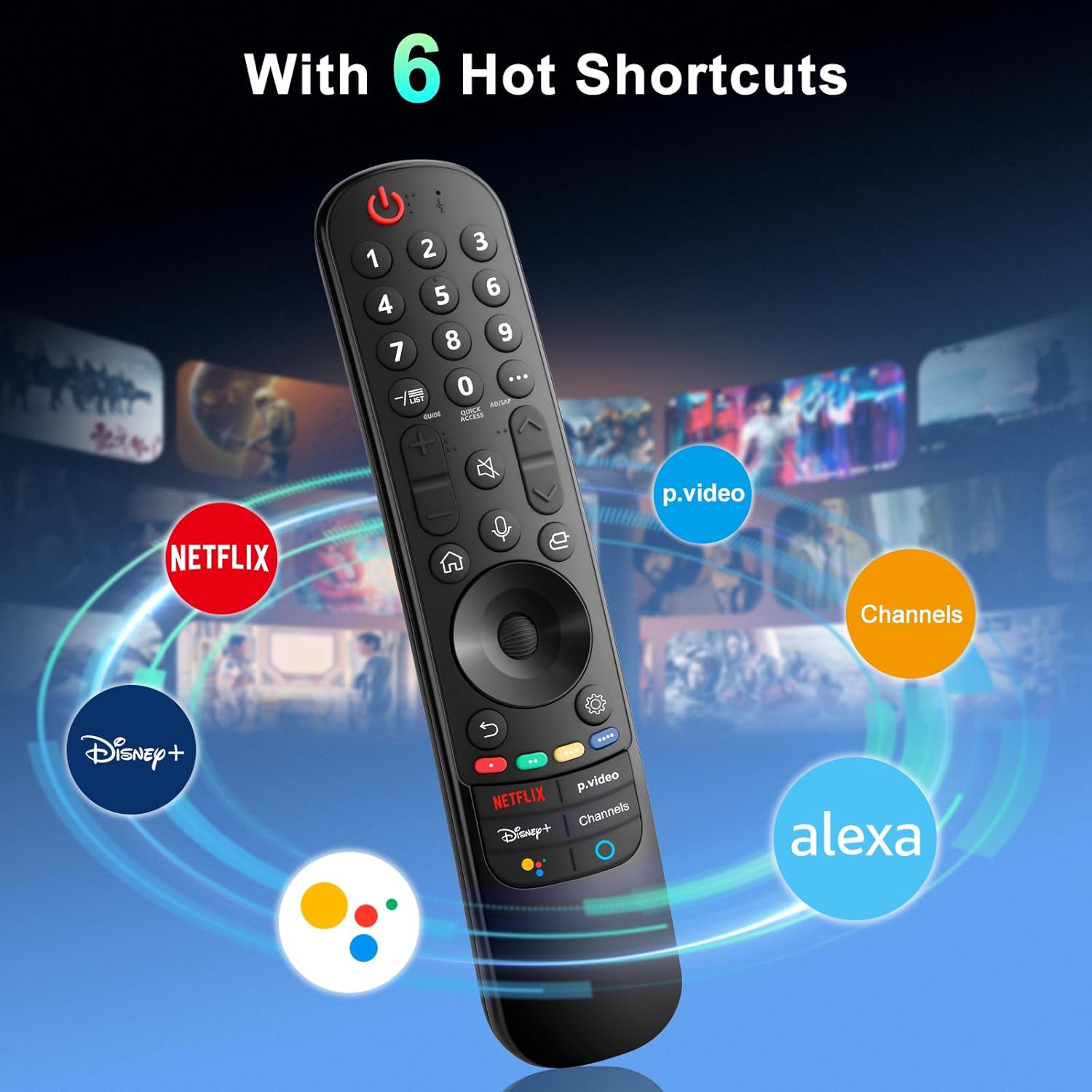
The remote provides dedicated shortcut buttons for quick access to popular streaming services and functions:
- НЕТФЛИКС: Покреће апликацију Нетфлик.
- P.Video: Launches the Prime Video application.
- Диснеи+: Покреће апликацију Disney+.
- Канали: Accesses TV channels.
- Гоогле помоћник: Активира Google асистент за гласовне команде и претраге.
- Алека: Activates Amazon Alexa for voice commands and searches.

Детаљне функције дугмади
For buttons marked with a circle symbol (©), a long press (more than one second) may activate additional functions:
- 9©: Launch Quick Help.
- - / LIST©: Checking saved channels.
- GUIDE©: Launch Guide.
- 0©: Појављује се екран за уређивање КУИЦК АЦЦЕСС.
- ...©: Display additional buttons on the remote control.
- AD/SAP©: Configures SAP.
- Volume Up/Down©: Подесите ниво јачине звука.
- Channel Up/Down©: Можете променити канал.
- Mute©: Select to turn off the sound from the TV.
- Accessibility©: Enter the Accessibility menu.
- Search©: Check out recommended contents. (Recommendation service may not be available depending on the countries you are in.)
- Voice Button (Microphone)©: Push and hold the button while speaking to use the voice recognition function.
- Home Button©: Приказује почетни мени.
- Input Button©: Бира извор улаза.
- Settings Button©: Entering into the Home Dashboard.
- Back Button©: Пређите на претходни корак.
- Exit Button©: Затвара мени.
- Quick Settings Button©: Улази у мени Брза подешавања.
- All Settings Button©: Enters the All Settings menu.
- Launch Record Button©: Launch Record. (Some models may not be supported.)
Решавање проблема
- Даљински не реагује:
- Уверите се да су батерије правилно уметнуте и да су довољно напуњене. По потреби замените новим АА батеријама.
- Re-attempt the pairing process (see "Setup and Pairing" section).
- Ensure there are no obstructions between the remote and the TV's infrared receiver. This remote primarily operates via line-of-sight.
- Pointer Function Not Working:
- Ensure the remote is properly paired.
- Try re-pairing the remote using Method 2 (holding Home and Back buttons).
- Гласовна контрола не ради:
- Ensure the remote is properly paired and the TV supports voice control.
- Confirm that the voice button is being pressed and held while speaking.
- Проверите подешавања телевизора да бисте били сигурни да је препознавање гласа омогућено.
- Buttons Feel Flimsy or Stick:
- This may indicate a manufacturing defect. Contact customer support for assistance.
Спецификације
| Бранд | Ангрок |
| Број модела | АН-МР21ГА |
| Димензије производа | 7.48 к 1.18 к 1.18 инча (18.54 к 4.06 к 1.77 цм) |
| Тежина артикла | 3.2 унци |
| Батерије су потребне | 2 АА батерије (нису укључене) |
| Посебне карактеристике | Ergonomic design, No Programming Required, Universal compatibility (for specified LG models), Voice Search, Pointer Function |
| Максимални број подржаних уређаја | 1 |
| Компатибилни уређаји | LG Smart Televisions (2021-2024 UHD, OLED, QNED, NanoCell series) |
Одржавање
- Чишћење: Користите меку, суву крпу за чишћење даљинског управљача. Не користите течна средства за чишћење или абразивне материјале.
- Замена батерије: Replace batteries when the remote's performance degrades. Remove batteries if the remote will not be used for an extended period to prevent leakage.
- Складиштење: Даљински управљач чувајте на хладном и сувом месту, даље од директне сунчеве светлости и екстремних температура.
- Руковање: Избегавајте испуштање даљинског управљача или његово излагање јаким ударцима, јер то може оштетити унутрашње компоненте.
Гаранција и подршка
For warranty information or technical support, please contact the manufacturer, Angrox, directly through their official channels or the retailer where the product was purchased. Please retain your proof of purchase for warranty claims.
Manufacturer: Angror
За додатну помоћ, можете посетити Angrox Store on Amazon.