
FIFINE H6 Gaming Headset User Manual
Модел: Х6
1. Увод
Thank you for choosing the FIFINE H6 Gaming Headset. This headset is designed to provide an immersive audio experience for gaming on PC, PS4, and PS5. It features virtual 7.1 surround sound, a detachable microphone for clear communication, three EQ modes, and comfortable ear cushions for extended use.
Please read this manual carefully before using the product to ensure proper operation and to maximize your gaming experience.
2. Садржај пакета
- FIFINE H6 Gaming Headset
- Одвојиви микрофон
- Упутство за употребу
3. Производ је готовview
3.1 Компоненте слушалица
The FIFINE H6 headset is designed for comfort and durability, featuring soft ear cushions and an adjustable headband.

Слика 3.1: The headset features breathable ear cushions, a soft headband, and an adjustable metal frame for a comfortable fit. It weighs approximately 330g.
3.2 Уграђене контроле
The headset includes an inline control unit for easy access to audio settings.
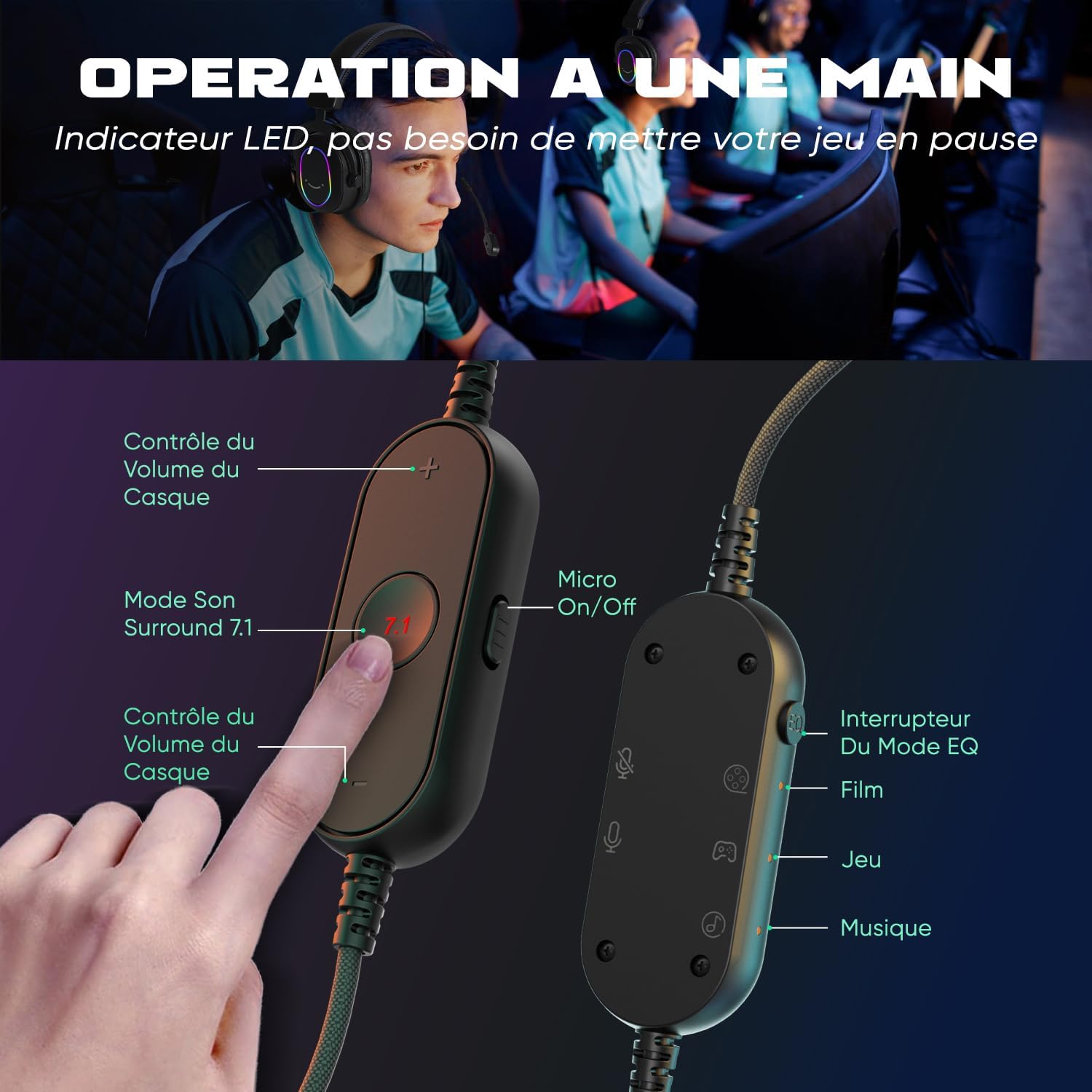
Слика 3.2: The inline controller allows for quick adjustments. It includes headset volume control, a 7.1 surround sound activation button, a microphone on/off switch, and an EQ mode selector for Film, Game, and Music modes.
3.3 Audio Technology
Equipped with 50mm drivers, the H6 headset delivers enhanced sound quality for an immersive experience.

Слика 3.3: The headset features 50mm drivers designed to improve overall sound quality and enhance your audio experience.
4. Подешавање
The FIFINE H6 headset offers plug-and-play functionality, making setup quick and easy.
4.1 Повезивање слушалица
- Connect the USB-A cable of the headset to an available USB port on your PC, PS4, or PS5.
- The headset is automatically recognized by your device. No additional drivers are typically required.
- Ensure the headset is selected as the default audio input and output device in your system's sound settings.

Слика 4.1: The headset connects via USB and is compatible with Windows, PS4/PS5, and Mac OS devices, offering simple plug-and-play installation.
4.2 Причвршћивање микрофона
- Insert the detachable microphone into the designated port on the left earcup until it clicks into place.
- Подесите флексибилни држач микрофона да бисте га оптимално поставили за свој глас.
- To remove, gently pull the microphone out of its port.

Слика 4.2: The headset features a detachable and 360-degree flexible microphone. A red light on the inline control indicates when the microphone is muted.
5. Упутство за употребу
5.1 Virtual 7.1 Surround Sound
Activate the virtual 7.1 surround sound for an immersive gaming experience, allowing you to pinpoint audio cues like footsteps and gunfire.
- Притисните тастер 7.1 button on the inline control unit to toggle virtual 7.1 surround sound on or off.
- An LED indicator on the control unit will confirm the status.

Слика 5.1: Virtual 7.1 surround sound provides an immersive gaming experience, allowing precise localization of in-game sounds such as explosions, gunshots, footsteps, aircraft, and vehicles.
5.2 ЕК режима
The headset offers three equalization (EQ) modes optimized for different audio scenarios.
- Притисните тастер Прекидач режима еквилајзера button on the inline control unit to cycle through the modes:
- Режим филма: Optimized for movie watching.
- Режим игре: Enhanced audio for gaming, highlighting in-game sounds.
- Музички режим: Balanced audio for listening to music.
- An LED indicator will show the currently active EQ mode.
5.3 Контрола јачине звука
- Користите Јачина звука (+) и Смањивање јачине звука (-) buttons on the inline control unit to adjust the headset's audio output level.
5.4 Искључивање микрофона
- Померите Micro On/Off switch on the inline control unit to mute or unmute the microphone.
- A red LED light on the control unit indicates when the microphone is muted.
6. Одржавање
- Чишћење: Користите меку, суву крпу за чишћење слушалица. Не користите јаке хемикалије или абразивне материјале.
- Складиштење: Чувајте слушалице на хладном и сувом месту, даље од директне сунчеве светлости и екстремних температура.
- Нега каблова: Avoid bending or twisting the cable excessively to prevent damage. The braided cable material is designed for durability.
- микрофон: When not in use, you can detach the microphone to prevent accidental damage.
КСНУМКС. Решавање проблема
| Проблем | Решење |
|---|---|
| Нема звука из слушалица |
|
| Микрофон не ради |
|
| Sound quality issues (e.g., static, distortion) |
|
8. Спецификације
| Феатуре | Детаљ |
|---|---|
| Бранд | ФИФИНЕ |
| Назив модела | H6 (also referred to as MI4 in some documentation) |
| Боја | Црно |
| Технологија повезивања | Жични (USB-A) |
| Постављање уха | Прекоушне (циркум-ауралне) |
| Дривер Типе | Динамиц |
| Дривер Сизе | 50 мм |
| Фреквенцијски опсег | 20 Hz - 20,000 Hz |
| Посебне карактеристике | Virtual 7.1 Surround Sound, Detachable Microphone, 3 EQ Modes (Film, Game, Music), RGB Lighting, Inline Controls |
| Компатибилни уређаји | Desktop Computers, Gaming Consoles (PS4, PS5) |
| Карактеристике каблова | Braided, Durable, Sufficient Length |
| Материјал | Метал, Пластика |
| Ниво отпорности на воду | Није водоотпоран |
9. Гаранција и подршка
9.1 Информације о гаранцији
FIFINE products typically come with a standard manufacturer's warranty. Please refer to your purchase documentation or the official FIFINE webсајт за специфичне гарантне одредбе и услове који важе за ваш регион.
9.2 Корисничка подршка
For technical assistance, troubleshooting, or any questions regarding your FIFINE H6 Gaming Headset, please contact FIFINE customer support through their official webсајт или продавницу где сте купили производ.
You can often find support contact information on the FIFINE brand store page or by visiting www.fifinemic.com.