
1. Увод и крајview
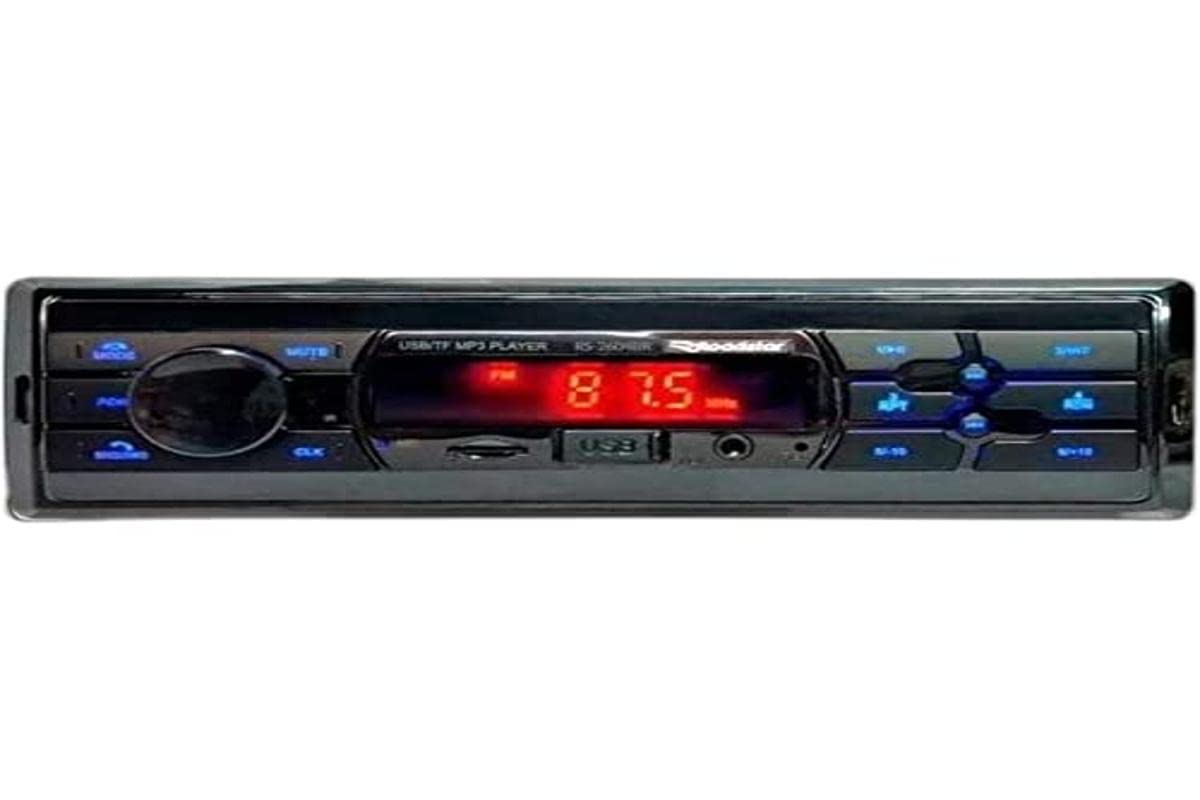
The Roadstar RS-2604BR USB/Bluetooth Car Radio is a versatile audio device designed to enhance your in-vehicle entertainment and communication. This unit features Bluetooth connectivity for wireless audio streaming and hands-free calling, a USB port for media playback, and an SD card slot. It also includes an auxiliary input for connecting other audio sources and an FM radio tuner. This manual provides essential information for the safe installation, operation, and maintenance of your new car radio.
2. Безбедносне информације
- Препоручена професионална инсталација: For optimal performance and safety, it is highly recommended that this product be installed by a qualified professional.
- Извор напајања: Повежите уређај само на напајање од 12V једносмерне струје са негативним уземљењем.
- Избегавајте ометања: Немојте користити јединицу или view videos while driving, as this can lead to accidents.
- Ожичење: Ensure all wiring is correctly connected according to the wiring diagram to prevent damage to the unit or vehicle. Incorrect wiring can cause fire or electric shock.
- Контрола јачине звука: Keep the volume at a level where you can still hear outside traffic sounds.
- Влага: Do not expose the unit to moisture or water to prevent electric shock.
3. Садржај пакета
Молимо вас да проверите пакет за следеће ставке:
- Roadstar RS-2604BR Car Radio Unit
- Ремоте Цонтрол
- Електрична инсталација
- Mounting Hardware (Screws, Brackets)
- Упутство за употребу (овај документ)
4. Карактеристике производа
The Roadstar RS-2604BR offers a range of features for a comprehensive audio experience:
- Излазна снага: 4 channels of 30 Watts RMS (Total 120W RMS).
- Приказ: Clear Red LED display.
- Блуетоотх повезивање: For wireless audio streaming and hands-free calling.
- Вишеструки улази: Micro SD card slot, Auxiliary input, and 1 USB port.
- Аудио излази: 4 RCA outputs for external ampлифиерс.
- ISO Connector: Yes, for easy installation.
- даљински управљач: Physical remote control included, with potential for app control.
- Контроле звука: Adjustable Bass, Treble, and Channel Balance.
- Equalizer Presets: Predefined equalization settings for various music genres.
- Прилагодљиво осветљење: 7-color illumination options to match your vehicle's interior.
Слика производа
5. Водич за инсталацију
Proper installation is crucial for the performance and longevity of your car radio. If you are unsure about any steps, consult a professional installer.
Основни кораци инсталације:
- Искључите батерију: Пре покретања, искључите негативни терминал акумулатора вашег возила како бисте спречили кратки спој.
- Уклоните стару јединицу: Carefully remove your existing car radio from the dashboard.
- Повежите ожичење: Connect the wiring harness of the RS-2604BR to your vehicle's wiring. Ensure all connections (power, ground, speaker, antenna, accessory) are secure and correctly matched. The ISO connector simplifies this process.
- Монтирана јединица: Slide the RS-2604BR into the dashboard opening and secure it using the provided mounting hardware.
- Повезивање антене: Plug in your vehicle's radio antenna cable.
- Поново повежите батерију: Поново повежите негативни терминал акумулатора вашег возила.
- Тест функционалност: Turn on the unit and test all functions (radio, USB, Bluetooth, sound controls) to ensure proper operation.
6. Упутство за употребу
6.1 Основне контроле
- Укључивање/искључивање: Притисните дугме за напајање (обично дугме за јачину звука) да бисте укључили или искључили уређај.
- Контрола јачине звука: Rotate the volume knob to adjust the audio level.
- Избор режима: Press the MODE button to cycle through available sources (FM, Bluetooth, USB, SD, AUX).
- Seek/Tune: Use the seek buttons (◀◀ / ▶▶) to change radio stations or skip tracks.
6.2 Radio Operation (FM)
- Select FM mode using the MODE button.
- Press and hold the seek buttons (◀◀ / ▶▶) for automatic station scanning.
- Briefly press the seek buttons to manually tune to the next available station.
- To save a station, tune to the desired frequency, then press and hold one of the preset number buttons (1-6) until you hear a beep.
6.3 Блуетоотх упаривање
- Ensure the car radio is in Bluetooth mode. The display will show "BT" or a Bluetooth icon.
- На мобилном телефону омогућите Bluetooth и потражите доступне уређаје.
- Select "ROADSTAR" or a similar name from the list of devices.
- If prompted, enter the pairing code (usually "0000").
- Once paired, the unit will confirm the connection, and you can stream audio or make calls.
6.4 Репродукција са USB/SD картице
- Уметните USB диск у USB порт или SD картицу у слот за SD картицу.
- The unit will automatically switch to USB/SD mode and begin playing compatible audio files.
- Use the seek buttons (◀◀ / ▶▶) to skip tracks.
- Use the Play/Pause button to pause or resume playback.
6.5 Помоћни улаз
Connect an external audio device (e.g., MP3 player, smartphone) to the AUX input jack using a 3.5mm audio cable. Select AUX mode using the MODE button to play audio from the connected device.
6.6 Sound Settings and Illumination
- Екуализер: Press the EQ button (or similar) to cycle through predefined equalizer settings (e.g., POP, ROCK, JAZZ, CLASSIC, USER).
- Bass/Treble/Balance: Press the AUDIO button repeatedly to access settings like BASS, TREBLE, FADER (front/rear balance), and BALANCE (left/right balance). Use the volume knob to adjust these values.
- Осветљење: The unit features 7-color illumination. Refer to the specific button on your unit (often labeled 'CLR' or similar) or the remote control to cycle through the available colors and select your preferred display color.
Видео демонстрација производа
КСНУМКС. Решавање проблема
If you encounter issues with your Roadstar RS-2604BR, refer to the following common problems and solutions:
| Проблем | Могући узрок | Решење |
|---|---|---|
| Нема струје | Blown fuse, incorrect wiring, loose power connection. | Check vehicle's fuse box and the unit's fuse. Verify all power and ground wires are securely connected. |
| Нема звука | Muted, incorrect source selected, loose speaker wires, damaged speakers. | Check if the unit is muted. Ensure the correct audio source is selected. Verify speaker wire connections. Test with different speakers if possible. |
| Блуетоотх се не повезује | Unit not in pairing mode, phone's Bluetooth off, interference. | Ensure the unit is in Bluetooth mode. Turn your phone's Bluetooth off and on again. Delete previous pairings and try re-pairing. |
| USB/SD not reading | Некомпатибилно file format, corrupted media, incorrect insertion. | Осигурати files are in a compatible format (e.g., MP3, WMA). Try a different USB drive or SD card. Ensure media is inserted correctly. |
| Даљински управљач не ради | Празна батерија, препрека, ван домета. | Replace the remote control battery. Ensure no obstructions between the remote and the unit's IR sensor. |
8. Спецификације
| Феатуре | Спецификација |
|---|---|
| Бранд | Роадстар |
| Број модела | RS-2604BR (78650) |
| Технологија повезивања | УСБ, Блуетоотх |
| Компатибилни уређаји | Smartphone, Speakers |
| Тип конектора | USB, Auxiliary, RCA |
| Режим аудио излаза | Стерео |
| Излазна снага | 30 Watts per channel (RMS) |
| Број канала | 4 |
| Контролни метод | Ремоте |
| Бежична комуникациона технологија | Блуетоотх |
| Тежина артикла | 300 грама |
| Укључене компоненте | Радио, даљински управљач |
| Боја | White (Note: Product image shows black/blue unit, color may vary by specific variant) |
9. Одржавање
To ensure the longevity and optimal performance of your Roadstar RS-2604BR car radio, follow these maintenance guidelines:
- Чишћење: Use a soft, dry cloth to clean the unit's exterior. Do not use abrasive cleaners, solvents, or chemical sprays, as they can damage the finish or internal components.
- Избегавајте течности: Keep the unit away from water and other liquids. If liquid enters the unit, immediately disconnect power and have it inspected by a qualified technician.
- температура: Избегавајте излагање уређаја екстремним температурама, директној сунчевој светлости током дужег периода или високој влажности.
- USB/SD Port Care: When inserting or removing USB drives or SD cards, do so gently to avoid damaging the ports.
10. Гаранција и подршка
Информације о гаранцији
This Roadstar RS-2604BR car radio comes with a 12-месечна гаранција from the date of purchase. This warranty covers manufacturing defects under normal use. It does not cover damage caused by improper installation, misuse, accidents, unauthorized repairs, or normal wear and tear.
Корисничка подршка
For technical assistance, warranty claims, or further inquiries, please contact Roadstar customer support through their official website or the retailer where the product was purchased. Please have your proof of purchase and product model number ready when contacting support.


