
Увод
Thank you for choosing the ESR HaloLock 3-in-1 Watch Wireless Charging Set. This device is designed to provide convenient and efficient wireless charging for your iPhone (12 series or later), Apple Watch (all series), and AirPods (Pro/3/2). This manual provides essential information for setup, operation, maintenance, and troubleshooting to ensure optimal performance and longevity of your charging set.
Шта је у кутији
- МагСафе станица за пуњење
- Made for Apple Watch Charger
- Charging Station for MagSafe
Упутства за подешавање
- Распакујте компоненте: Пажљиво извадите све предмете из амбалаже.
- Прикључите напајање: Plug the provided USB-C to USB-C cable into the charging station's USB-C port and connect the other end to the 20W PD charging adapter. Plug the adapter into a power outlet.
- Attach Apple Watch Charger: The Apple Watch charger is portable and can be detached. To use it with the main station, align the USB-C connector of the Apple Watch charger with the designated port on the charging stand and firmly insert it. Ensure it is securely connected.
- Пласман: Place the charging station on a stable, flat surface.
Visual Guide: Setting Up Your Charging Station
Video: Demonstrates the unboxing and setup process of the ESR HaloLock 3-in-1 Watch Wireless Charging Set, showing how to connect the power cable and attach the Apple Watch charger.
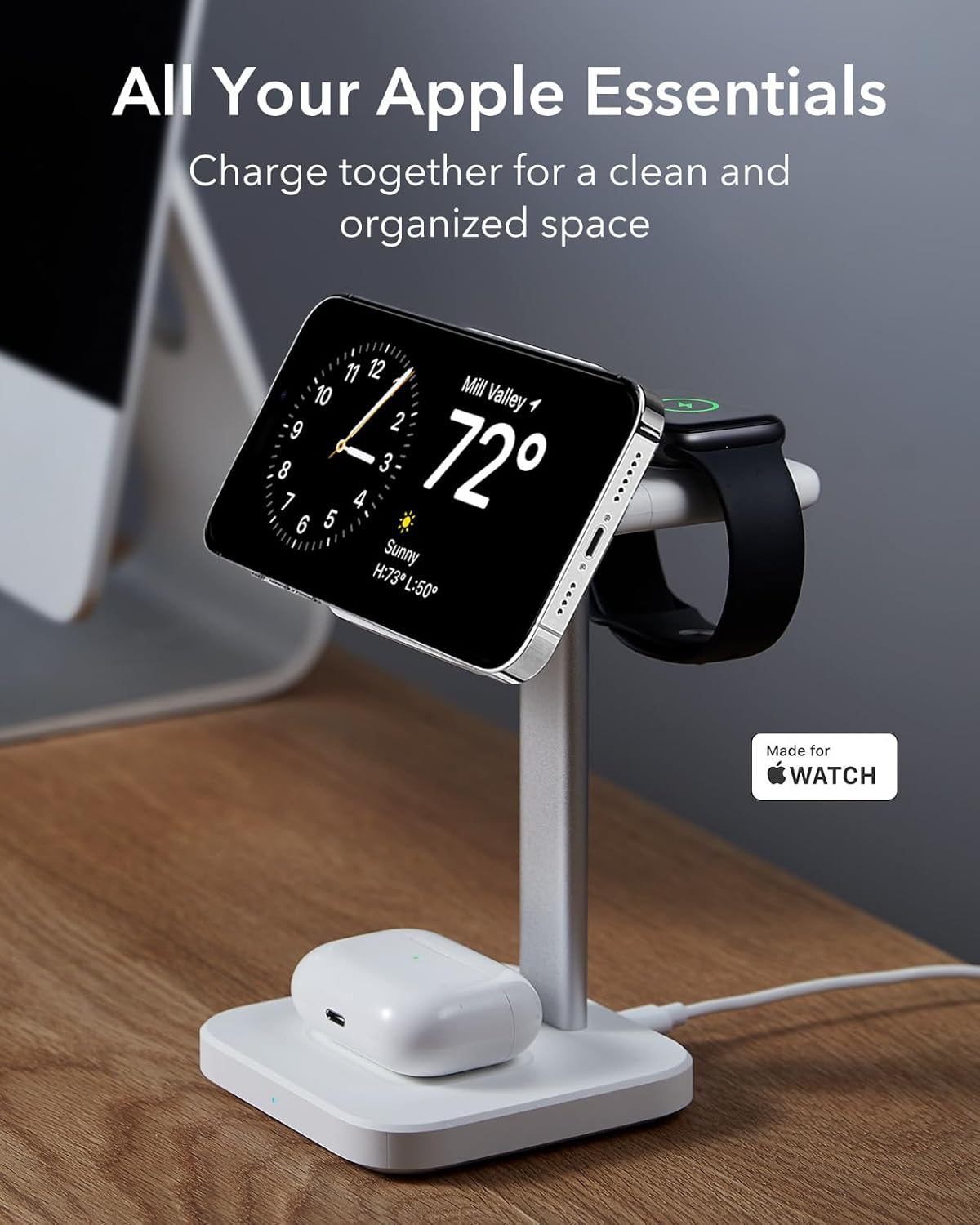
Image: The ESR 3-in-1 charging station neatly charging an iPhone, Apple Watch, and AirPods, illustrating a clean and organized charging setup.
Упутство за употребу
- Пуњење иПхоне-а: Place your MagSafe-compatible iPhone (12 series or later) onto the magnetic charging pad. The strong magnetic lock (1,000 g holding force) will securely hold your phone in place and initiate charging.
- Пуњење Аппле Ватцх-а: Place your Apple Watch onto the dedicated Apple Watch charger. Ensure the watch is properly aligned for charging. The officially certified charger provides safe and reliable fast charging.
- Пуњење АирПодс слушалица: Place your AirPods Pro/3/2 charging case onto the base charging pad. The built-in magnets ensure instant, secure alignment for charging. Note: The AirPods charging pad does not support magnetic alignment for the AirPods case itself, but rather for the charging coils.
- Portable Watch Charging: The small, lightweight USB-C Apple Watch charger can be disconnected from the main stand and used independently. Plug it into any powered USB-C port (e.g., laptop, power bank) to charge your Apple Watch on the go.
Visual Guide: Charging Devices

Image: A hand demonstrates placing an iPhone onto the magnetic charging pad, showcasing the 'Power in a Snap' feature for instant magnetic charging.

Image: A multi-panel image showing the portable Apple Watch charger being detached, plugged into a laptop, and used with a wall adapter, highlighting its versatility for on-the-go charging.
Компатибилност
The ESR HaloLock 3-in-1 Watch Wireless Charging Set is compatible with a wide range of Apple devices:
- iPhones with MagSafe: iPhone 17e, iPhone 17, iPhone Air, iPhone 17 Pro, iPhone 17 Pro Max, iPhone 16, iPhone 16 Plus, iPhone 16 Pro, iPhone 16 Pro Max, iPhone 15, iPhone 15 Plus, iPhone 15 Pro, iPhone 15 Pro Max, iPhone 14, iPhone 14 Plus, iPhone 14 Pro, iPhone 14 Pro Max, iPhone 13, iPhone 13 Pro, iPhone 13 Pro Max, iPhone 13 mini, iPhone 12, iPhone 12 Pro, iPhone 12 Pro Max. For the strongest magnetic lock, use an ESR magnetic case.
- Аппле Ватцх: Apple Watch Ultra, all Apple Watch Series (8/7/6/5/4/3/2/1), and Apple Watch SE (2/1).
- АирПодс: AirPods Pro/3/2.
Visual Guide: Device Compatibility

Image: A clear visual representation of the charging station's compatibility with various iPhone models, Apple Watch series, and AirPods, including different case types.
Одржавање
- Чишћење: Use a soft, dry cloth to clean the charging station. Avoid using harsh chemicals or abrasive materials.
- Складиштење: Чувајте уређај на хладном и сувом месту када се не користи дуже време.
- Руковање: Избегавајте испуштање уређаја или излагање јаким ударима.
Решавање проблема
- Уређај се не пуни:
- Ensure the charging station is properly connected to a working power outlet using the provided adapter.
- Verify that your device is correctly aligned on the charging pad.
- Remove any thick or metallic cases from your phone or AirPods that might interfere with wireless charging.
- Check if the Apple Watch charger is securely inserted into the stand or powered USB-C port.
- Споро пуњење:
- Ensure you are using the original 20W PD charging adapter and USB-C cable.
- Избегавајте коришћење уређаја док се пуни, јер то може успорити процес пуњења.
- прегревање:
- Ensure adequate ventilation around the charging station.
- Уклоните све кућишта која би могла да задржавају топлоту.
- Ако се прегревање настави, прекините употребу и контактирајте корисничку подршку.
Спецификације
| Феатуре | Детаљ |
|---|---|
| Бранд | ЕСР |
| Број модела | PD02UC |
| Технологија повезивања | Бежични |
| Тип конектора | УСБ тип Ц |
| Посебна карактеристика | Fast Charging, MagSafe Compatible |
| Улазни волtage | 12 волти (ДЦ) |
| Ватtage | 7.5 вати |
| Излазна струја | 2 Amps |
| Укупно УСБ портова | 1 |
| Тежина артикла | 0.7 килограма |
| Материјал кућишта | Метал, Пластика |
| Тип монтаже | Таблетоп Моунт |
| Спецификација Мет | Qi |
Гаранција и подршка
ESR provides a 24-month warranty for the HaloLock 3-in-1 Watch Wireless Charging Set. For any product inquiries, technical support, or warranty claims, please refer to the contact information provided in your product packaging or visit the official ESR webсајту.