
Увод
The One For All URC4810 is a dedicated replacement remote control designed specifically for Samsung televisions. This remote offers 100% compatibility with all Samsung TV models, providing a seamless and intuitive user experience. It features a quick setup process called SimpleSet and a learning function to transfer commands from your original remote, ensuring you retain all necessary functionalities.
Безбедносне информације
- Држите батерије ван домашаја деце.
- Немојте мешати старе и нове батерије или различите типове батерија.
- Remove batteries if the remote control is not used for an extended period.
- Avoid exposing the remote control to direct sunlight, heat sources, or excessive moisture.
- Не покушавајте да растављате или модификујете даљински управљач.
Садржај пакета
Молимо вас да проверите пакет за следеће ставке:
- One For All Samsung TV Replacement Remote Control (URC4810)
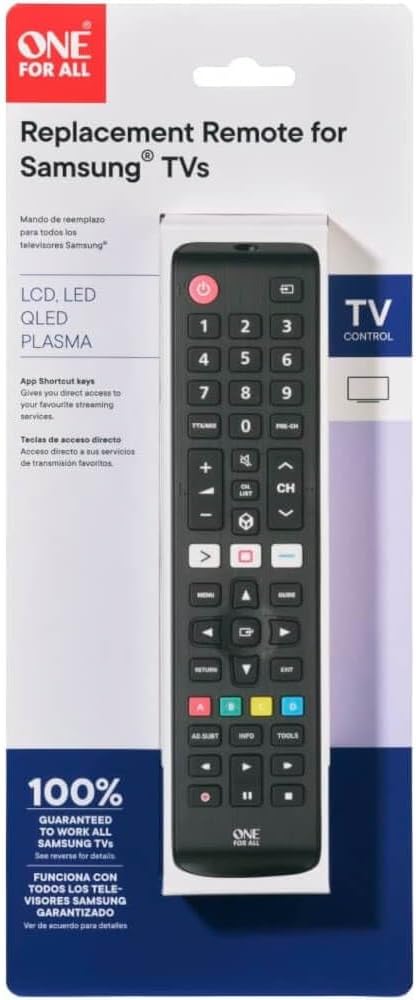
Image: The One For All URC4810 remote control displayed within its retail packaging, showing the product name and key features.
Сетуп
1. Инсталација батерије
The URC4810 remote control requires 2x AAA batteries (not included). Follow these steps to install them:
- Отворите поклопац одељка за батерије на задњој страни даљинског управљача.
- Уметните две ААА батерије, водећи рачуна да позитивни (+) и негативни (-) терминали буду поравнати са ознакама унутар одељка.
- Добро затворите поклопац одељка за батерије.

Слика: Споредни професионалацfile view of the One For All URC4810 remote control, illustrating its ergonomic design and the location of the battery compartment seam.
2. SimpleSet Setup
The URC4810 remote features SimpleSet, allowing for quick setup in under 30 seconds. No codes are needed.
- Уверите се да је ваш Самсунг ТВ укључен.
- Point the One For All remote at your Samsung TV.
- Притисните и држите Повер button on the One For All remote until your TV turns off. This may take a few seconds.
- Once the TV turns off, release the Повер button immediately. The remote is now set up.
- Test other functions like Volume Up/Down and Channel Up/Down to confirm full functionality.

Слика: Директни фронт view даљинског управљача One For All URC4810, приказанasing its full button layout, including the power button at the top.
3. Learning Feature (Optional)
The learning feature allows you to copy functions from your original Samsung TV remote to the URC4810. This is useful for any specific buttons not covered by the default setup.
- Place the One For All remote and your original Samsung remote on a flat surface, facing each other, about 1-2 inches apart.
- На даљинском управљачу One For All притисните и држите СЕТУП button (if available, otherwise refer to the specific manual for learning mode entry, typically a combination of buttons like СХИФТ + ЛЕАРН or similar) until the LED blinks twice and then stays lit.
- Press the button on the One For All remote that you wish to program (e.g., a specific app button). The LED will blink rapidly.
- On your original Samsung remote, press the corresponding button you want to copy. The LED on the One For All remote will blink twice to confirm successful learning.
- Repeat steps 3 and 4 for any other buttons you wish to learn.
- To exit learning mode, press the СЕТУП button again (or the button used to enter learning mode). The LED will turn off.

Слика: Угаона view даљинског управљача One For All URC4810, приказанasing its comfortable grip and button placement.
Упутство за употребу
Once set up, the URC4810 remote functions like your original Samsung TV remote. Here are some common button functions:
- Напајање (црвено дугме): Укључује или искључује ТВ.
- Дугмад са бројевима (0-9): Директан избор канала.
- Појачавање/утишавање (+/-): Подешава јачину звука ТВ-а.
- Канал горе/доле (CH +/-): Мења ТВ канале.
- Искључи звук: Искључује или укључује звук телевизора.
- Мени: Приступа главном менију телевизора.
- Navigation (Arrow Buttons): Креће кроз меније и опције.
- ОК/Ентер: Потврђује изборе.
- Повратак/назад: Враћа се на претходни екран или мени.
- Излаз: Излази из тренутног менија или апликације.
- Дугмад у боји (црвена, зелена, жута, плава): Functionality varies by TV model and application.
- Паметни центар/Дом: Accesses the TV's Smart Hub or Home screen.
Одржавање
Чишћење
To clean your remote control, use a soft, dry cloth. Do not use abrasive cleaners, waxes, or solvents. Avoid spraying liquids directly onto the remote.
Замена батерије
If the remote control's range decreases or buttons become unresponsive, it may be time to replace the batteries. Follow the "Battery Installation" steps in the Setup section to replace the old batteries with new AAA alkaline batteries.
Решавање проблема
| Проблем | Могући узрок | Решење |
|---|---|---|
| Remote does not work after setup. | Incorrect setup or dead batteries. | Ensure batteries are correctly inserted and charged. Repeat the SimpleSet process carefully. |
| Неки тастери не раде. | Button not recognized by SimpleSet or not learned. | Use the Learning Feature to copy the function from your original remote. Ensure the remote is pointed directly at the TV. |
| Даљински домет је лош. | Слабе батерије или препрека. | Replace batteries. Ensure there are no obstructions between the remote and the TV's IR receiver. |
| LED on remote does not light up. | No batteries or incorrect battery insertion. | Check battery orientation and ensure they are new and correctly inserted. |
Спецификације
| Бранд | Један за све |
| Број модела | УРЦ4810 |
| Компатибилни уређаји | Samsung Televisions |
| Извор напајања | Напајање батеријама (2x AAA, нису укључене) |
| Боја | White (Note: Product images show black, but specification states white. Please refer to product packaging for exact color.) |
| Тежина артикла | 3.52 унце (приближно 100 грама) |
| Димензије производа (Д к Ш к В) | Approx. 4"D x 3"W x 1"H (Note: Dimensions may refer to packaging or a specific part. Actual remote dimensions are typically longer and narrower.) |
| УПЦ | 810209030940 |
Гаранција и подршка
One For All products are designed and manufactured to the highest standards. For information regarding warranty, technical support, or frequently asked questions, please visit the official One For All webсајт или директно контактирајте њихову корисничку службу.
For the most up-to-date support information, please refer to the manufacturer's official channels:
- Један за све Webсајт: ввв.онефоралл.цом
- Служба за кориснике: Погледајте на webсајт за регионалне контакт информације.