
1. Увод
Thank you for choosing the YENKEE YMS 3030BK RGB Gaming Mouse Ultra Light Shotgun. This manual provides detailed instructions for setting up, operating, and maintaining your new gaming mouse. Please read this manual carefully before use to ensure optimal performance and longevity of your device.
The YENKEE YMS 3030BK RGB Gaming Mouse features an ergonomic design for comfortable use. Its unique ultra-light perforated construction promotes airflow, helping to keep your palm cool during extended use. Equipped with an accurate IC 6651 sensor, it offers precise tracking with a resolution of up to 6400 DPI, and includes customizable RGB backlighting.
2. Садржај пакета
Молимо вас да проверите пакет за следеће ставке:
- 1 x YENKEE YMS 3030BK RGB Gaming Mouse Ultra Light Shotgun
- Кориснички приручник (овај документ)
3. Производ је готовview
3.1 Кључне карактеристике
- Unique ultra-light perforated construction for improved airflow
- Ergonomic design for comfortable grip and to prevent palm sweat
- Customizable RGB backlight
- Accurate IC 6651 sensor with up to 6400 DPI resolution
- Wired USB connectivity
3.2 Компоненте миша
The YMS 3030BK mouse typically includes the following components:
- Дугме левог клика
- Десни клик на дугме
- Точкић за скроловање / Средњи клик дугмета
- DPI Adjustment Button (usually located behind the scroll wheel)
- Forward/Backward Side Buttons (typically on the left side)
- Optical Sensor (on the underside)
- УСБ кабл
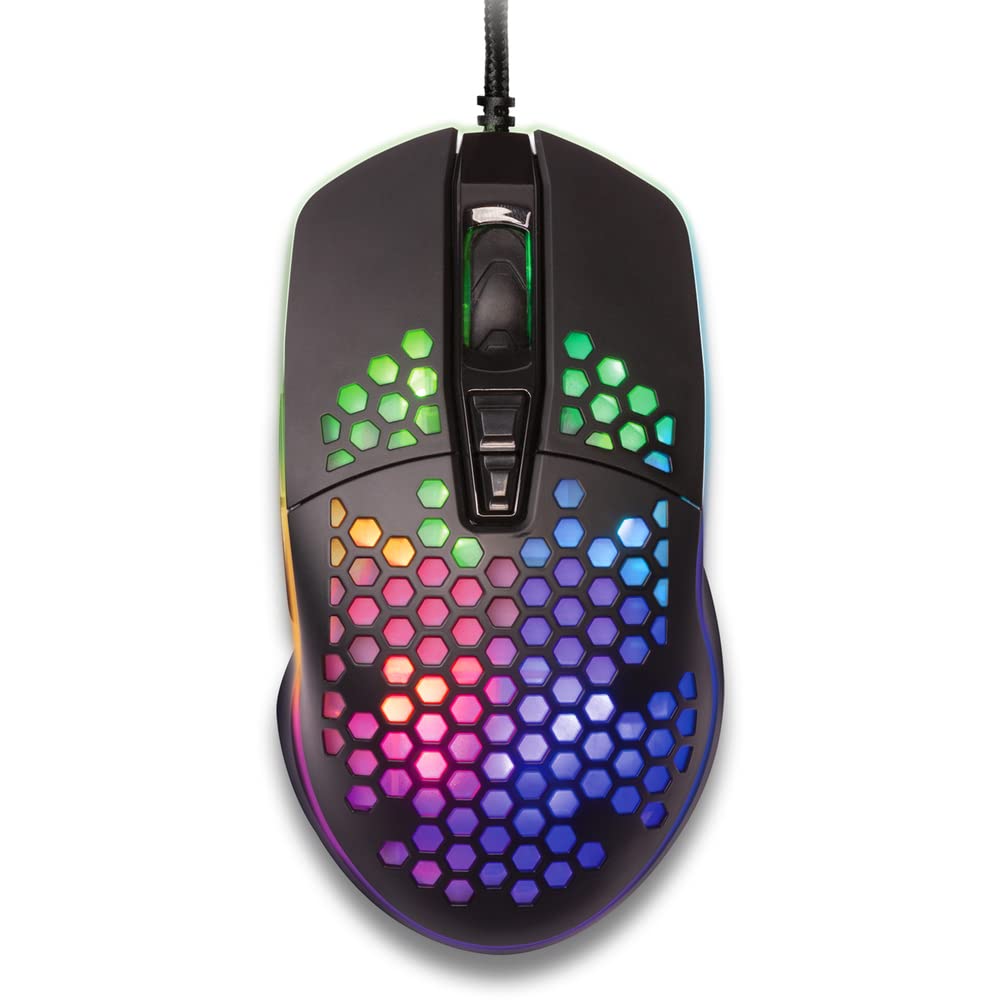
Слика 1: Одозго надоле view of the YENKEE YMS 3030BK RGB Gaming Mouse, highlighting its ultra-light perforated design and ergonomic contours.
4. Подешавање
Follow these steps to set up your YENKEE YMS 3030BK gaming mouse:
- Повежите миш: Прикључите УСБ конектор миша у слободан УСБ порт на рачунару.
- Инсталација драјвера: Your operating system (Windows 7, 8, Vista, XP) should automatically detect and install the necessary drivers. No additional software installation is typically required for basic functionality.
- Опциони софтвер: For advanced customization of RGB lighting and button assignments, please visit the official YENKEE website to check for any dedicated software for the YMS 3030BK model.
5. Упутство за употребу
5.1 Основни рад
- Леви клик: Примарна акција, селекција.
- Десни клик: Context menu, secondary action.
- Точак за померање: Scroll up/down, middle click for specific functions (e.g., opening links in new tabs).
- Бочна дугмад: Default functions are typically 'Forward' and 'Backward' in web претраживачи или file explorers. These can often be customized via software.
5.2 ДПИ подешавање
The YMS 3030BK mouse features an IC 6651 sensor with a maximum resolution of 6400 DPI. You can adjust the DPI (Dots Per Inch) sensitivity on-the-fly using the dedicated DPI button, usually located behind the scroll wheel. Pressing this button will cycle through preset DPI levels, indicated by changes in the mouse's RGB lighting color or pattern. Refer to the optional software for precise DPI level configuration and customization.
5.3 Прилагођавање RGB осветљења
The RGB backlight of your mouse can be customized to match your preferences. While some mice offer onboard controls for basic lighting effects, full customization of colors, patterns, and brightness is typically achieved through the dedicated YENKEE software (if available). Please download and install the software from the official YENKEE website for advanced lighting options.
6. Одржавање
Да бисте осигурали дуготрајност и оптималне перформансе вашег играчког миша, пратите ова упутства за одржавање:
- Чишћење: Use a soft, dry cloth to wipe the surface of the mouse. For perforated areas, a soft brush or compressed air can help remove dust. Avoid using harsh chemicals or abrasive materials.
- Чишћење сензора: Occasionally clean the optical sensor on the underside of the mouse with a cotton swab lightly dampened with isopropyl alcohol. Ensure it is completely dry before use.
- Нега каблова: Избегавајте оштра савијања или прекомерно повлачење USB кабла како бисте спречили оштећења.
- Складиштење: Store the mouse in a clean, dry environment when not in use.
КСНУМКС. Решавање проблема
If you encounter issues with your YENKEE YMS 3030BK mouse, refer to the table below for common problems and solutions:
| Проблем | Могући узрок | Решење |
|---|---|---|
| Миш не реагује | Лабава УСБ веза, неисправан УСБ порт, проблем са драјвером. | Ensure USB cable is securely plugged in. Try a different USB port. Restart your computer. Check Device Manager for driver status. |
| Покрет курсора је неправилан или скачкав | Прљави оптички сензор, неодговарајућа површина подлоге за миш. | Clean the optical sensor. Use a clean, uniform mouse pad. |
| Подешавање DPI-ја не ради | Software conflict, button malfunction. | Ensure no conflicting software is running. If using custom software, check its settings. |
| RGB осветљење не ради или је заглављено | Software issue, power issue. | Check the YENKEE software settings. Unplug and replug the mouse. Restart your computer. |
8. Спецификације
| Феатуре | Детаљ |
|---|---|
| Бранд | ИЕНКЕЕ |
| Број модела | YMS 3030BK |
| Технологија повезивања | USB (електрични са каблом) |
| Технологија детекције покрета | Optical (IC 6651 Sensor) |
| Мак ДПИ | 6400 ДПИ |
| Посебне карактеристике | Ergonomic Design, Lightweight, Perforated Construction, RGB Backlight |
| Боја | Црно |
| Тежина артикла | 4.2 унце (приближно 119 грама) |
| Димензије производа (ДкШкВ) | 5.43 x 2.44 x 9.06 инча (приближно 13.8 x 6.2 x 23 цм) |
| Хардверска платформа | Гаминг |
| Компатибилност оперативног система | Windows 7, Windows 8, Windows Vista, Windows XP |
9. Гаранција и подршка
Информације о гаранцији: For detailed warranty terms and conditions, please refer to the warranty card included with your product or visit the official YENKEE website. Warranty periods may vary by region and retailer.
Корисничка подршка: If you require technical assistance or have questions regarding your YENKEE YMS 3030BK gaming mouse, please contact your retailer or visit the support section of the official YENKEE webсајт за контакт информације и често постављана питања.