
Увод
Thank you for choosing the Yenkee YMS 5030 Wireless Ergonomic Vertical Mouse. This manual provides detailed instructions for setting up, operating, and maintaining your new mouse. Designed for comfort and precision, this vertical mouse helps promote a natural wrist posture, reducing strain during extended use.
Молимо вас да пажљиво прочитате ово упутство пре употребе производа како бисте осигурали правилно функционисање и дуготрајност.
Садржај пакета
Проверите да ли су све ставке присутне у пакету:
- 1 x Yenkee 1000/1600 DPI Wireless Ergonomic Vertical Mouse
- 1 к УСБ нано пријемник
- 1 x Упутство за употребу (овај документ)
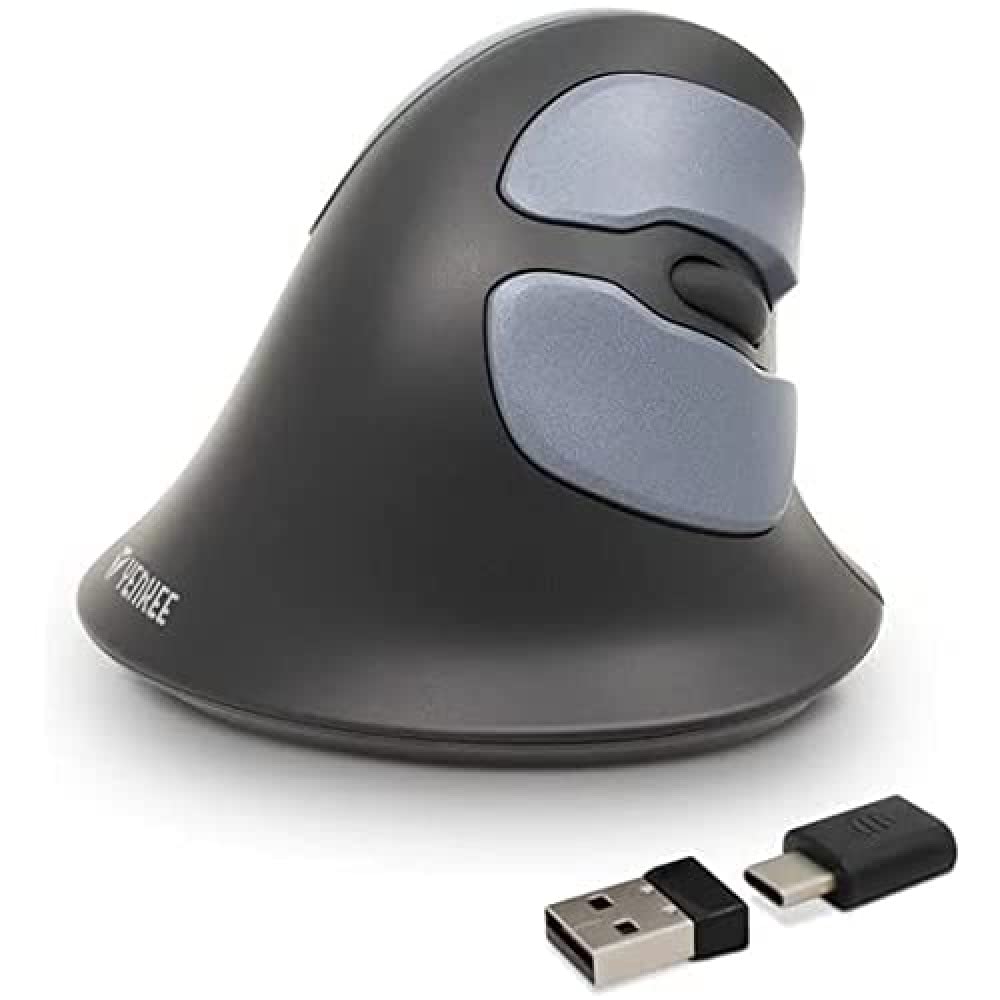
Image: Yenkee YMS 5030 Wireless Ergonomic Vertical Mouse with its USB nano receiver. The mouse is black, featuring a vertical design with multiple buttons.
Сетуп
- Инсталирајте батерије:
Locate the battery compartment on the underside of the mouse. Open the cover and insert the required batteries (not included), ensuring correct polarity (+/-). Close the battery compartment cover securely.
Слика: Доња страна view of the Yenkee YMS 5030 mouse, highlighting the battery compartment and the on/off switch.
- Connect USB Nano Receiver:
Plug the USB nano receiver into an available USB port on your computer. Your operating system should automatically detect and install the necessary drivers. This process may take a few moments.
- Укључивање миша:
Slide the ON/OFF switch, located on the underside of the mouse, to the "ON" position. The mouse should now be active and ready for use.
Упутство за употребу
The Yenkee YMS 5030 mouse features 6 buttons and adjustable DPI settings for precise control.
- Леви клик: Стандардна функција примарног клика.
- Десни клик: Стандардна функција секундарног клика.
- Точак за померање: Померајте се горе или доле кроз документе и web странице. Такође се може притиснути за функцију клика средњим тастером миша.
- Дугмад за напред/назад: Located on the side, these buttons allow for quick navigation in web претраживачи или file истраживачи.
- Дугме за подешавање DPI-ја: Located near the scroll wheel, press this button to cycle between DPI settings (1000 DPI and 1600 DPI). Adjust the sensitivity to suit your preference and task.
Слика: Одозго надоле view of the Yenkee YMS 5030 mouse, indicating the positions of the left/right click, scroll wheel, forward/backward, and DPI adjustment buttons.
Ергономски дизајн
The vertical design of the YMS 5030 mouse positions your hand in a natural handshake posture, which can help alleviate wrist strain and discomfort often associated with traditional horizontal mice. This design is particularly beneficial for users seeking to reduce the risk of repetitive strain injuries like Carpal Tunnel Syndrome.
Одржавање
- Чишћење: Use a soft, dry cloth to clean the surface of the mouse. For stubborn dirt, slightly dampИсперите крпу водом. Избегавајте употребу јаких хемикалија или абразивних средстава за чишћење.
- Замена батерије: When the mouse performance degrades or it stops responding, it's time to replace the batteries. Follow the "Install Batteries" steps in the Setup section. Dispose of old batteries responsibly according to local regulations.
- Складиштење: When not in use for extended periods, turn off the mouse using the ON/OFF switch to conserve battery life. Store the mouse and receiver in a dry, cool place.
Решавање проблема
| Проблем | Могући узрок | Решење |
|---|---|---|
| Миш не реагује. |
|
|
| Кретање курсора је неправилно или скачкасто. |
|
|
| DPI setting does not change. | DPI button not pressed correctly or mouse not powered on. | Ensure the mouse is on and press the DPI button firmly. Observe if cursor speed changes. |
Спецификације
| Феатуре | Детаљ |
|---|---|
| Бранд | Јенки |
| Број модела | ИМС 5030 |
| Боја | Црно |
| Технологија повезивања | бежични (Ви-Фи) |
| Технологија детекције покрета | Оптицал |
| ДПИ подешавања | 1000 DPI / 1600 DPI |
| Број дугмади | 6 |
| Воркинг Дистанце | До 10 метара |
| Извор напајања | Напајање батеријама (батерије нису укључене) |
| Хардверска платформа | PC |
| Компатибилност оперативног система | Windows 7, Windows 8, Windows Vista, Windows XP |
| Димензије производа | 14.1 к 7.8 к 23 цм |
| Тежина артикла | 125 г |
Гаранција и подршка
Yenkee products are manufactured to high-quality standards. For information regarding warranty terms and conditions, please refer to the warranty card included with your purchase or visit the official Yenkee website. For technical support or service inquiries, please contact your local retailer or the Yenkee customer support team.