
Увод
The IMICE T97 RGB Honeycomb Gaming Mouse is designed to provide a precise and comfortable experience for gaming and general computer use. It features a high-precision 4800 DPI sensor, a durable and ergonomic design, and is compatible with various operating systems. This manual will guide you through the setup, operation, and maintenance of your new gaming mouse.
- Бренд: IMICE
- Тип: Миш
- Компатибилност: Рачунари и лаптопи
- Кључне карактеристике: High precision 4800 DPI, comfortable and durable design, anti-sweat design, precise positioning.
- Боја: Црно
Упутства за подешавање
1. Повезивање миша
The IMICE T97 mouse uses a standard USB connection for plug-and-play functionality. No additional drivers are typically required for basic operation on supported operating systems.
- Пронађите слободан УСБ порт на рачунару или лаптопу.
- Insert the USB connector of the IMICE T97 mouse firmly into the USB port.
- Ваш оперативни систем би требало аутоматски да детектује и инсталира потребне драјвере. Овај процес може потрајати неколико тренутака.
- Once installed, the mouse will be ready for use.
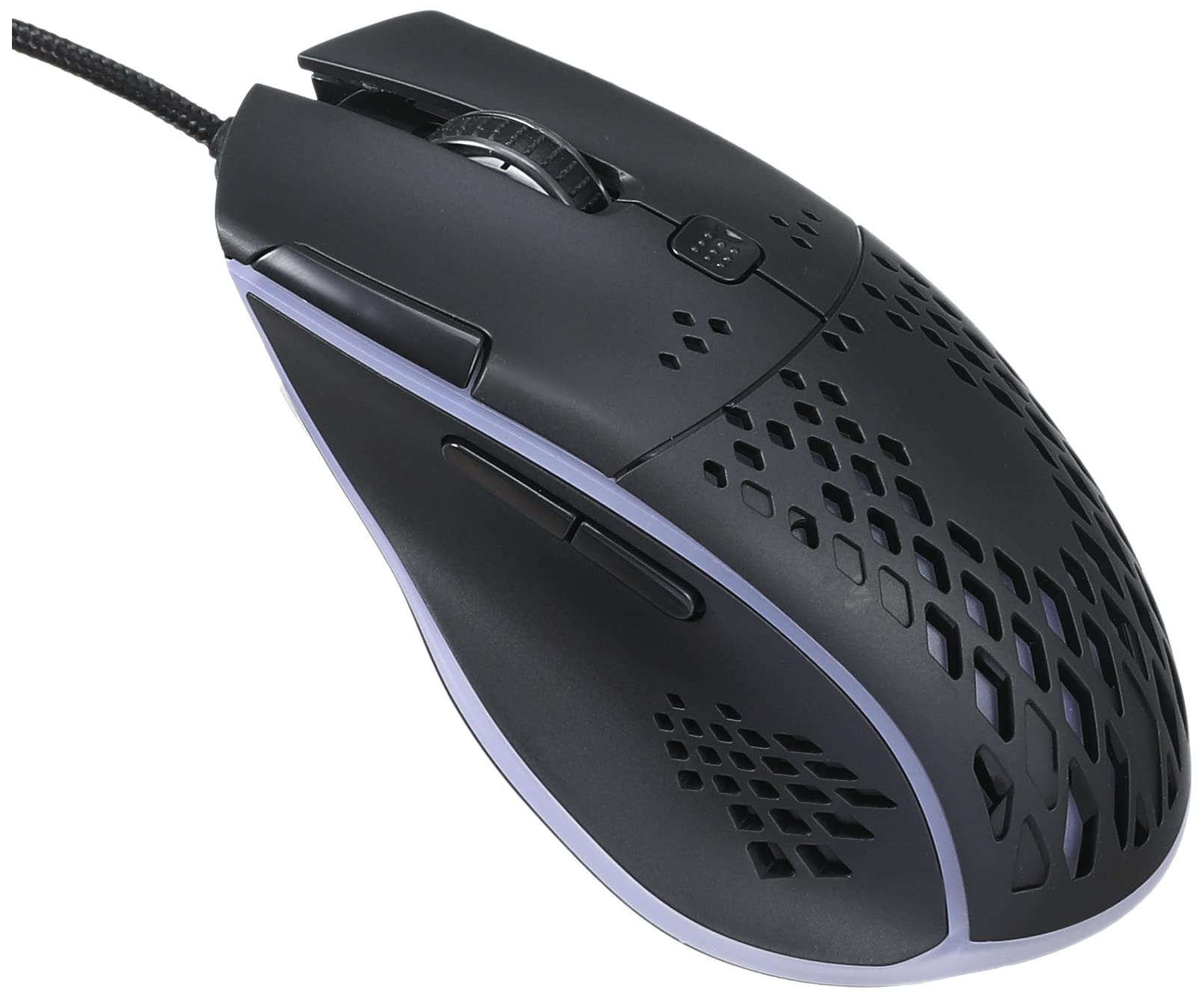
Слика: Горњи део view of the IMICE T97 RGB Honeycomb Gaming Mouse, showing its ergonomic shape and honeycomb shell design.
Управљање мишем
Основне функције
- Леви клик: Primary action, selection, activation.
- Десни клик: Контекстни мени, секундарне радње.
- Точак за померање: Scroll up/down documents and web странице. Такође се може кликнути за функционалност клика средњим тастером миша.
- Бочна дугмад: (If present, typically for forward/back navigation in browsers or custom functions in games). The T97 model typically includes two side buttons.
ДПИ Адјустмент
The IMICE T97 mouse features adjustable DPI (Dots Per Inch) settings, allowing you to change the cursor sensitivity. This mouse supports up to 4800 DPI. There is usually a dedicated button, often located behind the scroll wheel, to cycle through different DPI levels. Press this button to switch between sensitivity settings to find your preferred speed.
РГБ осветљење
The mouse features RGB lighting, which typically cycles through various colors automatically. There may not be user-configurable software for lighting control, and it operates as a default aesthetic feature.

Слика: Доња страна view of the IMICE T97 RGB Honeycomb Gaming Mouse, showing the optical sensor, product label with model T97, and regulatory marks.
Одржавање
Чишћење
- Искључите миш из рачунара пре чишћења.
- Користите меку, суву крпу која не оставља влакна да обришете површину миша.
- За тврдокорну прљавштину, благо дampобришите крпу водом или благим средством за чишћење (избегавајте јаке хемикалије).
- Користите памучни штапић или компримовани ваздух да очистите простор око дугмади и точкића за померање.
- Уверите се да течност не улази у унутрашње компоненте миша.
Складиштење
Чувајте миш на хладном и сувом месту, даље од директне сунчеве светлости и екстремних температура када се не користи дуже време.
Решавање проблема
| Проблем | Решење |
|---|---|
| Миш не реагује. |
|
| Кретање курсора је неправилно или скачкасто. |
|
| Buttons or scroll wheel are not working. |
|
| Cannot find software for customization. | The IMICE T97 mouse is primarily designed for plug-and-play operation. Dedicated software for advanced customization (like button remapping or detailed RGB control) may not be available or easily accessible for this model. Most functions are hardware-controlled. |
Спецификације
| Бранд | IMICE |
| Модел | Т97 |
| Боја | Црно |
| Технологија повезивања | УСБ |
| DPI (макс.) | 4800 ДПИ |
| Посебне карактеристике | Comfortable design, RGB lighting, honeycomb shell |
| Оријентација руке | Амбидектроус |
| Препоручена употреба | Гаминг |
| Компатибилни уређаји | Лични рачунар, лаптоп |
| Компатибилност оперативног система | Линукс, Виндоус XP (и новије верзије) |
| Тежина артикла | 120 грама |
| Димензије испоруке | 15 к 11 к 5 цм |
| Батерије укључене | No (Wired USB mouse) |
| ASIN | B0BD2DDWNQ |
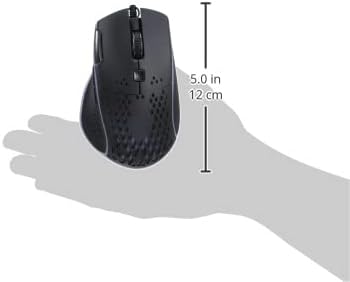
Слика: Са стране view of the IMICE T97 RGB Honeycomb Gaming Mouse held in a hand, illustrating its compact size (approximately 5.0 inches or 12 cm in length).
Информације о гаранцији
Please refer to the retailer or your purchase documentation for specific warranty terms and conditions. IMICE products typically come with a limited warranty against manufacturing defects. Keep your proof of purchase for warranty claims.
Корисничка подршка
For technical assistance or further inquiries, please contact your retailer or visit the official IMICE website for support resources. Ensure you have your product model (T97) and purchase details ready when contacting support.