
1. Увод
This manual provides detailed instructions for the installation, operation, and maintenance of your gearelec Type-C Motorcycle Bluetooth Headset Microphone. This 2-in-1 microphone set is designed for compatibility with various Type-C motorcycle Bluetooth headphones, offering both soft and hard microphone options to suit different helmet types.
Please read this manual thoroughly before use to ensure proper functionality and to maximize your product experience.
2. Карактеристике производа
- Universal Type-C Compatibility: Designed to work with a wide range of Type-C motorcycle Bluetooth headsets, including gearelec E3, Teleheer T6 Plus, and Moman H1.
- 2-in-1 Microphone Design: Includes both a soft microphone for full-face helmets and a hard microphone for open-face or half helmets, allowing for flexible use.
- Побољшани квалитет звука: Features 40mm thin, flat earphones with advanced noise and echo cancellation technology for clear communication and Hi-Fi music playback.
- Једноставна инсталација: Equipped with a detachable Velcro design for straightforward and secure installation within your helmet.
- Convenient Backup: Ideal as a spare or replacement set for motorcyclists with multiple helmets, eliminating the need for repeated disassembly and reinstallation.
3. Садржај пакета
Проверите да ли су све ставке присутне у вашем пакету:
- 1 x Type-C Microphone and Speaker Set (includes integrated soft and hard microphones)
- 2 x 40mm Earphones (speakers)
- Velcro mounting pads for earphones and microphone base
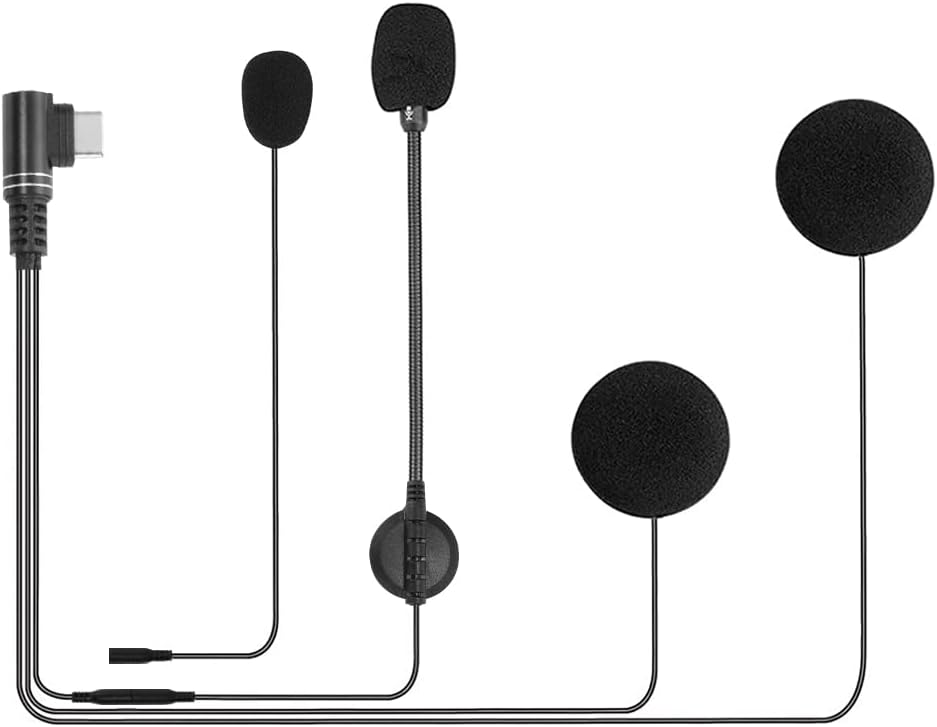
Слика 3.1: Готовоview of the gearelec Type-C Motorcycle Bluetooth Headset Microphone components, including the Type-C connector, soft microphone, hard microphone, and two speakers.
4. Упутства за подешавање
Follow these steps to install the microphone and speaker set into your helmet:
- Choose Microphone Type:
- За full-face helmets, користите soft microphone, which is typically integrated into the helmet's padding.
- За open-face or half helmets, користите hard microphone, which can be positioned closer to your mouth.
- Mount Earphones (Speakers): Identify suitable flat areas inside your helmet, typically near your ears. Attach the Velcro mounting pads to these areas, then firmly press the 40mm earphones onto the Velcro. Ensure they are positioned comfortably and do not obstruct your ears.
- Позиција микрофона: Route the microphone cable and position the chosen microphone type (soft or hard) appropriately. The soft microphone can be tucked into the helmet lining, while the hard microphone should extend forward to be near your mouth.
- Connect to Bluetooth Headset: Locate the Type-C port on your motorcycle Bluetooth headset. Carefully insert the Type-C connector from the microphone and speaker set into this port.
- Сигурни каблови: Route all cables neatly within the helmet lining to prevent tangling or discomfort. Use any included cable clips or the helmet's existing channels to secure them.
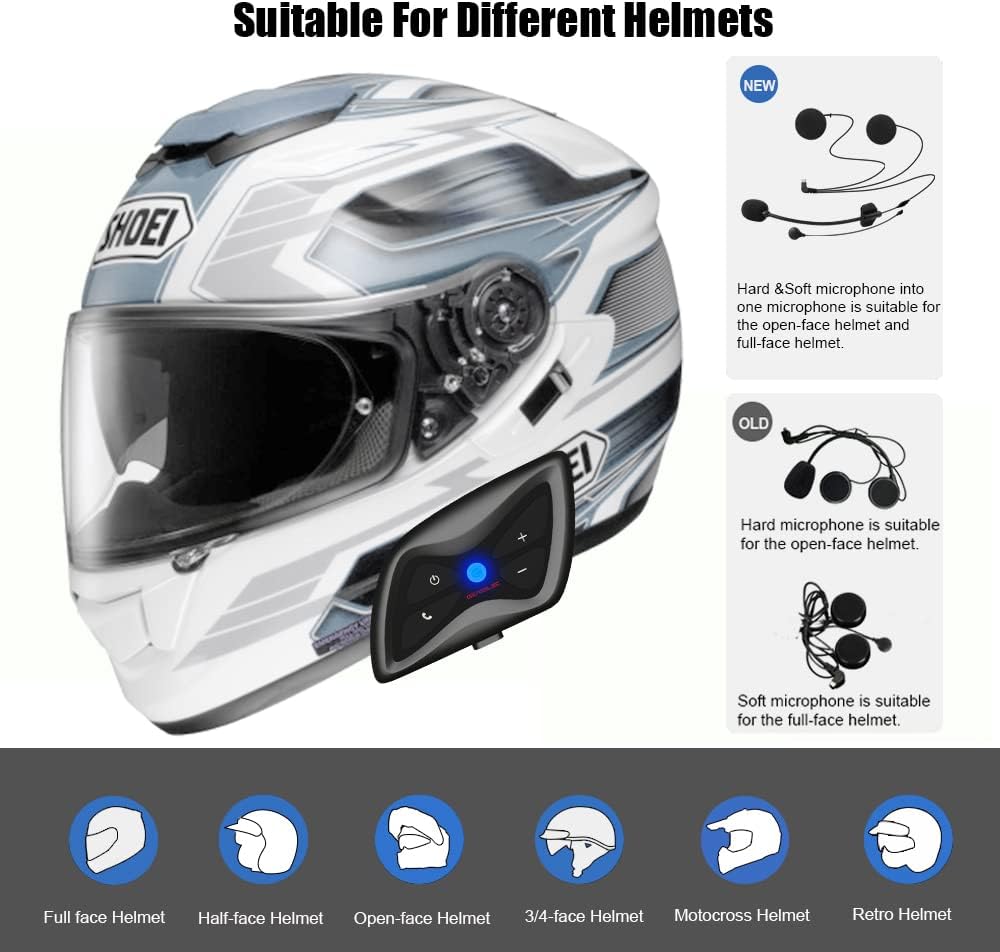
Image 4.1: Illustration demonstrating the suitability of soft and hard microphones for different helmet types, including full-face, half-face, and open-face helmets.

Image 4.2: Visual representation of the 40mm speakers installed within a motorcycle helmet, highlighting their thin profile and audio capabilities.

Слика 4.3: Детаљно view of the hard and soft cable microphones, illustrating how they connect to the main earphone unit.
5. Упутство за употребу
This microphone and speaker set functions as an accessory to your main Type-C motorcycle Bluetooth headset. All primary controls for power, pairing, volume, and call management will be handled directly on your Bluetooth headset unit.
- Аудио излаз: Once connected, audio from your Bluetooth headset (music, navigation, intercom, phone calls) will be routed through the 40mm speakers in your helmet.
- Улаз за микрофон: The selected microphone (soft or hard) will capture your voice for intercom communication or phone calls. The integrated noise and echo cancellation technology helps ensure clear voice transmission.
- Контрола јачине звука: Adjust volume directly on your connected Bluetooth headset.
6. Одржавање
Proper care ensures the longevity and performance of your microphone and speaker set:
- Чишћење: Gently wipe the earphones and microphone foam covers with a soft, dry cloth. Avoid using harsh chemicals or abrasive materials.
- Складиштење: When not in use, store the set in a cool, dry place away from direct sunlight and extreme temperatures.
- Нега каблова: Avoid sharply bending or pulling the cables. Ensure they are not pinched or snagged during helmet installation or removal.
- Влага: While designed for outdoor use, avoid prolonged exposure to heavy rain or submerging the components in water.
КСНУМКС. Решавање проблема
Ако наиђете на проблеме, погледајте следећа уобичајена решења:
- Нема звука из звучника:
- Ensure the Type-C connector is fully and securely plugged into your Bluetooth headset.
- Check the volume level on your Bluetooth headset.
- Verify that your Bluetooth headset is powered on and properly paired with your audio source.
- Microphone Not Picking Up Voice:
- Confirm the microphone is correctly positioned near your mouth.
- Ensure the Type-C connector is fully inserted.
- Check your Bluetooth headset's settings for microphone activation or mute status.
- Poor Sound Quality (Speakers or Microphone):
- Уверите се да су све везе безбедне.
- Check for any physical damage to the cables or components.
- If using the soft microphone, ensure it is not obstructed by helmet padding.
- Refer to your main Bluetooth headset's manual for advanced audio settings or firmware updates.
8. Спецификације
| Феатуре | Детаљ |
|---|---|
| Број модела | GC-E3-Mic-USBC |
| Бранд | gearelec |
| Технологија повезивања | Wired (Type-C to Bluetooth Headset) |
| Бежична комуникациона технологија | Bluetooth (via connected headset) |
| Тип микрофона | 2-in-1 (Soft Mic and Hard Mic) |
| Пречник звучника | 40мм |
| Посебне карактеристике | Echo Cancellation, Microphone Included |
| Боја | Црно |
| Димензије производа | 3.54 к 1.18 к 3.94 инча |
| Тежина артикла | 0.634 унци |
| Произвођач | gearelec |
9. Гаранција и подршка
For warranty information and customer support, please refer to the documentation provided with your original gearelec Bluetooth headset or visit the official gearelec webсајт. Сачувајте рачун као доказ о куповини за евентуалне рекламације по гаранцији.
If you require further assistance, please contact gearelec customer service through their official channels.