
Увод
The BALDR BA-102TY Wireless Weather Station provides accurate indoor and outdoor temperature and humidity readings, along with a 12-24 hour weather forecast. It features a large LCD display, supports up to three external sensors, and includes functions such as alarm, snooze, and backlight. This manual will guide you through the setup, operation, and maintenance of your device.
Садржај пакета
- 1 x BALDR Weather Station (Main Unit)
- 1 x Бежични спољни сензор
- 1 к Упутство за употребу
Note: Batteries are not included. The main unit requires 2x AAA batteries, and the outdoor sensor requires 2x AA batteries.
Сетуп
1. Инсталација батерије
- Главна јединица: Open the battery compartment cover on the back of the weather station. Insert 2 AAA batteries, observing the correct polarity (+/-). Close the cover.
- Спољни сензор: Open the battery compartment cover on the back of the outdoor sensor. Insert 2 AA batteries, observing the correct polarity (+/-). Close the cover.

Figure 1: Battery installation for the main unit and outdoor sensor. Ensure correct battery polarity.
2. Упаривање сензора
After inserting batteries, the main unit will automatically search for the outdoor sensor. The outdoor temperature and humidity will appear on the display. If the connection is not established, press the "CH" button on the main unit to cycle through channels or the "RESET" button on both units to re-initiate pairing.
The weather station can synchronize with up to 3 external sensors. To add additional sensors (sold separately), ensure each sensor is set to a different channel (CH1, CH2, CH3) before pairing.

Figure 2: The weather station supports up to three wireless sensors for monitoring different areas.
КСНУМКС. Постављање
- Главна јединица: Place the main unit indoors on a flat surface using its integrated kickstand, or mount it on a wall. Ensure it is away from direct sunlight or heat sources that could affect indoor temperature readings.
- Спољни сензор: Position the outdoor sensor within 100 meters (328 feet) of the main unit. Choose a shaded, dry location to protect it from direct rain and sunlight, which can impact accuracy. The sensor has an IP54 waterproof rating, but protection from extreme weather is recommended for longevity.

Слика 3: Прamples of suitable placement for the main unit and outdoor sensor in various environments.

Figure 4: Proper placement of the outdoor sensor under shelter to avoid direct rain and sun.
Упутство за употребу
1. Прикажи прекоview
The large LCD screen displays indoor and outdoor temperature and humidity, weather forecast icons, time, date, and maximum/minimum records. Data updates every 10 seconds for high responsiveness.
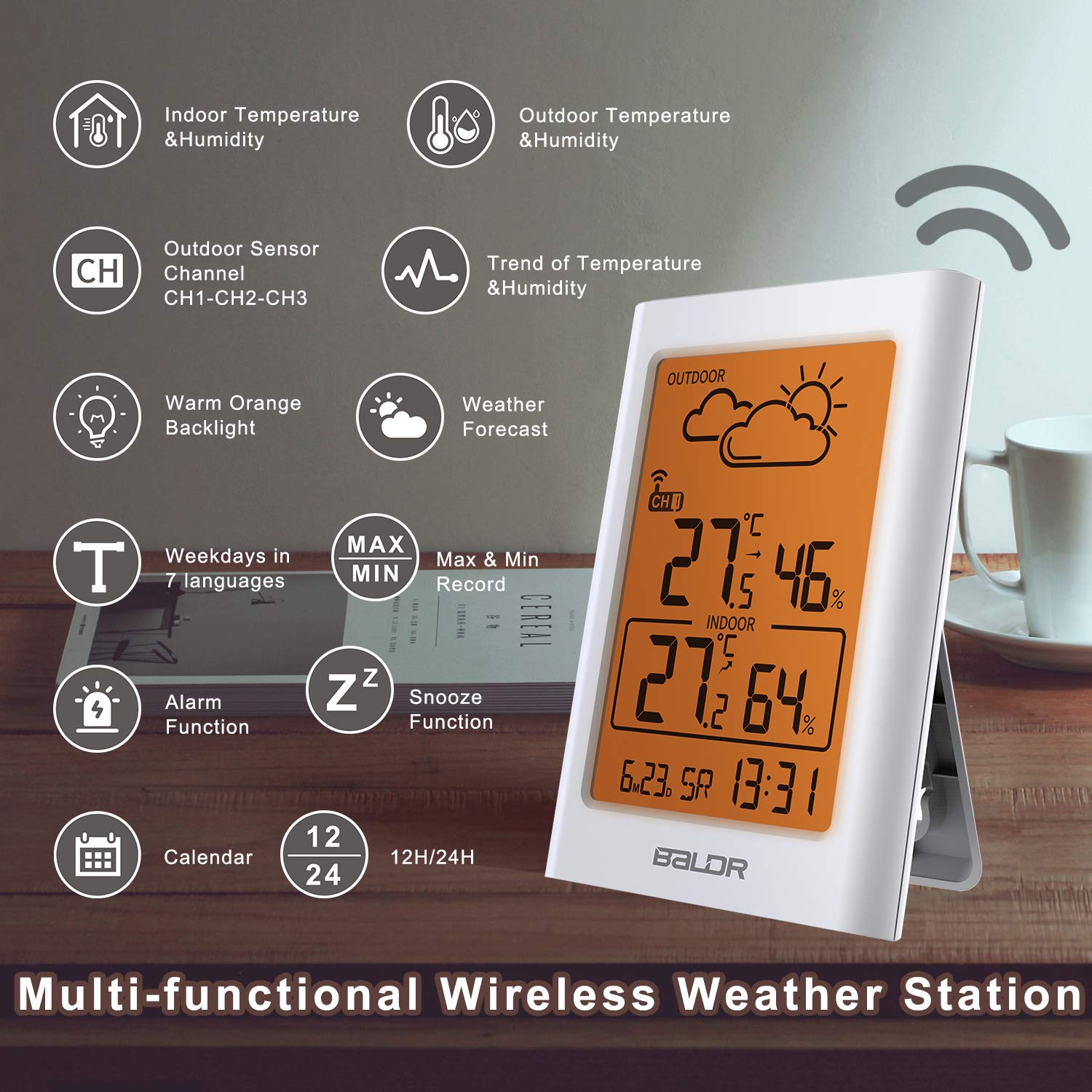
Слика 5: Завршеноview of the multi-functional display and its indicators.
2. Временска прогноза
The station uses Weather Forecast 2.0 technology to provide a graphical prediction for the next 12-24 hours. Icons include Sunny, Partly Cloudy, Cloudy, Rainy, and Snowy. These forecasts are based on atmospheric pressure changes and are estimates, not guarantees.

Figure 6: Weather forecast icons displayed on the screen.
3. Maximum and Minimum Records
The weather station automatically records the maximum and minimum indoor and outdoor temperature and humidity values. Press the "MEM" button to view these records. Pressing it again will cycle through current, maximum, and minimum values. These records reset daily or can be manually cleared.
4. Функција аларма и одлагања
The device includes an alarm clock function. To set the alarm, refer to the detailed instructions in the full manual. When the alarm sounds, press the "SNOOZE/LIGHT" button to activate the snooze function, which will temporarily silence the alarm for a few minutes.
5. Позадинско осветљење
Press the "SNOOZE/LIGHT" button to activate the warm orange backlight for approximately 20 seconds, improving readability in low-light conditions.

Figure 7: The warm orange backlight enhances visibility.
6. Подешавања времена и датума
The weather station allows setting the current time in 12/24-hour format and the calendar. Refer to the full instruction manual for specific button sequences to adjust these settings.
Одржавање
- Замена батерије: Replace batteries in both the main unit and outdoor sensor when the low battery indicator appears on the display. Always replace all batteries at the same time with new ones of the same type.
- Чишћење: Wipe the device and sensor with a soft, damp тканина. Немојте користити абразивна средства за чишћење или раствараче.
- Брига о сензорима: While the outdoor sensor is IP54 rated for water resistance, prolonged exposure to heavy rain or direct sunlight can reduce its lifespan. Position it in a sheltered area.
Решавање проблема
| Проблем | Могући узрок | Решење |
|---|---|---|
| No outdoor temperature/humidity display. | Sensor not paired, out of range, or low battery. |
|
| Нетачна очитавања температуре/влажности. | Sensor exposed to direct sunlight/rain, or near heat/cold sources. |
|
| Екран је туман или празан. | Слабе батерије у главној јединици. | Replace the AAA batteries in the main unit. |
Спецификације
| Феатуре | Детаљ |
|---|---|
| Бранд | Baldr |
| Број модела | BA-102TY |
| Извор напајања | Battery powered (Main Unit: 2x AAA, Sensor: 2x AA) |
| Технологија повезивања | 433 MHz or 868 MHz wireless |
| Опсег спољног сензора | До 100 метара (328 стопе) |
| Прецизност температуре | ±1°Ц |
| Дисплаи Типе | ЛЦД |
| Посебне карактеристике | Weather Forecast 2.0, graphical weather display, IP54 waterproof sensor, 10-second data update, Min/Max temperature and humidity memory, alarm, snooze, backlight, calendar, 12/24-hour time. |
| Материјал | Пластика |
| Боја | Крем |

Слика 8: Задња страна view of the main unit, showing control buttons and stand.

Figure 9: The weather station's compact design for easy placement.
Гаранција и подршка
For warranty information and technical support, please refer to the documentation included with your product or visit the official BALDR website. Contact details for customer service are typically provided in the full user manual.