
1. Производ је готовview
The havit GK59 Gaming Microphone is designed for clear audio capture during gaming, streaming, and voice communication. It features a condenser microphone for high-quality sound and a versatile design for ease of use.

Слика 1.1: Предња страна view of the havit GK59 Gaming Microphone, showcasing its main body, stand, and control buttons.
Кључне карактеристике:
- Једноставан за употребу: Једноставна функционалност „укључи и користи“.
- Good Performance: Delivers clear and consistent audio.
- Good Quality: Durable construction for reliable use.
- Преносиви дизајн: Компактан и лак за транспорт.
- Подесиво постоље: Allows for flexible positioning.
2. Упутства за подешавање
2.1 Садржај пакета
Молимо вас да проверите пакет за следеће ставке:
- havit GK59 Gaming Microphone
- УСБ прикључни кабл
- Кориснички приручник (овај документ)
2.2 Повезивање микрофона
The GK59 microphone offers versatile connectivity options for various devices.
- УСБ веза: Connect the provided USB cable to the USB-C port on the back of the microphone and the other end to an available USB port on your computer or gaming console. The microphone is plug-and-play and should be automatically recognized by most operating systems.
- Прикључак за 3.5 мм прикључак: For devices supporting a 3.5mm auxiliary input, connect a 3.5mm audio cable (not included) to the 3.5mm jack on the back of the microphone and to your device's audio input.
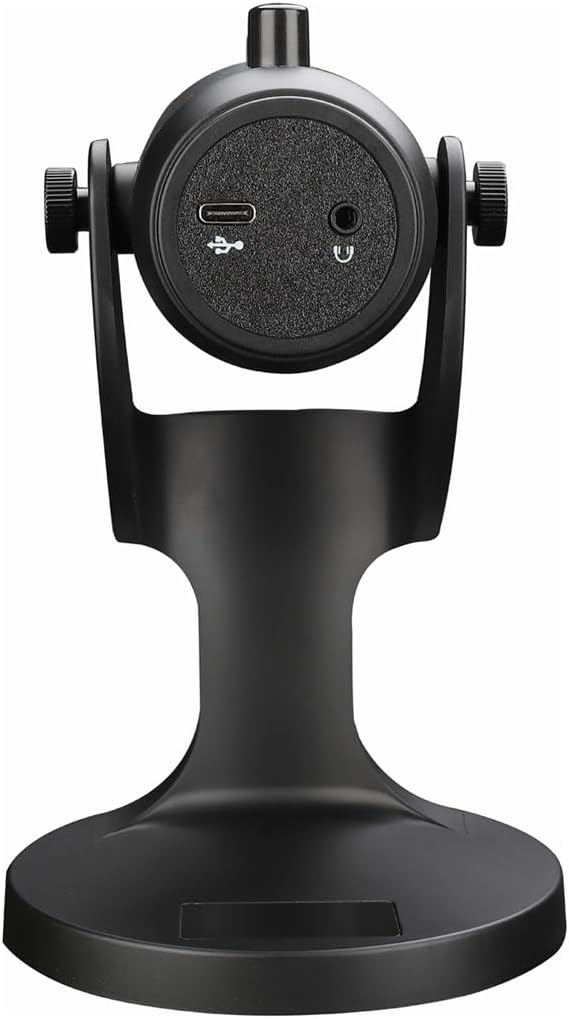
Слика 2.1: Задња страна view of the havit GK59 Gaming Microphone, highlighting the USB-C port for data and power, and the 3.5mm headphone jack for monitoring.
After connecting, ensure the microphone is selected as the default input device in your system's sound settings or your gaming/streaming software.
3. Упутство за употребу
3.1 Основне контроле
The havit GK59 features intuitive controls located on the front of the microphone body:
- Дугме за утишавање: Press to mute or unmute the microphone. An indicator light will typically show the mute status.
- MIC +/- Buttons: Adjust the microphone input sensitivity (gain). Press '+' to increase, '-' to decrease.
- ВОЛ +/- Дугмад: Adjust the headphone output volume for monitoring. Press '+' to increase, '-' to decrease.
- ECHO +/- Buttons: Adjust the echo effect level. Press '+' to increase, '-' to decrease.
Слика 3.1: Детаљно view of the microphone's control panel, including the mute button, microphone gain, volume, and echo adjustment buttons.
3.2 Adjusting Microphone Position
The microphone is equipped with an adjustable stand, allowing you to optimize its position for best sound capture and comfort.
- Gently hold the microphone body and the base of the stand.
- Tilt the microphone forward or backward to achieve the desired angle. The stand's design helps reduce vibration and abnormal sounds during use.
- Position the microphone approximately 6-12 inches (15-30 cm) from your mouth for optimal voice clarity.

Figure 3.2: The havit GK59 microphone demonstrating its adjustable tilt feature on the stand, designed for anti-vibration.
4. Одржавање
4.1 Чишћење
To maintain the microphone's performance and appearance:
- Disconnect the microphone from its power source before cleaning.
- Користите меку, суву крпу за брисање спољашњих површина.
- Не користите течна средства за чишћење, аеросоле или раствараче, јер могу оштетити завршну обраду или унутрашње компоненте.
4.2 Складиштење
When not in use, store the microphone in a cool, dry place away from direct sunlight and extreme temperatures. Protect it from dust and moisture.
КСНУМКС. Решавање проблема
If you encounter issues with your havit GK59 Gaming Microphone, please refer to the following table for common problems and solutions:
| Проблем | Могући узрок | Решење |
|---|---|---|
| No sound input from microphone | Микрофон није правилно повезан Изабран је погрешан улазни уређај Микрофон је искључен | Уверите се да је USB кабл безбедно повезан. Check system sound settings and select GK59 as input. Press the Mute button on the microphone to unmute. |
| Мала јачина микрофона | Microphone gain too low Јачина звука системског уноса је прениска | Press the 'MIC +' button on the microphone. Adjust input volume in your system's sound settings. |
| Изобличен или нејасан звук | Microphone gain too high Microphone too close to mouth Бука околине | Press the 'MIC -' button on the microphone. Подесите положај микрофона (6-12 цм од уста). Смањите позадинску буку у свом окружењу. |
| No headphone monitoring sound | Слушалице нису повезане Headphone volume too low | Ensure headphones are plugged into the 3.5mm jack. Press the 'VOL +' button on the microphone. |
6. Техничке спецификације
Below are the technical specifications for the havit GK59 Gaming Microphone:
| Феатуре | Спецификација |
|---|---|
| Бранд | хавит |
| Број модела | ГК59 |
| Технологија повезивања | USB, 3.5 mm Jack (Auxiliary) |
| Препоручена употреба | Гаминг |
| Полар Паттерн | Једносмерно |
| Фактор форме микрофона | Handheld (with desktop stand) |
| Тежина артикла | 429 грама |
| Импеданса | 250 Охмс |
| Однос сигнала и шума | 18 дБ |
| Аудибле Ноисе | 18 децибела |
| Извор напајања | Електрични са каблом (преко УСБ-а) |
| Компатибилни уређаји | Gaming Consoles, PCs |
| Димензије артикла (ДкШкВ) | 5.59 к 4.92 к 9.06 инча |
| Боја | Црно |
7. Гаранција и подршка
7.1 Информације о гаранцији
The havit GK59 Gaming Microphone comes with a standard manufacturer's warranty. Please refer to the warranty card included in your product packaging or visit the official havit webсајт за детаљне услове гаранције.
7.2 Корисничка подршка
For technical assistance, troubleshooting not covered in this manual, or warranty claims, please contact havit customer support through their official channels. You can find more information and contact details on the Хавит продавница на Амазону или њихов службеник webсајту.