
1. Увод
The Everest EWR-674N is a versatile 2.4GHz Wireless-N router designed to provide reliable internet connectivity and network expansion. It supports multiple operating modes including Router, Repeater, Access Point (AP), and Wireless Internet Service Provider (WISP), making it suitable for various networking needs. With 300Mbps wireless speed and three 5dBi external antennas, it offers enhanced coverage and performance for your home or office network.
2. Садржај пакета
Молимо вас да проверите да ли су све ставке присутне у вашем пакету:
- Everest EWR-674N Wireless Router
- Повер Адаптер
- Етхернет Цабле
- Кратки водич за инсталацију (овај приручник)
3. Производ је готовview
Familiarize yourself with the physical components of your Everest EWR-674N router.
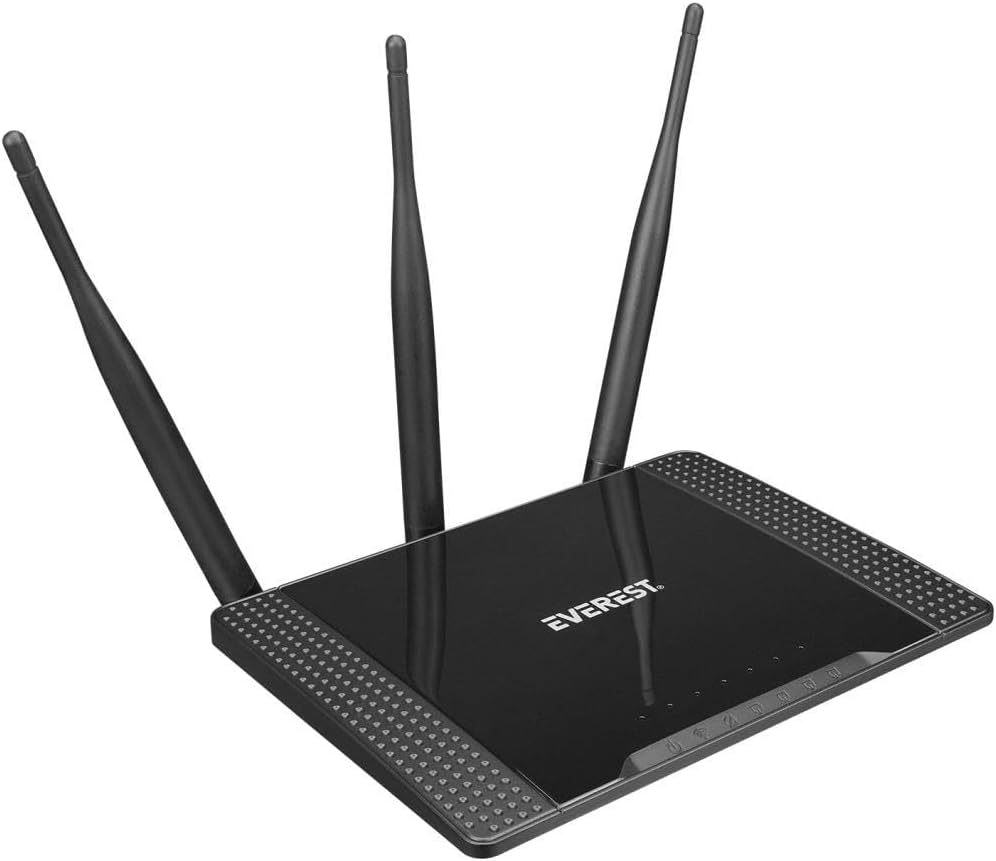
Слика 3.1: Англед view of the Everest EWR-674N Wireless Router, showcasing its top panel with the 'EVEREST' logo and three external antennas.

Слика 3.2: Фронтални view of the Everest EWR-674N Wireless Router with antennas in an upright position, highlighting the brand logo and LED indicators for power, internet, and LAN activity.

Слика 3.3: Задњи угаони view of the Everest EWR-674N Wireless Router, clearly displaying the WAN port, LAN ports, power input, and reset button.
3.1. ЛЕД индикатори
- ЛЕД за напајање: Означава статус напајања уређаја.
- ВАН ЛЕД: Indicates activity on the WAN (Internet) port.
- ЛАН ЛЕД диоде: Indicate activity on the LAN ports.
- ВЛАН ЛЕД: Означава активност бежичне мреже.
3.2. Портови и дугмад
- ВАН порт: Connects to your modem or internet service provider's network.
- ЛАН портови: Повежите се са жичним уређајима као што су рачунари, паметни телевизори или играчке конзоле.
- Улазна снага: Повезује се са приложеним адаптером за напајање.
- Дугме за ресетовање: Used to restore the router to factory default settings. Press and hold for 5-10 seconds while the device is powered on.
4. Подешавање
Follow these steps to set up your Everest EWR-674N router.
4.1. Повезивање хардвера
- Позиционирајте рутер: Place the router in a central location to maximize wireless coverage. Avoid placing it near obstructions or electronic devices that may cause interference.
- Повежите антене: Ensure the three external antennas are securely attached and oriented vertically for optimal signal.
- Повежите се са напајањем: Plug the power adapter into the router's power input and then into a wall outlet. The Power LED should illuminate.
- Connect to Modem (Router Mode): Connect one end of the Ethernet cable to your modem's LAN port and the other end to the router's WAN port.
- Повезивање са рачунаром (опционо): For initial configuration, you may connect your computer directly to one of the router's LAN ports using an Ethernet cable.
4.2. Почетна конфигурација
- Приступите Web Интерфејс: Отвори а web browser on a computer connected to the router (either wired or wirelessly). In the address bar, type the default IP address (usually
192.168.1.1or192.168.0.1) and press Enter. Refer to the label on the bottom of your router for the exact IP address. - Пријавите се: Унесите подразумевано корисничко име и лозинку. Обично су то
adminfor both. Refer to the router's label if different. - Run Quick Setup Wizard: Upon successful login, you will likely be prompted to run a Quick Setup Wizard. Follow the on-screen instructions to configure your internet connection and wireless network settings.
- Set Wireless Network Name (SSID) and Password: Choose a unique name for your Wi-Fi network and a strong password to secure it.
- Промена администраторске лозинке: For security, it is highly recommended to change the default administrator password for the router's web интерфејс.
5. Радни режими
The Everest EWR-674N supports four main operating modes:
5.1. Router Mode
In Router Mode, the device acts as a central hub for your network, connecting to your modem to provide internet access to all connected wired and wireless devices. It creates a private local area network (LAN).
5.2. Режим понављања
Repeater Mode extends the coverage of an existing wireless network. The EWR-674N connects wirelessly to your main router and re-broadcasts the signal, eliminating Wi-Fi dead zones.
5.3. Режим приступне тачке (АП)
In AP Mode, the router converts a wired network connection into a wireless one. It connects to an existing wired network via an Ethernet cable and broadcasts a Wi-Fi signal, allowing wireless devices to connect.
5.4. WISP Mode
WISP (Wireless Internet Service Provider) Mode allows the router to connect to a wireless ISP network and share that internet connection with multiple devices, both wired and wireless, within your local network.
6. Одржавање
Редовно одржавање помаже у обезбеђивању оптималних перформанси и безбедности вашег рутера.
6.1. Ажурирања фирмвера
Periodically check the Everest official website for firmware updates. Firmware updates can improve performance, add new features, and fix security vulnerabilities. Follow the instructions provided with the firmware update carefully.
6.2. Фацтори Ресет
If you encounter persistent issues or forget your login credentials, you can perform a factory reset. With the router powered on, press and hold the Reset button (typically located on the rear panel) for 5-10 seconds until the LEDs flash. The router will restart with default settings.
6.3. Чишћење
Clean the router periodically with a soft, dry cloth. Do not use liquid cleaners or aerosols. Ensure ventilation openings are free from dust to prevent overheating.
КСНУМКС. Решавање проблема
Овај одељак се бави уобичајеним проблемима на које можете наићи.
- Нема приступа интернету:
- Check if the WAN LED is lit. If not, ensure the Ethernet cable from your modem is securely connected to the router's WAN port.
- Поново покрените модем, а затим рутер.
- Проверите подешавања интернет конекције у рутеру web интерфејс.
- Обратите се свом интернет провајдеру (ISP) да бисте потврдили статус услуге.
- Weak or Unstable Wi-Fi Signal:
- Преместите рутер на централнији положај, даље од зидова, металних предмета и других електронских уређаја.
- Уверите се да су антене правилно оријентисане.
- Check for interference from other 2.4GHz devices (e.g., cordless phones, microwaves).
- Consider changing the wireless channel in the router's settings.
- Не могу приступити рутерима Web Интерфејс:
- Уверите се да је ваш уређај повезан са рутером (жичано или бежично).
- Проверите да ли користите исправну ИП адресу (нпр.
192.168.1.1). - Обришите кеш меморију прегледача или покушајте са другим прегледачем.
- If you forgot the password, perform a factory reset (see Section 6.2).
8. Спецификације
| Бранд | Еверест |
| Модел | EWR-674N |
| вирелесс стандард | Wireless-N (2.4GHz) |
| Бежична брзина | 300Мбпс |
| Антене | 3 x 5dBi External Antennas |
| Оперативни режими | Router, Repeater, AP, WISP |
| Сигурносни протокол | ВЕП |
| Компатибилни уређаји | Рутер |
| Димензије пакета | 30.4 к 22.8 к 6.2 цм |
| Тежина производа | 580 g (0.58 Kilogram) |
| Боја | Греи |
| ASIN | B0BGYD3B8C |
9. Гаранција и подршка
For warranty information and technical support, please refer to the warranty card included with your product or visit the official Everest webсајт. Такође можете контактирати свог продавца за помоћ.
Сачувајте доказ о куповини за гаранцијске захтеве.