
1. Увод
This manual provides detailed instructions for the setup, operation, and maintenance of your XTUGA U-260 Dual Channel UHF Wireless Microphone System. Please read this manual thoroughly before using the product to ensure proper functionality and to maximize its lifespan. Retain this manual for future reference.
2. Производ је готовview
The XTUGA U-260 is a professional-grade dual UHF wireless microphone system designed for various applications including church events, karaoke, weddings, and other live events. It features a robust design, adjustable frequencies, and convenient auto-scan and IR pairing functions.
2.1. Укључене компоненте
- U-260 UHF Wireless Receiver (1 unit)
- UHF Wireless Handheld Microphones (2 units)
- Antennas (2 units)
- Адаптер за напајање (1 јединица)
- User's Manual (1 unit)
- Аудио кабл (1 јединица)
- Anti-skid Rings (2 units)
- Power Plugs (2 units)
- Каблови за напајање (2 јединица)

Figure 2.1: All components included with the XTUGA U-260 Wireless Microphone System, including the receiver, two microphones, antennas, power adapter, cables, and anti-skid rings.
2.2. Кључне карактеристике
- Dual UHF Channels: Two independent channels with 100 selectable frequencies each (Channel 1: 540.1 - 564.85 MHz; Channel 2: 568.1 - 592.85 MHz).
- Auto Scan Function: Automatically searches for the least interference channel.
- IR Synchronization: Seamlessly pairs the receiver and microphones.
- Закључавање фреквенције: Prevents accidental frequency changes.
- Long Range Operation: Up to 492ft (150 meters) operating distance.
- Издржљива конструкција: Microphones feature sturdy metal construction.
- Врхунски квалитет звука: High-quality dynamic cartridge designed to limit feedback and interference.
- Rechargeable Microphones: Built-in lithium batteries provide up to 8 hours of use on a 3-hour charge via USB-C.
- Dashboard-Inspired Display: Receiver features a unique display for AF and RF signal indication.

Figure 2.2: The receiver's display screen, featuring a dashboard-inspired design for clear signal indication.
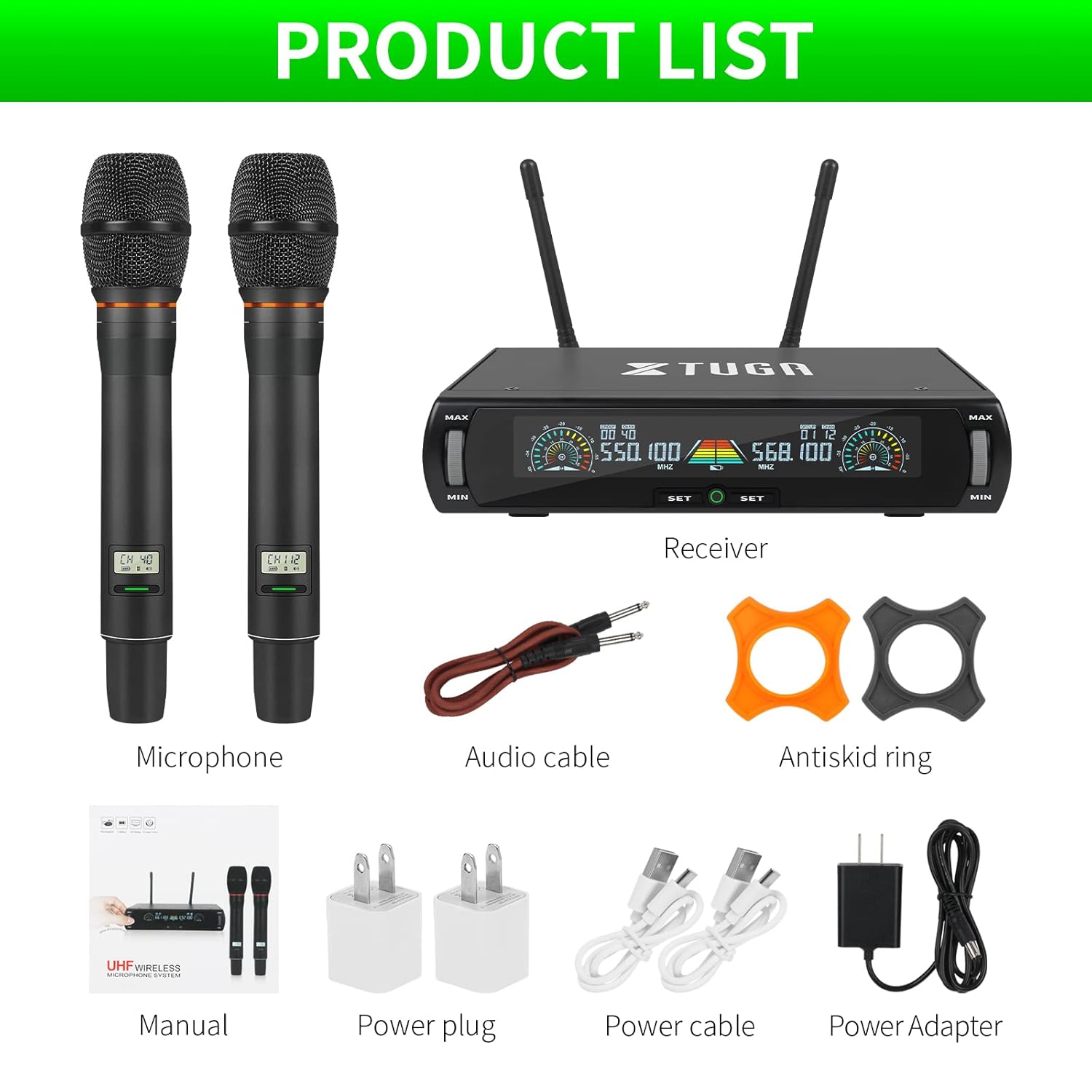
Figure 2.3: Illustration of the microphone's cardioid pickup pattern, designed to reduce noise and capture sound realistically.
2.3. Идентификација компоненте

Слика 2.4: Детаљно view of the receiver and microphone components.
- Контрола јачине звука
- Function settings button
- Switch (Power/Mode)
- Приказ екрана
- Power socket (DC 12V)
- Утичница за антену
- КСЛР излаз
- Audio output (6.35mm/1/4 inch)
- Steel meshed head (Microphone)
- Display screen (Microphone)
- Switch (Microphone Power)
- Type-C charging port (Microphone)
3. Упутства за подешавање
- Распакујте компоненте: Пажљиво извадите све предмете из амбалаже.
- Повежите антене: Screw the two antennas into the antenna jacks on the rear of the receiver. Ensure they are securely tightened.
- Прикључак за напајање: Connect the power adapter to the receiver's power socket (DC 12V) and plug it into a suitable power outlet.
- Аудио излаз:
- For balanced output, connect XLR cables from the receiver's XLR outputs to your mixer or ampлифиер.
- For unbalanced output, use the provided 6.35mm (1/4 inch) audio cable to connect the receiver's audio output to your mixer or ampлифиер.
- Пријемник по укључењу: Press the power switch on the receiver. The display screen should illuminate.
- Charge Microphones: Before first use, ensure both microphones are fully charged using the provided USB-C cables and power plugs. The microphone display will show charging status.
- Микрофони при укључивању: Press and hold the power switch on each microphone until its display illuminates.

Figure 3.1: The XTUGA U-260 system ready for operation, showing the receiver with antennas and two handheld microphones.
4. Упутство за употребу
4.1. Frequency Selection and IR Pairing
The system features an auto-scan function to find clear frequencies and IR synchronization for easy pairing.

Figure 4.1: Diagram illustrating the IR pairing process between the microphone and receiver.
- Initiate Auto Scan: On the receiver, press the "SET" button three times quickly for the desired microphone channel (left or right). The receiver will scan for the clearest available frequency.
- Select Frequency (Optional): If you wish to manually select a frequency after the scan, rotate the volume knob corresponding to the microphone channel you are adjusting.
- IR Pairing: Once a frequency is displayed on the receiver, hold the front of the microphone (where its display is located) close to the IR sensor on the receiver. The IR sensor is located on the bottom left side of the receiver's screen.
- Потврдите упаривање: While holding the microphone near the IR sensor, press the "SET" button on the receiver once for the corresponding microphone channel. A small indicator light on the receiver should flash, and the microphone's display will update to show the new frequency, confirming successful pairing. This process may require a couple of attempts to ensure proper alignment and timing.
4.2. Frequency Lock Function
To prevent accidental changes to the selected frequency, use the frequency lock function.

Figure 4.2: Visual representation of the frequency lock function, showing a padlock icon.
- Да закључате: Press and hold the "SET" button on the receiver for the desired microphone channel until a lock icon appears on the display.
- За откључавање: Press and hold the "SET" button again until the lock icon disappears.
4.3. Контрола јачине звука
Each microphone channel has an independent volume control knob on the receiver. Rotate the "MIN/MAX" knobs to adjust the output volume for each microphone.
4.4. Microphone Charging
The handheld microphones are equipped with built-in rechargeable lithium batteries.

Figure 4.3: Illustration of microphone battery life (8 hours work) and charging time (3 hours) via USB-C.
- Connect a USB-C cable to the charging port at the bottom of the microphone.
- Connect the other end of the USB-C cable to a power adapter or a USB power source.
- A dim red light on the microphone's display bar indicates charging. The light will turn off or change color when fully charged.
- A full charge typically takes approximately 3 hours and provides up to 8 hours of continuous use.
5. Одржавање
- Чишћење: Use a soft, dry cloth to clean the receiver and microphones. Do not use liquid cleaners or solvents.
- Складиштење: Систем чувајте на хладном и сувом месту, даље од директне сунчеве светлости и екстремних температура када се не користи.
- Одржавање батерије: For optimal battery life, avoid fully discharging the microphones frequently. Recharge them regularly, especially if storing for extended periods.
- Управљање кабловима: Ensure all cables are connected securely and are not strained or kinked.
КСНУМКС. Решавање проблема
| Проблем | Могући узрок | Решење |
|---|---|---|
| Нема излаза звука. |
|
|
| Интерференција или статички шум. |
|
|
| Microphone not pairing. |
|
|
| Microphone battery drains quickly. |
|
|
7. Спецификације
| Феатуре | Детаљ |
|---|---|
| Модел | У-260 |
| Бранд | КСТУГА |
| Фактор форме микрофона | Микрофонски систем (ручни) |
| Технологија повезивања | UHF бежични, XLR |
| Број канала | 2 (2x100 selectable frequencies) |
| Frequency Range (Channel 1) | 540.1 - 564.85 MHz |
| Frequency Range (Channel 2) | 568.1 - 592.85 MHz |
| Оперативни опсег | До 492 стопа (150 метара) |
| Полар Паттерн | Једносмерни (кардиоидни пикап) |
| Импеданса | 600 Охм |
| Однос сигнала и шума | 120 дБ |
| Microphone Power Source | Уграђена пуњива литијумска батерија |
| Трајање батерије микрофона | До 8 сати |
| Време пуњења микрофона | Приближно 3 сата (преко USB-C) |
| Извор напајања пријемника | ДЦ 12В адаптер за напајање |
| Материјал | Metal (Microphones) |
| Укључене компоненте | Receiver, 2 Handheld Microphones, 2 Antennas, Power Adapter, User Manual, Audio Cable, Anti-skid Rings, Power Plugs, Power Cables |
| Тежина артикла | 2 кг |
8. Гаранција и подршка
XTUGA provides a one-year free warranty period for products with authentic brand logos. For any questions, technical assistance, or warranty claims, please contact XTUGA customer support through your purchase platform or the official XTUGA webсајту.
Молимо вас да сачувате доказ о куповини ради потврде гаранције.