
1. Увод
Thank you for choosing the Voktta Battery Capacity Voltage Meter. This device is designed to accurately monitor your battery's capacity, voltage, and temperature, providing essential data for various applications. It features a clear display, alarm functions, and broad compatibility with different battery types. Please read this manual thoroughly before installation and operation to ensure correct usage and optimal performance.
2. Карактеристике производа
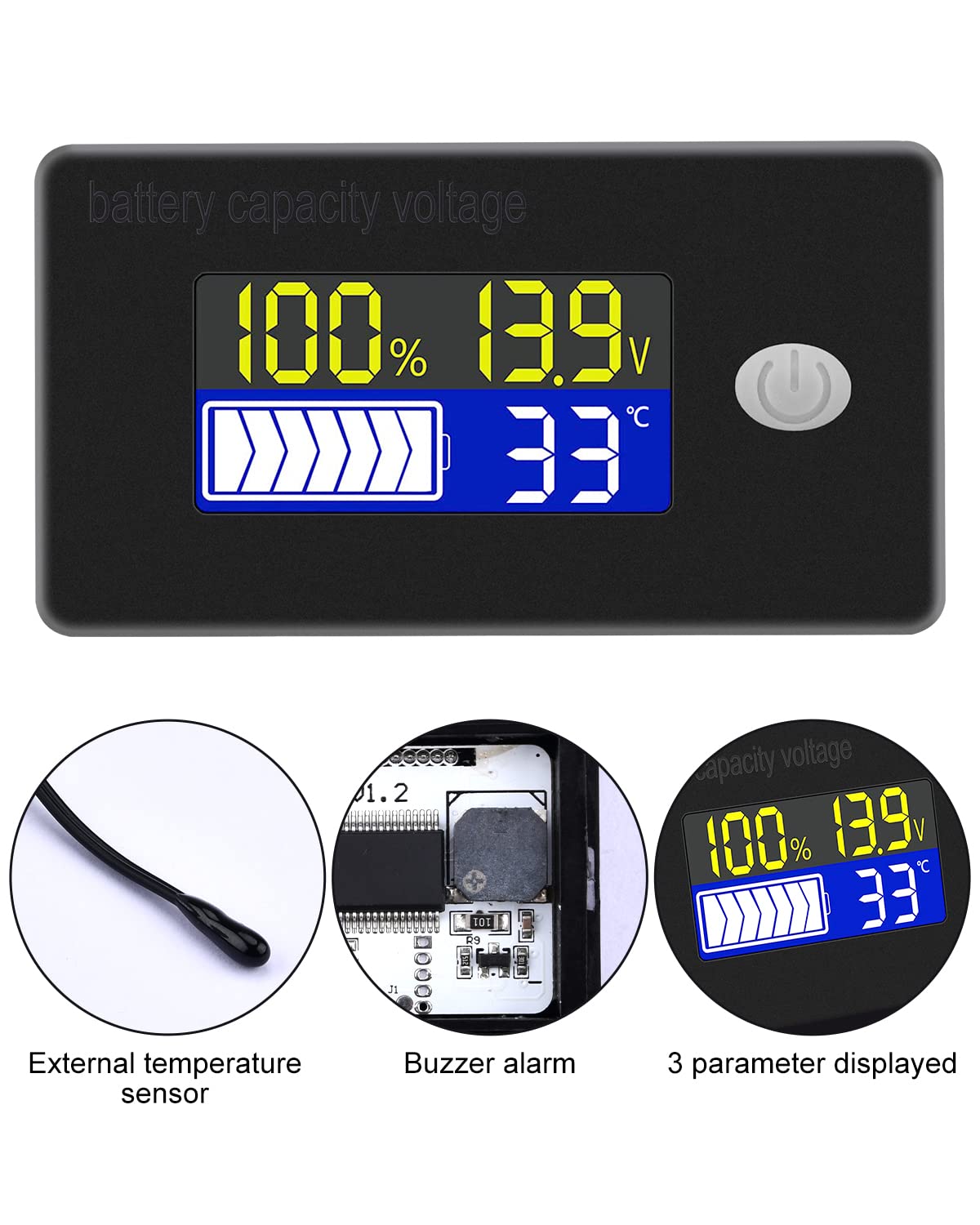
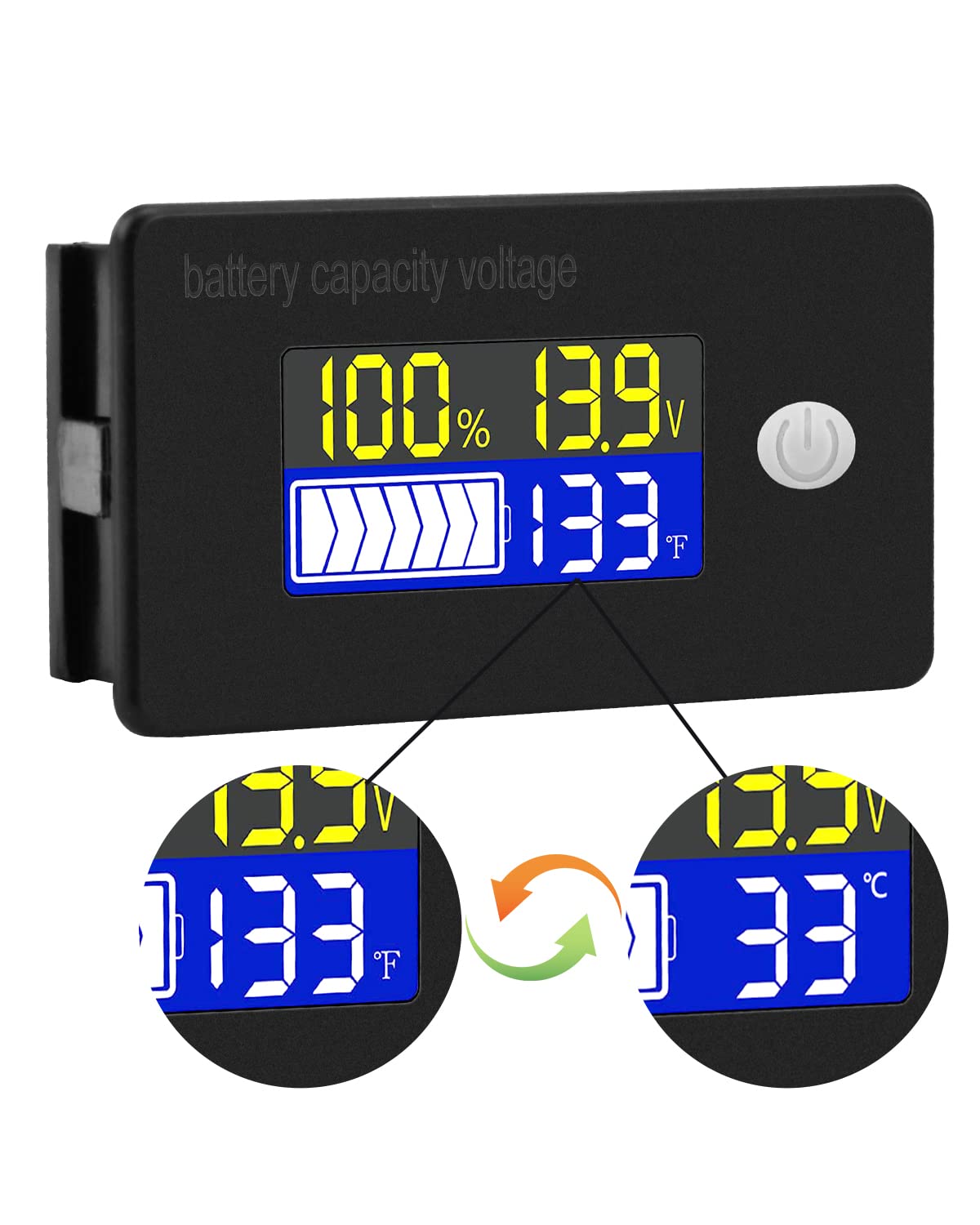
- Мултифункционални екран: Simultaneously shows battery capacity percentagе, волtage, and temperature (Celsius or Fahrenheit).
- Интегрисана заштита: Equipped with a protective cover, dustproof and waterproof surface, and reverse input connection protection.
- External Temperature Sensor & Buzzer: Includes an external temperature sensor for accurate readings and an internal buzzer for high/low voltage and over-temperature alarms.
- Six Programmable Modes: Allows setting battery type, delay for ultra-low power mode, adjusting battery percentage limits, activating undervoltage alarm and threshold, activating temperature alarm, and voltagе калибрација.
- Широка компатибилност са батеријама: Compatible with 12V, 24V, 36V, 48V, 60V, 72V, 84V lead-acid batteries, lithium-ion batteries, polymer lithium-ion batteries, 3-15 series lithium-ion batteries, water batteries, and lithium iron phosphate batteries.
- Широка примена: Suitable for use in jet skis, golf carts, RVs, lawnmowers, aquariums, DIY solar generators, and other systems requiring battery monitoring.
3. Садржај пакета
Молимо вас да проверите пакет за следеће ставке:
- Voktta Battery Capacity Voltagе Метер
- Connection Wires (Red for positive, Black for negative)
- Екстерни температурни сензор
- Кориснички приручник (овај документ)

4. Безбедносне информације
- Увек искључите напајање пре инсталирања или сервисирања уређаја.
- Ensure correct polarity when connecting the wires (Red to positive, Black to negative) to prevent damage to the meter and battery.
- Не прекорачујте наведену радну запреминуtagе опсег (10-100В).
- Keep the device away from extreme temperatures, moisture, and corrosive environments.
- Не покушавајте да растављате или модификујете уређај. Сва сервисирања препустите квалификованом особљу.
5. Производ је готовview
The Voktta Battery Capacity Voltage Meter features a compact design with a clear LCD display and a single control button. The external temperature sensor provides accurate ambient or battery temperature readings.

6. Инсталација и ожичење
Пратите ове кораке за правилну инсталацију:
- Монтажа: Choose a suitable location for the meter, ensuring it is protected from direct impact and excessive vibration. The meter is designed for panel mounting.
- Прикључак за напајање: Connect the red wire to the positive (+) terminal of your battery system and the black wire to the negative (-) terminal. Ensure a secure connection. The meter supports a wide voltagе улазни опсег од 10-100В.
- Прикључак температурног сензора: Plug the external temperature sensor into its designated port on the back of the meter. Position the sensor to measure the desired temperature (e.g., near the battery for battery temperature, or in the environment for ambient temperature).

7. Почетно подешавање
After connecting the meter, you may need to configure it for your specific battery type and preferences.
7.1 Укључивање/искључивање
Press the power button (usually located on the front panel) to turn the device on or off.

7.2 Подешавање типа батерије
The meter supports various battery types. Refer to the detailed programming instructions (often accessed by holding the power button or a dedicated 'SET' button) to select the correct battery chemistry and voltage configuration (e.g., 3S Lithium, 12V Lead-Acid).

8. Упутство за употребу
Once powered on and configured, the meter will display real-time battery information.
8.1 Режими приказа
The display typically shows battery capacity percentagе, актуелна волtage, and temperature. Some models allow switching between Celsius and Fahrenheit for temperature display.
8.2 функција аларма
The internal buzzer will activate if the battery voltage falls below the set low voltage threshold, exceeds the high voltage threshold, or if the temperature goes beyond the set limits. This provides an audible warning for critical conditions.
9. Напредна конфигурација
The meter offers several programmable modes for fine-tuning its operation. Access these modes by following the specific button press sequences outlined in the full product documentation (if provided separately) or by holding the main button for an extended period.
- Battery Type Setting: Configure the meter for your specific battery chemistry and cell count (e.g., LiFePO4, Li-ion, Lead-Acid, 3S, 4S, etc.).
- Ultra-Low Power Mode Delay: Set a delay (10s, 20s, 30s, 60s, 120s adjustable) before the meter enters a low power consumption state to conserve energy.
- Проценат батеријеtagе Ограничења: Adjust the upper and lower voltage thresholds that correspond to 100% and 0% battery capacity for accurate percentagе дисплеј.
- Ундерволtagе Аларм: Activate and set the specific voltage threshold (e.g., 10.5V to 60.0V) at which the low voltage alarm will trigger.
- Аларм за прекомерну температуру: Activate and set the temperature threshold (e.g., 0°C to 79°C or 0°F to 179°F) at which the over-temperature alarm will trigger.
- Волtagе калибрација: Изведите волtage calibration to ensure the most accurate readings.
10. Спецификације
| Параметар | Валуе |
|---|---|
| Бранд | Voktta |
| Број модела | B0BHSSKRVP |
| Оператинг Волtage | 10-100В |
| Оператинг Цуррент | 8-10мА |
| Потрошња енергије (режим спавања) | 15-20уА |
| Волtagе Прецизност | ±0.1% ~ ±0.5% |
| Прецизност температуре | ±0.5℃ ~ ±1℃ (built-in standard, external 30cm probe) |
| Температурни опсег | -19~80℃ / 0~179℉ |
| Over-temperature Alarm Setting | 0~79℃ / 0~179℉ |
| Лов Волtagе Подешавање аларма | 10.5~60.0В |
| Буззер Волуме | 60~80дБ |
| Радна температура | -10~65℃ |
| Боја | Црно |
| Усклађеност | ЦЕ, ИП67, РоХС |
| Меасуремент Типе | Волтметар |
КСНУМКС. Решавање проблема
If you encounter issues with your Voktta Battery Capacity Voltage Meter, refer to the following common problems and solutions:
- Без приказа:
- Check power connections: Ensure red wire is connected to positive and black to negative, and connections are secure.
- Проверите запремину батеријеtage: Потврдите јачину батеријеtage is within the 10-100V operating range.
- Нетачна очитавања:
- Волtagе/Капацитет: Уверите се у исправан тип и запремину батеријеtage configuration are set in the meter's settings. Perform voltage calibration if available.
- температура: Check if the external temperature sensor is properly connected and positioned.
- Alarm Constantly Triggering:
- Review alarm thresholds: Adjust the low voltagе, висока волtage, or over-temperature alarm settings to appropriate levels for your battery and application.
- Check battery health: A constantly triggering low voltage alarm might indicate a failing battery.
- Дугмад не реагују:
- Power cycle the device: Turn the meter off and then on again.
- Ensure no debris is obstructing the buttons.
12. Одржавање
To ensure the longevity and accurate operation of your Voktta Battery Capacity Voltage Meter, follow these maintenance guidelines:
- Чишћење: Користите меку, суву крпу за чишћење екрана и кућишта. Не користите абразивна средства за чишћење или раствараче.
- Везе: Периодично проверавајте све спојеве ожичења како бисте били сигурни да су безбедни и да немају корозије.
- Заштита животне средине: While the device has some dust and water resistance (IP67), avoid prolonged exposure to harsh weather conditions or direct water immersion.
- Складиштење: Ако складиштите уређај дуже време, искључите га из извора напајања и чувајте га на хладном и сувом месту.
13. Подршка
For any questions, technical assistance, or if you encounter issues not covered in this manual, please contact Voktta customer support. We are committed to providing assistance to resolve any problems you may experience.
Контакт информације се обично могу наћи на паковању производа или код продавца webсајт где је производ купљен.