
TENVIS IP602W
TENVIS IP602W Outdoor IP Camera User Manual
Model: IP602W
Марка: ТЕНВИС
Увод
The TENVIS IP602W is a robust outdoor IP camera designed for reliable surveillance. It offers broad compatibility, supporting not only Windows OS but also Mac OS and other platforms accessible via an internet browser. Its design facilitates easy installation, allowing for wall mounting and wireless connectivity.
Equipped with a 1/4 CMOS image sensor and a 6mm lens, the IP602W delivers video at a maximum frame rate of 30 frames per second, with a resolution of up to 640 x 480 pixels. For low-light and nighttime environments, the camera features 30 infrared LEDs, providing high levels of invisible light for clear visibility. Mobile viewing is supported across multiple platforms via 3G networks, including iPhone, Android, Windows Mobile, and Java phones, enabling remote monitoring from any location with internet access.
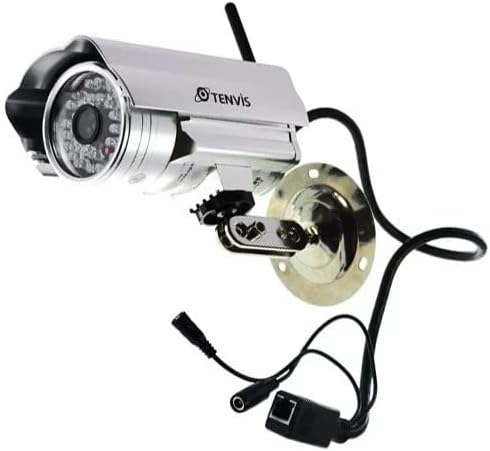
Image: The TENVIS IP602W Outdoor IP Camera, showcasing its durable build, integrated mounting bracket, and connectivity cables.
Шта је у кутији
Након отварања пакета, проверите да ли су све следеће компоненте укључене:
- 1 x IP602W WiFi IP Camera
- 1 x Power Adaptor (AU Plug)
- КСНУМКС к ВиФи антена
- 1 к носач за монтажу
- 1 x CD (containing software/drivers)
- 1 x Screw Set for mounting
- 1 к Упутство за употребу

Image: All components included in the TENVIS IP602W package, laid out for verification.
Карактеристике производа
The TENVIS IP602W camera is equipped with several key features to enhance its performance and usability:
- Night Version: Integrated infrared LEDs provide clear visibility in low-light and complete darkness.
- Бежична подршка: Connects to your network via Wi-Fi for flexible placement.
- Metal and Waterproof Shell: Designed for outdoor use with a durable, weather-resistant casing.
- Детекција покрета: Configurable motion detection alerts for security monitoring.
- Компатибилност на више платформи: Подржава viewing and control from various operating systems and browsers, including Windows, Mac OS, Firefox, Chrome, and Safari.
- Мобилни View: Access live feeds and controls from mobile devices via 3G network, supporting iPhone, Android, Windows Mobile, and Java phones.

Image: Visual representation of the TENVIS IP602W camera, emphasizing its key features such as night vision and wireless capabilities.
Подешавање и инсталација
Идентификација компоненте
Familiarize yourself with the camera's ports and components before installation:
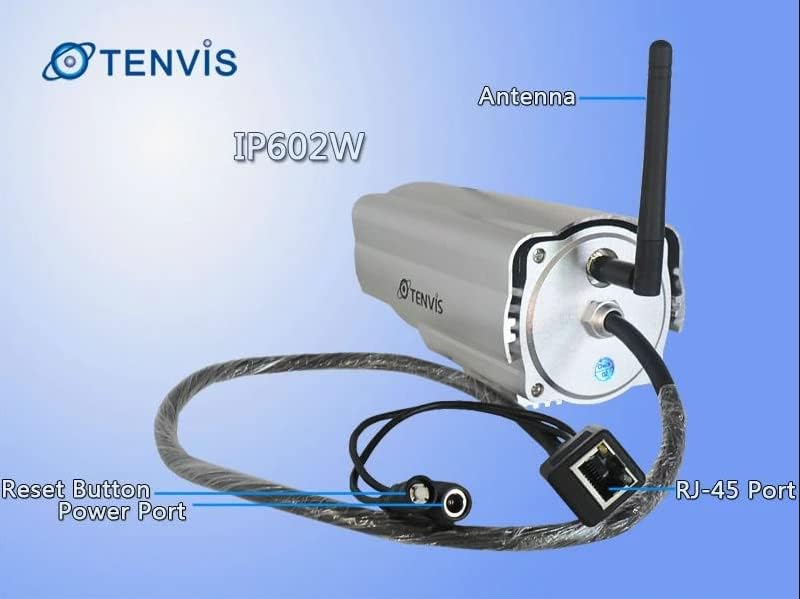
Слика: Детаљна view of the TENVIS IP602W camera's rear, showing the antenna, RJ-45 Ethernet port, power input, and reset button.
- Антена: За бежичну мрежну везу.
- РЈ-45 порт: For wired Ethernet connection to your router.
- Напајање: Овде повежите испоручени адаптер за напајање.
- Дугме за ресетовање: Користи се за враћање на фабричка подешавања.
Мрежна веза
The IP602W can connect to your network wirelessly or via an Ethernet cable. For initial setup, a wired connection is often recommended for stability.

Image: Network diagram showing how the IP602W camera connects to a router, allowing access from a LAN PC, Internet PC, and 3G phone.
- Connect the camera to your router using an Ethernet cable (if using wired setup).
- Прикључите адаптер за напајање на камеру и укључите га у електричну утичницу.
- Allow the camera a few minutes to power on and initialize.
- Refer to the included CD or the TENVIS website for software installation and detailed network configuration instructions, especially for wireless setup.
Монтажа
The camera comes with a mounting bracket for easy installation on a wall or other suitable surface. Ensure the mounting location provides a clear view and is within range of your Wi-Fi signal or Ethernet cable.
- Choose a suitable outdoor location for mounting.
- Користите монтажни носач као шаблон за обележавање рупа за бушење.
- Drill the necessary holes and insert wall anchors if required.
- Причврстите носач за монтажу на површину помоћу приложених вијака.
- Attach the camera to the mounting bracket and adjust its angle for optimal viewинг.
Операција
Once the camera is set up and connected to your network, you can begin monitoring. The IP602W supports various viewметоде:
- PC/Mac Access: Use the provided software or a compatible web browser (Firefox, Chrome, Safari) to access the camera's live feed and settings from your computer.
- Mobile Device Access: Download the TENVIS mobile application (if available) or use a compatible mobile browser on your iPhone, Android, Windows Mobile, or Java phone to view the camera remotely via a 3G network connection.
- Квалитет видеа: The camera streams video at up to 640x480 resolution with a frame rate of 30fps, providing clear and smooth surveillance footage.
- Детекција покрета: Configure motion detection settings through the camera's interface to receive alerts when movement is detected in the monitored area.
Одржавање
Regular maintenance helps ensure the longevity and optimal performance of your TENVIS IP602W camera:
- Чишћење: Периодично чистите сочиво и кућиште камере меком крпомamp крпу. Избегавајте абразивна средства за чишћење или раствараче.
- Инспекција каблова: Check all cables (power, Ethernet) for any signs of wear, damage, or loose connections.
- Ажурирања фирмвера: Check the TENVIS official website periodically for any available firmware updates. Keeping the firmware updated can improve performance and security.
- Провере животне средине: Ensure the camera's mounting remains secure and that no obstructions are blocking its field of view.
Решавање проблема
If you encounter issues with your IP602W camera, try the following steps:
- Нема напајања: Ensure the power adapter is securely connected to both the camera and a working electrical outlet.
- Нема мрежне везе:
- For wired connection, check the Ethernet cable and router status.
- For wireless connection, ensure the Wi-Fi antenna is properly attached and the camera is within range of your router. Verify Wi-Fi settings in the camera's configuration.
- Не могу приступити камери: Verify the camera's IP address. Ensure your computer or mobile device is on the same network or has proper internet access for remote viewing. Check firewall settings on your computer.
- Лош видео квалитет: Ensure the lens is clean. Check network bandwidth and signal strength.
- Ресетовање камере: If issues persist, use the reset button (refer to Component Identification) to restore factory default settings. You will need to reconfigure the camera after a reset.
Спецификације
| Феатуре | Детаљ |
|---|---|
| Назив модела | ИП602В |
| Бранд | ТЕНВИС |
| Унутрашња/спољна употреба | Оутдоор |
| Технологија повезивања | бежични (Ви-Фи) |
| Тип контролера | Android (and other platforms) |
| Тип монтаже | Валл Моунт |
| Резолуција снимања видео записа | 480п (640 к 480) |
| Фраме Рате | 30 фпс |
| Технологија фото сензора | CMOS (1/4 inch) |
| Ленс | 6мм |
| Лов Лигхт Тецхнологи | Night Color (Infrared LEDs) |
| Тип упозорења | Мотион Онли |
| Димензије производа | 10 к 9.5 к 4 инча |
| ГТИН | 06928446299816 |
Гаранција и подршка
For warranty information, technical support, or further inquiries regarding your TENVIS IP602W camera, please refer to the official TENVIS website or contact their customer service directly. The included CD may also contain support contact details.
You can visit the official TENVIS store for more information: TENVIS Store on Amazon