
Увод
Thank you for choosing the Dpofirs Portable MP3 Player. This device is designed to provide high-quality, lossless audio playback in a compact and durable form factor. This manual will guide you through the setup, operation, and maintenance of your new MP3 player.
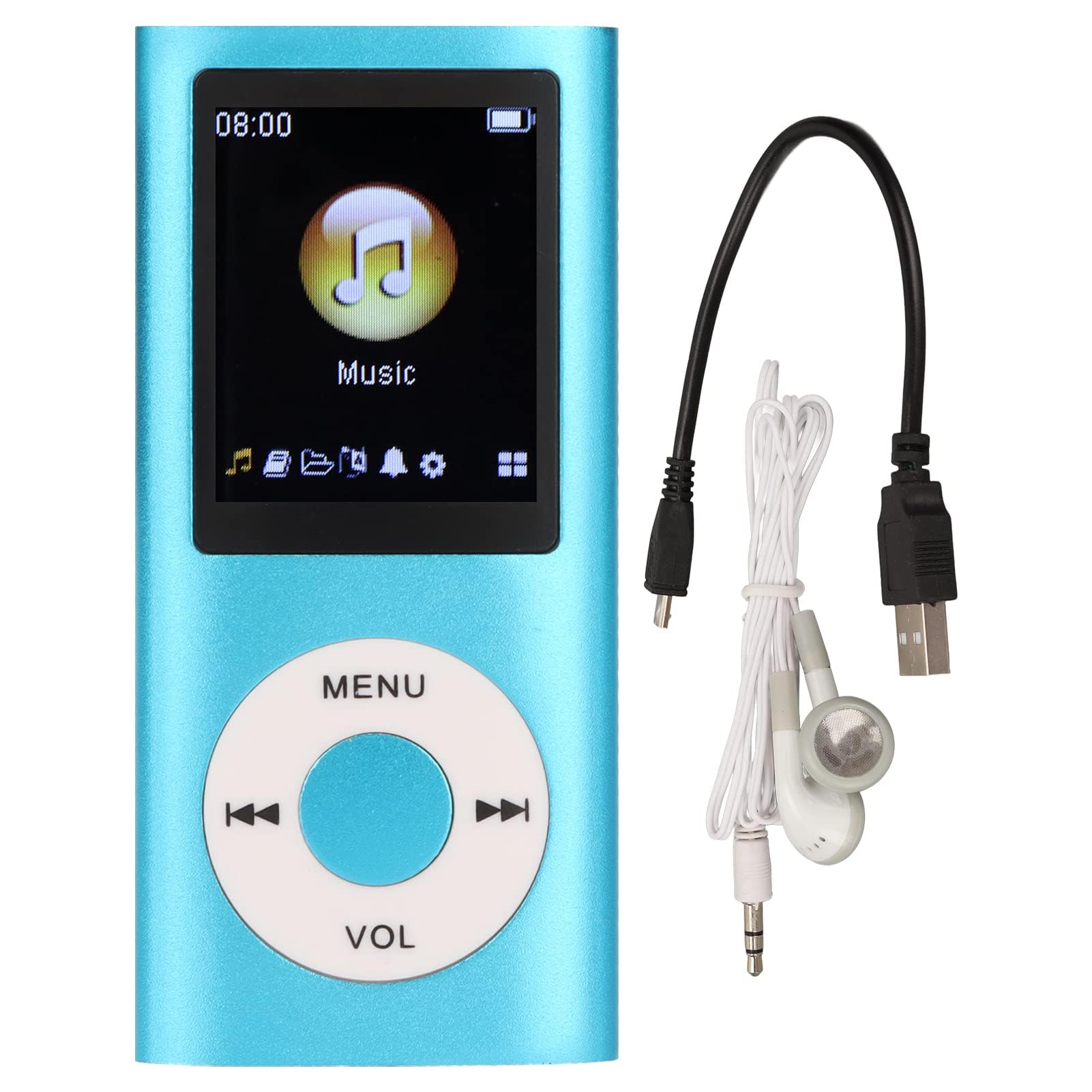
Image: The Dpofirs Portable MP3 Player, featuring a blue aluminum alloy casing and a circular control pad. A person is visible in the background, enjoying music with headphones.
Садржај пакета
Молимо вас да проверите пакет за следеће ставке:
- 1 x Dpofirs MP3 Player
- 1 к кабл за пуњење
- 1 к слушалице
Кључне карактеристике
- Квалитет звука без губитака: Supports MP3, WMA, FLAC, APE, AAC, OGG, and ACELP audio formats.
- Проширива меморија: Supports up to 64GB memory card (not included). MYMAHDI memory cards are recommended.
- Интерфејс прилагођен кориснику: Easy navigation for selecting songs, creating playlists, and managing playback.
- Дуг век трајања батерије: До 8 сати непрекидне репродукције уз пуно пуњење.
- Издржљив дизајн: Constructed from premium aluminum alloy for enhanced durability.
- Режими репродукције: Supports sequential and random playback, and sleep shutdown function.
Сетуп
1. Пуњење уређаја
Before first use, fully charge your MP3 player.
- Connect the provided charging cable to the MP3 player's charging port.
- Повежите други крај кабла са УСБ адаптером за напајање (није укључен) или УСБ портом рачунара.
- The device will indicate charging status. A full charge typically takes approximately 2 hours.
Важно: Ensure the charging cable is functioning correctly. If the device does not charge, try a different USB port or adapter.
2. Убацивање меморијске картице
The MP3 player requires a memory card for storing music.
- Locate the memory card slot on the side of the MP3 player.
- Gently insert a microSD card (up to 64GB, not included) into the slot until it clicks into place.
- Да бисте је уклонили, благо гурните картицу унутра док не искочи.
Напомена: A memory card is not included with the player. MYMAHDI brand memory cards are recommended for optimal performance.
3. Connecting Earphones
Connect the provided earphones or your preferred 3.5mm audio headphones to the headphone jack on the MP3 player.
Упутство за употребу
1. Укључивање/искључивање
- To power on, press and hold the power button (usually the Play/Pause button or a dedicated power button) until the screen lights up.
- Да бисте искључили напајање, поново притисните и држите дугме за напајање док се екран не искључи.
2. Основна навигација
The MP3 player features a circular control pad with several buttons:
- МЕНИ: Access the main menu or go back to the previous screen.
- ВОЛ (+/-): Подесите ниво јачине звука.
- Пусти/паузирај: Покрените или паузирајте репродукцију.
- Следећи/Претходни: Skip to the next track or go back to the previous track. Long press to fast forward/rewind.
3. Пренос музике Files
To transfer music to your MP3 player:
- Connect the MP3 player to your computer using the charging cable.
- The player should appear as a removable disk drive on your computer.
- Превуците и испустите своју музику files (MP3, WMA, FLAC, APE, AAC, OGG, ACELP) into the player's memory card folder.
- Безбедно избаците уређај из рачунара пре него што искључите кабл.
4. Puštanje muzike
- From the main menu, navigate to the "Music" or "Audio" section.
- Browse your music by artist, album, genre, or all songs.
- Изаберите песму да бисте започели репродукцију.
- Use the Play/Pause, Next/Previous, and VOL buttons to control playback.
5. Playback Options
- Плејлисте: Create and manage custom playlists directly on the device.
- Shuffle/Repeat: Toggle between sequential playback, shuffle, and repeat modes.
- Sleep Shutdown: Set a timer for the device to automatically power off.
Одржавање
- Keep the device dry. Moisture can damage internal circuits.
- Избегавајте екстремне температуре.
- Clean the device with a soft, dry cloth. Do not use harsh chemicals or cleaning agents.
- Заштитите екран од огреботина.
- Чувајте уређај на безбедном месту када га не користите.
Решавање проблема
Уређај се не укључује:
- Ensure the battery is charged. Connect the player to a power source and allow it to charge for at least 30 minutes.
- Try pressing and holding the power button for an extended period (5-10 seconds).
Cannot hear any sound:
- Check if the earphones are properly connected to the headphone jack.
- Increase the volume using the VOL+ button.
- Test with a different pair of earphones to rule out faulty headphones.
- Осигурајте звук files are not corrupted and are in a supported format.
Музика files are not recognized:
- Ensure the memory card is properly inserted and recognized by the device.
- Проверите да ли је музика files are in one of the supported formats (MP3, WMA, FLAC, APE, AAC, OGG, ACELP).
- Try reformatting the memory card (this will erase all data) and re-transferring the music.
- Ensure the memory card is not full.
Уређај се замрзава или престаје да реагује:
- Притисните и држите дугме за напајање око 10-15 секунди да бисте поново покренули рачунар.
- If available, use a small pin to press the reset button (if present on the device).
Спецификације
| Бранд | Дпофирс |
| Број модела | Dpofirs5yhtvp70d23123-13 |
| Материјал | Алуминијумска легура |
| Батерија | Уграђена литијумска батерија од 200мАх |
| Време пуњења | Прибл. 2 сата |
| Време репродукције | До 8 сати (потпуно напуњено) |
| Подршка за меморијску картицу | Up to 64GB (microSD, not included) |
| Подржани аудио формати | MP3, WMA, FLAC, APE, AAC, OGG, ACELP |
| Технологија повезивања | Auxiliary, Bluetooth, Wi-Fi (Note: Bluetooth/Wi-Fi functionality not detailed in product description, focusing on core MP3 player features) |
| Боја | Плава |
| Земља порекла | Кина |
Гаранција и подршка
Specific warranty information for this product is not provided in the available documentation. Please refer to the retailer's return policy or contact the seller directly for details regarding warranty coverage.
For technical support or further assistance, please contact Dpofirs customer service through the platform where you purchased the product.