
1. Увод
Thank you for choosing the Gembird USB-C Gigabit Network Adapter with 3-Port USB 3.1 Hub. This device is designed to expand the connectivity of your USB-C enabled laptop, tablet, or computer, providing both high-speed Gigabit Ethernet and additional USB 3.1 ports. This manual provides essential information for setting up, operating, and maintaining your device.
2. Карактеристике производа
- УСБ-Ц повезивање: Connects to your host device via a reversible USB-C port.
- Гигабитни Етхернет порт: Provides a stable and fast wired network connection up to 1000 Mbps.
- 3-портни USB 3.1 хаб: Adds three USB 3.1 ports for connecting peripherals such as external hard drives, flash drives, keyboards, and mice.
- Пренос података велике брзине: USB 3.1 ports support data transfer rates up to 5 Gbps.
- Плуг анд Плаи: No driver installation required for most modern operating systems.
3. Садржај пакета
Please ensure the following items are included in your package:
- Gembird USB-C Gigabit Network Adapter with 3-Port USB 3.1 Hub (Model A-CMU3-LAN-01)
4. Производ је готовview
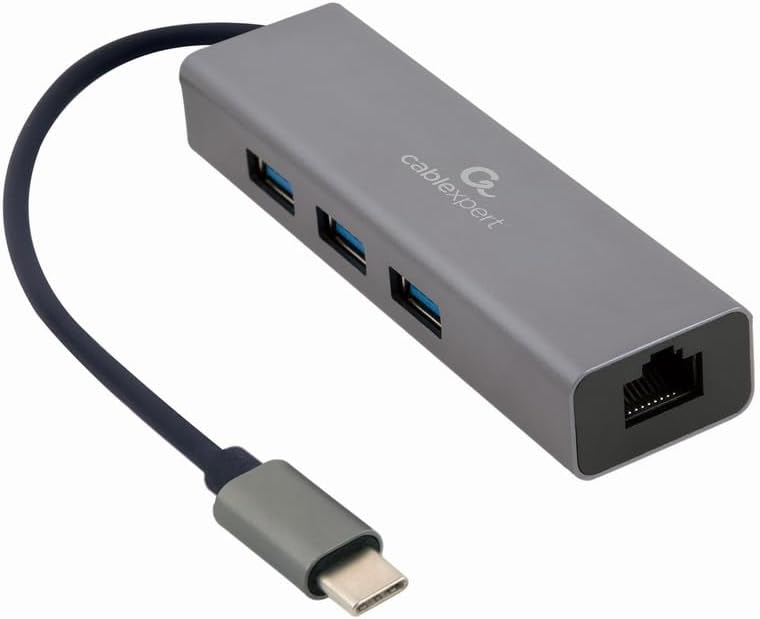
Слика 1: Фронт view of the Gembird USB-C Gigabit Network Adapter, showing the USB-C cable, three USB 3.1 ports, and the RJ45 Gigabit Ethernet port.

Слика 2: Retail packaging for the Gembird USB-C Gigabit Network Adapter, highlighting key features like USB Type-C, USB 3.1 x 3, RJ45, Gigabit, 1000 Mbps, and Plug & Play.
5. Подешавање
Follow these steps to set up your Gembird USB-C Gigabit Network Adapter:
- Повежите се са хост уређајем: Plug the USB-C connector of the adapter into an available USB-C port on your laptop, tablet, or computer.
- Повежите се на мрежу: Insert an Ethernet cable (RJ45) from your router or modem into the Gigabit Ethernet port on the adapter.
- Повежите УСБ периферне уређаје: Plug your USB devices (e.g., flash drives, external hard drives, mouse, keyboard) into the three available USB 3.1 ports on the adapter.
- Инсталација драјвера: The adapter is typically plug-and-play. Your operating system (Windows, macOS, Linux, Chrome OS) should automatically detect and install the necessary drivers. If prompted, allow the system to install drivers.
6. Упутство за употребу
Once connected, the adapter functions automatically:
- Приступ мрежи: Your host device should now have a wired network connection. You can verify this in your operating system's network settings.
- USB Device Access: Connected USB peripherals will be recognized by your host device and function as if directly connected.
КСНУМКС. Решавање проблема
Ако наиђете на проблеме, погледајте следеће уобичајене проблеме и решења:
- Нема мрежне везе:
- Ensure the Ethernet cable is securely connected to both the adapter and your router/modem.
- Check your router/modem for proper operation.
- Verify network settings on your host device.
- Try connecting the adapter to a different USB-C port on your host device.
- USB уређаји нису препознати:
- Ensure USB devices are properly plugged into the adapter's USB 3.1 ports.
- Try connecting the USB device directly to your host computer to confirm it is functional.
- Some high-power USB devices may require an external power source if your host device's USB-C port does not provide sufficient power (this adapter does not have a dedicated power input).
- Мала брзина мреже:
- Ensure your Ethernet cable is rated for Gigabit speeds (Cat5e or higher).
- Verify your internet service provider's speed and your router's capabilities.
- Ensure your host device's USB-C port supports USB 3.0/3.1 speeds.
8. Спецификације
| Број модела | A-CMU3-LAN-01 |
| Хардверски интерфејс | USB-C (Host), USB 3.1 (Hub), RJ45 (Ethernet) |
| Укупно УСБ портова | 3 (УСБ 3.1) |
| Етхернет портови | 1 (Gigabit RJ45) |
| Data Transfer Rate (USB) | До 5 Gbps (USB 3.1) |
| Data Transfer Rate (Ethernet) | 10/100/1000 Мбпс |
| Димензије производа | 10 к 2 к 2.7 инча |
| Тежина артикла | 2.46 унци |
9. Одржавање
To ensure the longevity and optimal performance of your adapter:
- Чишћење: Use a soft, dry cloth to clean the exterior of the device. Avoid liquid cleaners or solvents.
- Складиштење: Чувајте адаптер на хладном и сувом месту, даље од директне сунчеве светлости и екстремних температура када се не користи.
- Руковање: Avoid dropping or subjecting the device to strong impacts. Do not attempt to disassemble the adapter.
10. Гаранција и подршка
This Gembird product comes with a two-year warranty against factory defectsМолимо вас да сачувате доказ о куповини за потребе гаранције.
For technical support or warranty inquiries, please contact your retailer or visit the official Gembird webсајт за контакт информације.