
Увод
Thank you for choosing the Vicloon Digital Alarm Clock. This manual provides detailed instructions for the setup, operation, and maintenance of your device. Please read it carefully to ensure proper use and to maximize the clock's features.
Производ је завршенview
The Vicloon Digital Alarm Clock features a clear LCD display, showing time, date, day of the week, and temperature. It includes a 12/24-hour format switch, alarm with snooze, night light, and a timer function.

Слика: Фронт view of the Vicloon Digital Alarm Clock displaying time, date, day, and temperature, with icons indicating its multifunctional capabilities including time, alarms, snooze, 12/24 hour format, thermometer, night light, key tone, and countdown function.
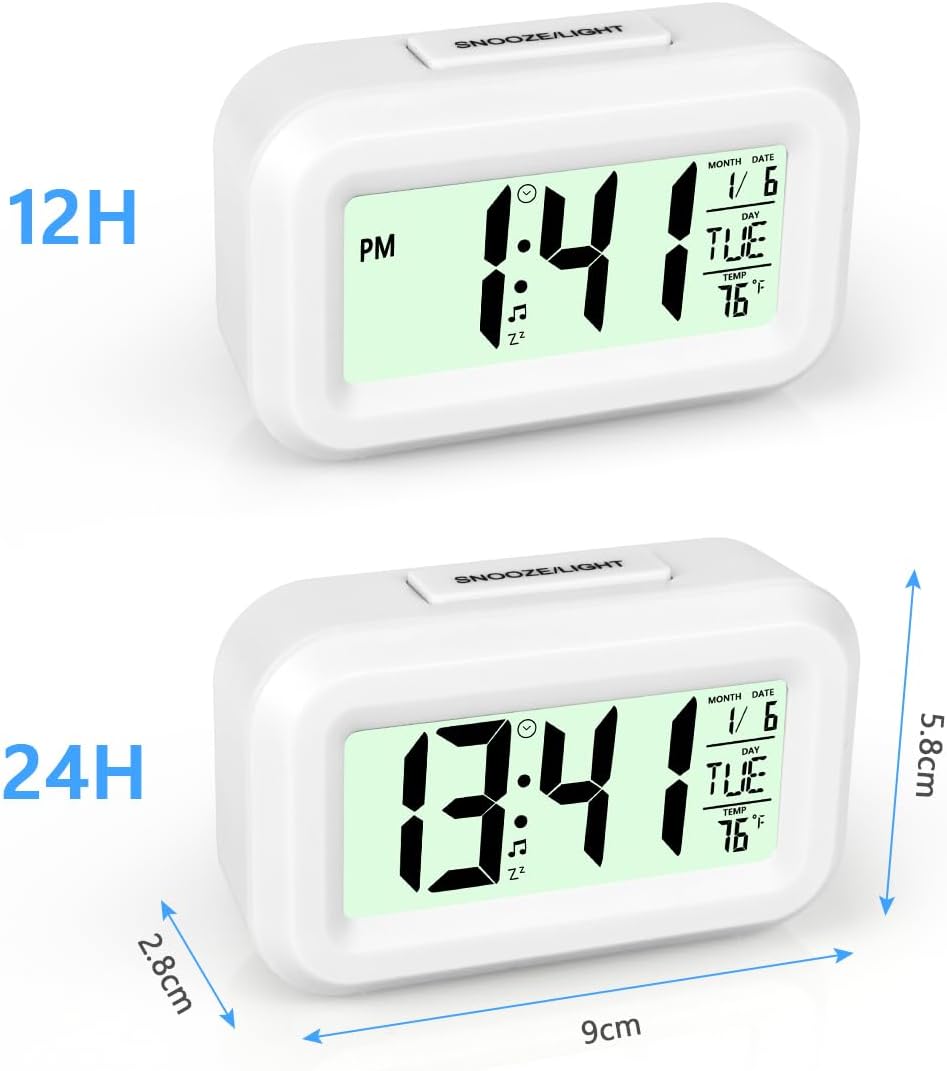
Слика: Два views of the Vicloon Digital Alarm Clock, one showing time in 12-hour format (1:41 PM) and the other in 24-hour format (13:41), along with product dimensions (9cm width, 5.8cm height, 2.8cm depth).
Сетуп
Инсталација батерије
The alarm clock is powered by batteries (not included).
- Пронађите одељак за батерије на полеђини сата.
- Скините поклопац батерије.
- Уметните две ААА батерије, водећи рачуна о исправном поларитету (+/-).
- Вратите поклопац батерије безбедно.

Слика: Позади view of the Vicloon Digital Alarm Clock, highlighting the battery compartment for two AAA batteries (not included) and labeled control buttons: МОДЕ, СЕТ, ТИМЕР, и АДЈ, along with the СНООЗЕ / СВЕТЛО дугме на врху.
Упутство за употребу
Функције дугмета су завршенеview
- МОДЕ: Switches between Normal Time, Alarm Time, and Timer modes.
- СЕТ: Enters setting mode for time, date, alarm, or timer. Confirms settings.
- ТИМЕР: Activates the countdown timer function.
- АДЈ: Adjusts values (up/down) during setting mode. Toggles 12/24-hour format.
- СНООЗЕ / СВЕТЛО (Top Button): Activates snooze during an alarm. Briefly illuminates the backlight.
Промена режима приказа
Притисните тастер МОДЕ button to cycle through the display modes:
- Нормал Тиме Моде: Displays current time, date, day, and temperature.
- Режим времена аларма: Displays the set alarm time.
- Тимер Моде: Displays the countdown timer.

Image: The alarm clock displaying two different modes. On the left, Normal Time Mode shows the current time (10:31), date (1/6), day (TUE), and temperature (16°C). On the right, Alarm Time Mode shows the alarm icon and the set alarm time (10:31).
Подешавање времена и датума
- Притисните тастер МОДЕ button until you are in Normal Time Mode.
- Притисните и држите СЕТ дугме док цифре сати не почну да трепћу.
- Користите АДЈ dugme za podešavanje sata.
- Притисните СЕТ again to move to the minute digits, then use АДЈ прилагодити.
- Наставите да притискате СЕТ to cycle through and adjust year, month, and day using the АДЈ дугме.
- Притисните СЕТ још једном да бисте изашли из режима подешавања.

Image: Step-by-step guide for setting the normal time. It shows pressing МОДЕ to enter normal time mode, then pressing СЕТ until the number flashes, and finally using АДЈ да подесите време.
Формат 12/24 сата
In Normal Time Mode, press the АДЈ button to switch between 12-hour and 24-hour display formats.

Image: The alarm clock demonstrating the switch between 12-hour (1:31 PM) and 24-hour (13:31) time formats by pressing the АДЈ дугме.
Постављање аларма
- Притисните тастер МОДЕ button to enter Alarm Time Mode (bell icon will appear).
- Притисните тастер АДЈ button to toggle the alarm on or off. The alarm icon (♫) and snooze icon (zz) will appear when the alarm is active.
- Притисните и држите СЕТ дугме док цифре сата аларма не затрепере.
- Користите АДЈ dugme za podešavanje sata alarma.
- Притисните СЕТ again to move to the alarm minute digits, then use АДЈ прилагодити.
- Притисните СЕТ again to select the alarm melody (there are 9 selectable melodies). Use АДЈ to cycle through them.
- Притисните СЕТ one last time to confirm and exit alarm setting mode.

Image: Step-by-step guide for setting the alarm time and melody. It shows pressing МОДЕ to enter alarm mode, using АДЈ to turn the alarm on/off, pressing СЕТ to adjust flashing numbers, and using АДЈ to select from 9 alarm melodies.
Функција одлагања
Када се огласи аларм, притисните велико СНООЗЕ / СВЕТЛО button on top of the clock to activate the snooze function. The alarm will pause for five minutes and then sound again.

Image: A child sleeping next to the alarm clock, with a hand reaching to press the large СНООЗЕ / СВЕТЛО button on top, illustrating how to activate the snooze or backlight function.
Функција ноћног светла
Притисните тастер СНООЗЕ / СВЕТЛО button to briefly illuminate the display for 5 seconds. This is useful for checking the time in the dark without disturbing sleep.

Image: A split image showing the alarm clock in a dark room. The left side shows the display off when the night time sensor is off. The right side shows the display illuminated when the night time light is on, making the time visible.
Функција тајмера
The clock features a countdown timer. This is useful for various tasks, such as cooking or study sessions.
- У било ком режиму притисните ТИМЕР button to enter Timer Mode.
- Притисните и држите СЕТ button until the timer digits flash.
- Користите АДЈ button to set the desired countdown time (hours, minutes, seconds).
- Притисните СЕТ to confirm each segment.
- Притисните ТИМЕР again to start the countdown.
- When the timer reaches zero, an alarm will sound.

Image: Instructions for using the timer function. It shows pressing ТИМЕР to enter timer mode, then pressing СЕТ until the numbers flash, and using АДЈ to adjust the countdown time.
Одржавање
- Очистите сат меком, сувом крпом. Не користите абразивна средства за чишћење или раствараче.
- Избегавајте излагање сата екстремним температурама, директној сунчевој светлости или високој влажности.
- Ако се сат неће користити дуже време, извадите батерије да бисте спречили цурење.
Решавање проблема
| Проблем | Могући узрок | Решење |
|---|---|---|
| Clock does not turn on or display is blank. | Батерије су истрошене или неправилно постављене. | Замените батерије новим, водећи рачуна о исправном поларитету. |
| Аларм се не оглашава или је превише тих. | Alarm is not activated or volume is low (non-adjustable). | Ensure the alarm is turned on (bell icon visible). Note that alarm volume is fixed and cannot be adjusted. |
| Incorrect day of the week displayed. | Date was set incorrectly. | Re-enter time and date setting mode and ensure the correct year, month, and day are set. The day of the week is automatically calculated. |
| Backlight does not stay on. | This model features a temporary backlight. | The backlight is designed to illuminate for 5 seconds when the СНООЗЕ / СВЕТЛО button is pressed. It does not have a permanent 'always-on' feature. |
Спецификације
| Феатуре | Детаљ |
|---|---|
| Бранд | Vicloon |
| Број модела | 3085065 (BS-XLJLCDNZ+WT-FBA) |
| Боја | Бела |
| Дисплаи Типе | Дигитални ЛЦД |
| Посебне карактеристике | Alarm, Snooze, Night Light, Timer, Temperature Display, Date/Week Display, 12/24 Hour Format |
| Димензије производа (Ш x В) | 9.5 цм к 6 цм |
| Извор напајања | Batteries (AAA, not included) |
| Тип монтаже | Таблетоп |
| Материјал | акрилонитрил бутадиен стирен (АБС) |
| Мовемент Типе | кварц |
| Наменска употреба | Indoor (Bedroom, Office, Travel) |
| Земља порекла | Кина |
Гаранција и подршка
Ограничена гаранција
This Vicloon Digital Alarm Clock comes with a limited warranty. Please retain your proof of purchase for any warranty claims. Specific terms and conditions of the warranty may vary and are typically provided at the time of purchase or on the manufacturer's official webсајту.
Корисничка подршка
For further assistance, technical support, or inquiries regarding your product, please contact Vicloon customer service through the retailer where the product was purchased or refer to the official Vicloon webсајт за контакт информације.