
1. Увод
This manual provides essential information for setting up and operating your UMIDIGI C1 Max smartphone. Please read it thoroughly to ensure proper use and to maximize the device's capabilities. Keep this manual for future reference.
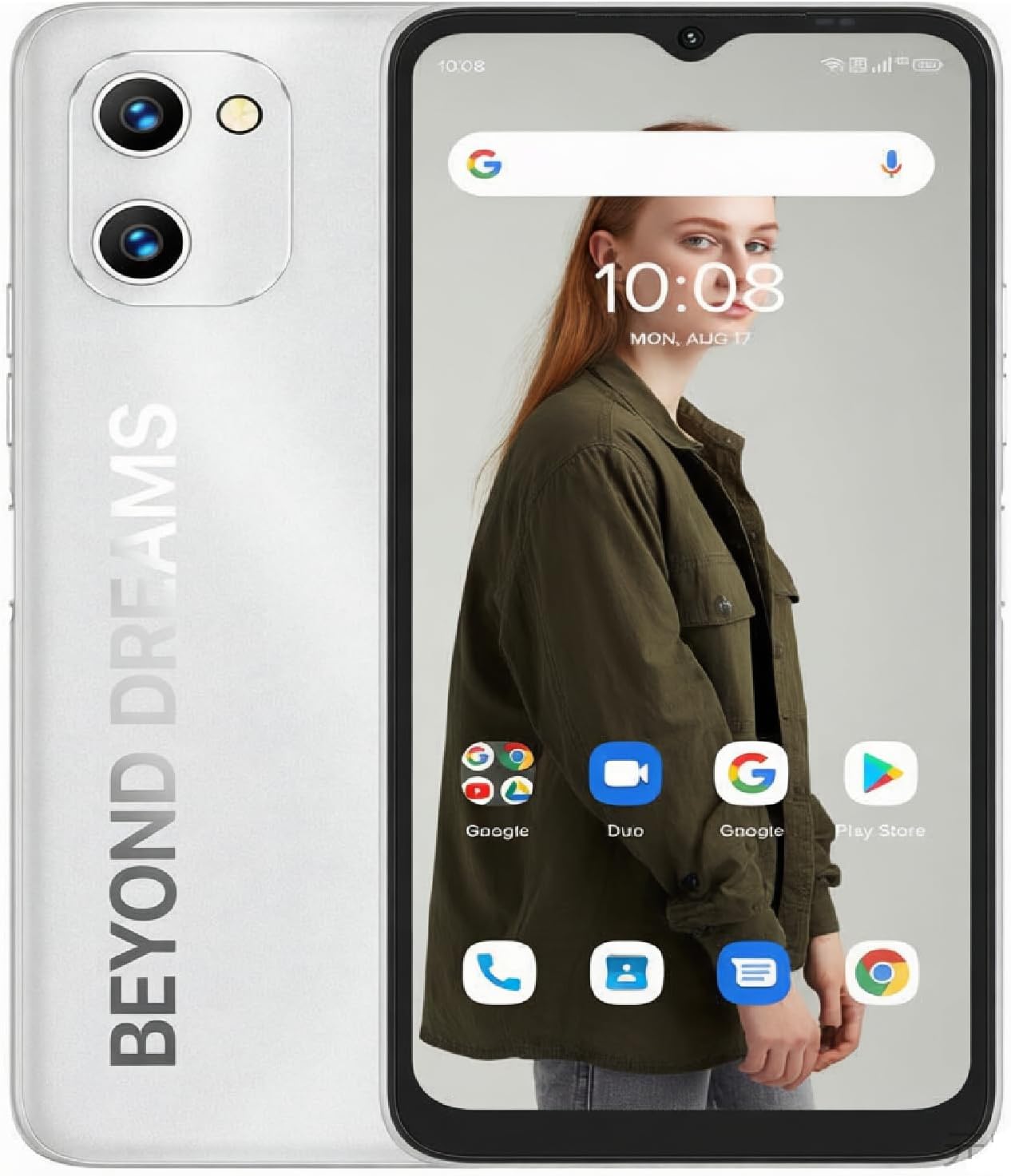
Figure 1: UMIDIGI C1 Max Smartphone Overview
2. Шта је у кутији
Проверите да ли су све ставке присутне у пакету:
- UMIDIGI C1 Max Smartphone
- УСБ кабл
- Адаптер за напајање (може да варира у зависности од региона)
- Алат за избацивање СИМ картице
- Protective Case (pre-installed or included separately)
- Screen Protector (pre-applied or included separately)
- Водич за брзи почетак
3. Девице Оверview
Familiarize yourself with the physical components of your UMIDIGI C1 Max.
Систем камера 3.1

Figure 2: Camera System Details
The UMIDIGI C1 Max features a versatile camera setup:
- Главна камера од 50 МП: За фотографије високе резолуције.
- Камера дубине од 2 МП: Побољшава портретни режим замућењем позадине.
- Селфи камера од 8 МП: For clear self-portraits and video calls.
3.2 Дисплеј

Figure 3: 6.52-inch HD+ Full-Screen Display
The device is equipped with a 6.52-inch HD+ full-screen display, offering a resolution of 1600 x 720 pixels and a 20:9 aspect ratio for an immersive viewинг искуство.
4. Подешавање
4.1 Инсталација SIM картице и MicroSD картице
The UMIDIGI C1 Max supports dual SIM cards and expandable storage via a MicroSD card. Locate the SIM tray on the side of the device.
- Уметните алат за избацивање СИМ картице у мали отвор на лежишту СИМ картице да бисте га отворили.
- Пажљиво извуците лежиште за СИМ картицу.
- Поставите своје Nano-SIM картице и/или MicroSD картице у предвиђене слотове на лежишту. Уверите се да су златни контакти окренути надоле.
- Пажљиво гурните лежиште назад у телефон док не кликне на своје место.
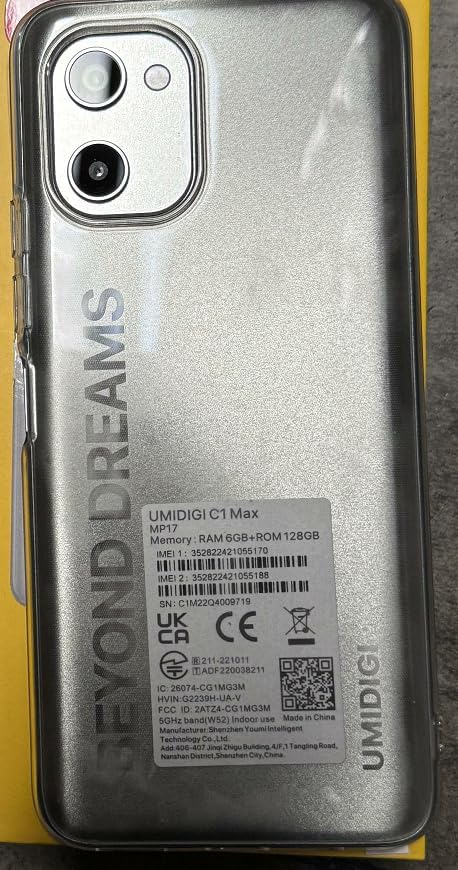
Слика 4: Задња страна View with Product Label (SIM tray location indicated on side)
For your device's unique identification, refer to the IMEI numbers located on the product label, as shown in Figure 5. The IMEI is a 15-digit number used to identify mobile phones.

Figure 5: Close-up of Product Information Label with IMEI
The IMEI numbers for this device are 352822421055188 и 352822421055188.
4.2 Почетно укључивање
Да бисте први пут укључили уређај:
- Press and hold the Power button (usually on the right side of the phone) until the UMIDIGI logo appears.
- Пратите упутства на екрану да бисте завршили почетно подешавање, укључујући избор језика, Wi-Fi везу, подешавање Google налога и безбедносна подешавања.
5. Основна операција
5.1 Укључивање/искључивање и поновно покретање
- Укључено: Притисните и држите дугме за напајање док уређај не завибрира и не појави се лого.
- Искључивање: Притисните и држите дугме за напајање, а затим из понуђених опција изаберите „Искључивање“.
- Поново покрени: Притисните и држите дугме за напајање, а затим изаберите „Рестарт“ из опција.
5.2 Закључавање и откључавање екрана
To lock the screen, briefly press the Power button. To unlock, press the Power button and swipe up, or use your configured fingerprint/face unlock.
5.3 Навигација
The UMIDIGI C1 Max runs on Android 12, offering intuitive navigation. You can choose between gesture navigation or traditional three-button navigation in the device settings.
5.4 Обављање позива и слање порука
Use the pre-installed Phone and Messages applications for communication. Ensure your SIM card is active and has network coverage.
5.5 Повезивање на Ви-Фи
- Иди на Подешавања > Мрежа и интернет > Ви-Фи.
- Укључите Ви-Фи.
- Изаберите жељену мрежу са листе и унесите лозинку ако се то од вас затражи.
5.6 Употреба камере
Open the Camera application to capture photos and videos. Tap the shutter button to take a picture. Swipe left or right to switch between modes like Photo, Video, Portrait, and more.
5.7 Управљање батеријом

Слика 6: Велика батерија од 5150 mAh
The UMIDIGI C1 Max is equipped with a 5150mAh battery. To charge, connect the USB cable to the phone's Type-C port and the power adapter, then plug the adapter into a wall outlet. For optimal battery life, avoid extreme temperatures and use the provided charger.
6. Напредне функције
6.1 Сензор отиска прста
The device features a side-mounted fingerprint sensor for quick and secure unlocking. To set up:
- Иди на Подешавања > Безбедност > Отисак прста.
- Пратите упутства на екрану да бисте регистровали отисак прста.
6.2 Откључавање лицем
For an alternative secure unlock method:
- Иди на Подешавања > Безбедност > Откључавање лицем.
- Пратите упутства да бисте регистровали своје лице.
6.3 ГПС навигација
The UMIDIGI C1 Max supports GPS for location services and navigation. Ensure location services are enabled in Подешавања > Локација.
6.4 Bluetooth повезивање
Да бисте се повезали са Bluetooth уређајима:
- Иди на Подешавања > Повезани уређаји > Блуетоотх.
- Укључите Блутут.
- Select the device you wish to pair from the list of available devices.
7. Перформансе и софтвер
7.1 Процесор и меморија

Figure 7: High-Performance Processor Details
The UMIDIGI C1 Max is powered by a Unisoc T610 Octa-core Processor, coupled with 6GB of RAM and 128GB of internal storage (expandable up to 256GB via MicroSD). This configuration ensures smooth multitasking and efficient performance for daily tasks and applications.
КСНУМКС Оперативни систем

Слика 8: Интерфејс Андроида 12
The device runs on Android 12, offering a user-friendly interface, enhanced privacy controls, and improved system performance.
8. Спецификације
| Феатуре | Спецификација |
|---|---|
| Назив модела | Ц1 Макс |
| Бранд | УМИДИГИ |
| Оперативни систем | Андроид 12.0 |
| РАМ | 6 ГБ |
| Капацитет меморије | 128 GB (прошириво до 256 GB) |
| Величина екрана | 6.52 инча |
| Резолуција | 720 к 1650 |
| Рефресх Рате | 60 Хз |
| Главна камера | 50 МП |
| Селфи камера | 8 МП |
| Капацитет батерије | 5150 Милиamp Сати |
| Време разговора телефоном | 20 сата |
| Време приправности телефона (са интернетом) | 300 сата |
| Време пуњења | Approximately 20 Hours (for full discharge to full charge, actual time may vary) |
| Аудио Јацк | УСБ тип Ц |
| Вирелесс Царриер | Откључано за све превознике |
| Целлулар Тецхнологи | 4G |
| Димензије производа | 6.46 к 3.01 к 0.34 инча |
| Тежина артикла | 6.8 унци (192 грама) |
КСНУМКС. Решавање проблема
If you encounter issues with your UMIDIGI C1 Max, try the following solutions:
- Уређај не реагује: Притисните и држите дугме за напајање око 10-15 секунди да бисте поново покренули рачунар.
- Рушење апликације: Close the app and reopen it. If the issue persists, clear the app's cache and data in Подешавања > Аппс.
- Проблеми са мрежом: Check if Airplane Mode is off. Restart your phone. Verify your SIM card is properly inserted.
- Батерија се брзо празни: Смањите осветљеност екрана, затворите некоришћене апликације, онемогућите непотребне функције попут GPS-а или Bluetooth-а када их не користите.
- Фацтори Ресет: Као последње средство, можете извршити фабричко ресетовање (Подешавања > Систем > Опције ресетовања > Обриши све податке (ресетовање на фабричка подешавања)). Упозорење: Овим ћете обрисати све податке на телефону. Направите резервну копију важних података пре него што наставите.
10. Безбедносне информације
Молимо придржавајте се следећих безбедносних смерница:
- Не излажите уређај екстремним температурама, директној сунчевој светлости или прекомерној влази.
- Use only UMIDIGI-approved chargers and accessories.
- Избегавајте испуштање или излагање уређаја јаким ударцима.
- Не покушавајте сами да раставите или поправите уређај.
- Одложите уређај и његову батерију одговорно у складу са локалним прописима.
11. Гаранција и подршка
Your UMIDIGI C1 Max smartphone comes with a standard manufacturer's warranty. For detailed warranty terms and conditions, please refer to the warranty card included in your package or visit the official UMIDIGI website. For technical support or service inquiries, please contact UMIDIGI customer service through their official channels.
12. Видео снимци производа
12.1 UMIDIGI C1 Max Smartphone Overview
Овај видео пружа свеобухватан прегледview of the UMIDIGI C1 Max smartphone, showcasing its stylish design, camera features, powerful processor, and vibrant display.
12.2 UMIDIGI C1 Max Key Features
This video highlights the core functionalities and advantages of the UMIDIGI C1 Max, including its camera capabilities, processing power, and long-lasting battery.