
1. Увод
This manual provides detailed instructions for the setup, operation, and maintenance of your MageGee Star98 Mechanical Keyboard. Designed for gaming and daily use, this 98-key wired keyboard features blue mechanical switches, customizable backlighting, and a hot-swappable design for personalized key switch replacement.
2. Садржај пакета
- MageGee Star98 Mechanical Keyboard
- УСБ кабл
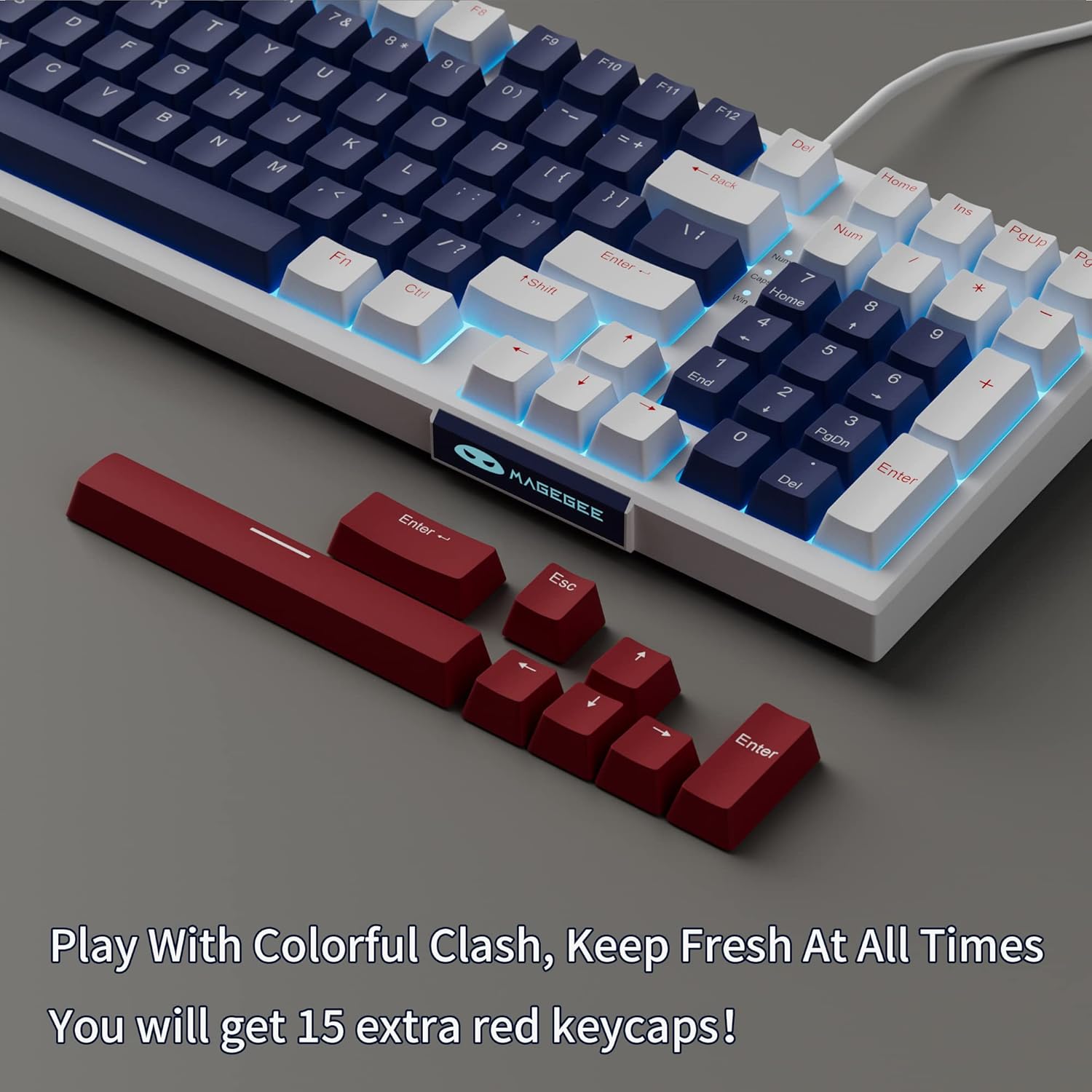
- Additional Red Keycaps (15 pieces)

Image: The MageGee Star98 keyboard displayed with a set of 15 additional red keycaps, highlighting the customization option.
3. Карактеристике производа
- Удобно искуство куцања: Equipped with blue mechanical switches for tactile feedback and a stepped layout for ergonomic typing.
- 98-тастерна анти-гостинг функција: All 98 keys can be pressed simultaneously without conflict, ensuring fast and accurate input.
- Mixed Keycaps & Adjustable Tilt Legs: Features 3-color mixed double injection keycaps for clear backlighting and foldable brackets for adjustable typing angles.
- Дизајн са могућношћу брзе замене: Компатибилан са већином 3-пинских и 5-пинских механичких прекидача, што омогућава лако прилагођавање и замену.
- Solid Sea Blue Backlight: Multiple backlight modes with a solid sea blue color, which can also be turned off.
- Широка компатибилност: Supports Win2000, Win XP, Win ME, Vista, Win7, Win8, Win10, Android, Linux, Mac operating systems. Plug and play functionality via USB.

Image: A diagram illustrating the compact 98-key layout of the MageGee Star98 keyboard, highlighting its space-saving design while retaining full functionality.
4. Упутства за подешавање
- Повежите тастатуру: Locate the USB cable provided in the package. Plug one end into the USB port on the back of the keyboard and the other end into an available USB port on your computer.
- Препознавање система: Your operating system should automatically detect and install the necessary drivers for the keyboard. This is a plug-and-play device, so no additional software installation is typically required.
- Adjust Tilt Legs: For ergonomic comfort, unfold the adjustable tilt legs located on the underside of the keyboard to achieve your preferred typing angle.

Image: The MageGee Star98 keyboard connected to a laptop, demonstrating the USB connection point and overall setup.
5. Упутство за употребу
5.1 Контрола позадинског осветљења
The keyboard features a solid sea blue backlight with multiple operating modes. Use the following key combinations to control the backlighting:
- Fn + [тастер]: Specific key combinations for changing backlight modes are typically indicated on the keycaps themselves (e.g., Fn + Ins, Fn + Home, Fn + PgUp, Fn + Del, Fn + End, Fn + PgDn). Refer to the keycap legends for exact functions.
- Fn + стрелица горе/доле: Подесите осветљеност позадинског осветљења.
- Fn + стрелица лево/десно: Adjust backlight speed (for dynamic modes).
- Фн + Вин: Locks the Windows key to prevent accidental presses during gaming.
5.2 Прекидачи са могућношћу замене током рада
The MageGee Star98 keyboard supports hot-swappable mechanical switches, allowing you to change switches without soldering. This feature is compatible with most 3-pin and 5-pin mechanical switches on the market.
- Уклоните капицу тастатуре: Use a keycap puller (not included) to gently remove the desired keycap.
- Уклоните прекидач: Use a switch puller (not included) to carefully grip the switch and pull it straight up.
- Уметни нови прекидач: Align the pins of the new switch with the holes on the PCB. Press down firmly until the switch clicks into place. Ensure the pins are not bent.
- Замена тастера: Place the keycap onto the new switch stem and press down.
Слика: Крупни план view of the keyboard demonstrating the hot-swappable switch feature, with several keycaps and switches removed to show the underlying mechanism.
Video: An official video demonstrating the features of the MageGee Sky98 Mechanical Gaming Keyboard, including its hot-swappable switches and design.
6. Одржавање
- Чишћење тастера: Користите меку, дamp cloth to wipe down keycaps. For deeper cleaning, keycaps can be removed using a keycap puller (not included) and washed with mild soap and water. Ensure they are completely dry before reattaching.
- Чишћење прекидача: Use compressed air to remove dust and debris from between the switches. Avoid spraying liquids directly into the switches.
- Нега каблова: Избегавајте оштре кривине или увијање USB кабла како бисте спречили оштећења.
- Складиштење: Чувајте тастатуру на чистом и сувом месту, даље од екстремних температура и директне сунчеве светлости.
КСНУМКС. Решавање проблема
- Тастатура не реагује:
Ensure the USB cable is securely connected to both the keyboard and the computer. Try plugging the keyboard into a different USB port or a different computer to rule out port issues.
- Кључеви не раде:
If individual keys are not responding, check if any debris is lodged under the keycap or switch. For hot-swappable switches, try removing and re-inserting the switch, or replacing it with a known working switch.
- Backlight Not Working/Flickering:
Ensure the backlight is not turned off (check Fn key combinations). Try adjusting brightness. If flickering persists, ensure the keyboard is connected to a stable USB port providing sufficient power.
- Закључан Windows тастер:
Притисните Фн + Победа to toggle the Windows key lock function.
8. Спецификације
| Феатуре | Детаљ |
|---|---|
| Бранд | MageGee |
| Број модела | Стар98 |
| Опис тастатуре | Механички |
| Број кључева | 98 |
| Тип прекидача | Тактилни (плави прекидачи) |
| Технологија повезивања | Жичани (УСБ) |
| Позадинско осветљење | Single Color (Sea Blue), Multiple Modes |
| Могућност замјене врућим путем | Yes (3-pin and 5-pin switches) |
| Компатибилни уређаји | ПЦ, Лаптоп |
| Компатибилан ОС | Win2000, Win XP, Win ME, Vista, Win7, Win8, Win10, Android, Linux, Mac |
| Материјал | акрилонитрил бутадиен стирен (АБС) |
| Посебна карактеристика | Ergonomic, Anti-Ghosting |
9. Гаранција и подршка
The MageGee Star98 Mechanical Keyboard comes with a 1 година гаранције од датума куповине. Ова гаранција покрива производне недостатке и проблеме настале нормалном употребом.
For technical support, warranty claims, or any questions regarding your product, please contact MageGee customer service through the retailer's platform or the official MageGee website. Please have your purchase receipt and product model number (Star98) ready when contacting support.