
RAZEAK X44-BKWT-RS
RAZEAK Portable 60% Mechanical Keyboard User Manual
Model: X44-BKWT-RS
Производ је завршенview
The RAZEAK Portable 60% Mechanical Keyboard (Model: X44-BKWT-RS) is a compact, 61-key mini mechanical keyboard designed for PC and Mac users, including gamers. It features switchable colorful backlighting and Red switches for a responsive typing experience.
- Компактни распоред од 60%: Space-saving 61-key design with full functionality via key combinations.
- Н-Кеи Ролловер: Independent mechanical Red switches ensure long-lasting and stable operation with anti-ghosting for all 61 keys.
- Dual Colour Translucent Keycaps: Injection-moulded keycaps provide durability and enhanced light transmission for visibility in low-light conditions.
- Шарено позадинско осветљење: Multi-colored LED backlighting with 19 distinct modes to customize your experience.
- Humanistic Design: Features flat and 2-angle height adjustment for ergonomic comfort and a detachable USB-C cable for universal compatibility and portability.

Image: The RAZEAK Portable 60% Mechanical Keyboard, showcasing its compact design and colorful backlighting.
Водич за подешавање
Follow these steps to set up your RAZEAK Portable 60% Mechanical Keyboard:
- Распакујте тастатуру: Carefully remove the keyboard and the included USB-C cable from its packaging.
- Повежите USB-C кабл: Insert the smaller USB-C end of the cable into the USB-C port located on the back of the keyboard.
- Повежите се са рачунаром: Plug the standard USB-A end of the cable into an available USB port on your Windows PC or Mac.
- Инсталација драјвера (аутоматска): The keyboard is plug-and-play. Your operating system should automatically detect and install the necessary drivers. No manual driver installation is typically required.
- Подесите висину: Flip out the two adjustable feet on the underside of the keyboard to set your preferred typing angle.

Image: The RAZEAK keyboard connected to a computer via its USB-C cable, ready for use.

Слика: Крупни план view of the detachable USB-C port on the RAZEAK keyboard, highlighting its connectivity.
Упутство за употребу
The RAZEAK 60% keyboard utilizes a compact layout, requiring the use of the Function (Fn) key for accessing secondary functions and multimedia controls.
Key Functions and Combinations
Many keys have dual functions, accessible by pressing the Fn key in combination with another key. Refer to the diagram below for common combinations.

Image: Diagram illustrating the compound function key switches and combinations on the RAZEAK keyboard.
- Fn + F1-F12: Access various multimedia and system functions (e.g., volume control, media playback, brightness).
- Shift + Sub-Function: Some keys have a third function accessible with Shift. For example, Shift + ! for '!' symbol.
- Fn + тастери са стрелицама: To unlock or cancel arrow keys, press Fn + the desired arrow key. This allows the standard WASD keys to function as arrow keys when needed.
Контрола позадинског осветљења
The keyboard features multi-colored LED backlighting with 19 different modes. Use the following combinations to control the lighting:
- Фн + \ |: Cycle through the 19 different backlighting modes.
- Fn + [{ or ]}: Подесите осветљеност позадинског осветљења.
- Fn + ;: or '": Adjust backlight speed/direction (depending on mode).

Image: Multiple RAZEAK keyboards displaying different colorful backlighting effects.
N-Key Rollover and Switches
The keyboard supports N-Key Rollover, meaning all 61 keys can be pressed simultaneously and registered correctly without ghosting. It is equipped with durable Red mechanical switches, known for their linear feel and quiet operation.
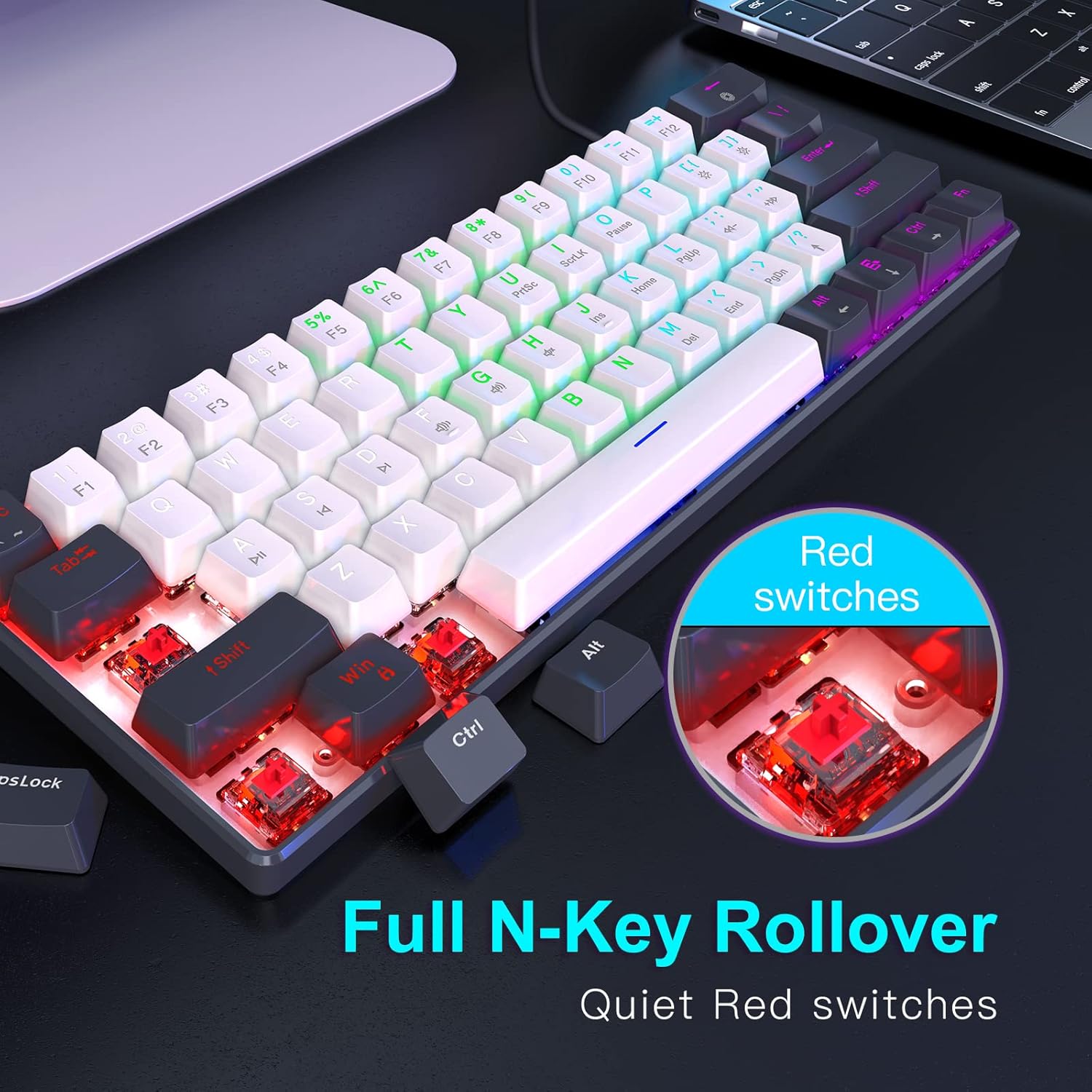
Слика: Крупни план view of the Red mechanical switches and an illustration of the N-Key Rollover feature.
Одржавање
Правилно одржавање осигурава дуготрајност и оптималне перформансе ваше тастатуре.
- Чишћење тастера: Користите меку, дamp cloth with a mild cleaning solution to wipe down the keycaps. Avoid excessive moisture.
- Cleaning Between Keys: Use compressed air to remove dust, crumbs, and debris from between the keycaps. A small brush can also be used.
- Генерално чишћење: Wipe the keyboard's body with a dry or slightly damp cloth. Do not submerge the keyboard in water or use harsh chemicals.
- Нега каблова: Избегавајте оштре кривине или увијање USB-C кабла како бисте спречили оштећења.
Решавање проблема
If you encounter issues with your RAZEAK keyboard, refer to the following common troubleshooting steps:
| Проблем | Могући узрок | Решење |
|---|---|---|
| Keyboard not responding / Keys not registering | Loose cable connection, USB port issue, temporary software glitch. |
|
| Backlighting not working or stuck | Backlight turned off, mode selected has no animation, software conflict. |
|
| Одређени тастери не раде | Отпад испод капице тастера, квар прекидача. |
|
Спецификације
Detailed specifications for the RAZEAK Portable 60% Mechanical Keyboard:
- Број модела: X44-BKWT-RS
- Распоред тастатуре: 60% (61 кључ)
- Тип прекидача: Црвени механички прекидачи
- Повезивање: Wired USB-C (Detachable cable)
- Компатибилни уређаји: Windows PCs, Mac
- Позадинско осветљење: Multi-colored LED with 19 modes
- Тип тастатуре: Dual Colour Injection Moulded Translucent Keycaps
- Н-Кеи Ролловер: Supported (61 keys anti-ghosting)
- Димензије производа: 11.5 к 4.02 к 1.57 инча (29.21 к 10.21 к 3.99 цм)
- Тежина артикла: 1.34 фунте (0.61 кг)
- Произвођач: WINSTAR TECHNOLOGY INDUSTRIAL LIMITED
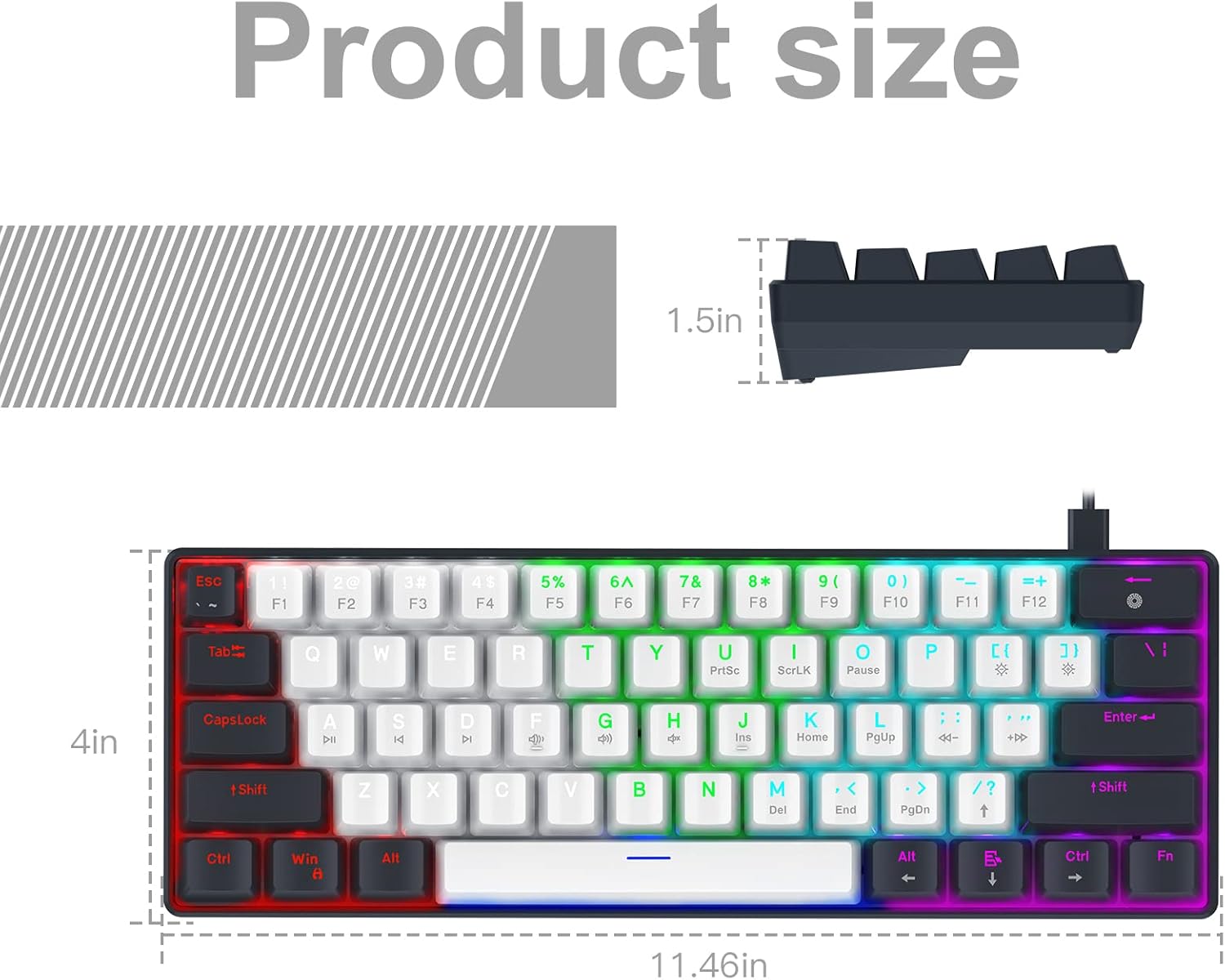
Image: Diagram illustrating the precise dimensions of the RAZEAK Portable 60% Mechanical Keyboard.
Гаранција и подршка
For warranty information and customer support, please refer to the documentation included with your product or contact the seller directly. While specific warranty terms are not detailed in this manual, the product typically includes a return/replacement policy for a period of 30 days from purchase.
You can also visit the official RAZEAK store on Amazon for more information and support resources: RAZEAK Store
For direct inquiries, please contact the seller, Razeak-US, through the Amazon platform.
Ask a question about this manual
Ask about setup, troubleshooting, compatibility, parts, safety, or missing instructions. Manuals+ will review the question and use this page’s manual context to help answer it.