
1. Увод
This manual provides essential instructions for the setup, operation, maintenance, and troubleshooting of your Shuttle XPC Slim DH610 Barebone PC. The DH610 is a compact and versatile barebone system designed to support Intel 12th and 13th Generation LGA1700 processors, offering robust performance for various applications including office, digital signage, and kiosks.
2. Безбедносне информације
Please read and follow these safety guidelines to prevent damage to the device or injury to yourself:
- Always disconnect the power cord before performing any installation or maintenance.
- Ensure the system is placed on a stable, flat surface with adequate ventilation.
- Не излажите уређај влази, екстремним температурама или директној сунчевој светлости.
- Only use the power adapter provided or an approved equivalent.
- Refer to qualified service personnel for any repairs not covered in this manual.
3. Садржај пакета
Проверите да ли су све ставке присутне у вашем пакету:
- Shuttle XPC Slim DH610 Barebone PC Unit
- ВЕСА комплет за монтажу
- Адаптер за напајање и кабл
- Accessory Pack (screws, cables, etc.)
- Водич за брзи почетак (ако је укључен)
4. Подешавање и инсталација
The Shuttle DH610 is a barebone system, requiring the installation of a CPU, RAM, and storage devices before operation.
4.1. Opening the Chassis
Carefully remove the chassis cover to access the internal components. Typically, this involves unscrewing a few screws on the rear or sides of the unit and sliding the cover off.

Image: The Shuttle XPC Slim DH610 with its top cover removed, showing the internal layout including cooling fans and the motherboard.
4.2. Инсталација процесора
The DH610 supports Intel 12th/13th Generation Alder Lake-S LGA1700 processors with a maximum TDP of 65W. Ensure your chosen CPU has integrated graphics, as the system does not support F-series processors without integrated graphics or K-series processors.
- Отворите полугу процесорског утичнице и уклоните заштитни поклопац.
- Carefully align the CPU with the socket, matching the triangular markers.
- Пажљиво поставите процесор у утичницу без присиљавања.
- Затворите полугу утичнице да бисте осигурали процесор.
- Инсталирајте хладњак процесора према упутствима произвођача.
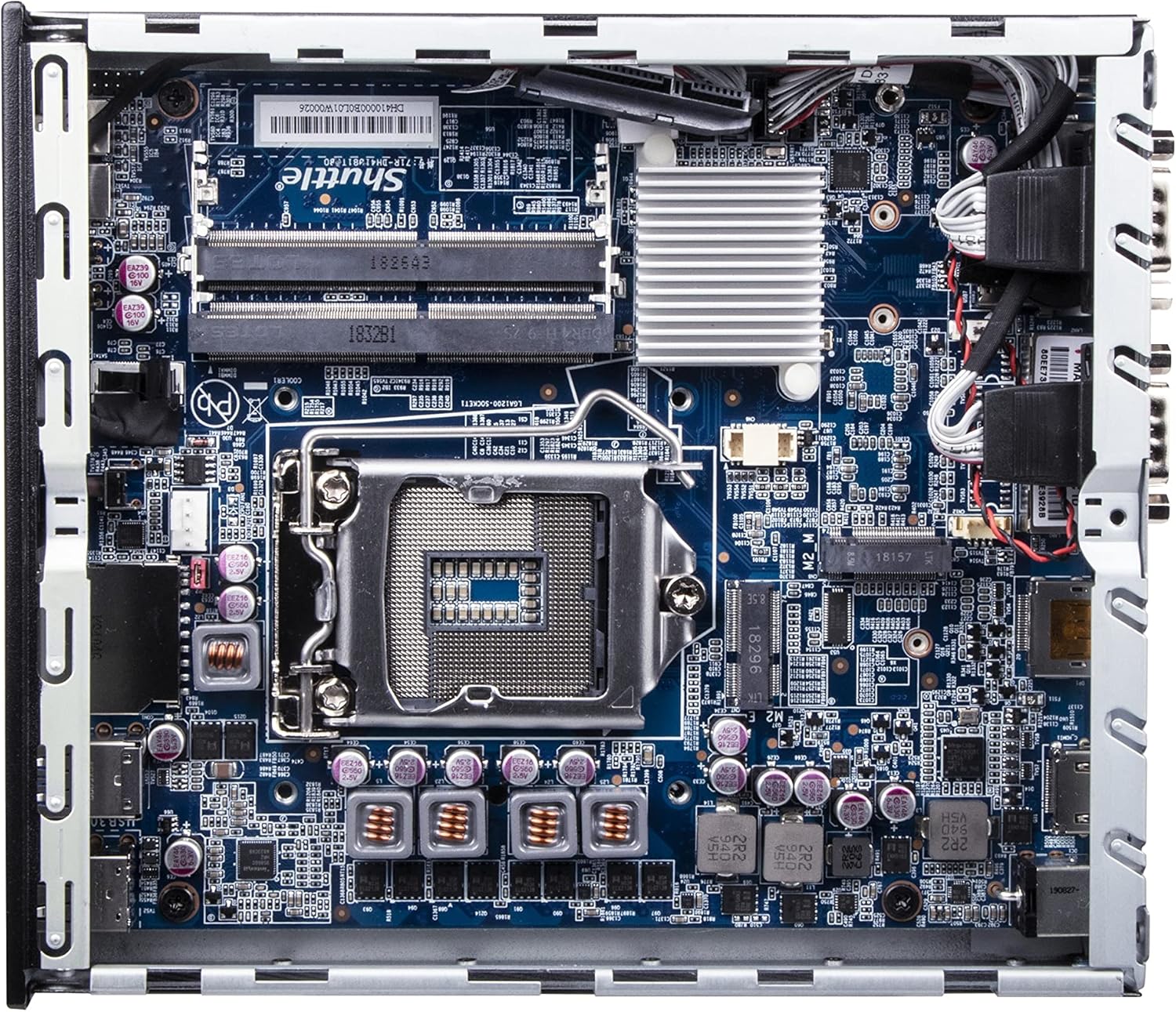
Слика: Детаљна view of the Shuttle DH610 motherboard, highlighting the LGA1700 CPU socket, RAM slots, and other integrated circuits.
Note: For 13th Gen Intel Processors, BIOS Version DH610000.202 or newer is required. Update BIOS if necessary after initial setup with a 12th Gen CPU or via a compatible method.
4.3. Инсталација РАМ-а
The system features two 260-pin dual-channel DDR4 SODIMM slots, supporting up to 64GB (2x 32GB) at 3200MHz. Dual-channel memory is recommended for optimal performance.
- Locate the SODIMM slots on the motherboard.
- Поравнајте зарез на РАМ модулу са кључем у слоту.
- Insert the module at a 45-degree angle and push down until the clips on both sides snap into place.
4.4. Инсталација складишта
The DH610 supports one 2.5-inch HDD/SSD and one M.2 2280 SSD.
- 2.5" Drive: Mount the 2.5" HDD/SSD into the designated bay using the provided screws and connect the SATA data and power cables.
- М.2 ССД: Insert the M.2 2280 SSD into its slot, securing it with the provided screw.
4.5. Повезивање периферних уређаја
After installing internal components, reattach the chassis cover. Connect your peripherals to the available ports:
- Приказ: Connect your monitor(s) to the HDMI 2.0b port or one of the two DisplayPort outputs. The system supports up to three 4K UHD displays.
- УСБ уређаји: Use the four USB 3.2 Gen1 ports (including one Type-C) and four USB 2.0 ports for keyboard, mouse, and other USB devices.
- Мрежа: Connect to your network using either of the two Gigabit Ethernet LAN ports (Intel 2.5GbE + Intel 1GbE).
- Серијски уређаји: Utilize the two RS232 COM ports for compatible devices.
- аудио: Connect headphones or a microphone to the front audio jacks.

Image: The front panel of the Shuttle DH610, featuring the power button, USB 3.2 Gen1 ports (one Type-C), and audio input/output jacks.

Image: The rear panel of the Shuttle DH610, displaying the DC-IN power input, HDMI, two DisplayPort outputs, two LAN ports, USB ports, and two COM ports.
4.6. Прикључак за напајање
Connect the power adapter to the DC-IN port on the rear of the unit, then plug the power cord into an electrical outlet.
5. Упутство за употребу
5.1. Укључивање/искључивање
- Укључено: Притисните дугме за напајање које се налази на предњој плочи.
- Искључивање: Perform a graceful shutdown through your operating system. Alternatively, press and hold the power button for 4-5 seconds for a forced shutdown (use only when necessary).
5.2. Инсталација оперативног система
The DH610 is compatible with Windows 11/10 (64-bit) and Linux (64-bit) operating systems. Follow the standard installation procedures for your chosen OS. Ensure all necessary drivers are installed for optimal performance, which can typically be found on the Shuttle support webсајту.
5.3. Приступ BIOS-у/UEFI-ју
Да бисте приступили услужном програму за подешавање BIOS/UEFI, притисните тастер Избриши or F2 key repeatedly during system startup. This allows configuration of boot options, system settings, and hardware parameters.
6. Одржавање
6.1. Чишћење
Regularly clean the exterior of the unit with a soft, dry cloth. Use compressed air to clear dust from ventilation openings to ensure proper airflow and prevent overheating. Do not use liquid cleaners directly on the device.
6.2. Ажурирања BIOS-а
Periodically check the Shuttle website for BIOS updates. BIOS updates can improve system stability, add support for new hardware (like 13th Gen Intel CPUs), and fix bugs. Follow the instructions provided with the BIOS update package carefully.
КСНУМКС. Решавање проблема
Ако наиђете на проблеме са вашим DH610, погледајте следеће уобичајене проблеме и решења:
- Нема излаза на екран:
- Ensure the monitor is powered on and correctly connected to the HDMI or DisplayPort.
- Verify that the CPU has integrated graphics and that the display cable is connected to the motherboard's video output, not a discrete graphics card (if applicable).
- Пробајте други кабл за дисплеј или монитор.
- Систем се не укључује:
- Check that the power adapter is securely connected to both the unit and the electrical outlet.
- Ensure the CPU and RAM are correctly installed and seated.
- Тестирајте утичницу са другим уређајем.
- 13th Gen CPU Not Recognized:
- The system requires BIOS Version DH610000.202 or newer for 13th Gen Intel processors. If you have an older BIOS, you may need to install a 12th Gen CPU first to update the BIOS.
- Прегревање система:
- Ensure the chassis ventilation holes are not obstructed.
- Clean any dust accumulation from the internal fans and heatsinks.
- Verify the CPU cooler is properly installed and making good contact with the CPU.
8. Спецификације
| Феатуре | Спецификација |
|---|---|
| Бранд | Шатл |
| Назив модела | ДХ610 |
| ЦПУ Соцкет | ЛГА 1700 |
| Подржани процесори | Intel 12th/13th Gen Alder Lake-S (65W max, with integrated graphics) |
| Чипсет | Интел Х610 |
| РАМ Типе | DDR4 SODIMM (2x slots) |
| Максимални капацитет РАМ-а | 64 GB (2x 32GB) |
| Брзина меморије | До 3200 МХз |
| Графика | Integrated Intel UHD Graphics (CPU dependent) |
| Видео Оутпут | 1x HDMI 2.0b, 2x DisplayPort (Supports triple 4K UHD displays) |
| Складиштење | 1x 2.5" HDD/SSD bay, 1x M.2 2280 slot |
| УСБ портови | 4x USB 3.2 Gen1 (1x Type-C), 4x USB 2.0 (Total 8) |
| ЛАН | 1x Intel 2.5GbE, 1x Intel 1GbE |
| Сериал Портс | 2x RS232 (COM) |
| Компатибилност оперативног система | Windows 11/10 (64-bit), Linux (64-bit) |
| Потрошња енергије | 65 Watts (CPU) |
| Укључене компоненте | ВЕСА Моунт |
9. Гаранција и подршка
9.1. Гаранција произвођача
The Shuttle XPC Slim DH610 Barebone PC comes with a 3-Year Manufacturer's Warranty. This warranty covers defects in materials and workmanship under normal use. Please retain your proof of purchase for warranty claims.
9.2. Техничка подршка
For technical assistance, driver downloads, BIOS updates, or further troubleshooting not covered in this manual, please visit the official Shuttle website or contact Shuttle customer support. Free lifetime technical support is typically provided by the manufacturer.
За више информација посетите: ввв.схуттле.цом