

Увод
This manual provides comprehensive instructions for the Xtrfy M8 Wireless Gaming Mouse. Designed for professional gamers, the M8 offers an ultra-lightweight design, symmetrical shape, and lag-free 2.4 GHz wireless connectivity.
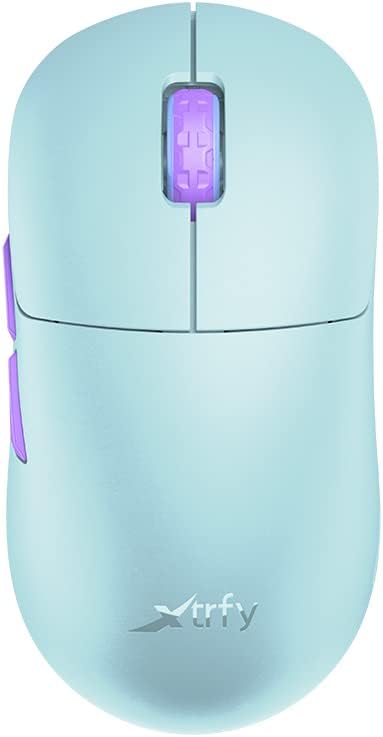
Image: The Xtrfy M8 Wireless Gaming Mouse in Frosty Mint, showcasinг његов ергономски дизајн.
A key design feature is its ultra-low front, measuring just 4mm, which allows for a unique grip style.

Слика: Крупни план view of the Xtrfy M8 mouse's front, highlighting its low profile од 4мм.
Садржај пакета
Проверите да ли су све ставке присутне у вашем пакету:
- Xtrfy M8 Wireless Gaming Mouse
- УСБ-Ц кабл за пуњење
- Бежични USB пријемник (донгл)
- USB-A to USB-C Adapter (for receiver extension)
- Упутство за употребу (овај документ)

Image: The USB-C charging cable and the USB wireless receiver (dongle) for the Xtrfy M8 mouse.
Сетуп
- Напуните миша: Before first use, connect the USB-C charging cable to the mouse and a powered USB port. The mouse has an internal Lithium Ion battery.
- Connect the USB Wireless Receiver:
- Insert the USB wireless receiver directly into an available USB-A port on your computer.
- For optimal signal strength or if your computer's USB port is not easily accessible, use the provided USB-A to USB-C adapter with the charging cable to extend the receiver closer to the mouse.
- Укључивање миша: Locate the power switch on the underside of the mouse. Slide the switch to the "ON" position.
- Аутоматско повезивање: The mouse should automatically connect to the receiver. No additional pairing software is typically required for 2.4 GHz wireless operation.

Image: The underside of the Xtrfy M8 mouse, displaying the power switch, optical sensor, and hardware adjustment buttons.
Упутство за употребу
The Xtrfy M8 mouse features standard left and right click buttons, a scroll wheel, and two side buttons. All functions are plug-and-play compatible with most operating systems.
Hardware Adjustments
The Xtrfy M8 allows for on-the-fly adjustment of key performance settings directly from the mouse hardware, without the need for software. These settings are typically located on the underside of the mouse.
- DPI/CPI (Dots Per Inch / Counts Per Inch): Adjusts mouse sensitivity. Use the dedicated button on the mouse bottom to cycle through preset DPI levels. An indicator light may change color to show the current setting.
- Polling Rate (PR): Determines how often the mouse reports its position to the computer. Higher polling rates (e.g., 1000 Hz) provide smoother tracking but consume more battery.
- Lift-off Distance (LOD): Controls how high the mouse can be lifted before tracking stops. A lower LOD prevents unwanted cursor movement when repositioning the mouse.
Refer to the markings near the buttons on the mouse's underside for specific adjustment procedures.

Слика: Са стране view of the Xtrfy M8 mouse, highlighting the main click buttons, scroll wheel, and two programmable side buttons.
Пуњење и батерија
The Xtrfy M8 Wireless Gaming Mouse is equipped with a rechargeable Lithium Ion battery. To charge the mouse, connect the supplied USB-C cable to the front port of the mouse and the other end to a powered USB port on your computer or a USB wall adapter.
- A small LED indicator on the mouse will typically show charging status (e.g., solid light for charging, off or different color for fully charged).
- The mouse can be used while charging, though the cable connection point may feel unusual during active use.
- Battery life varies based on usage and polling rate settings.
Одржавање
Proper maintenance ensures the longevity and performance of your Xtrfy M8 mouse.
- Чишћење: Користите меку, суву крпу да обришете површину миша. За тврдокорну прљавштину, благо обришитеampНатопите крпу водом. Избегавајте јаке хемикалије или абразивне материјале.
- Сензор: Одржавајте оптички сензор на доњој страни миша чистим и без прашине или прљавштине. По потреби користите памучни штапић или компримовани ваздух.
- Складиштење: Када се миш не користи дуже време, чувајте га на сувом и хладном месту.
- Нега каблова: Avoid sharp bends or excessive pulling on the USB-C charging cable to prevent damage.
Решавање проблема
If you encounter issues with your Xtrfy M8 mouse, refer to the following common solutions:
- Миш не реагује:
- Уверите се да је миш укључен.
- Check if the USB wireless receiver is securely plugged into a working USB port.
- Verify the mouse battery is charged. Connect the charging cable and observe the indicator light.
- Покушајте да прикључите пријемник на други УСБ порт.
- Кашњење или прекиди везе:
- Ensure the receiver is close to the mouse and not obstructed by metal objects.
- Avoid placing the receiver near other wireless devices that may cause interference (e.g., Wi-Fi routers, other wireless peripherals).
- Lower the polling rate setting on the mouse if experiencing frequent disconnections in a crowded wireless environment.
- Нетачно праћење:
- Очистите оптички сензор на доњој страни миша.
- Уверите се да користите миш на одговарајућој површини (препоручује се подлога за миш).
- Adjust the DPI/CPI settings to a comfortable level.
- Scroll Wheel Issues (e.g., jumping):
- Ensure the mouse firmware is up to date (check the Xtrfy official website for any available updates).
- If the issue persists, contact Xtrfy customer support.
Спецификације
| Број модела | M8 |
| Бранд | Кстрфи |
| Технологија повезивања | Radio Frequency (2.4 GHz), USB (for charging/wired mode) |
| Технологија детекције покрета | Оптицал |
| Посебне карактеристике | Lightweight, Wireless |
| Тежина артикла | 1.94 унце (приближно 55 грама) |
| Батерије | 1 литијум-јонска батерија (укључена) |
| Димензије пакета | 7.32 к 4.06 к 2.44 инча |
| ASIN | B0BMLF5FMT |
| Датум првог доступног | 16. новембар 2022 |
Гаранција и подршка
The Xtrfy M8 Wireless Gaming Mouse typically comes with a 1-year manufacturer's warranty. For specific warranty details, claims, or technical support, please contact Xtrfy directly through their official webсајту.
Xtrfy Official Webсајт: ввв.ктрфи.цом
Always refer to the manufacturer's official resources for the most current support information and firmware updates.