
Увод
Thank you for choosing the Ledwood Apollo S True Wireless Stereo (TWS) Earphones. This manual provides essential instructions for setting up, operating, and maintaining your earphones to ensure optimal performance and longevity. The Apollo S earphones feature a sleek design, sensitive touch controls, and a wireless charging case with a digital battery level display.
Садржај пакета
- Ledwood Apollo S TWS Earphones (Left and Right)
- Футрола за бежично пуњење
- УСБ кабл за пуњење
- Упутство за употребу
Note: Please check all items are present upon unboxing.
Сетуп
1. Пуњење слушалица и футроле
Before first use, fully charge the earphones and the charging case. The charging case features a digital screen that displays the battery level percentage.
- Пуњење кућишта: Connect the provided USB charging cable to the charging port on the case and to a USB power adapter (not included). The digital display will show the charging progress.
- Пуњење слушалица: Place the earphones into their respective slots in the charging case. Ensure they are correctly seated. The earphones will automatically begin charging. The case's digital display may indicate the charging status of the earphones.
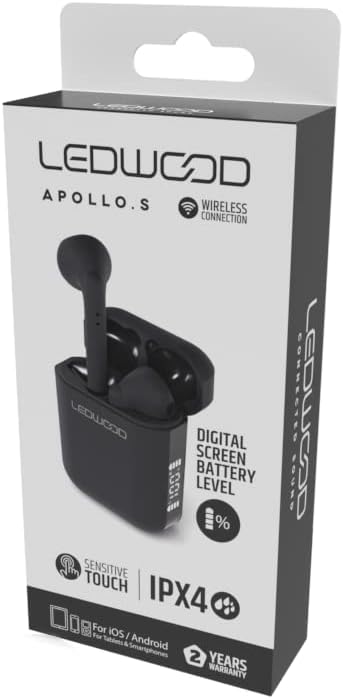
Image: Ledwood Apollo S TWS Earphones shown inside their open charging case. The earphones are black, and the case is also black with a sleek design. This image illustrates the product components.
2. Упаривање са Блуетоотх уређајем
- 1. корак: Ensure the earphones are charged. Open the charging case. The earphones will automatically enter pairing mode, indicated by a flashing LED light on one or both earphones.
- 2. корак: On your mobile device (smartphone, tablet, etc.), go to the Bluetooth settings.
- 3. корак: Укључите Блуетоотх. Тражи доступних уређаја.
- 4. корак: Select "Ledwood Apollo S" from the list of available devices.
- 5. корак: Once connected, the LED indicator on the earphones will stop flashing, and you will hear a confirmation tone.
- Напомена: Слушалице ће се аутоматски поново повезати са последњим упареним уређајем када се изваде из футроле, ако је Bluetooth омогућен на уређају.
Упутство за употребу
Носити слушалице
Gently insert the earphones into your ears, ensuring a comfortable and secure fit. Adjust them slightly to achieve optimal sound quality and passive noise isolation.
Додирните контроле
The Ledwood Apollo S earphones feature sensitive touch controls on each earbud. The functions may vary slightly depending on your device and operating system.
- Пусти/паузирај: Један додир на обе слушалице.
- Следећа нумера: Двапут додирните десну слушалицу.
- Претходни запис: Двапут додирните леву слушалицу.
- Одговори/заврши позив: Једнократно додирните било коју слушалицу током долазног позива или активног позива.
- Одбиј позив: Притисните и држите било коју слушалицу 2 секунде током долазног позива.
- Активирање гласовног помоћника: Трипут додирните било коју слушалицу (нпр. Siri, Google Assistant).
- Укључивање/искључивање: Earphones power on automatically when removed from the case and power off when placed back into the case. Manual power on/off may be available by pressing and holding the touch area for an extended period (refer to specific device behavior).
Одржавање
- Чишћење: Користите меку, суву крпу која не оставља влакна за чишћење слушалица и кућишта за пуњење. Не користите абразивна средства за чишћење или раствараче.
- Складиштење: Када се не користе, чувајте слушалице у њиховој футроли за пуњење како бисте их заштитили и одржали напуњеним.
- Отпорност на воду: The earphones are rated IPX4, meaning they are resistant to splashing water from any direction. They are not waterproof and should not be submerged in water. Avoid exposure to heavy rain or sweat for extended periods.
- температура: Избегавајте излагање слушалица екстремним температурама (врућим или хладним) или високој влажности.
Решавање проблема
- Слушалице се не упарују:
- Уверите се да су обе слушалице напуњене.
- Искључите Блутут на свом уређају и поново га укључите.
- Forget "Ledwood Apollo S" from your device's Bluetooth list and try pairing again.
- Place earphones back in the case, close the lid, wait a few seconds, then open again to reset.
- Нема звука из једне слушалице:
- Уверите се да су обе слушалице напуњене.
- Покушајте да вратите обе слушалице у футролу и поново их извадите.
- Проверите подешавања баланса звука на вашем уређају.
- Футрола за пуњење се не пуни:
- Уверите се да је кабл за пуњење безбедно повезан и са кућиштем и са извором напајања.
- Покушајте са другим УСБ каблом или адаптером за напајање.
- Додирне контроле не реагују:
- Уверите се да су вам прсти чисти и суви.
- Поново покрените уређај и покушајте поново.
Спецификације
| Бранд | Ledwood |
| Назив модела | APOLLO S (LD-APOLLO-S-BLK) |
| Форм Фацтор | Ин Еар |
| Технологија повезивања | бежични (Блуетоотх) |
| Контролни метод | Додирните |
| Оцена водоотпорности | ИПКС4 |
| Уграђени медији | Футрола за бежично пуњење |
| Додатне карактеристике | Брзо пуњење |
| Материјал | Пластика |
| Боја | Црно |
| Компатибилност | For iOS / Android (Tablets & Smartphones) |
Гаранција и подршка
The Ledwood Apollo S TWS Earphones come with a 2 година гаранције од датума куповине. Ова гаранција покрива производне недостатке. Молимо вас да сачувате доказ о куповини за потребе подношења захтева за гарантни захтев.
For technical support or warranty inquiries, please contact your retailer or visit the official Ledwood website for customer service information. Ensure you have your model number (LD-APOLLO-S-BLK) and purchase details ready.