
1. Производ је готовview
The Phanteks Eclipse G500A DRGB is a high-performance mid-tower chassis designed to accommodate modern PC components with excellent airflow and integrated D-RGB lighting. It features an Ultra-fine Performance Mesh on both the front and top panels, ensuring optimal cooling and dust filtration.

Figure 1: Phanteks Eclipse G500A DRGB Mid Tower Case, Matte White.
Кључне карактеристике:
- High Airflow Design: Ultra-fine Performance Mesh on front and top panels for superior cooling and dust filtration.
- Интегрисано D-RGB осветљење: Built-in D-RGB lighting on the front and side, controllable via manual buttons or motherboard synchronization.
- Унапред инсталирани вентилатори: Includes three high-performance M25-140 D-RGB fans.
- Extensive Cooling Support: Supports up to 420mm radiators in the front and 360mm in the top.
- Простран ентеријер: Accommodates full-length GPUs and offers vertical GPU mounting options (with optional bracket).
- Флексибилно складиштење: Multiple HDD and SSD locations, including dedicated SSD brackets and stackable HDD bays.
- Modern Front I/O: Features 10Gbps USB-C, 2x USB 3.0, Microphone/Headphone Combo, Power button, and D-RGB controls.
2. Подешавање и инсталација
This section provides general guidelines for installing components into your Phanteks Eclipse G500A DRGB chassis. Always refer to your component manuals for specific installation instructions.
2.1 Припрема шасије
Before installing components, ensure the chassis is placed on a stable, flat surface. Remove the side panels by gently pulling them open (they are hinged) to access the interior.
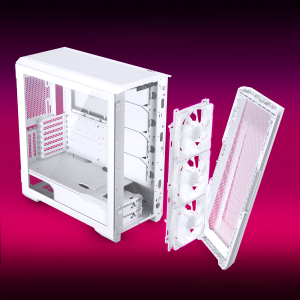
Figure 2: The removable front panel allows for easy installation of fans and radiators.
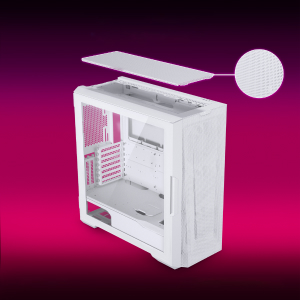
Figure 3: The removable top mesh panel facilitates fan and radiator installation.
2.2 Инсталација матичне плоче
The G500A supports ATX, micro-ATX, mini-ITX, and E-ATX motherboards (up to 280mm wide). Install the necessary standoffs for your motherboard form factor, then secure the motherboard with screws.
2.3 Инсталација јединице за напајање (ПСУ).
Install the PSU at the bottom rear of the chassis. The G500A supports PSUs up to 250mm in length (195mm if all 4 bottom HDD positions are used).
2.4 Инсталација уређаја за складиштење
The case offers extensive storage options:
- 2.5" SSD дискови: Up to 9 dedicated 2.5" drive bays are included.
- 3.5" HDD-ови: Two stackable 3.5" HDD bays are included, expandable up to a total of 10 HDD bays.

Figure 4: Multiple storage options for 2.5" and 3.5" drives.
2.5 Инсталација графичке картице (GPU)
The G500A supports graphics cards up to 435mm in length. For vertical GPU mounting, an optional bracket (PH-VGPUKT4.0_03) or riser cable is required.
2.6 Инсталација система за хлађење
The chassis supports various fan and radiator configurations:
- Подршка обожаватеља:
- Front: 3x 120mm or 3x 140mm (3x 140mm pre-installed)
- Top: 3x 120mm or 3x 140mm
- Задњи: 1x 120 мм или 1x 140 мм
- Liquid Cooling Radiator Support:
- Front: Up to 360mm (120mm radiator) or 420mm (140mm radiator)
- Top: Up to 360mm (120mm radiator) or 280mm (140mm radiator)
- Задња: 120 мм
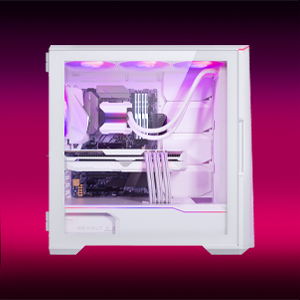
Figure 5: High-end cooling compatibility with various fan and radiator sizes.
2.7 Управљање кабловима
The G500A provides ample space and Velcro ties for efficient cable management, ensuring a clean interior and optimal airflow. Cover doors help to conceal cables on the backside of the motherboard tray.
2.8 Видео снимци о инсталацији
Video 1: Detailed PC Build Guide in the Phanteks Eclipse G500A (13:33).
Video 2: Another comprehensive PC assembly guide featuring the Phanteks Eclipse G500A (14:01).
3. Упутство за употребу
3.1 Предња У/И плоча
Предња И/О плоча пружа практичан приступ основним портовима и контролама:
- Дугме за напајање: Да бисте укључили/искључили систем.
- УСБ 3.0 портови (к2): За повезивање USB 3.0 уређаја.
- USB-C Gen2 Port (x1): For high-speed USB-C connectivity.
- Комбиновани прикључак за микрофон/слушалице: За аудио улаз и излаз.
- Дугме за D-RGB режим: Cycles through pre-programmed D-RGB lighting effects.
- D-RGB дугме за боје: Мења боју D-RGB осветљења.

Figure 6: Front I/O panel with USB-C, USB 3.0, audio, and D-RGB controls.
3.2 D-RGB Lighting Control
The integrated D-RGB lighting can be controlled in two ways:
- Ручна контрола: Use the D-RGB Mode and Color buttons on the front I/O panel to cycle through effects and colors without software.
- Синхронизација матичне плоче: Connect the D-RGB controller to a compatible motherboard's D-RGB header to enable software control and synchronization with other D-RGB components.

Figure 7: Integrated D-RGB lighting with included M25-140 D-RGB fans.
4. Одржавање
Редовно одржавање помаже у обезбеђивању оптималних перформанси и дугог века трајања компоненти вашег рачунара.
- Филтрација прашине: The Ultra-fine Performance Mesh on the front and top panels acts as a dust filter. Periodically remove these panels and clean the mesh to maintain optimal airflow.
- Унутрашње чишћење: Use compressed air to remove dust from inside the chassis, especially from fans, heatsinks, and other components. Ensure the system is powered off and unplugged before cleaning.
- Спољно чишћење: Обришите спољашње површине меком, дamp крпу. Избегавајте абразивна средства за чишћење или раствараче.
КСНУМКС. Решавање проблема
Овај одељак се бави уобичајеним проблемима на које можете наићи са кућиштем рачунара.
5.1 Проблеми са напајањем
- Систем се не укључује:
- Ensure all power cables (24-pin ATX, 8-pin CPU, GPU power) are securely connected to the motherboard and components.
- Проверите да ли је прекидач напајања у положају „УКЉУЧЕНО“.
- Check that the front panel power switch cable is correctly connected to the motherboard's F_PANEL header.
5.2 D-RGB Lighting Issues
- D-RGB not lighting up or incorrect colors:
- Ensure the D-RGB cables from the fans and LED strips are correctly connected to the integrated D-RGB controller.
- If using motherboard synchronization, ensure the D-RGB controller is connected to the motherboard's D-RGB header and that the motherboard's lighting software is configured correctly.
- Verify the D-RGB controller is receiving power (e.g., via SATA power connector).
- Try cycling through modes and colors using the front I/O buttons to rule out software issues.
5.3 Fan Noise or Malfunction
- Прекомерна бука вентилатора:
- Check for dust buildup on fan blades and clean if necessary.
- Ensure fans are securely mounted and not vibrating against the chassis.
- Verify fan speeds are controlled appropriately by the motherboard or fan controller.
- Вентилатор се не окреће:
- Check fan power connections to the motherboard or fan hub.
- Ensure fan headers are enabled in the BIOS/UEFI settings.
6. Спецификације
Detailed technical specifications for the Phanteks Eclipse G500A DRGB Mid Tower Case.
| Феатуре | Спецификација |
|---|---|
| Назив модела | Eclipse G500A DRGB, White |
| Број модела ставке | ПХ-ЕЦ500ГА_ДМВ01А |
| Форм Фацтор | Мид Товер |
| Димензије (ДкШкВ) | 19.69 к 9.45 к 20.28 инча (500 к 240 к 515 мм) |
| Тежина артикла | 23.2 фунти |
| Материјал | Челична шасија, каљено стакло |
| Подршка матичне плоче | ATX, micro-ATX, mini-ITX, E-ATX (ширине до 280 мм) |
| Слотови за проширење | 7 |
| Вертикална подршка за ГПУ | Yes (with optional bracket PH-VGPUKT4.0_03 or riser cable) |
| Унутрашњи одељци за дискове од 3.5 инча | 10 (2x included, expandable) |
| Унутрашњи одељци за дискове од 2.5 инча | 9 (9x укључена) |
| Фронт И/О | 2x USB 3.0, USB-C Gen2, Microphone/Headphone Combo, Power Button, D-RGB Mode, D-RGB Color |
| Унапред инсталирани вентилатори | 3x M25-140 D-RGB (Front) |
| Максимална дужина ГПУ-а | 435 мм / 17.2 ин |
| Максимална висина ЦПУ хладњака | 185 мм |
| Мак ПСУ Ленгтх | 195mm (if all 4 bottom HDD positions used) / 250mm (if 2 bottom HDD used) |
| Метод хлађења | Fan, Water |
7. Гаранција и подршка
Phanteks products are manufactured with high-quality standards. For warranty information and technical support, please refer to the official Phanteks webсајту или контактирајте њихову корисничку службу.
Контакт информације:
- Webсајт: ввв.пхантекс.цом
- Phanteks Taiwan Inc.: 11Ф., Но. 150, Јиан 1ст Рд., Зхонгхе Дист. Нови град Тајпеј 235
- Importer EU (Axpertec Int B.V.): Sydneystraat 33, 3047 BP Rotterdam, The Netherlands
- Importer US (Axpertec Inc.): 20465 E Walnut Dr. N, City of Industry, California 91789, United States

Figure 8: Phanteks company and importer details, along with compliance markings (CE, UKCA, RoHS).