
Увод
The mophie powerstation Go is a versatile portable device designed to provide power in various emergency situations. It functions as a car jump starter, a portable power bank for mobile devices, and a bright LED work light. This manual provides essential instructions for safe and effective use, maintenance, and troubleshooting of your powerstation Go.
Безбедносне информације
Read all safety warnings and instructions before using this product. Failure to follow these instructions may result in electric shock, fire, or serious injury.
- Do not expose the powerstation Go to moisture or extreme temperatures.
- Не покушавајте да раставите или модификујете уређај.
- Чувати ван домашаја деце.
- Ensure proper polarity when connecting jumper cables to a vehicle battery. Incorrect connection can cause damage or injury.
- Use only the provided jumper cables and charging accessories.
- Избегавајте продужено излагање директној сунчевој светлости.
- Ако се уређај претерано загреје, одмах прекините употребу.
Садржај пакета
- mophie powerstation Go
- Mini Jumper Cables
- Кабл за пуњење (УСБ-Ц на УСБ-А)
- Упутство за употребу
Производ је завршенview
Familiarize yourself with the components of your mophie powerstation Go.


- ЛЕД лампа: Located at one end, provides bright illumination.
- Радно светло: Integrated into the body, offers broad area lighting.
- Дугме за напајање: Activates the device and checks battery status.
- ЛЕД индикатор батерије: Displays the remaining charge level.
- УСБ-А излазни порт: За пуњење мобилних уређаја.
- Прикључак за кабл за пребацивање: Dedicated port for connecting the mini jumper cables.
- УСБ-Ц улазни порт: For recharging the powerstation Go.
Подешавање: Почетно пуњење
Before first use, fully charge your mophie powerstation Go.
- Connect the provided USB-C charging cable to the USB-C input port on the powerstation Go.
- Connect the other end of the charging cable to a compatible USB wall adapter (not included) or a powered USB port.
- The LED battery indicator lights will illuminate and flash, indicating the charging status. All four lights will be solid when fully charged.
- Време пуњења може да варира у зависности од извора напајања.
Упутство за употребу
1. Паљење возила помоћу каблова
Ensure the powerstation Go is at least 50% charged before attempting to jump start a vehicle.
- Connect the mini jumper cables to the jumper cable port on the powerstation Go. Ensure a secure connection.
- Повежите црвена clamp to the positive (+) terminal of the vehicle's dead battery.
- Повежите црна clamp to a metal part of the vehicle's chassis (unpainted, non-moving part) or the negative (-) terminal of the battery, if accessible and safe.
- Once connected, the powerstation Go will automatically perform safety checks. Wait for the indicator light on the jumper cable connector to turn solid green.
- Start your vehicle. If it doesn't start immediately, wait 30 seconds and try again. Do not attempt more than three consecutive jump starts.
- Once the vehicle starts, immediately disconnect the black clamp, затим црвени цлamp, and finally disconnect the jumper cables from the powerstation Go.
2. Charging Mobile Devices
Use the USB-A output port to charge your smartphone, tablet, or other USB-powered devices.

- Connect your device's USB charging cable to the USB-A output port on the powerstation Go.
- The powerstation Go will automatically begin charging your device. The LED battery indicator lights will show the remaining charge.
- Искључите уређај када се пуњење заврши.
3. Using the LED Flashlight and Work Light
The powerstation Go features both a focused LED flashlight and a broad work light.
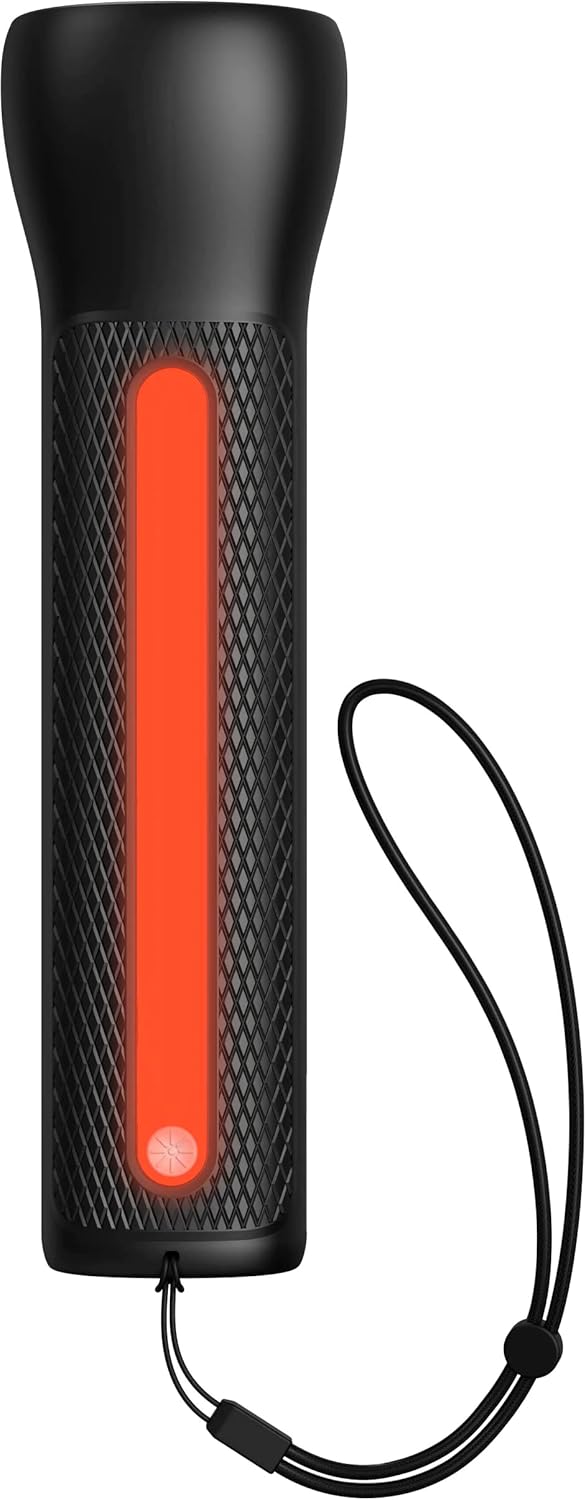

- To activate the LED Flashlight: Press and hold the power button for 2 seconds. Press again to cycle through modes (high, low, strobe, off).
- To activate the Work Light: Double-press the power button. Double-press again to cycle through modes (white, red, flashing red, off).
Одржавање
- Чишћење: Обришите уређај меком, сувом крпом. Не користите јаке хемикалије или абразивне материјале.
- Складиштење: Store the powerstation Go in a cool, dry place away from direct sunlight. For optimal battery life, recharge the device every 3 months if not in regular use.
- Одржавање батерије: The internal battery is not user-replaceable. Do not attempt to open the device.
Решавање проблема
| Проблем | Могући узрок | Решење |
|---|---|---|
| Уређај се не пуни | Charging cable or adapter faulty; port obstruction. | Try a different USB-C cable and wall adapter. Ensure ports are clean and free of debris. |
| Vehicle not jump starting | Low powerstation Go charge; incorrect cable connection; severely dead battery. | Ensure powerstation Go is fully charged. Verify correct clamp polarity. Check vehicle battery for severe damage. Consult vehicle manual. |
| Mobile device not charging | Powerstation Go battery low; faulty USB cable; device incompatibility. | Recharge powerstation Go. Try a different USB cable. Ensure your device is compatible with standard USB charging. |
| Светла не раде | Powerstation Go battery low; incorrect button press. | Recharge powerstation Go. Refer to "Using the LED Flashlight and Work Light" section for correct operation. |
Спецификације
- Бренд: мопхие
- Број модела: mpsgrgd-FL36630
- Број дела произвођача: 401107454
- Капацитет батерије: 9900 мАх (36.6 Вх)
- Волtage: 12 Volts (for jump starting)
- Тежина производа: 1.07 килограма
- Димензије: 30.3 x 24.69 x 10.79 цм (паковање)
- Посебне карактеристике: LED Indicator Lights, 450-lumen LED Flashlight, Spark-proof Jumper Cables
- Automotive Service Type: Камион, Аутомобил
Гаранција и подршка
За информације о гаранцији и корисничку подршку, посетите званичну веб страницу mophie-ја webсајт или контактирајте њихову службу за кориснике. Сачувајте доказ о куповини за потребе гаранције.
Подршка на мрежи: www.mophie.com/support