
1. Увод
Thank you for choosing the typecase Touch iPad Keyboard Case. This manual provides detailed instructions for setting up, operating, and maintaining your keyboard case to ensure optimal performance and longevity. Please read this manual thoroughly before use.
2. Компатибилност
This keyboard case is designed for specific iPad models. Please verify your iPad model number to ensure compatibility.
- iPad 10th Generation (10.9-inch, 2022): Models A2696, A2757, A2777
- iPad A16 (11th Generation, 2025): Models A3354, A3355, A3356
To verify your iPad model:
- 1. метод: Check the back of your iPad for the model number (e.g., A2696).
- 2. метод: Go to iPad Settings > General > About > Model Number. Tap the model number to display the A-number.
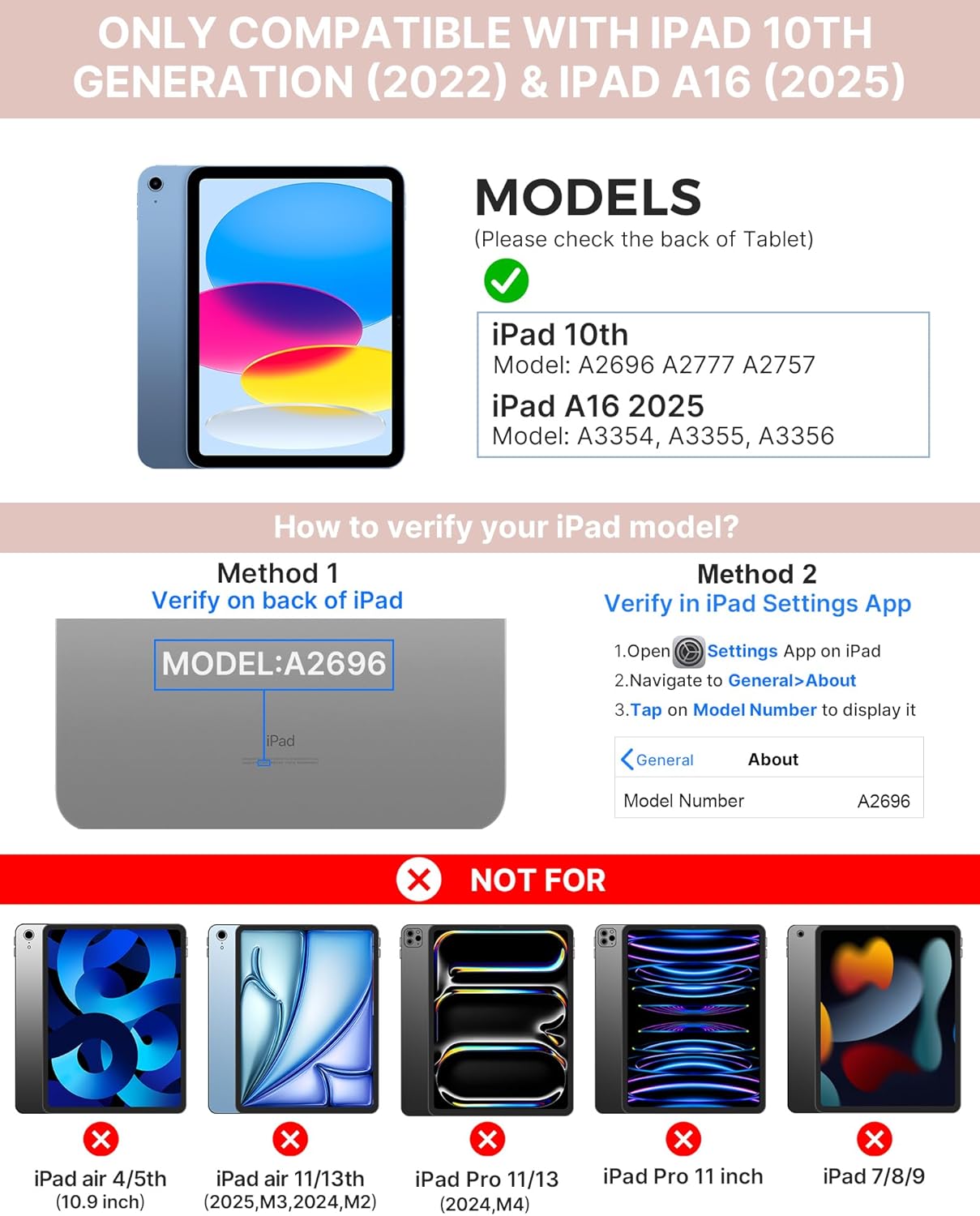
Image: Visual guide for identifying compatible iPad models and verifying the model number on the device or through settings.
3. Садржај пакета
Пакет укључује:
- 1 x typecase Touch iPad Keyboard Case
- КСНУМКС к УСБ-Ц кабл за пуњење
- 1 к Упутство за употребу
4. Упутства за подешавање
4.1 Пуњење тастатуре
Before initial use, fully charge the keyboard. Connect the provided USB-C charging cable to the keyboard's charging port and a power source. The charging indicator light will show the charging status.
- Стандби: До 1 године
- Daytime use (2 hours/day with backlight off): До 3 месеци
- Nighttime use (2 hours/day with backlight on): До 2 недеље

Image: Close-up of the keyboard's USB-C charging port and battery life specifications.
4.2 Pairing with iPad
- Уверите се да је тастатура напуњена.
- Turn on the keyboard by pressing the power button. The Bluetooth indicator light will flash.
- На вашем iPad-у идите на Подешавања > Блуетоотх.
- Укључите Bluetooth. Ваш iPad ће тражити доступне уређаје.
- Select "typecase Keyboard" from the list of devices.
- Follow any on-screen prompts to complete the pairing process. The Bluetooth indicator light on the keyboard will turn solid when successfully paired.
5. Упутство за употребу
5.1 Инсталирање вашег iPad-а
Gently insert your iPad into the case, ensuring all edges are securely seated. The case provides full protection for your device.
5.2 Функције тастатуре
The keyboard features a standard 78-key layout with a dedicated row of iPadOS shortcut keys for enhanced productivity.

Слика: Изнад главе view of the keyboard layout, highlighting the 78-key design and iPadOS shortcuts.
Тастери са позадинским осветљењем
The keyboard features 11-color RGB LED backlighting with adjustable brightness levels. This allows for comfortable typing in various lighting conditions.
- Притисните тастер кључ за сијалицу to cycle through backlight colors.
- Притисните Fn + тастер сијалице за подешавање осветљености позадинског осветљења.
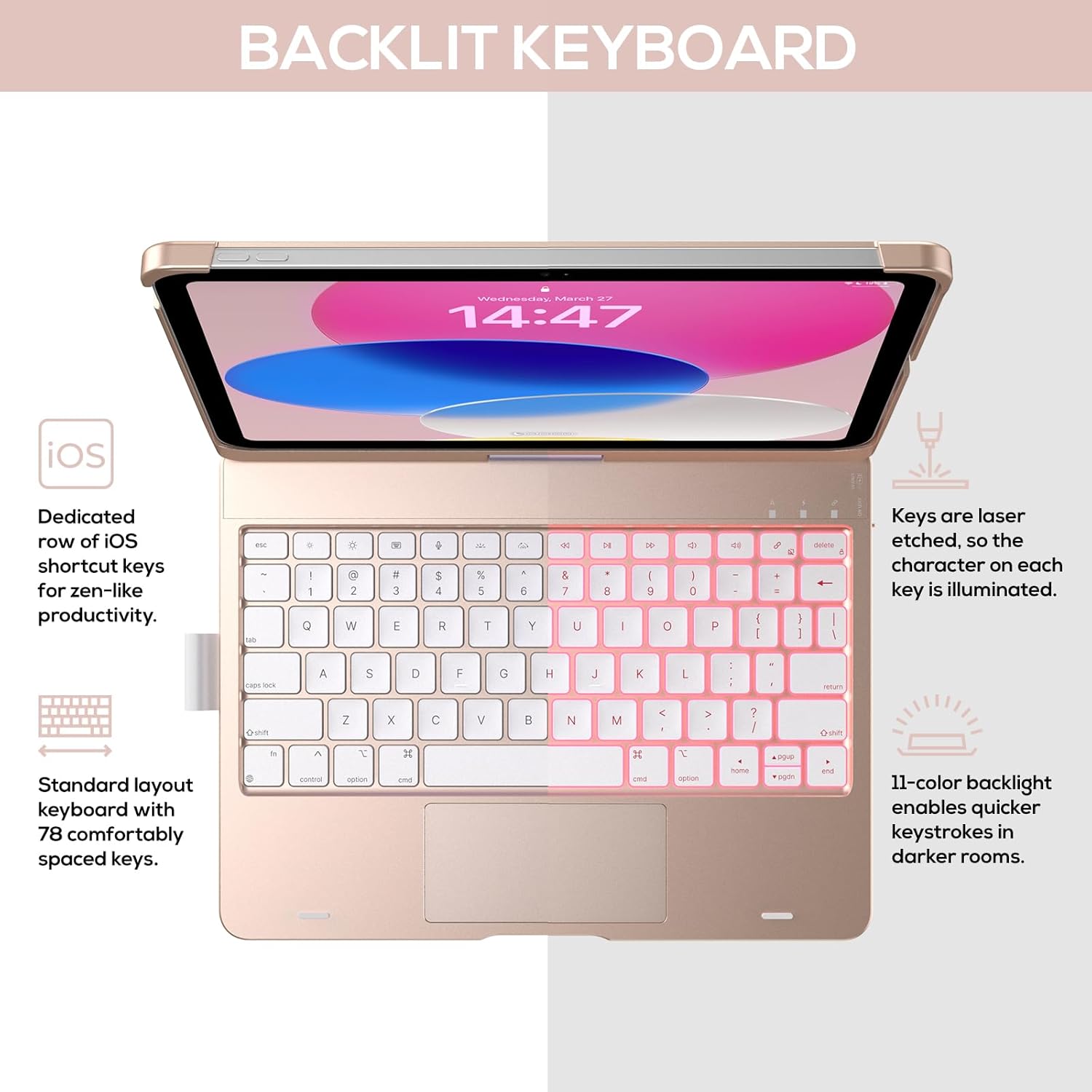
Image: The keyboard with illuminated keys, demonstrating the 11-color backlight and dedicated iOS shortcut keys.
5.3 Мулти-тач трекпед
The integrated precision trackpad supports multi-gesture controls, enhancing productivity for tasks like document editing, web browsing, and presentation building.
- Додир једним прстом: Click/Select
- Померање са два прста: Померање горе/доле или лево/десно
- Стисните прсте за зумирање: Увећајте/умањите
- Превлачење нагоре са три прста: Отвори пребацивач апликација
- Превлачење надоле са три прста: Вратите се на почетни екран

Image: Diagram showing common multi-touch gestures for the trackpad, including managing files, web browsing, and app switching.
5.4 360° Rotatable Hinge and Use Modes
The patented 360° hinge allows for versatile use of your iPad in 7 unique modes, adapting to various tasks from typing to viewинг.
- Режим лаптопа: Traditional laptop setup for typing.
- Режим стајања: Идеално за viewинг садржаја.
- Режим шатора: Stable for touch interaction or presentations.
- Режим таблета: Fold the keyboard behind the iPad for tablet use. Keys are protected in this mode.
- Угаони режим: Angled for comfortable drawing or writing.
- Режим дељења: Rotate the screen to share content with others.
- Заштитни режим: Close the case to fully protect the iPad.
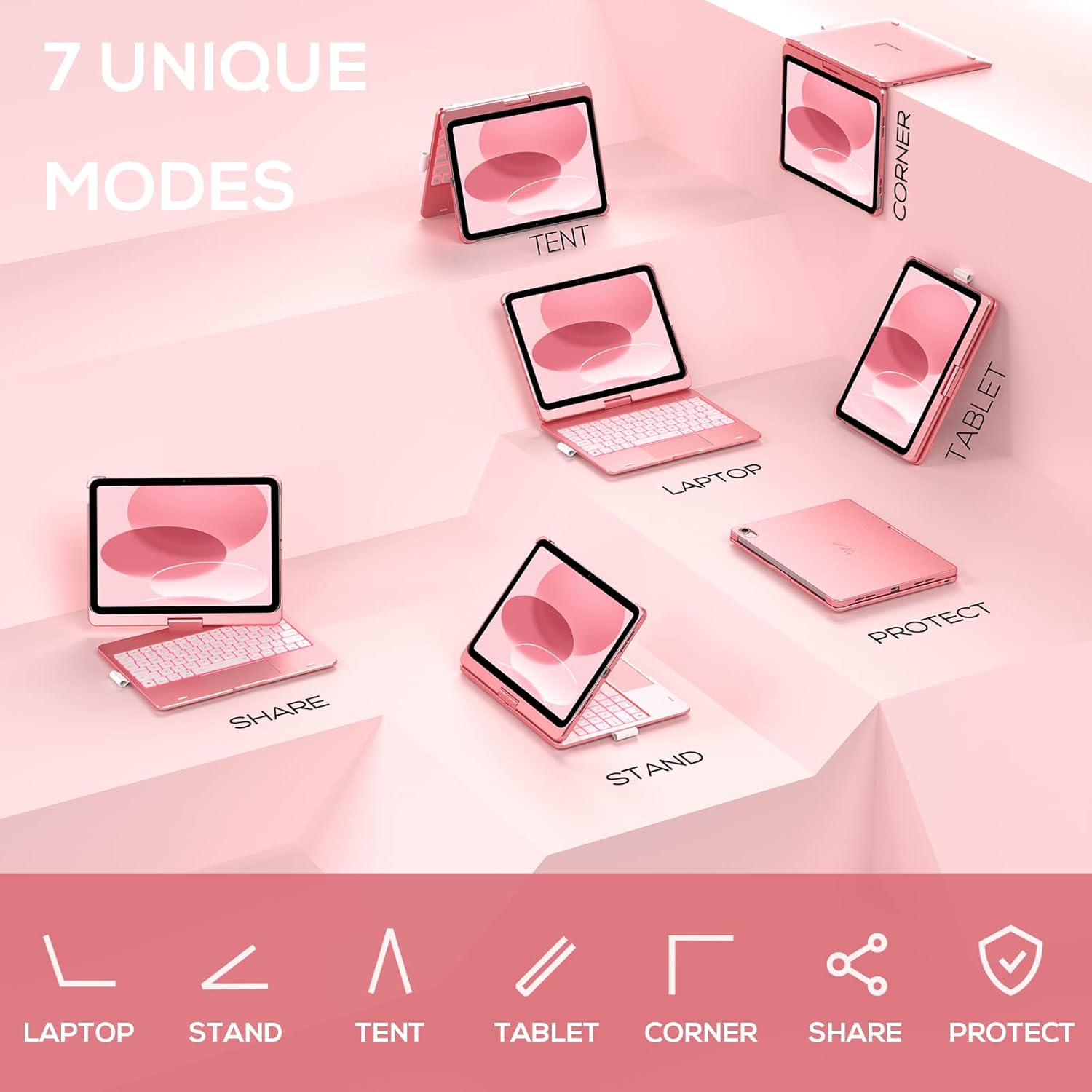
Image: A visual representation of the seven different configurations the keyboard case can be used in, including laptop, stand, and tablet modes.
5.5 Функција аутоматског спавања/буђења
The case features an auto sleep/wake function. Opening the case will wake your iPad, and closing it will put your iPad to sleep, helping to conserve battery life for both the iPad and the keyboard.

Image: A user's hand on the trackpad, illustrating the built-in trackpad and the auto sleep/wake feature that activates when the case is opened or closed.
5.6 Apple Pencil Holder
An integrated holder is provided for your Apple Pencil, ensuring it is securely stored and easily accessible.
6. Одржавање
6.1 Чишћење
To clean the keyboard case, use a soft, damp cloth. Avoid using harsh chemicals or abrasive materials, as these may damage the surface. Ensure the charging port is dry before charging.
6.2 Складиштење
When not in use for extended periods, store the keyboard case in a cool, dry place. It is recommended to fully charge the keyboard before long-term storage to maintain battery health.
КСНУМКС. Решавање проблема
7.1 Тастатура се не повезује
- Уверите се да је тастатура укључена и напуњена.
- Проверите да ли је Bluetooth омогућен на вашем iPad-у.
- Заборавите уређај у Блутут подешавањима вашег iPad-а и покушајте поново да га упарите.
- Поново покрените и iPad и тастатуру.
7.2 Тастери не реагују
- Уверите се да је тастатура правилно повезана путем Блутут-а.
- Проверите ниво батерије тастатуре.
- Очистите све остатке око тастера.
7.3 Трекпед не ради
- Ensure the keyboard is connected.
- Check iPad settings for trackpad functionality (Settings > General > Trackpad).
- Поново покрените тастатуру и iPad.
7.4 Позадинско осветљење не ради
- Уверите се да је тастатура укључена.
- Press the backlight control keys (light bulb key, Fn + light bulb key) to activate or adjust.
- Check battery level; low battery may disable backlighting.
8. Спецификације
| Број модела | КБ201Т-100 |
| Димензије производа | 11 x 8.6 x 1.5 цм (11 x 8.6 x 1.5 цм) |
| Тежина артикла | 1.43 фунти |
| Технологија повезивања | Блуетоотх |
| Опис тастатуре | Flexible, 78-key layout with iPadOS shortcuts |
| Посебне карактеристике | 360° Rotatable, 11-Color Backlit, Ergonomic, Lightweight, Multi-Touch Trackpad, Auto Sleep/Wake, Apple Pencil Holder |
| Позадинско осветљење тастатуре | РГБ (11 боја) |
| Тип батерије | 1 литијум-полимерска батерија (укључена) |
9. Гаранција и подршка
typecase is committed to product quality and customer satisfaction. This product comes with the following support:
- Услуга замене: Within 1 year of purchase.
- Политика рефундирања: У року од 30 дана од куповине.
For any issues or inquiries, please contact typecase customer support for quick feedback and assistance.

Image: Information on typecase's after-sales service, including replacement, refund, and customer support.