

1. Увод
This manual provides essential information for the safe and efficient operation of your Sygonix Built-in Thermostat SY-5044424. This device is designed as a built-in solution for regulating and monitoring heat generators within heating, climate, and ventilation technology systems. Please read these instructions thoroughly before installation and use, and retain them for future reference.
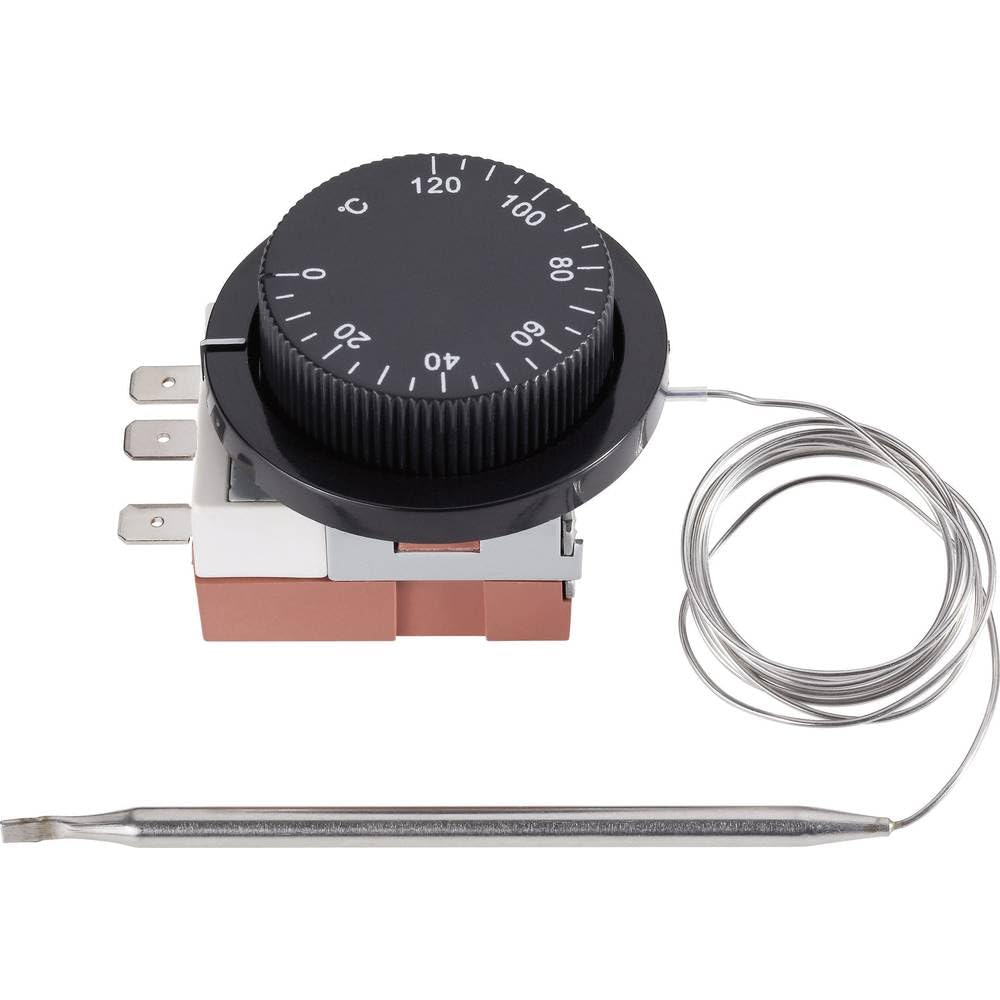
Image 1.1: The Sygonix Built-in Thermostat SY-5044424. This image shows the compact design of the thermostat, ready for integration into a control panel or wall unit.
2. Безбедносна упутства
Упозорење: Failure to follow these safety instructions may result in fire, electric shock, injury, or damage to the product or property.
- Инсталацију мора да изврши квалификовани електричар у складу са свим локалним и националним електричним прописима.
- Ensure the power supply is disconnected before installation, maintenance, or troubleshooting.
- Не излажите уређај влази, екстремним температурама или директној сунчевој светлости.
- Не покушавајте сами да модификујете или поправите уређај. Обратите се квалификованом сервисеру.
- Држите материјале за паковање даље од деце.
3. Карактеристике производа
- Setting range: 0 - 120 °C
- Switching differential: 3 ± 1.5 °C
- Уграђени дизајн за беспрекорну интеграцију
- Suitable for heating, climate, and ventilation systems
- Remote control capability (via RF connectivity)
4. Подешавање и инсталација
The Sygonix Built-in Thermostat is designed for integration into existing control systems or panels. Professional installation is highly recommended.
4.1. Провере пре инсталације
- Verify that the power supply matches the thermostat's requirements (230V).
- Ensure the installation location is free from excessive vibration, moisture, and direct heat sources.
- Confirm that all necessary mounting hardware is available.
4.2. Ожичење
- Искључите напајање: Turn off the main power supply to the circuit where the thermostat will be installed. Use a voltage tester to confirm that power is off.
- Монтажа: Secure the thermostat in its designated built-in location using the provided mounting hardware.
- Повежите жице: Follow the wiring diagram provided with the product packaging. Connect the power input, load output, and sensor wires to the appropriate terminals. Ensure all connections are secure.
- Положај сензора: Position the temperature sensor in an area that accurately reflects the ambient temperature to be controlled, away from drafts or direct heat sources.
- Врати снагу: Када су све везе безбедне и проверене, вратите напајање у коло.
5. Упутство за употребу
The Sygonix Built-in Thermostat is designed for straightforward temperature control. Specific operation details may vary based on the integrated system and any connected remote control unit.
5.1. Прво укључивање
- Upon first power-on, the thermostat may display a default temperature or enter a calibration mode. Refer to the specific display indicators in your product packaging.
5.2. Подешавање температуре
- Use the integrated controls (if any) or a compatible remote control unit to adjust the desired temperature. The setting range is 0 to 120 °C.
- The thermostat will activate or deactivate the connected heating/cooling device to maintain the set temperature within the specified switching differential.
5.3. Функционалност даљинског управљања
- The thermostat supports RF connectivity for remote control. Pair your compatible remote control or smart system according to its specific instructions.
- Ensure the remote control unit is within the effective range and has fresh batteries (if applicable).
6. Одржавање
The Sygonix Built-in Thermostat requires minimal maintenance.
- Чишћење: Gently wipe the surface of the thermostat with a soft, dry cloth. Do not use abrasive cleaners, solvents, or excessive moisture.
- Редовне провере: Periodically inspect the wiring connections for any signs of wear or damage. Ensure the temperature sensor is clean and unobstructed.
- Циклус напајања: If the device behaves unexpectedly, try disconnecting and reconnecting the power supply for a few minutes.
КСНУМКС. Решавање проблема
Ако наиђете на проблеме са термостатом, погледајте следеће уобичајене проблеме и решења:
| Проблем | Могући узрок | Решење |
|---|---|---|
| Термостат се не укључује | Нема напајања; неправилно ожичење | Check circuit breaker; verify wiring connections (ensure power is off first). |
| Нетачна очитавања температуре | Sensor obstructed or misplaced; faulty sensor | Ensure sensor is clean and in an appropriate location; contact support if suspected faulty. |
| Heating/cooling device not responding | Incorrect wiring; thermostat setting issue; device malfunction | Verify wiring; check thermostat settings; test the heating/cooling device independently. |
| Даљински управљач не ради | Remote not paired; batteries low; out of range | Pair remote as per its instructions; replace batteries; ensure remote is within RF range. |
Ако проблем и даље постоји након покушаја ових решења, обратите се корисничкој подршци.
8. Спецификације
| Феатуре | Детаљ |
|---|---|
| Бранд | Сигоник |
| Број модела | СИ-5044424 |
| Боја | Црно |
| Димензије производа | 7 x 5 x 18 cm; 14 kg (or 17D x 6W x 5H cm) |
| Капацитет | 10 литара |
| Повер/Волtage | 280 |
| Волtage | 230 В |
| Ниво буке | 1 децибела |
| Посебне карактеристике | Ремоте Цонтрол |
| Произвођач | Сигоник |
| Број артикла | СИ-5044424 |
| ASIN | B0BPX282HB |
| Тип контролера | Хандхелд Цонтроллер |
| Специфичне употребе производа | Building heating and air conditioning |
| Тип контроле температуре | Smart/Remote Control |
| Технологија повезивања | RF |
| Укључене компоненте | Монтажни хардвер |
| Опсег подешавања | 0 - 120 °C |
| Свитцхинг Дифферентиал | 3 ± 1.5 °Ц |
9. Гаранција и подршка
For warranty information and technical support, please refer to the documentation included with your purchase or visit the official Sygonix webсајт. Сачувајте доказ о куповини за потребе гаранције.