
1. Увод
Thank you for choosing the Vetroo 1000W Black Power Supply. This power supply unit (PSU) is designed to provide stable and efficient power to your personal computer, especially for high-performance gaming and workstation builds. It features 80 Plus Gold certification for energy efficiency, full modular cabling for easy management, and is compliant with the latest ATX 3.1 and PCIe 5.1 standards. This manual provides essential information for safe installation, operation, and maintenance of your PSU.
2. Безбедносне информације
Please read and understand all safety warnings before installing or operating this product. Failure to follow these instructions may result in electric shock, fire, or serious injury.
- Хигх Волtage: The PSU contains high voltagе компоненте. Не отварајте напајање цasinг. Унутра нема делова које корисник може сам да поправи.
- Професионална инсталација: Installation should be performed by qualified personnel. Incorrect installation can damage your system or the PSU.
- Искључивање струје: Always disconnect the AC power cord from the wall outlet before installing, removing, or cleaning the PSU or any other components in your computer.
- уземљење: Ensure the PSU is properly grounded. Use only the provided power cord.
- Окружење: Operate the PSU in a dry, well-ventilated environment. Avoid exposure to moisture, extreme temperatures, or direct sunlight.
- вентилација: Do not block the ventilation openings of the PSU. Ensure adequate airflow around the unit.
- Управљање кабловима: Ensure all cables are securely connected and routed to prevent interference with cooling fans or other components.
3. Садржај пакета
Проверите да ли су све ставке присутне у вашем пакету:
- Vetroo 1000W Black Power Supply Unit
- Modular Cable Set (including 24-pin ATX, 8-pin CPU, PCIe 5.1 12+4-pin, PCIe 6+2-pin, SATA, Molex, FDD cables)
- Кабл за напајање наизменичном струјом
- Монтажни завртњи
- Везице за каблове/чичак траке
- Кориснички приручник (овај документ)


4. Карактеристике производа
- 80+ златни сертификат: Ensures high energy efficiency, reducing power consumption and heat generation.
- Fully Compliant with ATX 3.1 Specifications: Designed to meet the latest power delivery standards for modern PC components.
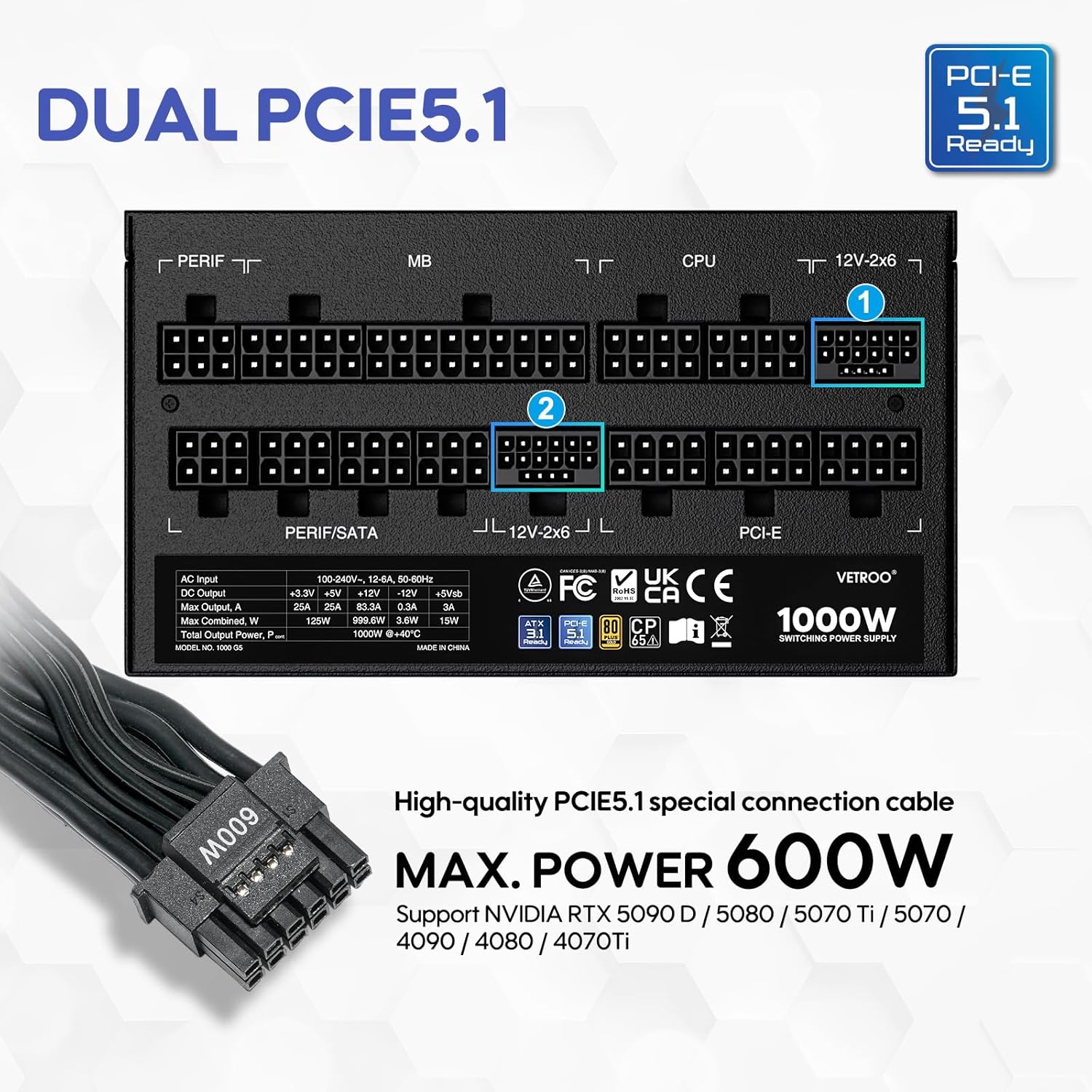
- PCIe Gen 5.1 Ready: Equipped with dedicated 12+4-pin connectors for the latest PCIe 5.1 graphics cards, offering up to 600W power delivery. Also backwards compatible with PCIe 4.0 and 3.0.
- Premium 105° C Capacitors: Utilizes high-quality Japanese capacitors for enhanced stability, reliability, and extended lifespan.
- Full Modular Design: Allows users to connect only the necessary cables, improving airflow and simplifying cable management within the PC case.
- Eco Mode with 120mm FDB Fan: Features a fluid dynamic bearing (FDB) fan that operates silently under low loads, with an Eco Mode switch to stop the fan entirely when power consumption is below 50%.
- Компактна величина: Designed to fit comfortably in various PC chassis types.
- Свеобухватна заштита: Укључује прекомерни обимtage Protection (OVP), Over Current Protection (OCP), Over Power Protection (OPP), Short Circuit Protection (SCP), Under Voltage Protection (UVP), and Over Temperature Protection (OTP).

5. Спецификације
| Феатуре | Детаљ |
|---|---|
| Назив модела | 1000Г5 |
| Оутпут Ватtage | 1000 Ваттс |
| Форм Фацтор | АТКС |
| Дизајн напајања | Фулл Модулар |
| Сертификација ефикасности | 80 плус злато |
| ATX стандард | АТКС 3.1 спреман |
| ПЦИе Стандард | PCIe 5.1 Ready (Dual) |
| Метод хлађења | Air (120mm FDB Fan) |
| Димензије производа (Д к Ш к В) | 5.9 к 5.5 к 3.4 инча |
| Тежина артикла | 5.83 фунти |
| Компатибилни уређаји | Персонал Цомпутер |
| Тип конектора | ATX & PCIE |

6. Подешавање и инсталација
Follow these steps to install your Vetroo 1000W Power Supply:
- Припремите свој систем: Уверите се да је рачунар потпуно искључен из напајања и да је кабл искључен из зидне утичнице. Отворите кућиште рачунара да бисте приступили месту за монтажу напајања.
- Уклоните стари напајач (ако је применљиво): Искључите све каблове из старог напајања и извадите га из кућишта.
- Монтирајте нови PSU: Carefully slide the Vetroo 1000W PSU into the designated power supply bay in your PC case. Secure it with the provided mounting screws.
- Повежите модуларне каблове: Identify the necessary cables for your motherboard, CPU, graphics card(s), and storage devices. Connect these cables to the corresponding ports on the PSU first, then route them to your components.
- матична плоча: Повежите 24-пински АТКС кабл на матичну плочу.
- ЦПУ: Connect the 8-pin (or 4+4-pin) CPU power cable(s) to your motherboard.
- Graphics Card(s): For modern GPUs, use the PCIe 5.1 12+4-pin cable. For older or additional GPUs, use the PCIe 6+2-pin cables.
- Storage/Peripherals: Connect SATA power cables to SSDs/HDDs and Molex cables for other peripherals as needed.
- Управљање кабловима: Use the included cable ties or Velcro straps to organize cables, ensuring optimal airflow and a tidy build.
- Коначне везе: Close your PC case. Connect the AC power cord to the PSU and then to a wall outlet or surge protector.

7. Упутство за употребу
- Укључивање/искључивање: After all connections are secure, flip the main power switch on the back of the PSU to the 'ON' position. Your computer can now be powered on via its front panel button. To power off, shut down your computer normally, then flip the PSU switch to 'OFF' for complete power disconnection.
- Еко режим: The Vetroo 1000W PSU features an Eco Mode switch on the rear panel.
- Eco Mode ON: When the Eco Mode switch is in the 'ON' position, the PSU fan will remain off under low to moderate loads (typically below 50% load) for silent operation. The fan will automatically activate when the load increases or internal temperature rises.
- Eco Mode OFF: When the Eco Mode switch is in the 'OFF' position, the PSU fan will spin continuously regardless of the load, providing constant cooling.

8. Одржавање
Proper maintenance ensures the longevity and optimal performance of your PSU:
- Чишћење прашине: Periodically clean the PSU fan and ventilation grilles to prevent dust buildup, which can hinder cooling performance. Use compressed air to gently blow dust away. Always disconnect power before cleaning.
- Инспекција каблова: Regularly check all modular cable connections to ensure they are secure and free from damage.
- Услови животне средине: Maintain a clean, dry, and well-ventilated environment for your PC to prevent excessive heat and moisture exposure to the PSU.
КСНУМКС. Решавање проблема
If you encounter issues with your Vetroo 1000W Power Supply, try the following steps:
- Нема напајања:
- Уверите се да је кабл за напајање наизменичном струјом безбедно прикључен и у уређај за напајање и у зидну утичницу.
- Verify the main power switch on the PSU is in the 'ON' position.
- Проверите све модуларне кабловске везе, посебно 24-пински ATX и 8-пински CPU каблове, да бисте били сигурни да су добро причвршћени.
- Тестирајте зидну утичницу другим уређајем да бисте потврдили да има струју.
- Нестабилност система/Случајна гашења:
- Ensure your PSU wattage is sufficient for all your components, especially high-power GPUs.
- Проверите да ли постоји одговарајућа вентилација унутар кућишта рачунара како бисте спречили прегревање.
- Verify that all PCIe power cables to your graphics card(s) are correctly connected.
- If Eco Mode is enabled, try disabling it to see if continuous fan operation resolves the issue.
- Необични звуци:
- If you hear a fan noise, ensure the PSU fan is not obstructed by cables or dust.
- If a 'coil whine' noise is present, it is often harmless but can sometimes indicate a component under stress. Ensure your system is not drawing excessive power.
If problems persist after performing these checks, please contact Vetroo customer support for further assistance.
10. Гаранција и подршка
The Vetroo 1000W Black Power Supply comes with a 10-годишња гаранција од дана куповине. Ова гаранција покрива недостатке у материјалу и изради при нормалној употреби.
Гаранција не покрива:
- Штета узрокована несрећом, злоупотребом, злоупотребом, поплавом, пожаром, земљотресом или другим спољним узроцима.
- Damage caused by operating the product outside the permitted or intended uses described by Vetroo.
- Damage caused by service (including upgrades and expansions) performed by anyone who is not a representative of Vetroo.
- Products or parts that have been modified to alter functionality or capability without the written permission of Vetroo.
For warranty claims or technical support, please visit the official Vetroo website or contact their customer service department with your product model and proof of purchase.