
Увод
This manual provides instructions for the Earto Wireless Keyboard Case designed for the iPad 10th Generation. It covers product features, setup, operation, and maintenance to ensure optimal performance and user experience.
Производ је завршенview
The Earto Keyboard Case integrates a wireless keyboard with a multi-touch trackpad into a protective case for your iPad. Key features include a detachable magnetic keyboard, adjustable viewing angles, 7-color backlighting with 3 brightness levels, and multi-device Bluetooth connectivity.
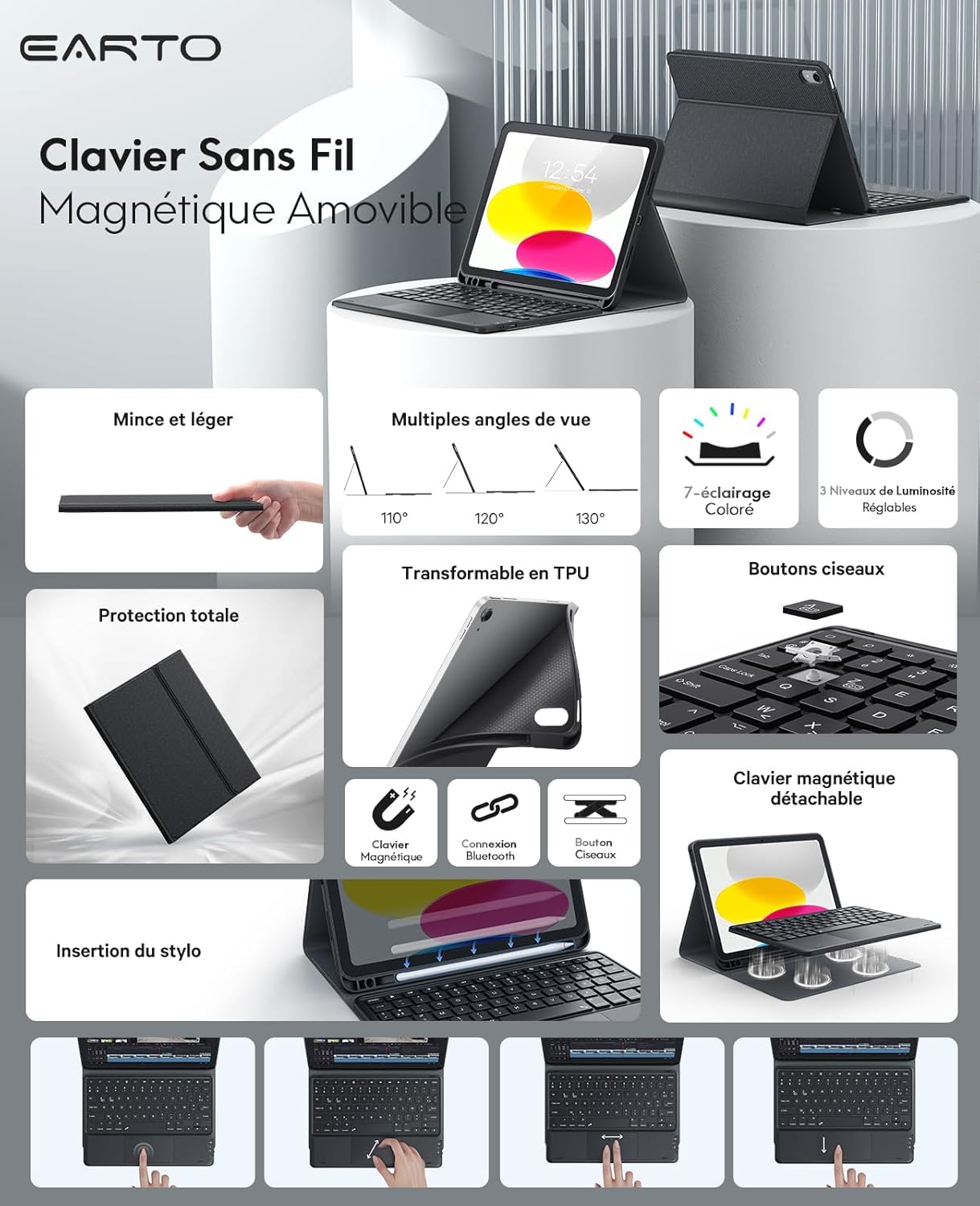
Слика: Прекоview of the Earto Wireless Keyboard Case highlighting its features such as slim design, multiple viewing angles, 7-color lighting, full protection, detachable keyboard, Bluetooth connection, and pen slot.
Компатибилност
This keyboard case is compatible with specific iPad models. Please verify your iPad's model number before use.
- iPad 10th Generation 10.9 inch 2022: Model Numbers A2696, A2757, A2777
- iPad A16 11th Generation 11 inch 2025: Model Numbers A3354, A3355, A3356
Note: This product does not contain an Apple Pencil.

Image: A visual guide detailing compatible iPad models (iPad 10th Gen 10.9 inch 2022, iPad A16 11th Gen 11 inch 2025) and incompatible models (iPad Air 11 inch, iPad Air 5 10.9 inch, iPad Air 4 10.9 inch).
Подешавање и повезивање
Initial Connection Steps:
- Пуњење тастатуре: Fully charge the keyboard for approximately 3-4 hours using the provided USB charging cable.
- Укључено: Turn on the keyboard. The Bluetooth indicator light will flash for 3 seconds, then turn off.
- Activate Bluetooth Pairing: Притисните тастер "FN" кључ истовремено са "C" key to activate Bluetooth matching mode. The Bluetooth indicator will start flashing.
- Connect on iPad: Open the Bluetooth settings on your iPad. Locate and select "Bluetooth Keyboard 3.0" from the list of available devices to connect.
- Потврда везе: Once connected, the Bluetooth signal light on the keyboard will turn off. The connection is now successful.
Веза са више уређаја:
The keyboard supports connecting up to two devices simultaneously. You can easily switch between them with a single click.

Image: The Earto keyboard connected to both an iPad and a smartphone, demonstrating its multi-device switching capability.
Упутство за употребу
Позадинско осветљење тастатуре:
The keyboard features 7-color backlighting and 3 adjustable brightness levels for comfortable typing in various lighting conditions.

Image: Several Earto keyboards displayed with different backlight colors, illustrating the 7-color lighting options and adjustable brightness levels.
Мулти-тач тракпед:
The integrated multi-touch trackpad supports various gestures, enhancing navigation and interaction with your iPad. Refer to your iPad's settings for specific gesture configurations.

Image: A close-up of the Earto keyboard's touchpad with illustrations of various multi-touch gestures, such as scrolling, zooming, and swiping.
Подесиво Viewуглови угла:
The case allows for three adjustable viewing angles (110°, 120°, 130°) to suit your preference for typing, viewње, или цртање.

Image: The Earto keyboard case shown at three different adjustable angles: 130°, 120°, and 110°, demonstrating its versatility.
Одвојива тастатура:
The keyboard is magnetically detachable from the case, offering flexibility. You can remove the keyboard when not needed, making the iPad lighter and easier to carry.
Одржавање
- Чишћење: Use a soft, dry cloth to clean the keyboard and case. For stubborn marks, a slightly damp cloth can be used, ensuring no moisture enters the keyboard's internal components.
- Складиштење: Када се не користи дуже време, чувајте футролу за тастатуру на хладном и сувом месту. Уверите се да је тастатура искључена да бисте уштедели батерију.
- Одржавање батерије: To prolong battery life, avoid fully discharging the keyboard frequently. Charge it regularly, especially if it will be stored for a long time.
- Заштита: The case provides full protection against bumps, scratches, and splashes. However, avoid exposing the device to extreme temperatures or direct water immersion.
Решавање проблема
- Тастатура се не повезује:
- Уверите се да је тастатура напуњена и укључена.
- Проверите да ли је Bluetooth омогућен на вашем iPad-у.
- Притисните ФН+Ц да бисте поново ушли у режим упаривања.
- Forget "Bluetooth Keyboard 3.0" from your iPad's Bluetooth settings and attempt to pair again.
- Поново покрените и iPad и тастатуру.
- Трекпед не реагује:
- Уверите се да је тастатура правилно повезана путем Блутут-а.
- Check iPad settings to ensure trackpad support is enabled.
- Clean the trackpad surface for any obstructions.
- Позадинско осветљење не ради:
- Уверите се да је батерија тастатуре довољно напуњена.
- Refer to the keyboard's function keys for backlight control (usually a dedicated key or FN combination).
- Кратак век трајања батерије:
- Ensure the keyboard is fully charged before use.
- Disable backlighting when not needed to conserve power.
- The keyboard enters sleep mode after periods of inactivity; ensure it wakes up correctly.
Спецификације
| Бранд | Earto |
| Број модела | А2696 |
| Компатибилни уређаји | iPad 10th Generation (10.9 inch, 2022), iPad 11th Generation (11 inch, 2025) |
| Технологија повезивања | Блуетоотх |
| Опис тастатуре | Мембране |
| Посебне карактеристике | Rechargeable, Multi-Touch Trackpad, Detachable Keyboard, Backlit (7 colors, 3 brightness levels), Multi-device pairing |
| Боја | Црно |
| Димензије производа | 28Д к 22.5В к 3Х центиметара |
| Тежина артикла | 920 грама |