
Увод
Thank you for choosing the DELUX GM905 Ergonomic Wireless Keyboard. This manual provides detailed instructions for setting up, operating, and maintaining your keyboard to ensure optimal performance and comfort. Please read this manual thoroughly before using the product.

Карактеристике производа
- Ergonomic Split and Curved Design: Engineered to promote a natural arm and wrist posture, reducing strain and discomfort during extended typing sessions.
- Повезивање са више уређаја: Supports 2.4G wireless (via USB receiver) and Bluetooth 5.0 (BT1 + BT2 channels), allowing connection to up to three devices simultaneously with easy switching.
- Integrated Padded Wrist Rest: Features a skin-friendly synthetic leather wrist rest to provide comfortable support for your palms and wrists.
- Full-Size Layout with Multimedia Keys: Includes a standard 112-key layout with a number pad, 12 FN function keys, and dedicated multimedia controls for enhanced productivity.
- Adjustable Front and Palm Supports: Equipped with four adjustable kickstands to customize the keyboard angle for both seated and standing postures.
- Широка компатибилност система: Compatible with Microsoft Windows (7/8/10/11), Mac OS 10.12 or higher, and Android 4.3 or higher.


Садржај пакета
Молимо вас да проверите садржај пакета након распакивања:
- DELUX GM905 Ergonomic Wireless Keyboard
- 2.4Г УСБ пријемник
- УСБ кабл
- Кориснички приручник (овај документ)
Сетуп
1. Инсталирајте батерије
The keyboard requires two AAA batteries (not included). Locate the battery compartment on the underside of the keyboard. Open the cover, insert two AAA batteries according to the polarity indicators, and close the cover.
2. Повежите се са својим уређајем
The DELUX GM905 keyboard offers three connection modes: 2.4G Wireless and two Bluetooth 5.0 channels (BT1, BT2).
2.1. 2.4Г бежична веза
- Locate the 2.4G USB receiver, usually stored in a compartment on the keyboard or included in the package.
- Укључите УСБ пријемник у слободан УСБ порт на рачунару.
- На тастатури притисните 2.4Г key to switch to 2.4G wireless mode. The indicator light will illuminate.
- Your computer should automatically detect and install the keyboard.
2.2. Блутут веза (BT1 / BT2)
- On the keyboard, press and hold either the БТ1 or БТ2 тастер 3-5 секунди док одговарајућа индикаторска лампица не почне брзо да трепери. Ово указује на режим упаривања.
- On your device (computer, tablet, smartphone), go to Bluetooth settings and enable Bluetooth.
- Тражи new devices. You should see "DELUX GM905" or a similar name appear in the list.
- Select the keyboard to pair. The indicator light on the keyboard will stop flashing and remain solid once connected.
- Repeat these steps for the other Bluetooth channel (BT2 or BT1) to connect a second device.


3. Adjust Keyboard Angle
The keyboard features adjustable kickstands at the front and palm rest area. You can adjust these to find the most comfortable typing angle for your seated or standing posture. Experiment with different angles to reduce wrist and arm strain.

Упутство за употребу
Пребацивање између уређаја
Once multiple devices are paired, you can switch between them by simply pressing the corresponding connection key: 2.4Г, БТ1, или БТ2. The keyboard will connect to the selected device almost instantly.
Using Function (FN) Keys
The keyboard features 12 FN function keys (F1-F12) with secondary multimedia functions. To activate the secondary function, hold down the Fn тастер (који се налази близу левог тастера Ctrl), а затим притисните жељени F-тастер.
Common FN key combinations include:
- Фн + Ф1: Цут
- Фн + Ф2: Копирај
- Фн + Ф3: Залепите
- Фн + Ф4: Pretraga
- Фн + Ф5: Превиоус Трацк
- Фн + Ф6: Пусти/Паузирај
- Фн + Ф7: Нект Трацк
- Фн + Ф8: Муте
- Фн + Ф9: Утишавање звука
- Фн + Ф10: Волуме Уп
- Фн + Ф11: Закључавање екрана
- Фн + Ф12: Калкулатор

Dedicated Multimedia Controls
The central circular dial provides quick access to multimedia functions:
- Централно дугме: Пусти/Паузирај
- Дугмад лево/десно: Prethodna/Sledeća numera
- Дугмад за горе/доле: Појачавање/утишавање јачине звука
- Top/Bottom Buttons (Sun icons): Brightness Up/Down (System dependent)

Одржавање
Чишћење тастатуре
- Искључите тастатуру из уређаја пре чишћења.
- Користите меку крпу која не оставља длачицеampводом или благим раствором за чишћење да бисте обрисали површину тастатуре.
- For stubborn dirt between keys, use compressed air or a soft brush.
- Избегавајте употребу јаких хемикалија, абразивних средстава за чишћење или прекомерне влаге, јер оне могу оштетити тастатуру.
- Clean the wrist rest with a damp cloth and mild soap if necessary, then wipe dry.
Замена батерије
When the keyboard's performance degrades or the connection becomes unstable, it may be time to replace the batteries. Follow the "Install Batteries" steps in the Setup section to replace the two AAA batteries.
Решавање проблема
| Проблем | Могући узрок | Решење |
|---|---|---|
| Тастатура не реагује | Low batteries; Incorrect connection mode; USB receiver not plugged in (2.4G); Bluetooth not paired. | Replace batteries. Ensure the correct connection mode (2.4G, BT1, BT2) is selected. For 2.4G, ensure the USB receiver is securely plugged in. For Bluetooth, re-pair the keyboard. |
| Кашњење или повремена веза | Interference; Distance from device; Low batteries. | Move closer to your device. Remove potential sources of interference (other wireless devices). Replace batteries. |
| Keys not typing correctly or double typing | Software issue; Keyboard defect; Low batteries. | Restart your computer. Ensure keyboard drivers are up to date. Replace batteries. If the issue persists, contact customer support. |
| Мултимедијални тастери не раде | System compatibility; Software conflict. | Ensure your operating system supports multimedia key functions. Check for any conflicting software or drivers. |
Спецификације
- Бренд: ДЕЛУКС
- Модел: ГМ905
- Повезивање: 2.4G Wireless, Bluetooth 5.0 (BT1, BT2)
- Компатибилни уређаји: PC, Laptop, Smart TV, Smartphone, Tablet
- Тип тастатуре: Ergonomic, Split, Wireless, Full-Size
- Број кључева: 112
- Распоред тастера: КВЕРТИ
- Тип прекидача: Кликните
- Ослонац за зглоб: Integrated, Padded (Synthetic Leather)
- Подесиви угао: Yes (Front and Palm Kickstands)
- Извор напајања: 2 к ААА батерије
- Материјал: Пластика
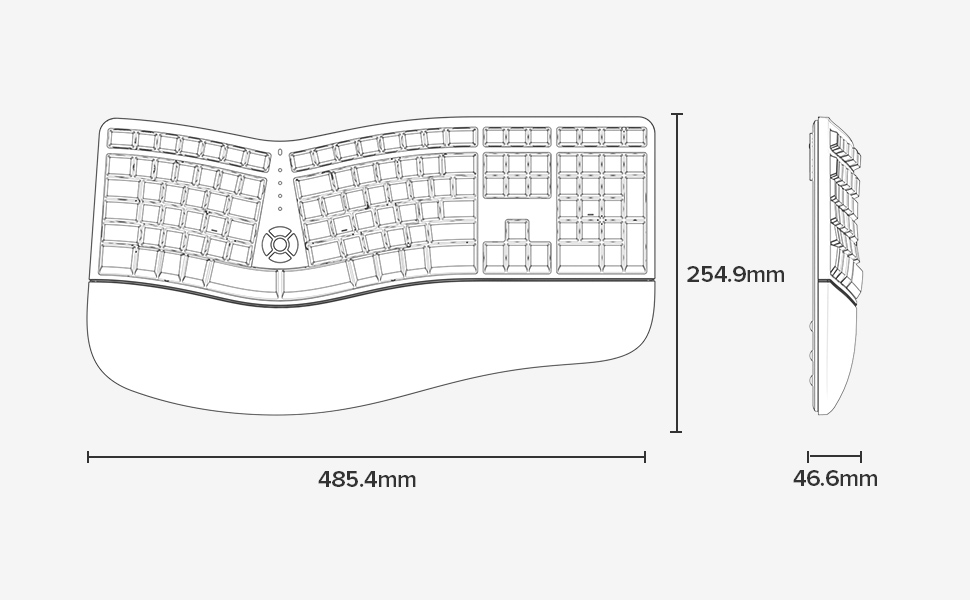
- Димензије (Д к Ш к В): 48.5 цм к 25.5 цм к 4.7 цм (19.1 к 10.0 к 1.85 инча)
- Отпорност на воду: Није водоотпоран
- Садржај кутије: Keyboard, 2.4G USB Receiver, USB Cable


Информације о гаранцији
Specific warranty details for the DELUX GM905 Ergonomic Wireless Keyboard are not provided in the available product data. Please refer to the product packaging or the manufacturer's official webсајт за услове гаранције.
Подршка
For further assistance, technical support, or inquiries regarding your DELUX GM905 keyboard, please visit the official DELUX website or contact their customer service department. Contact information is typically found on the product packaging or the manufacturer's webсајту.
You can also visit the DELUX store on Amazon for more information: DELUX Amazon Store