
Увод
This manual provides essential instructions for the safe and efficient use of your Olympia 2298 foldable 4G mobile phone. Please read it thoroughly before operating the device and keep it for future reference.
1. Подешавање
1.1 Садржај пакета
- Olympia 2298 Mobile Phone
- Батерија (литијум-јонска)
- УСБ-Ц кабл за пуњење
- Charging Cradle (if included)
- Упутство за употребу
1.2 Inserting the Battery and SIM Card
- Open the phone: Gently open the phone to access the battery compartment.
- Уклоните задњи поклопац: Пажљиво уклоните задњу маску телефона.
- Уметните СИМ картицу: Locate the SIM card slot(s). Insert your 4G compatible SIM card(s) into the designated slot(s) with the gold contacts facing down, ensuring it clicks into place.
- Уметните батерију: Place the Lithium-ion battery into the battery compartment, aligning the contacts.
- Replace back cover: Securely attach the back cover until it clicks.
 Слика: Фронт view of the Olympia 2298 foldable phone, showing the main display with time and date.
1.3 Пуњење батерије
Пре прве употребе, потпуно напуните батерију телефона.
- Connect charger: Plug the USB-C cable into the phone's USB-C port or place the phone in the charging cradle. Connect the other end of the cable to a suitable power adapter.
- Индикатор пуњења: The phone will display a charging indicator on the screen.
- Puno punjenje: Allow the phone to charge until the battery indicator shows a full charge. This may take several hours for the initial charge.
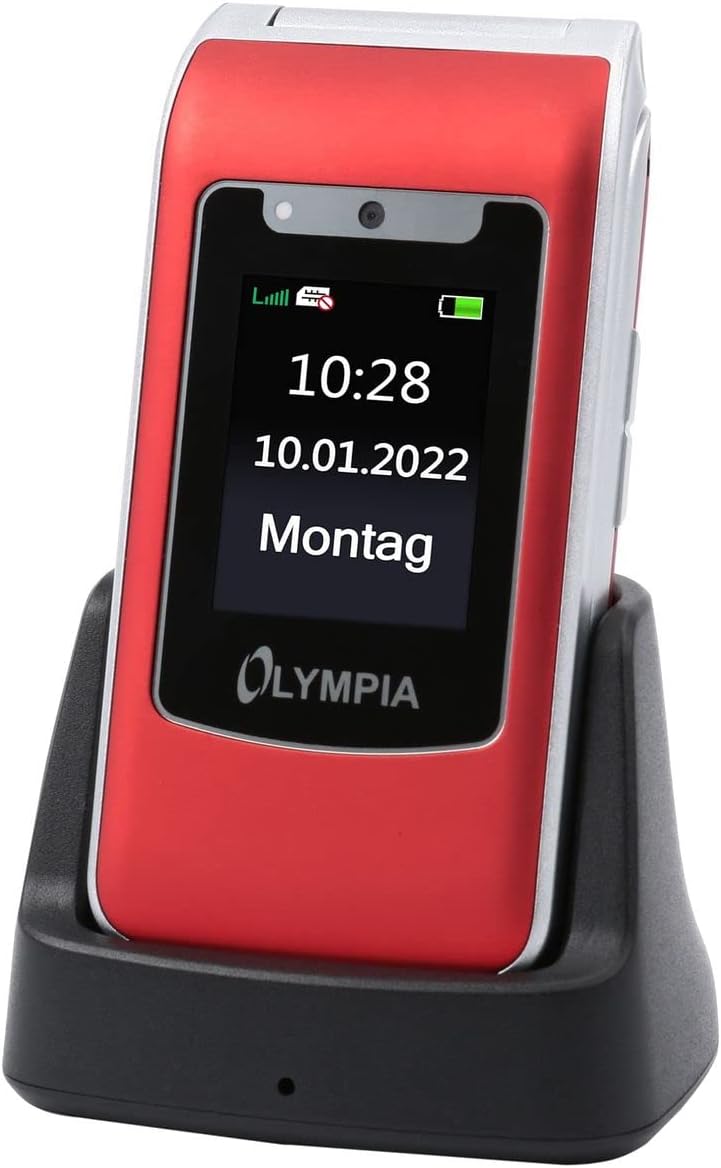 Image: The Olympia 2298 phone placed in its charging cradle, indicating ease of charging.
1.4 Укључивање/искључивање
- За укључивање: Press and hold the Power/End Call button until the screen lights up.
- За искључивање: Press and hold the Power/End Call button, then select "Power Off" from the options on the screen.
2. Упутство за употребу
2.1 Основне функције позива
- Позивање: Dial the number using the keypad and press the Green Call button.
- Одговарање на позив: When the phone rings, press the Green Call button.
- Завршавање позива: Притисните црвено дугме за прекид позива.
- Подешавање јачине звука: Use the volume buttons on the side of the phone during a call.
2.2 Emergency Call Button (SOS)
The Olympia 2298 features a dedicated SOS button for emergencies.
 Слика: Позади view of the Olympia 2298 phone, highlighting the prominent SOS emergency call button.
- Setup Emergency Contacts: Before using, configure up to 5 emergency contacts in the phone's settings. Refer to the "Settings" section in the menu for details.
- Активирање СОС-а: In an emergency, press and hold the SOS button on the back of the phone for several seconds.
- Automatic Dialing: The phone will automatically dial the pre-set emergency contacts one by one until a connection is made. It will also send an emergency SMS message to these contacts.
Важно: Ensure emergency contacts are regularly updated and aware they are listed as such.
2.3 Навигација кроз мени
Use the navigation keys (up, down, left, right) and the central "OK" button to browse the phone's menu. The "Back" button typically returns to the previous screen.
- Контакти: Store and manage phone numbers.
- Поруке: Слање и примање СМС порука.
- Дневник позива: View missed, dialed, and received calls.
- Подешавања: Customize phone preferences, including sound, display, and emergency contacts.
- камера: Access the integrated camera.
- Алати: Includes features like alarm, calendar, and calculator.
2.4 Слање и примање порука
- To Send: Go to "Messages" -> "Write Message". Enter the recipient's number or select from contacts, type your message, and send.
- За пријем: New messages will appear as a notification. Go to "Messages" -> "Inbox" to read them.
3. Одржавање
3.1 Чишћење
- Use a soft, dry cloth to clean the phone's exterior.
- Avoid using liquid cleaners, aerosols, or harsh chemicals.
- Keep the USB-C port free from dust and debris.
3.2 Одржавање батерије
- Не излажите батерију екстремним температурама.
- Избегавајте често потпуно пражњење батерије како бисте продужили њен век трајања.
- Ако се телефон неће користити дуже време, напуните га на око 50% пре складиштења.
КСНУМКС. Решавање проблема
| Проблем | Могући узрок | Решење |
|---|---|---|
| Телефон се не укључује. | Батерија је испражњена или није правилно уметнута. | Напуните батерију. Уверите се да је батерија правилно уметнута. |
| Не могу да упућујем или примам позиве. | No network signal, SIM card not inserted, or SIM card issue. | Check network signal strength. Reinsert SIM card. Contact your service provider. |
| SOS дугме не ради. | Emergency contacts not set up or incorrect. | Verify and update emergency contacts in settings. |
| Лош квалитет позива. | Слаб мрежни сигнал или сметње. | Move to an area with better signal. Avoid obstructions. |
5. Спецификације
- Број модела: 2298
- Бренд: ОЛИМПИЈА
- Величина екрана: 2.4 инча
- Ћелијска технологија: 4Г (ЛТЕ)
- Технологија повезивања: USB (USB Type C)
- Бежични оператер: Сви превозници
- батерија: 1 литијум-јонска (укључена)
- Тежина артикла: 105 грама
- Време разговора: 6 сата
- Димензије: 5.3 к 2.1 к 10.5 центиметара
6. Гаранција и подршка
For warranty information and technical support, please refer to the documentation provided with your purchase or visit the official OLYMPIA webсајт. Сачувајте доказ о куповини за потребе гаранције.
Напомена: Spare parts availability and software update guarantees are not specified in the product information provided.