
Sigma SG60600L
Sigma 60-600mm F4.5-6.3 DG DN OS for L-Mount Instruction Manual
Model: SG60600L
1. Увод
This manual provides detailed instructions for the safe and effective use of your Sigma 60-600mm F4.5-6.3 DG DN OS Sports Lens for L-Mount. Please read this manual thoroughly before using the product and retain it for future reference. This lens is designed for mirrorless cameras and offers a versatile 10x zoom range, suitable for various photographic applications from landscapes to wildlife.
2. Шта је у кутији
Након отварања пакета, уверите се да су присутни сви следећи елементи:
- Sigma 60-600mm F4.5-6.3 DG DN OS Sports Lens
- Сјенило
- Предњи поклопац објектива
- Поклопац задњег сочива
- Tripod Socket (removable)
- Упутство за употребу (овај документ)
3. Кључне карактеристике
- Versatile 10x Zoom: Covers a broad focal length range from 60mm to 600mm.
- High-response Linear Actuator (HLA) AF Motor: Provides fast and precise autofocus performance.
- Dust and Splash-Resistant Structure: Designed for durability in various shooting conditions.
- Maximum Magnification Ratio of 1:2.4: Allows for detailed close-up shots.
- Dual Action Zoom Function: Offers both rotary and push-pull zoom mechanisms for flexible operation.
- Optical Stabilization (OS): Minimizes camera shake for sharper images, especially at longer focal lengths.
- Ручно превазилажење фокуса: Enables manual focus adjustments even when using autofocus.
- Zoom Lock Switch: Secures the lens at a desired focal length to prevent accidental extension.
4. Подешавање
4.1 Причвршћивање објектива на камеру
- Уверите се да су и камера и објектив искључени.
- Уклоните задњи поклопац објектива са објектива и поклопац тела са фотоапарата.
- Align the mounting index marks on the lens and camera body.
- Уметните објектив у носач објектива фотоапарата и окрените га у смеру казаљке на сату док не кликне на своје место.
4.2 Постављање заштитне сенке објектива
The included lens hood helps to block stray light and protect the front element of the lens. Align the red dot on the lens hood with the red dot on the front of the lens, then twist the hood clockwise until it locks securely.
4.3 Using the Tripod Socket
For stable shooting, especially at longer focal lengths, attach the lens to a tripod using the integrated tripod socket. The tripod collar can be rotated for optimal balance and composition. Loosen the locking knob on the tripod collar to rotate the lens, then tighten it to secure the position.
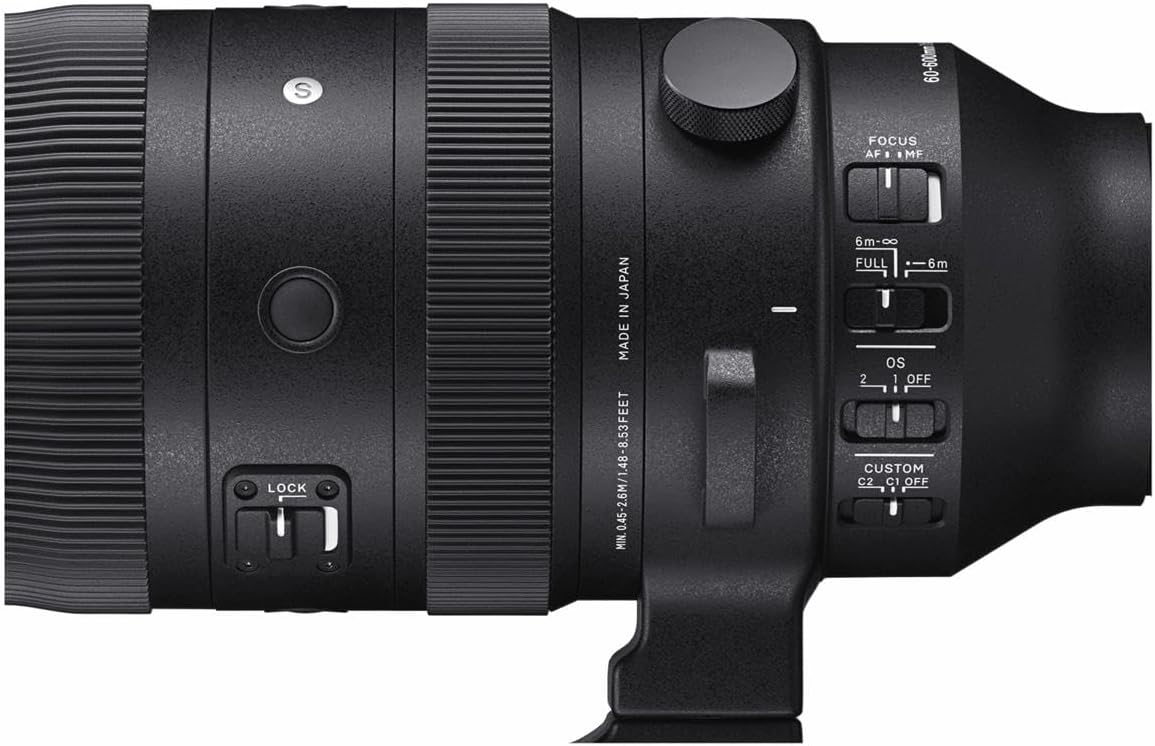
Image: Sigma 60-600mm lens securely mounted on a tripod, demonstrating its use for stable photography.
5. Радни режими
5.1 Режими фокуса (AF/MF)
The lens features a switch to select between Autofocus (AF) and Manual Focus (MF). In AF mode, the camera automatically focuses on the subject. In MF mode, you manually adjust the focus ring on the lens. The Manual Override (MO) function allows for fine-tuning focus manually even when AF is engaged.
5.2 Optical Stabilizer (OS) Modes
The Optical Stabilizer (OS) system helps reduce blur caused by camera shake. The lens offers different OS modes:
- Режим 1: General-purpose stabilization for static subjects.
- Режим 2: Optimized for panning shots, stabilizing vertical movement while allowing horizontal movement.
- ВАН: Disables optical stabilization.
5.3 Zoom Lock Switch
The zoom lock switch prevents the lens barrel from extending or retracting unintentionally, which is useful during transport or when shooting at a fixed focal length.

Слика: Детаљна view of the lens control panel, highlighting the various switches for focus, optical stabilization, and zoom lock.
6. Спецификације
| Феатуре | Спецификација |
|---|---|
| Бранд | Сигма |
| Назив модела | СГ60600Л |
| Фоцал Ленгтх | 60-600мм |
| Ленс Типе | Телефото зум |
| Компатибилни носачи | Leica L-бајонет |
| Максимални отвор бленде | Ф4.5-6.3 |
| Минимални отвор бленде | Ф22-32 |
| Стабилизација слике | Optical (OS) |
| Фоцус Типе | Autofocus (HLA) with Manual Focus Override |
| Број лопатица дијафрагме | 9 (Rounded) |
| Минимална удаљеност фокуса | 45 cm (17.7 inches) at 200mm |
| Однос максималног увећања | 1:2.4 (на 200 мм) |
| Величина филтера | 105мм |
| Тежина артикла | 2500 грама (5.5 фунте) |
| Ниво отпорности на воду | Отпоран на воду |
7. Одржавање
7.1 Чишћење сочива
- Користите четкицу за дување да бисте уклонили прашину са површине сочива.
- For smudges or fingerprints, use a clean, soft microfiber cloth specifically designed for optics, along with a lens cleaning solution.
- Never use harsh chemicals or abrasive materials, as these can damage the lens coatings.
7.2 Складиштење
Store the lens in a cool, dry place away from direct sunlight and extreme temperatures. Use the front and rear lens caps to protect the glass elements. If storing for an extended period, consider using a dehumidifying agent to prevent mold growth.
КСНУМКС. Решавање проблема
8.1 Image Blur
- Check OS setting: Ensure the Optical Stabilizer is set to an appropriate mode (Mode 1 or Mode 2) for your shooting conditions, or OFF if using a tripod.
- Брзина затварача: Use a faster shutter speed, especially when shooting handheld at longer focal lengths.
- Фокус: Verify that the lens is properly focused on your subject.
8.2 Проблеми са аутофокусом
- АФ/РФ прекидач: Confirm the lens is set to AF mode.
- Услови осветљења: Autofocus may struggle in very low light. Consider using manual focus or a brighter light source.
- Подешавања камере: Check your camera's autofocus settings to ensure they are appropriate for your subject.
9. Гаранција и подршка
The Sigma 60-600mm F4.5-6.3 DG DN OS Sports Lens comes with a 4-year warranty. For warranty claims, technical support, or service inquiries, please contact Sigma customer service or visit their official webсајт. Сачувајте доказ о куповини ради потврде гаранције.
За више информација посетите званичник Сигма Глобал webсајту.
Ask a question about this manual
Ask about setup, troubleshooting, compatibility, parts, safety, or missing instructions. Manuals+ will review the question and use this page’s manual context to help answer it.