
PTZOptics PT30X-4K-GY-G3_EDI_1
Упутство за употребу PTZOptics Move 4K PTZ камере са аутоматским праћењем
Model: PT30X-4K-GY-G3_EDI_1
Производ је завршенview
The PTZOptics Move 4K 30x Auto-Tracking PTZ Camera is designed for high-quality video production, offering advanced features such as auto-tracking, auto-framing, and 4K resolution at 60 frames per second. It is suitable for various applications including education, conferences, and live broadcasts. This manual provides essential information for setting up, operating, and maintaining your camera.
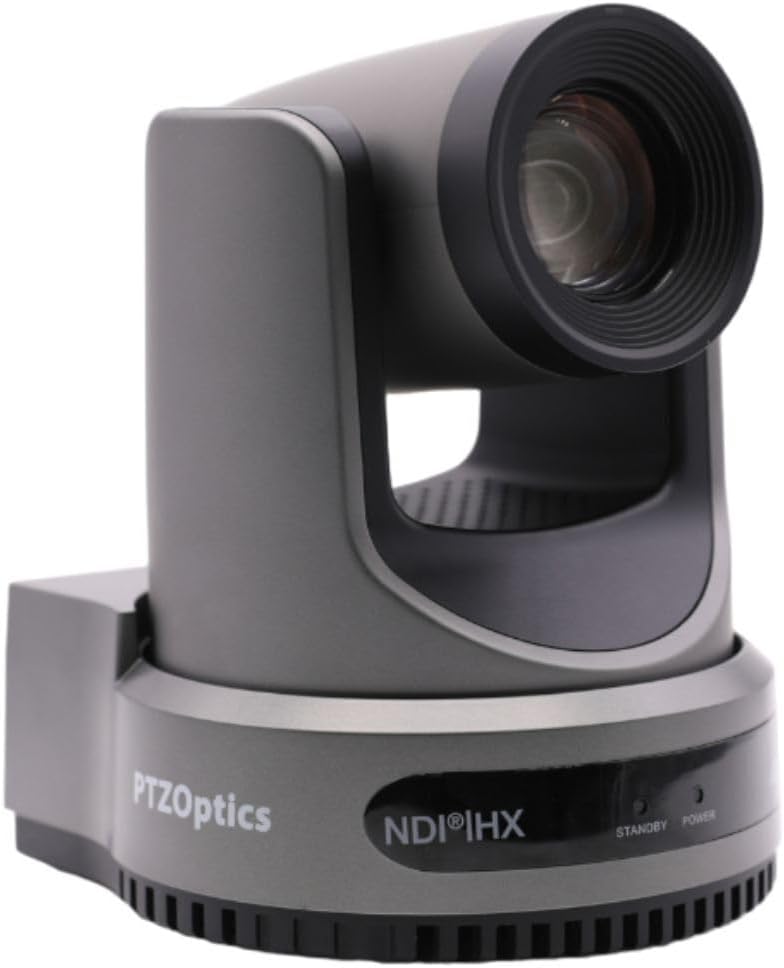
Слика 1: Предња страна view of the PTZOptics Move 4K Camera.
Распакивање и садржај пакета
Upon unboxing your PTZOptics Move 4K camera, ensure all components are present. The package typically includes the following items:
- PTZOptics Move 4K Camera (30X model)
- 12В АЦ напајање
- УСБ АА кабл
- РС232 кабл
- Водич за брзи почетак
- ИР Ремоте
- (2) АА батерије
Video 1: PTZOptics Move 4K Unboxing. This video demonstrates the unboxing process and highlights the included accessories.

Слика 2: Страна view of the PTZOptics Move 4K Camera, showcasinг његов елегантан дизајн.
Сетуп
Follow these steps to set up your PTZOptics Move 4K camera:
- Прикључак за напајање: Connect the provided 12V AC Power Supply to the DC 12V port on the back of the camera. Alternatively, if your network supports Power over Ethernet (PoE), you can connect an Ethernet cable to the LAN port for both power and data.
- Resolution and Frame Rate Selection: Before powering on, select your desired video resolution and frame rate using the yellow dial labeled "SYSTEM SELECT" on the back of the camera. Refer to the Quick Start Guide or the table on the bottom of the camera for available options.
- Почетно укључивање: Once powered, the camera will perform an initial pan and tilt movement. The "POWER" light on the front will illuminate.
- Повезивање: Connect the camera to your live streaming, recording, or conferencing device using the appropriate output ports (USB 2.0, 3G-SDI, or HDMI).

Слика 3: Задња страна view of the camera, highlighting the various input/output ports including DC 12V, LAN (PoE), USB 2.0, 3G-SDI, HDMI, RS232, RS485, and audio line in/out.
Упутство за употребу
The PTZOptics Move 4K camera offers multiple control options and features for seamless operation:
- Auto-Tracking and Auto-Framing: Utilize the camera's built-in auto-tracking and auto-framing capabilities to automatically follow a subject or keep multiple subjects framed within the shot.
- Талли Лигхт: A built-in tally light located above the lens indicates whether the camera is live (red) or in preview mode, helping talent stay in sync with the production.
- Опције контроле: The camera can be controlled via the included IR remote, network connection, RS-232, RS-485, Web UI, PTZ Control App, or a Camera Management Platform.
- Истовремени излази: The camera provides simultaneous video outputs via NDI, USB, and IP, along with either SDI or HDMI, allowing for flexible integration into various production workflows.

Figure 4: This diagram illustrates how the PTZOptics camera can be used for live streaming directly to platforms like YouTube and Facebook Live, with audio input via 3.5mm.
Одржавање
To ensure the longevity and optimal performance of your PTZOptics Move 4K camera, follow these general maintenance guidelines:
- Чишћење: Користите меку, суву крпу за чишћење кућишта фотоапарата. За објектив користите специјализовану крпу за чишћење објектива и раствор како бисте избегли огреботине. Не користите јаке хемикалије или абразивне материјале.
- Заштита од прашине: Keep the camera in a clean, dust-free environment when not in use. Consider using a dust cover.
- Температура и влажност: Operate and store the camera within recommended temperature and humidity ranges to prevent damage to internal components.
- Ажурирања фирмвера: Periodically check the PTZOptics official website for any available firmware updates. Keeping the firmware updated can improve performance, add new features, and resolve potential issues.
Решавање проблема
If you encounter issues with your PTZOptics Move 4K camera, consider the following troubleshooting steps:
- Нема напајања: Ensure the power supply is securely connected and the power outlet is functional. If using PoE, verify your network switch provides sufficient power.
- Нема видео излаза: Check all video cable connections (HDMI, SDI, USB, Ethernet). Verify the selected resolution and frame rate on the camera's system select dial are compatible with your receiving device.
- Контролни проблеми: Ensure the IR remote batteries are fresh and there are no obstructions between the remote and the camera. For network control, verify the camera's IP address and network settings.
- Проблеми са квалитетом слике: Check lighting conditions. Ensure the lens is clean and free from smudges or dust. Adjust white balance and exposure settings as needed.
- Камера не реагује: Try pressing the "RESTORE" button on the back of the camera to reset it to factory defaults. This may resolve software-related glitches.
Спецификације
| Феатуре | Детаљ |
|---|---|
| Димензије производа | 5.6 к 6.6 к 6.5 инча |
| Тежина артикла | 8.33 фунти |
| ASIN | B0BSMM3VM3 |
| Број модела артикла | PT30X-4K-GY-G3_EDI_1 |
| Батерије | Потребне су 2 АА батерије. (укључено) |
| Датум првог доступног | 18. јануара 2023. године |
| Произвођач | ПТЗ оптика |
| Бранд | ПТЗОптицс |
| Технологија фото сензора | ЦМОС |
| Резолуција снимања видео записа | 4K |
| Максимална жижна даљина | 20 милиметара |
| Тип флеш меморије | SD |
| Формат видео снимања | МП4 |
| Подржани аудио формат | МП3, ВАВ, ААЦ |
| Величина екрана | 1.8 инча |
| Технологија повезивања | ХДМИ, УСБ |
| Боја | Греи |
Гаранција и подршка
For detailed warranty information, technical support, and additional resources, please visit the official PTZOptics website or refer to the documentation included with your product. You may also find helpful information and protection plans available on the PTZOptics Store on Amazon.