
1. Увод
This manual provides detailed instructions for the installation, operation, and maintenance of the Supermicro X13SEI-F Server Motherboard. This motherboard is designed for high-performance server applications, supporting Intel Xeon processors with an LGA4677 socket and DDR5 memory.
Please read this manual thoroughly before attempting to install or operate the motherboard to ensure proper setup and to prevent damage to the components.
2. Безбедносне информације
Придржавајте се следећих мера безбедности како бисте спречили повреде и оштећења опреме:
- Always disconnect the power cord from the power supply before installing or removing any components.
- Wear an anti-static wrist strap when handling the motherboard and other components to prevent electrostatic discharge (ESD).
- Ensure the installation environment is dry and free from static electricity.
- Не излажите матичну плочу влази или екстремним температурама.
- Држите матичну плочу за ивице како бисте избегли додиривање осетљивих компоненти.
- Refer to the power supply unit's manual for specific safety guidelines related to power connections.
3. Садржај пакета
Verify that all items are present and in good condition. If any items are damaged or missing, contact your vendor.
- Supermicro X13SEI-F Server Motherboard
- И / О штит
- SATA каблови (количина може да варира)
- Quick Reference Guide / User Manual (this document)
- Driver CD/DVD or USB drive (or download instructions)
4. Производ је готовview
The Supermicro X13SEI-F is a high-performance server motherboard featuring the LGA4677 socket, designed to support Intel Xeon Scalable processors. It offers robust memory capabilities with 8 DDR5 DIMM slots, supporting up to 4800MHz memory speed. The board also includes multiple PCIe slots for expansion.
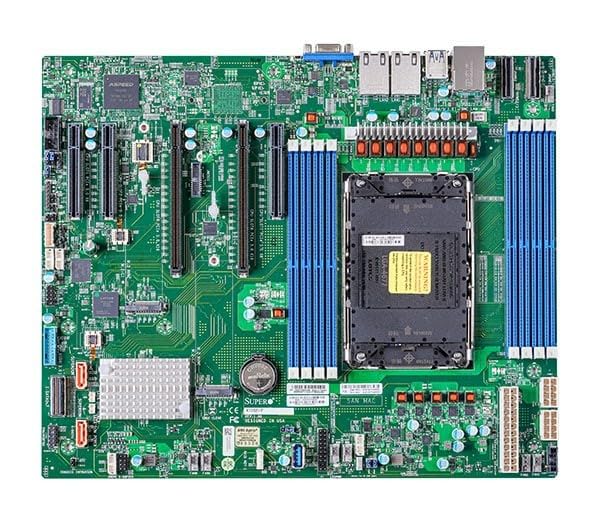
Figure 1: Supermicro X13SEI-F Server Motherboard. This image displays the overall layout of the motherboard, including the CPU socket, DIMM slots, and various connectors.
4.1 Кључне карактеристике
- ЦПУ Соцкет: LGA4677 for Intel Xeon Scalable Processors
- Чипсет: Интел Ц621
- Меморија: 8x DDR5 DIMM slots, up to 4800MHz
- Слотови за проширење: Multiple PCIe slots (specific configuration depends on model variant)
- Складиштење: Support for various storage interfaces (SATA, NVMe - specific details in specifications)
- умрежавање: Integrated LAN controllers
5. Подешавање и инсталација
Before beginning installation, ensure your system case is compatible with the motherboard's form factor and that you have all necessary components.
5.1 Инсталација процесора (LGA4677)
- Пронађите LGA4677 сокет на матичној плочи.
- Carefully open the CPU socket retention mechanism according to the instructions provided with your CPU or motherboard.
- Align the CPU with the socket, ensuring the triangular mark on the CPU matches the mark on the socket. Do not force the CPU into the socket.
- Gently lower the CPU into the socket.
- Close the CPU socket retention mechanism until it locks securely.
- Инсталирајте хладњак процесора према упутствима произвођача.
5.2 Инсталација РАМ меморије (DDR5)
- Locate the 8 DDR5 DIMM slots on the motherboard.
- Open the retention clips at both ends of the DIMM slot.
- Поравнајте зарез на DDR5 меморијском модулу са кључем у DIMM слоту.
- Insert the memory module firmly into the slot until the retention clips snap into place. Ensure both clips are closed.
- For optimal performance, refer to the motherboard's manual for recommended memory population order.
5.3 Инсталација PCIe картице
- Identify the appropriate PCIe slot for your expansion card (e.g., GPU, RAID card).
- Уклоните одговарајући поклопац слота за проширење са кућишта.
- Align the PCIe card with the slot and press down firmly until it is fully seated.
- Secure the card with a screw or retention clip to the chassis.
5.4 Инсталација уређаја за складиштење
- SATA дискови: Connect SATA data cables from the motherboard's SATA ports to your SATA hard drives or SSDs. Connect power cables from the PSU to the drives.
- NVMe M.2 Drives: Locate the M.2 slots. Insert the M.2 drive at an angle, then push it down and secure it with the provided screw or retention mechanism.
5.5 Прикључци за напајање
- Повежите 24-пински АТКС конектор за напајање са вашег напајања са главним прикључком за напајање на матичној плочи.
- Connect the 8-pin (or 4+4 pin) EPS 12V CPU power connector(s) to the corresponding sockets near the CPU.
- Уверите се да су сви прикључци за напајање безбедни.
5.6 Прикључци предње плоче
Connect the front panel cables (Power LED, HDD LED, Power Switch, Reset Switch, USB, Audio) from your chassis to the corresponding headers on the motherboard. Refer to the motherboard's silkscreen labels or the detailed manual for exact pin configurations.
6. Упутство за употребу
6.1 Прво покретање
- After completing all hardware installations, connect the monitor, keyboard, and mouse.
- Connect the power cord to the power supply and turn on the power switch on the PSU.
- Press the power button on your chassis.
- The system should power on, and you should see the BIOS/UEFI POST screen.
6.2 Подешавање BIOS-а/UEFI-ја
Да бисте ушли у услужни програм за подешавање BIOS/UEFI-ја, притисните тастер ДЕЛ or F2 key repeatedly during the POST process. Within the BIOS/UEFI, you can configure:
- Редослед покретања
- Системско време и датум
- Подешавања процесора и меморије
- Storage configurations (RAID, AHCI)
- Контрола брзине вентилатора
- Сигурносна подешавања
Save changes before exiting the BIOS/UEFI.
6.3 Инсталација оперативног система
Insert your operating system installation media (USB drive or DVD) and set it as the primary boot device in the BIOS/UEFI. Follow the on-screen instructions to install your preferred operating system. After installation, install all necessary drivers from the Supermicro website or the provided driver media.
7. Одржавање
7.1 Чишћење
- Regularly clean dust from the motherboard and system components using compressed air.
- Уверите се да је систем искључен и искључен из струје пре чишћења.
- Избегавајте употребу течних средстава за чишћење директно на компонентама.
7.2 Ажурирања фирмвера
Periodically check the Supermicro website for updated BIOS/UEFI firmware. Firmware updates can improve system stability, performance, and compatibility. Follow the specific instructions provided by Supermicro for updating the firmware to avoid system damage.
КСНУМКС. Решавање проблема
Овај одељак пружа решења за уобичајене проблеме на које можете наићи.
8.1 Нема напајања / Нема POST-а (самотестирање при укључивању)
- Проверите прикључке за напајање: Ensure the 24-pin ATX and 8-pin EPS 12V power connectors are securely seated.
- Verify PSU: Test the power supply unit (PSU) with another system or a PSU tester.
- Поново поставите компоненте: Reseat the CPU, RAM modules, and any expansion cards.
- Обриши ЦМОС: Refer to the motherboard manual for instructions on how to clear the CMOS (Complementary Metal-Oxide-Semiconductor) settings, which can resolve boot issues.
- Минимална конфигурација: Try booting with only the CPU, one RAM stick, and the necessary power connections.
8.2 Нема излаза за приказ
- Веза монитора: Ensure the monitor is properly connected to the graphics output (either integrated or discrete GPU) and is powered on.
- графичка картица: If using a discrete graphics card, ensure it is fully seated in its PCIe slot and has all necessary power connectors from the PSU.
- Интегрисана графика: If your CPU supports integrated graphics, try connecting the monitor to the motherboard's video output to rule out a discrete GPU issue.
8.3 Operating System Not Booting
- Редослед покретања: Check the BIOS/UEFI settings to ensure the correct boot device (e.g., SSD, HDD) is selected as the primary boot option.
- Drive Connections: Verify that your storage drives are properly connected (data and power).
- OS Installation: If the OS is newly installed, ensure the installation process completed successfully and all drivers are installed.
9. Спецификације
| Феатуре | Детаљ |
|---|---|
| Бранд | Супермицро |
| Назив модела | MBD-X13SEI-F-B |
| ЦПУ Соцкет | ЛГА 4677 |
| Компатибилни процесори | Intel Xeon Scalable |
| Тип чипсета | Интел Ц621 |
| Технологија РАМ меморије | ДДР5 |
| Брзина меморије | 4800 МХз |
| Слотови за РАМ меморију | 8x DDR5 DIMM slots |
| Димензије производа (ДкШкВ) | 16 к 12 к 5 инча |
| Тежина артикла | 3.19 фунти |
| Први доступан датум | 20. јануара 2023. године |
Note: Specifications are subject to change without notice. For the most current information, please refer to the official Supermicro product page.
10. Гаранција и техничка подршка
10.1 Информације о гаранцији
Supermicro products are covered by a limited warranty. For detailed warranty terms and conditions, including duration and coverage, please visit the official Supermicro website or consult the warranty card included with your product. Keep your proof of purchase for warranty claims.
10.2 Техничка подршка
For technical assistance, driver downloads, BIOS updates, and further product information, please visit the official Supermicro support webсајт:
https://www.supermicro.com/support
Before contacting support, please have your motherboard model number (MBD-X13SEI-F-B) and serial number ready.